> ## Documentation Index
> Fetch the complete documentation index at: https://apidoc.cometapi.com/llms.txt
> Use this file to discover all available pages before exploring further.
# Use Gemini image models
> Call Gemini image models (Nano Banana 2 / Pro) on CometAPI using the Google Gen AI SDK for text-to-image, image-to-image, and multi-image composition.
This guide demonstrates how to use Gemini image models via CometAPI using the **Google Gen AI SDK**. It covers:
* Text-to-image generation
* Image-to-image editing
* Multi-image composition
* Saving generated images
- **Base URL:** `https://api.cometapi.com`
- Install the SDK: `pip install google-genai` (Python) or `npm install @google/genai` (Node.js)
***
## Setup
Initialize the client with CometAPI's base URL:
```python Python theme={null}
from google import genai
from google.genai import types
import os
COMETAPI_KEY = os.environ["COMETAPI_KEY"]
client = genai.Client(
http_options={"api_version": "v1beta", "base_url": "https://api.cometapi.com"},
api_key=COMETAPI_KEY,
)
```
```javascript Node.js theme={null}
import { GoogleGenAI } from "@google/genai";
const COMETAPI_KEY = process.env.COMETAPI_KEY;
const ai = new GoogleGenAI({
apiKey: COMETAPI_KEY,
httpOptions: { apiVersion: "v1beta", baseUrl: "https://api.cometapi.com" },
});
```
```go Go theme={null}
package main
import (
"context"
"os"
"google.golang.org/genai"
)
func main() {
ctx := context.Background()
apiKey := os.Getenv("COMETAPI_KEY")
client, _ := genai.NewClient(ctx, &genai.ClientConfig{
APIKey: apiKey,
Backend: genai.BackendGeminiAPI,
HTTPOptions: genai.HTTPOptions{
BaseURL: "https://api.cometapi.com",
},
})
// use client below...
}
```
***
## Text-to-image generation
Generate an image from a text prompt and save it to a file.
```python Python theme={null}
from google import genai
from google.genai import types
from PIL import Image
import os
client = genai.Client(
http_options={"api_version": "v1beta", "base_url": "https://api.cometapi.com"},
api_key=os.environ.get("COMETAPI_KEY"),
)
response = client.models.generate_content(
model="gemini-3.1-flash-image-preview",
contents="Create a picture of a nano banana dish in a fancy restaurant with a Gemini theme",
config=types.GenerateContentConfig(
response_modalities=["TEXT", "IMAGE"],
),
)
final_image = None
for part in response.parts:
if getattr(part, "thought", False):
continue
if part.text is not None:
print(part.text)
elif part.inline_data is not None:
final_image = part.as_image()
if final_image:
final_image.save("generated_image.png")
print("Image saved to generated_image.png")
```
```javascript Node.js theme={null}
import { GoogleGenAI } from "@google/genai";
import * as fs from "fs";
const ai = new GoogleGenAI({
apiKey: process.env.COMETAPI_KEY,
httpOptions: { apiVersion: "v1beta", baseUrl: "https://api.cometapi.com" },
});
const response = await ai.models.generateContent({
model: "gemini-3.1-flash-image-preview",
contents: "Create a picture of a nano banana dish in a fancy restaurant with a Gemini theme",
config: { responseModalities: ["TEXT", "IMAGE"] },
});
let finalImagePart;
for (const part of response.candidates[0].content.parts) {
if (part.thought === true) {
continue;
}
if (part.text) {
console.log(part.text);
}
if (part.inlineData) {
finalImagePart = part;
}
}
if (finalImagePart) {
const buffer = Buffer.from(finalImagePart.inlineData.data, "base64");
fs.writeFileSync("generated_image.png", buffer);
console.log("Image saved to generated_image.png");
}
```
```bash Shell theme={null}
curl -s -X POST \
"https://api.cometapi.com/v1beta/models/gemini-3.1-flash-image-preview:generateContent" \
-H "Authorization: Bearer $COMETAPI_KEY" \
-H "Content-Type: application/json" \
-d '{
"contents": [{
"parts": [{"text": "Create a picture of a nano banana dish in a fancy restaurant with a Gemini theme"}]
}],
"generationConfig": {
"responseModalities": ["TEXT", "IMAGE"]
}
}'
```
**Save the final image part:**
The image data is in `candidates[0].content.parts`, which can contain text and/or image parts. Gemini image models can also return intermediate thought parts before the final image, especially when you request both text and images or explicitly enable thinking output. Do not save the first `inlineData` blindly; skip parts where `thought` is `true`, then save the last remaining image part.
Typical response with only the final image:
```json theme={null}
{
"candidates": [{
"content": {
"parts": [
{ "text": "Here is your image..." },
{
"inlineData": {
"mimeType": "image/png",
"data": ""
}
}
]
}
}]
}
```
Response with a text part, an intermediate thought image, and the final image:
```json theme={null}
{
"candidates": [{
"content": {
"role": "model",
"parts": [
{ "text": "Here is your image..." },
{
"inlineData": {
"mimeType": "image/jpeg",
"data": ""
},
"thought": true
},
{
"inlineData": {
"mimeType": "image/jpeg",
"data": ""
},
"thought": false,
"thoughtSignature": ""
}
]
},
"finishReason": "STOP"
}]
}
```
Use this parsing rule for every Gemini image response:
```javascript theme={null}
const imageParts = response.candidates[0].content.parts.filter(
(part) => part.inlineData && part.thought !== true,
);
const finalImagePart = imageParts.at(-1);
```
***
## Image-to-image generation
Upload an input image and transform it with a text prompt.
```python Python theme={null}
from google import genai
from google.genai import types
from PIL import Image
import os
client = genai.Client(
http_options={"api_version": "v1beta", "base_url": "https://api.cometapi.com"},
api_key=os.environ.get("COMETAPI_KEY"),
)
# Load the source image
source_image = Image.open("source.jpg")
response = client.models.generate_content(
model="gemini-3.1-flash-image-preview",
contents=["Transform this into a watercolor painting", source_image],
config=types.GenerateContentConfig(
response_modalities=["TEXT", "IMAGE"],
),
)
final_image = None
for part in response.parts:
if getattr(part, "thought", False):
continue
if part.text is not None:
print(part.text)
elif part.inline_data is not None:
final_image = part.as_image()
if final_image:
final_image.save("watercolor_output.png")
```
```javascript Node.js theme={null}
import { GoogleGenAI } from "@google/genai";
import * as fs from "fs";
const ai = new GoogleGenAI({
apiKey: process.env.COMETAPI_KEY,
httpOptions: { apiVersion: "v1beta", baseUrl: "https://api.cometapi.com" },
});
const imageData = fs.readFileSync("source.jpg").toString("base64");
const response = await ai.models.generateContent({
model: "gemini-3.1-flash-image-preview",
contents: [
{ text: "Transform this into a watercolor painting" },
{ inlineData: { mimeType: "image/jpeg", data: imageData } },
],
config: { responseModalities: ["TEXT", "IMAGE"] },
});
const imageParts = response.candidates[0].content.parts.filter(
(part) => part.inlineData && part.thought !== true,
);
const finalImagePart = imageParts.at(-1);
if (finalImagePart) {
fs.writeFileSync("watercolor_output.png", Buffer.from(finalImagePart.inlineData.data, "base64"));
}
```
```bash Shell theme={null}
curl -s -X POST \
"https://api.cometapi.com/v1beta/models/gemini-3.1-flash-image-preview:generateContent" \
-H "Authorization: Bearer $COMETAPI_KEY" \
-H "Content-Type: application/json" \
-d '{
"contents": [{
"role": "user",
"parts": [
{ "text": "Transform this into a watercolor painting" },
{ "inline_data": { "mime_type": "image/jpeg", "data": "" } }
]
}],
"generationConfig": { "responseModalities": ["TEXT", "IMAGE"] }
}'
```
* The Python SDK accepts `PIL.Image` objects directly — no manual Base64 encoding needed.
* Do **not** include the `data:image/jpeg;base64,` prefix when passing raw Base64 strings.
***
## Multi-image composition
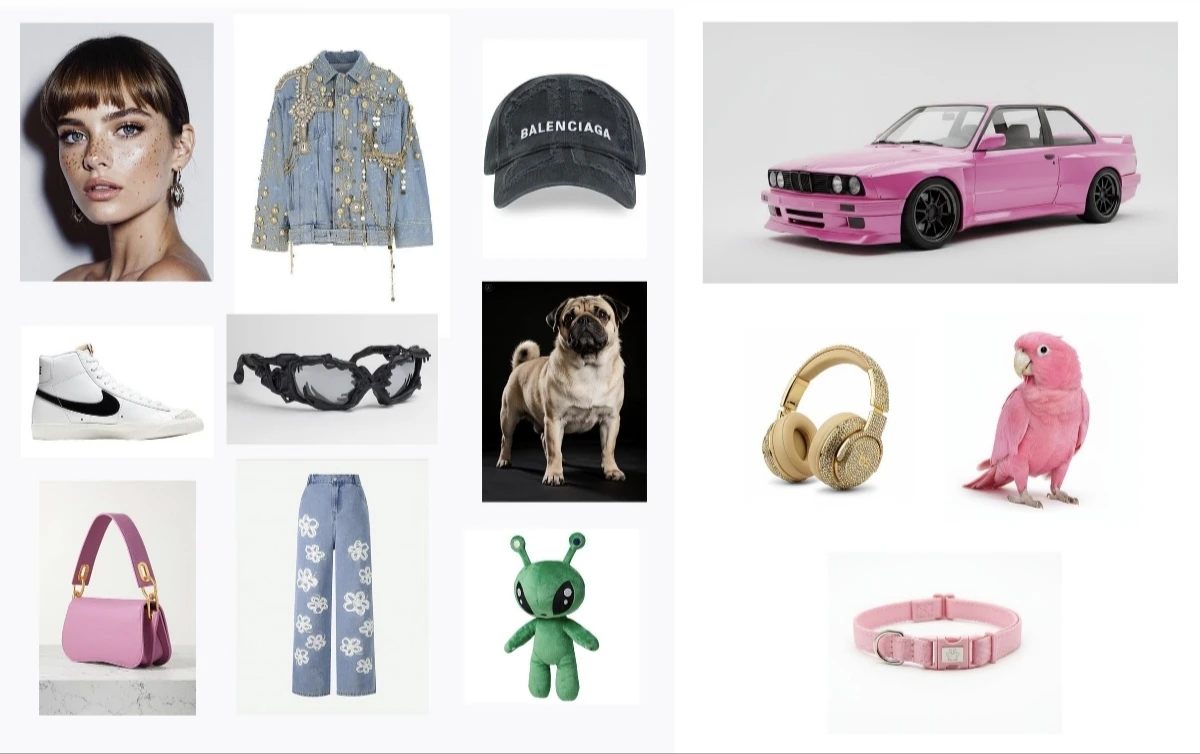
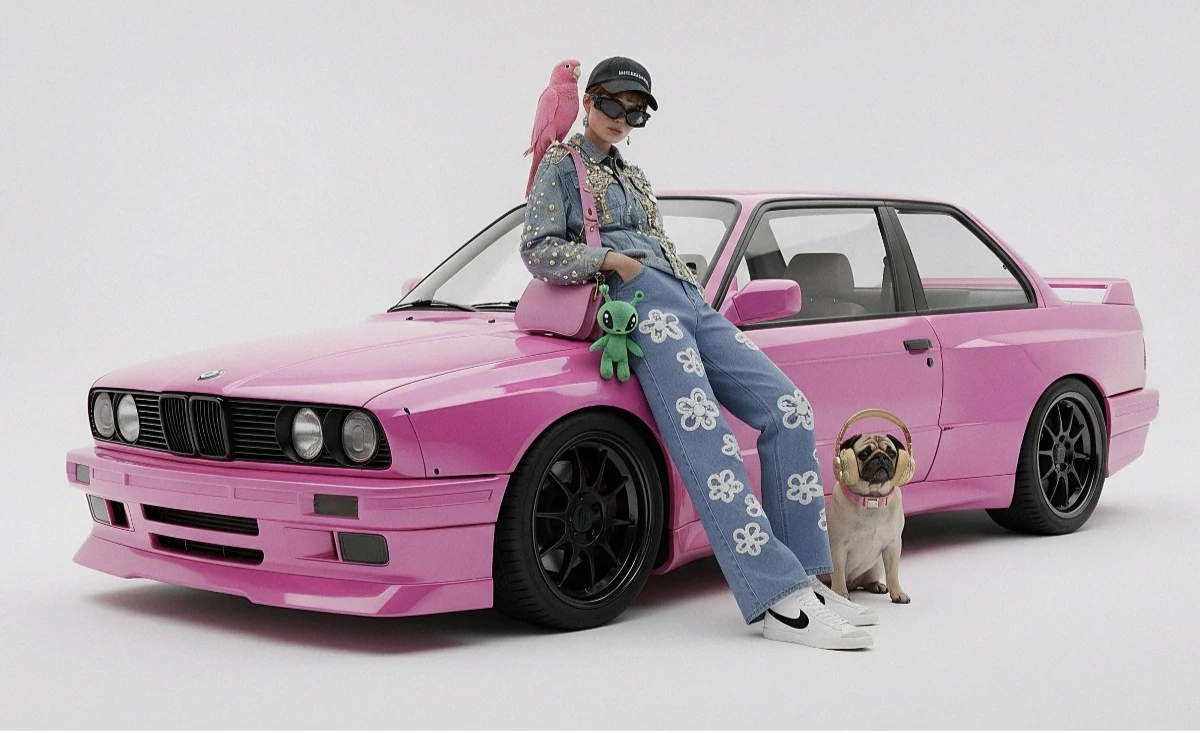
Generate a new image from multiple input images. CometAPI supports two approaches:
### Method 1: Single collage image
Combine multiple source images into one collage, then describe the desired output.
 ```python Python theme={null}
from google import genai
from google.genai import types
from PIL import Image
import os
client = genai.Client(
http_options={"api_version": "v1beta", "base_url": "https://api.cometapi.com"},
api_key=os.environ.get("COMETAPI_KEY"),
)
collage = Image.open("collage.jpg")
response = client.models.generate_content(
model="gemini-3.1-flash-image-preview",
contents=[
"A model is posing and leaning against a pink BMW with a green alien keychain attached to a pink handbag, a pink parrot on her shoulder, and a pug wearing a pink collar and gold headphones",
collage,
],
config=types.GenerateContentConfig(
response_modalities=["TEXT", "IMAGE"],
),
)
final_image = None
for part in response.parts:
if getattr(part, "thought", False):
continue
if part.inline_data is not None:
final_image = part.as_image()
if final_image:
final_image.save("composition_output.png")
```
```bash Shell theme={null}
curl -s -X POST \
"https://api.cometapi.com/v1beta/models/gemini-3.1-flash-image-preview:generateContent" \
-H "Authorization: Bearer $COMETAPI_KEY" \
-H "Content-Type: application/json" \
-d '{
"contents": [{
"role": "user",
"parts": [
{ "text": "A model is posing and leaning against a pink BMW with a green alien keychain attached to a pink handbag, a pink parrot on her shoulder, and a pug wearing a pink collar and gold headphones" },
{ "inline_data": { "mime_type": "image/jpeg", "data": "" } }
]
}],
"generationConfig": { "responseModalities": ["TEXT", "IMAGE"] }
}'
```
### Method 2: Multiple separate images (up to 14)
Pass multiple images directly. Gemini 3 models support up to 14 reference images (objects + characters):
```python Python theme={null}
from google import genai
from google.genai import types
from PIL import Image
import os
client = genai.Client(
http_options={"api_version": "v1beta", "base_url": "https://api.cometapi.com"},
api_key=os.environ.get("COMETAPI_KEY"),
)
image1 = Image.open("image1.jpg")
image2 = Image.open("image2.jpg")
image3 = Image.open("image3.jpg")
response = client.models.generate_content(
model="gemini-3.1-flash-image-preview",
contents=["Merge the three images", image1, image2, image3],
config=types.GenerateContentConfig(
response_modalities=["TEXT", "IMAGE"],
),
)
final_image = None
for part in response.parts:
if getattr(part, "thought", False):
continue
if part.inline_data is not None:
final_image = part.as_image()
if final_image:
final_image.save("merged_output.png")
```
```bash Shell theme={null}
curl -s -X POST \
"https://api.cometapi.com/v1beta/models/gemini-3.1-flash-image-preview:generateContent" \
-H "Authorization: Bearer $COMETAPI_KEY" \
-H "Content-Type: application/json" \
-d '{
"contents": [{
"role": "user",
"parts": [
{ "text": "Merge the three images" },
{ "inline_data": { "mime_type": "image/jpeg", "data": "" } },
{ "inline_data": { "mime_type": "image/jpeg", "data": "" } },
{ "inline_data": { "mime_type": "image/jpeg", "data": "" } }
]
}],
"generationConfig": { "responseModalities": ["TEXT", "IMAGE"] }
}'
```
```python Python theme={null}
from google import genai
from google.genai import types
from PIL import Image
import os
client = genai.Client(
http_options={"api_version": "v1beta", "base_url": "https://api.cometapi.com"},
api_key=os.environ.get("COMETAPI_KEY"),
)
collage = Image.open("collage.jpg")
response = client.models.generate_content(
model="gemini-3.1-flash-image-preview",
contents=[
"A model is posing and leaning against a pink BMW with a green alien keychain attached to a pink handbag, a pink parrot on her shoulder, and a pug wearing a pink collar and gold headphones",
collage,
],
config=types.GenerateContentConfig(
response_modalities=["TEXT", "IMAGE"],
),
)
final_image = None
for part in response.parts:
if getattr(part, "thought", False):
continue
if part.inline_data is not None:
final_image = part.as_image()
if final_image:
final_image.save("composition_output.png")
```
```bash Shell theme={null}
curl -s -X POST \
"https://api.cometapi.com/v1beta/models/gemini-3.1-flash-image-preview:generateContent" \
-H "Authorization: Bearer $COMETAPI_KEY" \
-H "Content-Type: application/json" \
-d '{
"contents": [{
"role": "user",
"parts": [
{ "text": "A model is posing and leaning against a pink BMW with a green alien keychain attached to a pink handbag, a pink parrot on her shoulder, and a pug wearing a pink collar and gold headphones" },
{ "inline_data": { "mime_type": "image/jpeg", "data": "" } }
]
}],
"generationConfig": { "responseModalities": ["TEXT", "IMAGE"] }
}'
```
### Method 2: Multiple separate images (up to 14)
Pass multiple images directly. Gemini 3 models support up to 14 reference images (objects + characters):
```python Python theme={null}
from google import genai
from google.genai import types
from PIL import Image
import os
client = genai.Client(
http_options={"api_version": "v1beta", "base_url": "https://api.cometapi.com"},
api_key=os.environ.get("COMETAPI_KEY"),
)
image1 = Image.open("image1.jpg")
image2 = Image.open("image2.jpg")
image3 = Image.open("image3.jpg")
response = client.models.generate_content(
model="gemini-3.1-flash-image-preview",
contents=["Merge the three images", image1, image2, image3],
config=types.GenerateContentConfig(
response_modalities=["TEXT", "IMAGE"],
),
)
final_image = None
for part in response.parts:
if getattr(part, "thought", False):
continue
if part.inline_data is not None:
final_image = part.as_image()
if final_image:
final_image.save("merged_output.png")
```
```bash Shell theme={null}
curl -s -X POST \
"https://api.cometapi.com/v1beta/models/gemini-3.1-flash-image-preview:generateContent" \
-H "Authorization: Bearer $COMETAPI_KEY" \
-H "Content-Type: application/json" \
-d '{
"contents": [{
"role": "user",
"parts": [
{ "text": "Merge the three images" },
{ "inline_data": { "mime_type": "image/jpeg", "data": "" } },
{ "inline_data": { "mime_type": "image/jpeg", "data": "" } },
{ "inline_data": { "mime_type": "image/jpeg", "data": "" } }
]
}],
"generationConfig": { "responseModalities": ["TEXT", "IMAGE"] }
}'
```
 ***
## 4K image generation
Specify `image_config` with `aspect_ratio` and `image_size` for high-resolution output:
```python Python theme={null}
from google import genai
from google.genai import types
import os
client = genai.Client(
http_options={"api_version": "v1beta", "base_url": "https://api.cometapi.com"},
api_key=os.environ.get("COMETAPI_KEY"),
)
response = client.models.generate_content(
model="gemini-3.1-flash-image-preview",
contents="Da Vinci style anatomical sketch of a Monarch butterfly on textured parchment",
config=types.GenerateContentConfig(
response_modalities=["TEXT", "IMAGE"],
image_config=types.ImageConfig(
aspect_ratio="1:1",
image_size="4K",
),
),
)
final_image = None
for part in response.parts:
if getattr(part, "thought", False):
continue
if part.text is not None:
print(part.text)
elif image := part.as_image():
final_image = image
if final_image:
final_image.save("butterfly_4k.png")
```
```javascript Node.js theme={null}
import { GoogleGenAI } from "@google/genai";
import * as fs from "fs";
const ai = new GoogleGenAI({
apiKey: process.env.COMETAPI_KEY,
httpOptions: { apiVersion: "v1beta", baseUrl: "https://api.cometapi.com" },
});
const response = await ai.models.generateContent({
model: "gemini-3.1-flash-image-preview",
contents: "Da Vinci style anatomical sketch of a Monarch butterfly on textured parchment",
config: {
responseModalities: ["TEXT", "IMAGE"],
imageConfig: { aspectRatio: "1:1", imageSize: "4K" },
},
});
const imageParts = response.candidates[0].content.parts.filter(
(part) => part.inlineData && part.thought !== true,
);
const finalImagePart = imageParts.at(-1);
if (finalImagePart) {
fs.writeFileSync("butterfly_4k.png", Buffer.from(finalImagePart.inlineData.data, "base64"));
}
```
```bash Shell theme={null}
curl -s -X POST \
"https://api.cometapi.com/v1beta/models/gemini-3.1-flash-image-preview:generateContent" \
-H "Authorization: Bearer $COMETAPI_KEY" \
-H "Content-Type: application/json" \
-d '{
"contents": [{"parts": [{"text": "Da Vinci style anatomical sketch of a Monarch butterfly on textured parchment"}]}],
"generationConfig": {
"responseModalities": ["TEXT", "IMAGE"],
"imageConfig": {"aspectRatio": "1:1", "imageSize": "4K"}
}
}'
```
For high-resolution requests, judge the output by the final non-thought image part. If your integration saves the first `inlineData` part, it may save an intermediate thought image that is lower resolution than the requested `imageSize`.
***
## Multi-turn image editing (chat)
Use the SDK's chat feature to iteratively refine images:
```python Python theme={null}
from google import genai
from google.genai import types
import os
client = genai.Client(
http_options={"api_version": "v1beta", "base_url": "https://api.cometapi.com"},
api_key=os.environ.get("COMETAPI_KEY"),
)
chat = client.chats.create(
model="gemini-3.1-flash-image-preview",
config=types.GenerateContentConfig(
response_modalities=["TEXT", "IMAGE"],
),
)
## First turn: Generate
response = chat.send_message(
"Create a vibrant infographic explaining photosynthesis as a recipe, styled like a colorful kids cookbook"
)
final_image = None
for part in response.parts:
if getattr(part, "thought", False):
continue
if part.text is not None:
print(part.text)
elif image := part.as_image():
final_image = image
if final_image:
final_image.save("photosynthesis.png")
## Second turn: Refine
response = chat.send_message("Update this infographic to be in Spanish. Do not change any other elements.")
final_image = None
for part in response.parts:
if getattr(part, "thought", False):
continue
if part.text is not None:
print(part.text)
elif image := part.as_image():
final_image = image
if final_image:
final_image.save("photosynthesis_spanish.png")
```
```javascript Node.js theme={null}
import { GoogleGenAI } from "@google/genai";
import * as fs from "fs";
const ai = new GoogleGenAI({
apiKey: process.env.COMETAPI_KEY,
httpOptions: { apiVersion: "v1beta", baseUrl: "https://api.cometapi.com" },
});
const chat = ai.chats.create({
model: "gemini-3.1-flash-image-preview",
config: { responseModalities: ["TEXT", "IMAGE"] },
});
// First turn: generate
const response1 = await chat.sendMessage(
"Create a vibrant infographic explaining photosynthesis as a recipe, styled like a colorful kids cookbook"
);
const imageParts1 = response1.candidates[0].content.parts.filter(
(part) => part.inlineData && part.thought !== true,
);
const finalImagePart1 = imageParts1.at(-1);
if (finalImagePart1) {
fs.writeFileSync("photosynthesis.png", Buffer.from(finalImagePart1.inlineData.data, "base64"));
}
// Second turn: refine
const response2 = await chat.sendMessage(
"Update this infographic to be in Spanish. Do not change any other elements."
);
const imageParts2 = response2.candidates[0].content.parts.filter(
(part) => part.inlineData && part.thought !== true,
);
const finalImagePart2 = imageParts2.at(-1);
if (finalImagePart2) {
fs.writeFileSync("photosynthesis_spanish.png", Buffer.from(finalImagePart2.inlineData.data, "base64"));
}
```
***
## Tips
Specify style keywords (e.g., "cyberpunk, film grain, low contrast"), aspect ratio, subject, background, lighting, and detail level.
When using raw HTTP, do not include `data:image/png;base64,` prefix — use only the raw Base64 string. The Python SDK handles this automatically with `PIL.Image` objects.
Set `"responseModalities"` to `["IMAGE"]` only to guarantee image output without text.
Check whether your code saved an intermediate thought image. Gemini image responses may include image parts where `thought` is `true`; these are not the final output. Skip `thought: true` parts and save the last image part where `inlineData` exists and `thought` is not `true`. If you do not need text output, request `"responseModalities": ["IMAGE"]` to reduce mixed text/image response handling.
For more details, see the [API Reference](/api/image/gemini/gemini-generates-image).
**Official documentation:** [Nano Banana image generation](https://ai.google.dev/gemini-api/docs/image-generation)
* [Gemini Image Understanding](https://ai.google.dev/gemini-api/docs/image-understanding)
***
## 4K image generation
Specify `image_config` with `aspect_ratio` and `image_size` for high-resolution output:
```python Python theme={null}
from google import genai
from google.genai import types
import os
client = genai.Client(
http_options={"api_version": "v1beta", "base_url": "https://api.cometapi.com"},
api_key=os.environ.get("COMETAPI_KEY"),
)
response = client.models.generate_content(
model="gemini-3.1-flash-image-preview",
contents="Da Vinci style anatomical sketch of a Monarch butterfly on textured parchment",
config=types.GenerateContentConfig(
response_modalities=["TEXT", "IMAGE"],
image_config=types.ImageConfig(
aspect_ratio="1:1",
image_size="4K",
),
),
)
final_image = None
for part in response.parts:
if getattr(part, "thought", False):
continue
if part.text is not None:
print(part.text)
elif image := part.as_image():
final_image = image
if final_image:
final_image.save("butterfly_4k.png")
```
```javascript Node.js theme={null}
import { GoogleGenAI } from "@google/genai";
import * as fs from "fs";
const ai = new GoogleGenAI({
apiKey: process.env.COMETAPI_KEY,
httpOptions: { apiVersion: "v1beta", baseUrl: "https://api.cometapi.com" },
});
const response = await ai.models.generateContent({
model: "gemini-3.1-flash-image-preview",
contents: "Da Vinci style anatomical sketch of a Monarch butterfly on textured parchment",
config: {
responseModalities: ["TEXT", "IMAGE"],
imageConfig: { aspectRatio: "1:1", imageSize: "4K" },
},
});
const imageParts = response.candidates[0].content.parts.filter(
(part) => part.inlineData && part.thought !== true,
);
const finalImagePart = imageParts.at(-1);
if (finalImagePart) {
fs.writeFileSync("butterfly_4k.png", Buffer.from(finalImagePart.inlineData.data, "base64"));
}
```
```bash Shell theme={null}
curl -s -X POST \
"https://api.cometapi.com/v1beta/models/gemini-3.1-flash-image-preview:generateContent" \
-H "Authorization: Bearer $COMETAPI_KEY" \
-H "Content-Type: application/json" \
-d '{
"contents": [{"parts": [{"text": "Da Vinci style anatomical sketch of a Monarch butterfly on textured parchment"}]}],
"generationConfig": {
"responseModalities": ["TEXT", "IMAGE"],
"imageConfig": {"aspectRatio": "1:1", "imageSize": "4K"}
}
}'
```
For high-resolution requests, judge the output by the final non-thought image part. If your integration saves the first `inlineData` part, it may save an intermediate thought image that is lower resolution than the requested `imageSize`.
***
## Multi-turn image editing (chat)
Use the SDK's chat feature to iteratively refine images:
```python Python theme={null}
from google import genai
from google.genai import types
import os
client = genai.Client(
http_options={"api_version": "v1beta", "base_url": "https://api.cometapi.com"},
api_key=os.environ.get("COMETAPI_KEY"),
)
chat = client.chats.create(
model="gemini-3.1-flash-image-preview",
config=types.GenerateContentConfig(
response_modalities=["TEXT", "IMAGE"],
),
)
## First turn: Generate
response = chat.send_message(
"Create a vibrant infographic explaining photosynthesis as a recipe, styled like a colorful kids cookbook"
)
final_image = None
for part in response.parts:
if getattr(part, "thought", False):
continue
if part.text is not None:
print(part.text)
elif image := part.as_image():
final_image = image
if final_image:
final_image.save("photosynthesis.png")
## Second turn: Refine
response = chat.send_message("Update this infographic to be in Spanish. Do not change any other elements.")
final_image = None
for part in response.parts:
if getattr(part, "thought", False):
continue
if part.text is not None:
print(part.text)
elif image := part.as_image():
final_image = image
if final_image:
final_image.save("photosynthesis_spanish.png")
```
```javascript Node.js theme={null}
import { GoogleGenAI } from "@google/genai";
import * as fs from "fs";
const ai = new GoogleGenAI({
apiKey: process.env.COMETAPI_KEY,
httpOptions: { apiVersion: "v1beta", baseUrl: "https://api.cometapi.com" },
});
const chat = ai.chats.create({
model: "gemini-3.1-flash-image-preview",
config: { responseModalities: ["TEXT", "IMAGE"] },
});
// First turn: generate
const response1 = await chat.sendMessage(
"Create a vibrant infographic explaining photosynthesis as a recipe, styled like a colorful kids cookbook"
);
const imageParts1 = response1.candidates[0].content.parts.filter(
(part) => part.inlineData && part.thought !== true,
);
const finalImagePart1 = imageParts1.at(-1);
if (finalImagePart1) {
fs.writeFileSync("photosynthesis.png", Buffer.from(finalImagePart1.inlineData.data, "base64"));
}
// Second turn: refine
const response2 = await chat.sendMessage(
"Update this infographic to be in Spanish. Do not change any other elements."
);
const imageParts2 = response2.candidates[0].content.parts.filter(
(part) => part.inlineData && part.thought !== true,
);
const finalImagePart2 = imageParts2.at(-1);
if (finalImagePart2) {
fs.writeFileSync("photosynthesis_spanish.png", Buffer.from(finalImagePart2.inlineData.data, "base64"));
}
```
***
## Tips
Specify style keywords (e.g., "cyberpunk, film grain, low contrast"), aspect ratio, subject, background, lighting, and detail level.
When using raw HTTP, do not include `data:image/png;base64,` prefix — use only the raw Base64 string. The Python SDK handles this automatically with `PIL.Image` objects.
Set `"responseModalities"` to `["IMAGE"]` only to guarantee image output without text.
Check whether your code saved an intermediate thought image. Gemini image responses may include image parts where `thought` is `true`; these are not the final output. Skip `thought: true` parts and save the last image part where `inlineData` exists and `thought` is not `true`. If you do not need text output, request `"responseModalities": ["IMAGE"]` to reduce mixed text/image response handling.
For more details, see the [API Reference](/api/image/gemini/gemini-generates-image).
**Official documentation:** [Nano Banana image generation](https://ai.google.dev/gemini-api/docs/image-generation)
* [Gemini Image Understanding](https://ai.google.dev/gemini-api/docs/image-understanding)