> ## Documentation Index
> Fetch the complete documentation index at: https://apidoc.cometapi.com/llms.txt
> Use this file to discover all available pages before exploring further.
# تشغيل n8n محليًا مع CometAPI
> استخدم هذا الدليل لتشغيل n8n محليًا مع CometAPI من خلال إعدادات النشر المحلي وبيانات الاعتماد والوصول إلى النموذج.
انشر n8n على جهازك الخاص ووَصِّله بـ CometAPI عبر عقدة المجتمع لتشغيل سير عمل AI المؤتمتة محليًا.
## المتطلبات الأساسية
* Linux (Ubuntu/Debian/CentOS، إلخ) أو macOS
* ذاكرة RAM بسعة 2 GB+، ومساحة قرص فارغة 10 GB+
* وصول إلى Shell مع إمكانية الوصول إلى سجل npm العام
* Node.js 18.x أو 20.x LTS (راجع الخطوة 1)
* حساب CometAPI مع مفتاح API نشط — [احصل على مفتاحك من هنا](https://www.cometapi.com/console/token)
سجّل الدخول إلى [لوحة تحكم CometAPI](https://www.cometapi.com/console/token). انقر على **Add API Key** وانسخ مفتاح API الخاص بـ CometAPI.

 يتطلب n8n 1.x استخدام Node.js 18.x أو 20.x. النهج الموصى به هو [nvm](https://github.com/nvm-sh/nvm):
```bash theme={null}
# Install nvm
curl -o- https://raw.githubusercontent.com/nvm-sh/nvm/v0.39.7/install.sh | bash
# Reload your shell profile
source ~/.bashrc # or ~/.zshrc on macOS
# Install and activate the LTS version
nvm install --lts
nvm use --lts
# Verify
node -v
npm -v
```
إذا ظهرت لك لاحقًا الرسالة `n8n: command not found`، فأعد تشغيل الطرفية أو تأكد من أن دليل npm global bin المُدار بواسطة nvm موجود ضمن `PATH` لديك.
```bash theme={null}
npm install -g n8n
n8n -v # verify the installed version
n8n start # runs on http://localhost:5678/
```
إذا كان المنفذ 5678 مستخدمًا بالفعل:
```bash theme={null}
export N8N_PORT=5679
n8n start
```
للإبقاء على n8n قيد التشغيل بعد إغلاق الطرفية:
```bash theme={null}
npm install -g pm2
pm2 start "n8n" --name n8n
pm2 save
pm2 status
```
يتطلب n8n 1.x استخدام Node.js 18.x أو 20.x. النهج الموصى به هو [nvm](https://github.com/nvm-sh/nvm):
```bash theme={null}
# Install nvm
curl -o- https://raw.githubusercontent.com/nvm-sh/nvm/v0.39.7/install.sh | bash
# Reload your shell profile
source ~/.bashrc # or ~/.zshrc on macOS
# Install and activate the LTS version
nvm install --lts
nvm use --lts
# Verify
node -v
npm -v
```
إذا ظهرت لك لاحقًا الرسالة `n8n: command not found`، فأعد تشغيل الطرفية أو تأكد من أن دليل npm global bin المُدار بواسطة nvm موجود ضمن `PATH` لديك.
```bash theme={null}
npm install -g n8n
n8n -v # verify the installed version
n8n start # runs on http://localhost:5678/
```
إذا كان المنفذ 5678 مستخدمًا بالفعل:
```bash theme={null}
export N8N_PORT=5679
n8n start
```
للإبقاء على n8n قيد التشغيل بعد إغلاق الطرفية:
```bash theme={null}
npm install -g pm2
pm2 start "n8n" --name n8n
pm2 save
pm2 status
```
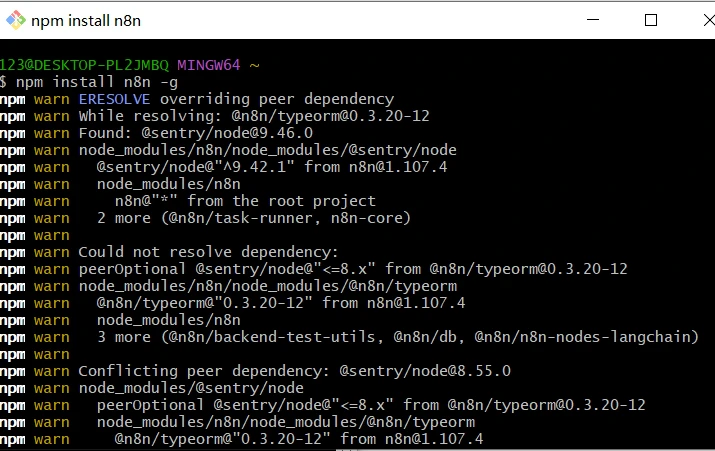
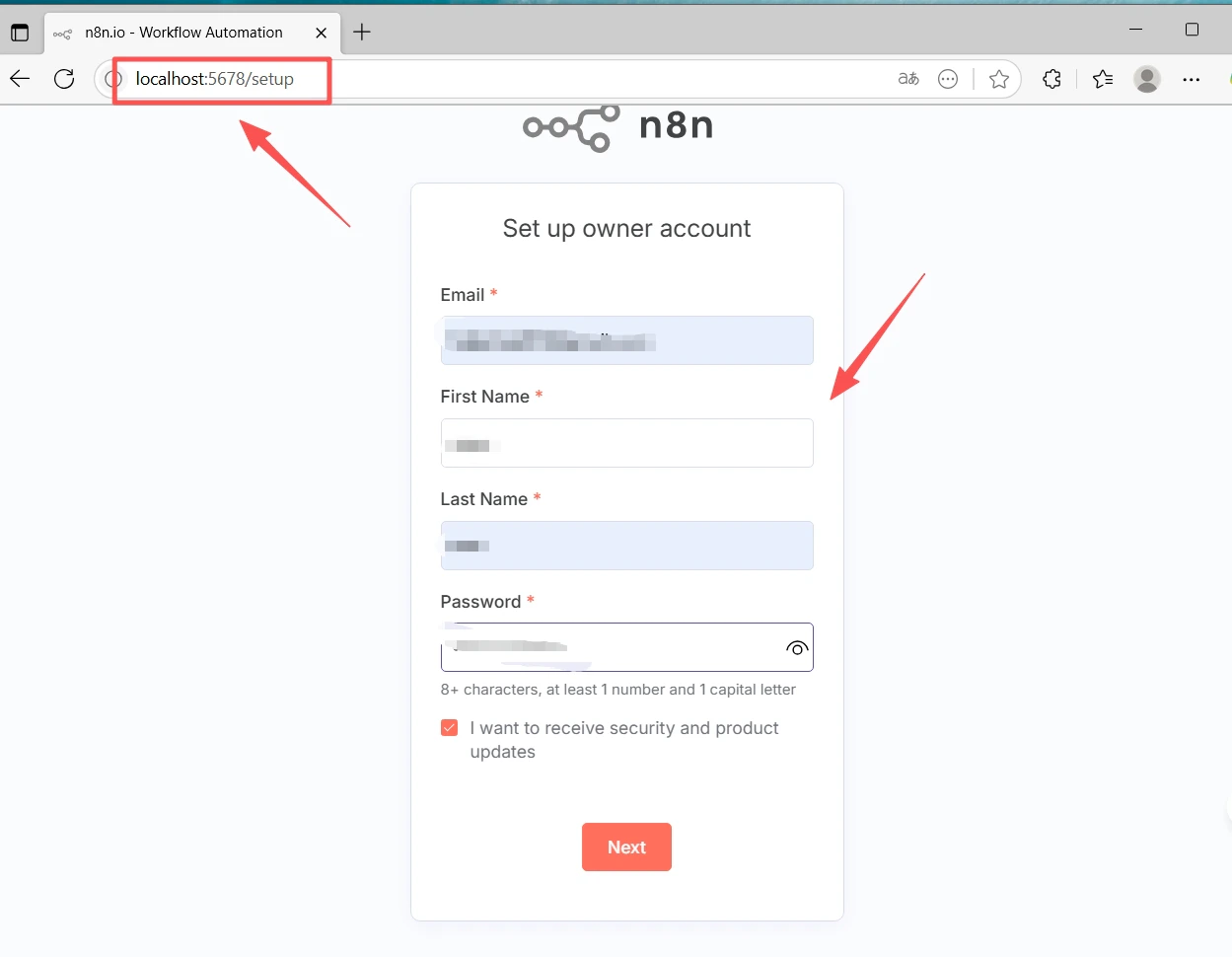
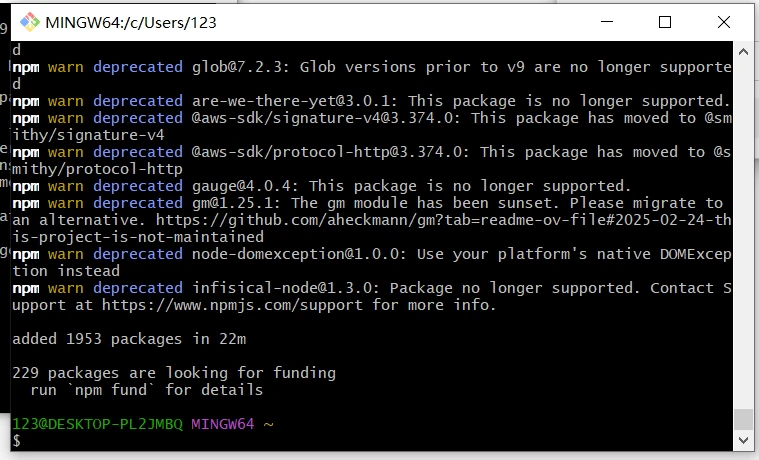 افتح [http://localhost:5678/](http://localhost:5678/) في متصفحك. عند التشغيل لأول مرة، سيطلب منك معالج الإعداد إنشاء حساب **Owner** (بريد إلكتروني + كلمة مرور). أكمل ذلك ثم سجّل الدخول.
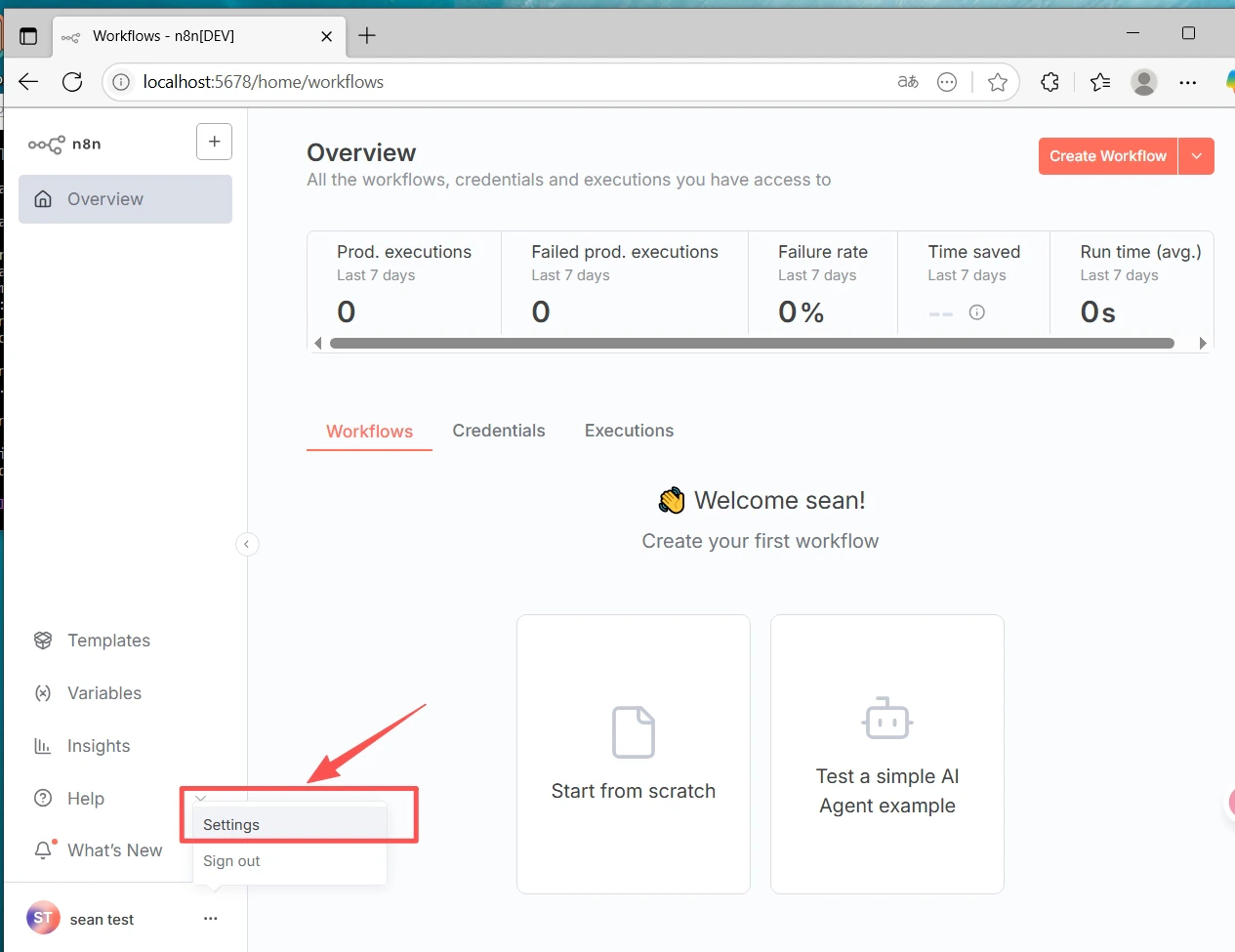
 1. انتقل إلى **Settings** (أسفل اليسار) → **Community nodes**
2. انقر على **Install a community node**
3. أدخل اسم الحزمة: `@cometapi-dev/n8n-nodes-cometapi`
4. حدّد مربع الإقرار بالمخاطر وانقر على **Install**
بعد التثبيت، يمكنك البحث عن **CometAPI** في لوحة العقد.
1. انتقل إلى **Settings** (أسفل اليسار) → **Community nodes**
2. انقر على **Install a community node**
3. أدخل اسم الحزمة: `@cometapi-dev/n8n-nodes-cometapi`
4. حدّد مربع الإقرار بالمخاطر وانقر على **Install**
بعد التثبيت، يمكنك البحث عن **CometAPI** في لوحة العقد.
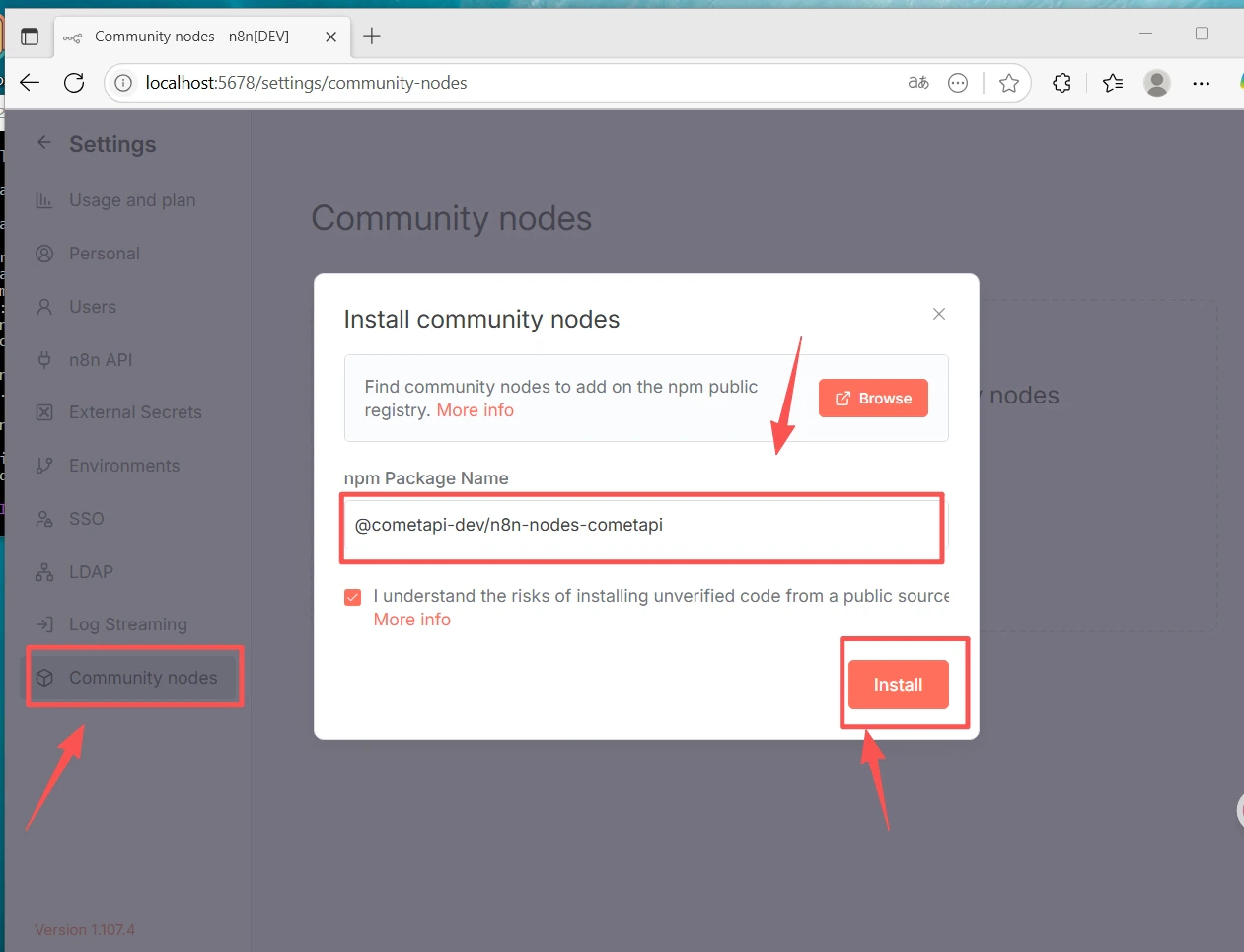 إذا كان قسم Community Nodes غير موجود: تأكد من أنك سجلت الدخول باستخدام حساب **Owner**، وتحقق من **Settings → Security** للتأكد من أن تثبيت community node مُمكّن.
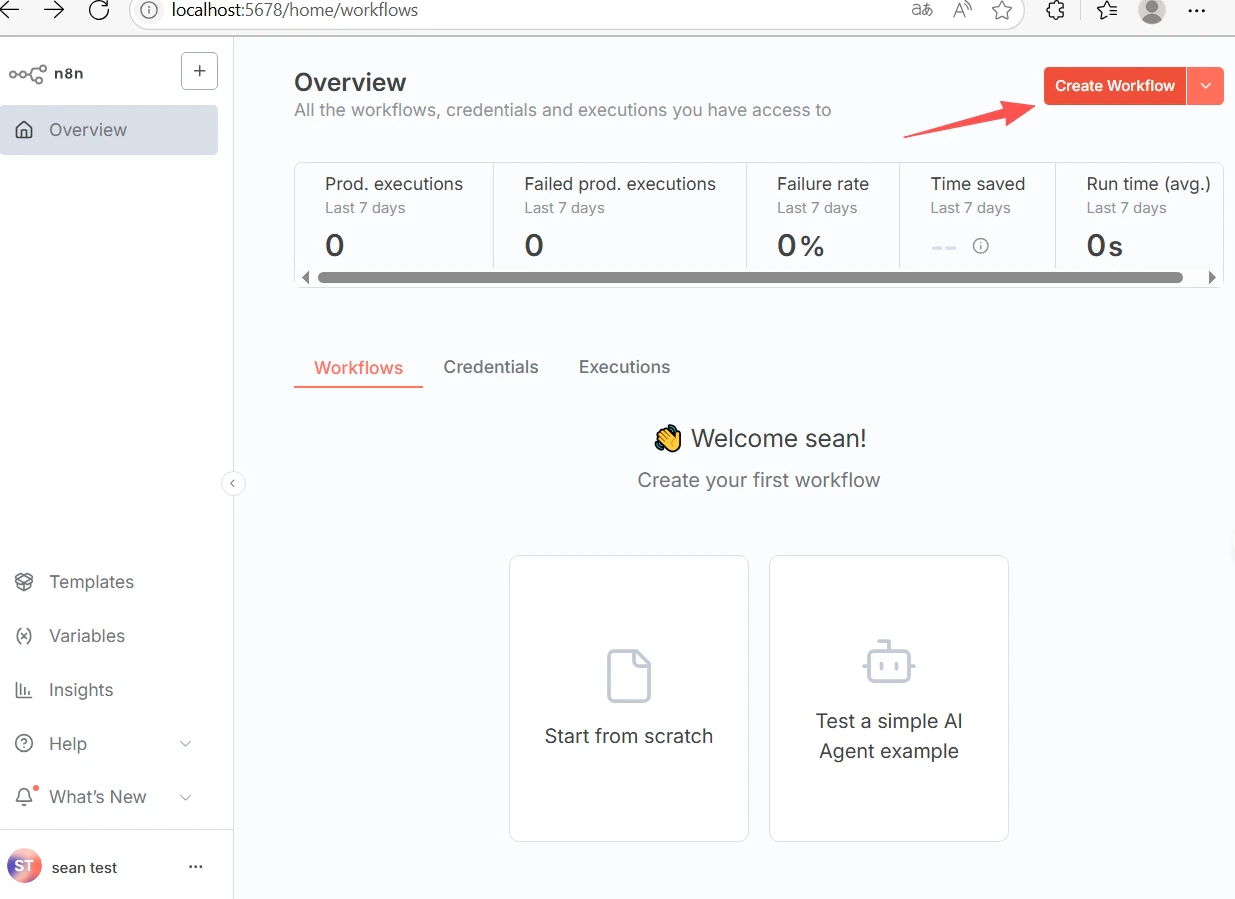
1. انقر على **+ New** في الأعلى لإنشاء سير عمل.
2. انقر على **+** في مساحة العمل وابحث عن **CometAPI** لإضافة العقدة.
إذا كان قسم Community Nodes غير موجود: تأكد من أنك سجلت الدخول باستخدام حساب **Owner**، وتحقق من **Settings → Security** للتأكد من أن تثبيت community node مُمكّن.
1. انقر على **+ New** في الأعلى لإنشاء سير عمل.
2. انقر على **+** في مساحة العمل وابحث عن **CometAPI** لإضافة العقدة.
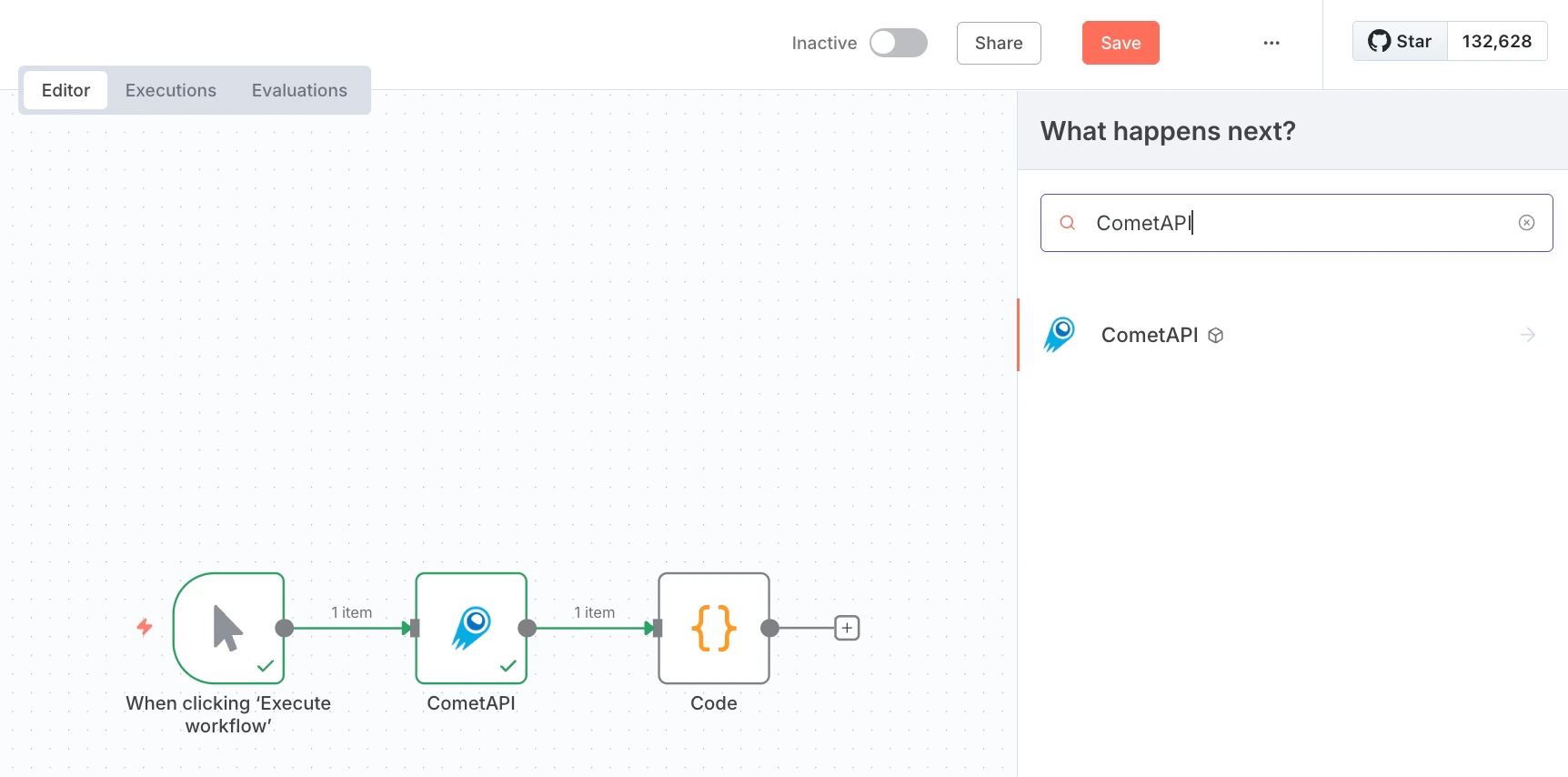 3. أضف عقدة **Manual Trigger** ووصلها بعقدة CometAPI.
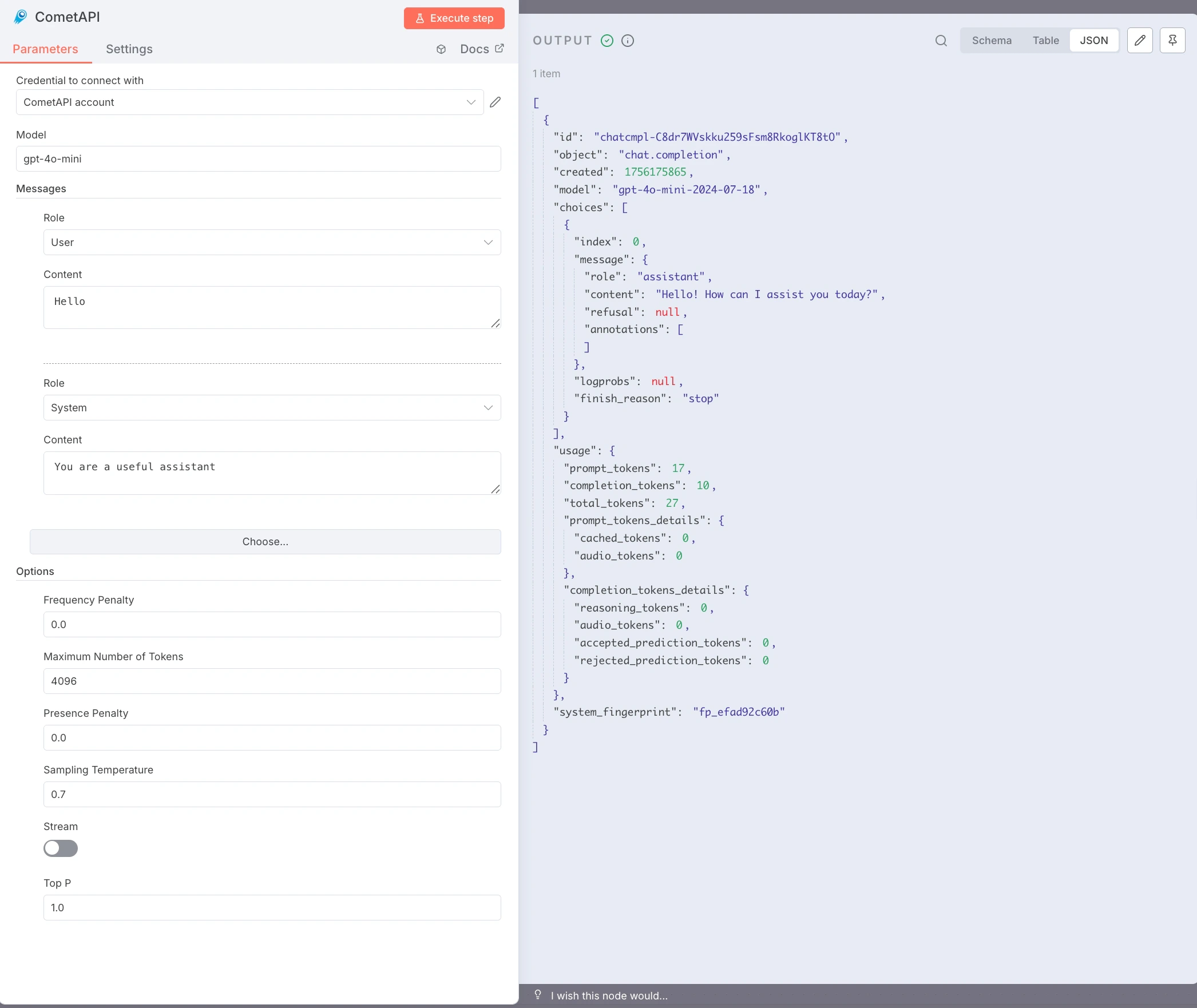
4. في عقدة CometAPI، ضمن **Credential to connect with**، اختر **Create new**. الصق مفتاح API الخاص بـ CometAPI في **CometAPI Key** ثم انقر على **Save**. تكون قيمة Base URL الافتراضية هي `https://api.cometapi.com` وعادةً لا تحتاج إلى تغيير.
3. أضف عقدة **Manual Trigger** ووصلها بعقدة CometAPI.
4. في عقدة CometAPI، ضمن **Credential to connect with**، اختر **Create new**. الصق مفتاح API الخاص بـ CometAPI في **CometAPI Key** ثم انقر على **Save**. تكون قيمة Base URL الافتراضية هي `https://api.cometapi.com` وعادةً لا تحتاج إلى تغيير.
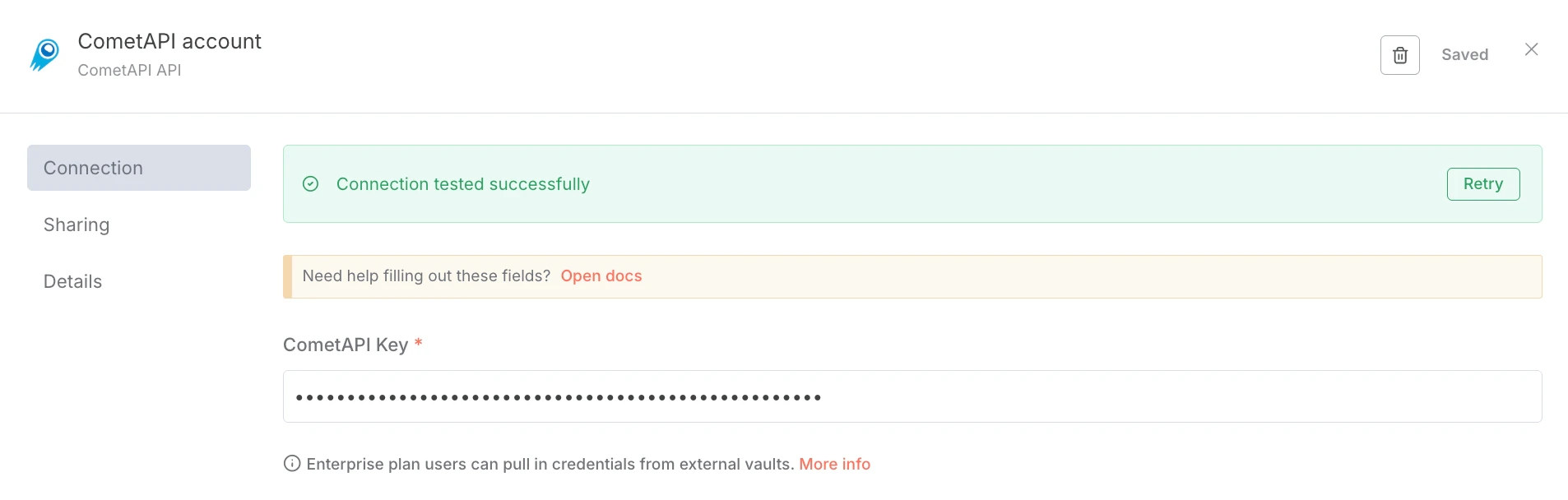 5. اضبط العقدة:
* **Model**: أدخل model ID الحالي الذي تريد استخدامه
* **Messages**: اضبط Role على `user`، وContent على Prompt الاختبار الخاص بك (مثلًا `Hello`)
* اختياري: أضف رسالة `system`، واضبط **Max Tokens** و**Temperature** وما إلى ذلك.
6. انقر على **Execute step** لتشغيل العقدة. تعرض لوحة **Output** استجابة JSON.
5. اضبط العقدة:
* **Model**: أدخل model ID الحالي الذي تريد استخدامه
* **Messages**: اضبط Role على `user`، وContent على Prompt الاختبار الخاص بك (مثلًا `Hello`)
* اختياري: أضف رسالة `system`، واضبط **Max Tokens** و**Temperature** وما إلى ذلك.
6. انقر على **Execute step** لتشغيل العقدة. تعرض لوحة **Output** استجابة JSON.
 * **أخطاء `node-gyp` أو أخطاء البناء الأصلية** — ثبّت أدوات البناء: `sudo apt install build-essential python3` (Debian/Ubuntu) أو Xcode Command Line Tools (macOS).
* **أخطاء أذونات npm (EACCES)** — استخدم nvm لتثبيت Node.js على مستوى المستخدم؛ لا حاجة إلى `sudo`.
* **تعارض المنفذ (`localhost:5678` غير متاح)** — اضبط `N8N_PORT=5679` (أو أي منفذ حر آخر) قبل تشغيل `n8n start`.
* **قسم Community Nodes غير موجود** — سجّل الدخول باستخدام حساب **Owner** وتحقق من **Settings → Security**.
* **فشل npm install على شبكات الشركات** — اضبط proxy: `npm config set proxy http://user:pass@host:port`
* **تعيد عقدة CometAPI رمز 401/403** — تحقّق من مفتاح API الخاص بك ومن أن model متاح ضمن خطة CometAPI الخاصة بك.
* **استجابات فارغة أو أخطاء حد token** — زِد **Max Tokens**؛ واضبط **Temperature** و**Top P** حسب الحاجة.
* **يتوقف n8n عند إغلاق الطرفية** — استخدم pm2: `pm2 start "n8n" --name n8n && pm2 save`.
* **أخطاء `node-gyp` أو أخطاء البناء الأصلية** — ثبّت أدوات البناء: `sudo apt install build-essential python3` (Debian/Ubuntu) أو Xcode Command Line Tools (macOS).
* **أخطاء أذونات npm (EACCES)** — استخدم nvm لتثبيت Node.js على مستوى المستخدم؛ لا حاجة إلى `sudo`.
* **تعارض المنفذ (`localhost:5678` غير متاح)** — اضبط `N8N_PORT=5679` (أو أي منفذ حر آخر) قبل تشغيل `n8n start`.
* **قسم Community Nodes غير موجود** — سجّل الدخول باستخدام حساب **Owner** وتحقق من **Settings → Security**.
* **فشل npm install على شبكات الشركات** — اضبط proxy: `npm config set proxy http://user:pass@host:port`
* **تعيد عقدة CometAPI رمز 401/403** — تحقّق من مفتاح API الخاص بك ومن أن model متاح ضمن خطة CometAPI الخاصة بك.
* **استجابات فارغة أو أخطاء حد token** — زِد **Max Tokens**؛ واضبط **Temperature** و**Top P** حسب الحاجة.
* **يتوقف n8n عند إغلاق الطرفية** — استخدم pm2: `pm2 start "n8n" --name n8n && pm2 save`.