> ## Documentation Index
> Fetch the complete documentation index at: https://apidoc.cometapi.com/llms.txt
> Use this file to discover all available pages before exploring further.

# AnythingLLM mit CometAPI verwenden

> Verwenden Sie diese Anleitung, um AnythingLLM mit CometAPI zu konfigurieren, indem Sie die base URL, den API key sowie model- oder provider-Optionen festlegen.

[AnythingLLM](https://anythingllm.com/) ist eine All-in-one-KI-Desktop-App. Wenn Sie **Generic OpenAI** als provider auswählen, können Sie es mit CometAPI verbinden und auf über 500 Modelle zugreifen.

## Voraussetzungen

* [AnythingLLM](https://anythingllm.com/) ist auf Ihrem Rechner installiert
* Ein [CometAPI](https://www.cometapi.com)-Konto mit einem aktiven API key

## Einrichtung

<Steps>
  <Step title="Rufe deinen CometAPI API-Schlüssel ab">
    Melde dich im [CometAPI-Dashboard](https://www.cometapi.com/console) an. Klicke auf **Add API Key** und kopiere deinen Schlüssel und die Basis-URL (`https://api.cometapi.com`).


    <Frame>
      <img src="https://mintcdn.com/cometapi/SZhlxZhCnMLn__BW/images/overview/810968_364191.png?fit=max&auto=format&n=SZhlxZhCnMLn__BW&q=85&s=aef81a83f29f8eb16655ed4060425f50" alt="CometAPI-Dashboard — Add API Key" width="3824" height="1892" data-path="images/overview/810968_364191.png" />
    </Frame>

    <Frame>
      <img src="https://mintcdn.com/cometapi/HhtmQffktazbxUvS/images/overview/810968_364193.png?fit=max&auto=format&n=HhtmQffktazbxUvS&q=85&s=d893f659267150d0faf45f99eb5dffc1" alt="CometAPI API-Schlüssel und Basis-URL" width="2434" height="1232" data-path="images/overview/810968_364193.png" />
    </Frame>
  </Step>

  <Step title="Konfiguriere den LLM-Anbieter">
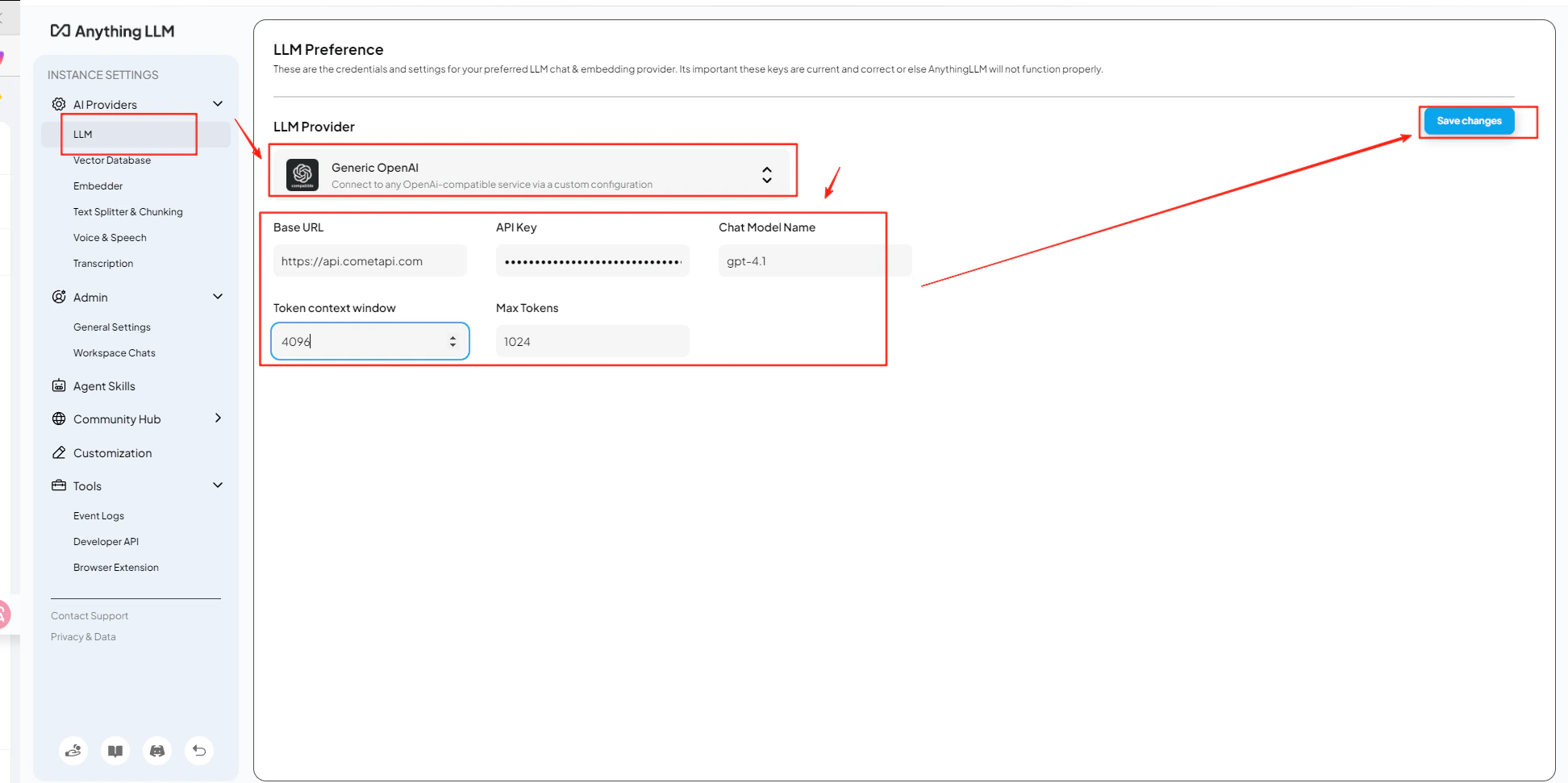
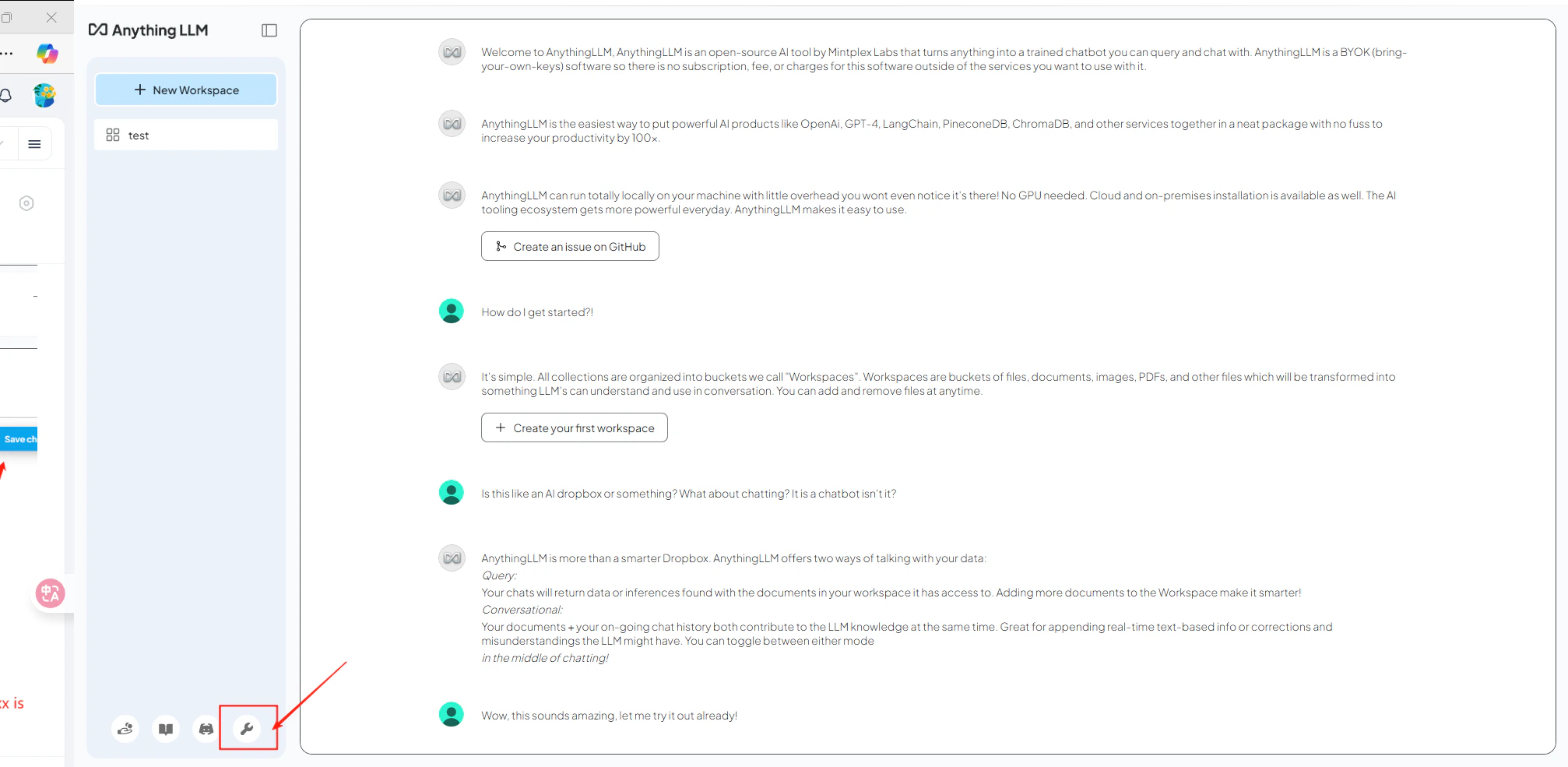
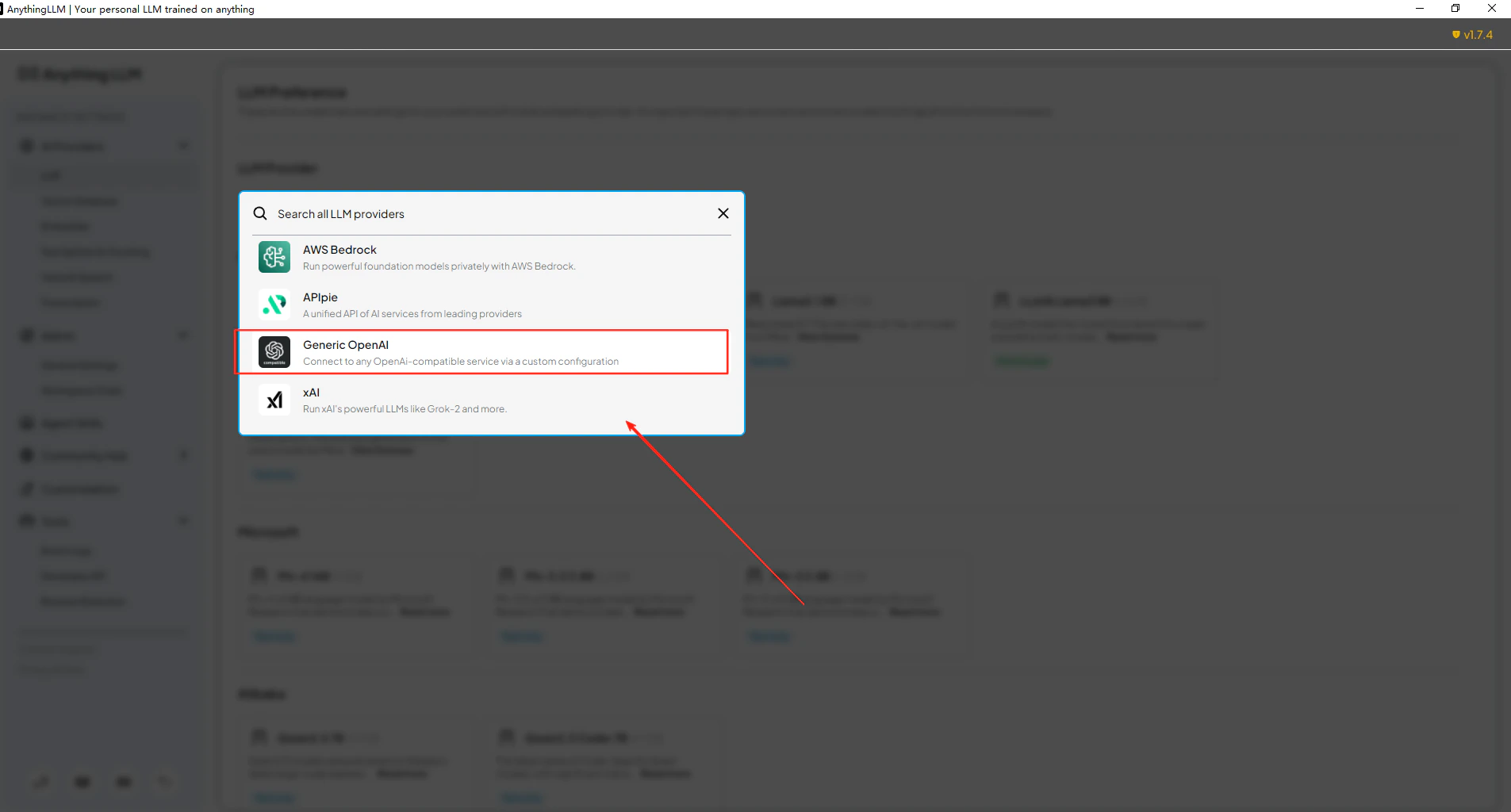
    Öffne AnythingLLM **Settings** → **AI Providers** → **LLM Preferences**. Wähle **Generic OpenAI** als model-Anbieter aus und gib `https://api.cometapi.com/v1` in das Feld **URL** ein.
  </Step>

  <Step title="Füge deinen API-Schlüssel und dein Modell hinzu">
    Füge deinen CometAPI-Schlüssel in das Feld **API Key** ein. Setze **Token Context Window** und **Max Tokens** passend zu deinem gewählten Modell und gib dann die aktuelle model ID ein, die du verwenden möchtest.
    <Frame>
      <img src="https://mintcdn.com/cometapi/E4FFvyMYmaOZoldp/images/integrations/810968_360336.png?fit=max&auto=format&n=E4FFvyMYmaOZoldp&q=85&s=499826a1508a3749bf0815fe3c7e03df" alt="AnythingLLM LLM Preferences mit ausgewähltem Generic OpenAI" width="2014" height="985" data-path="images/integrations/810968_360336.png" />
    </Frame>

    <Frame>
      <img src="https://mintcdn.com/cometapi/E4FFvyMYmaOZoldp/images/integrations/810968_360337.png?fit=max&auto=format&n=E4FFvyMYmaOZoldp&q=85&s=0e882f3675ff64c5c688e95b9629a2d9" alt="Felder für Basis-URL und API-Schlüssel ausgefüllt" width="1905" height="1024" data-path="images/integrations/810968_360337.png" />
    </Frame>

    <Frame>
      <img src="https://mintcdn.com/cometapi/E4FFvyMYmaOZoldp/images/integrations/810968_360338.png?fit=max&auto=format&n=E4FFvyMYmaOZoldp&q=85&s=7c1f49711b3c429b74c9934f69caa7d9" alt="Modellname und Token-Einstellungen konfiguriert" width="1944" height="971" data-path="images/integrations/810968_360338.png" />
    </Frame>
  </Step>

  <Step title="Teste die Verbindung">
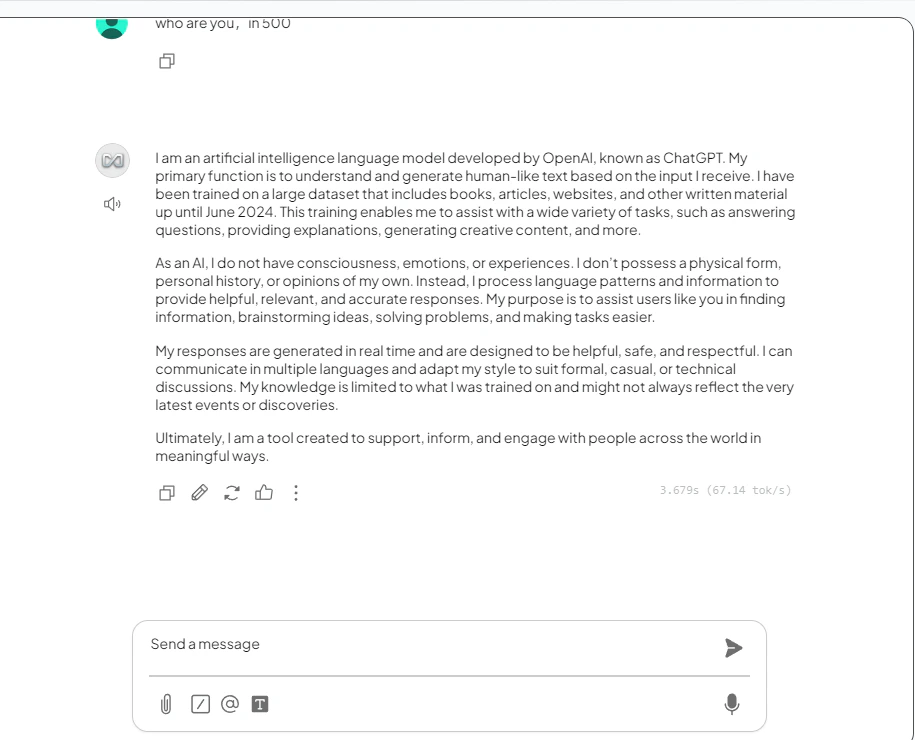
    Öffne einen Workspace und sende eine Testnachricht. Eine erfolgreiche Antwort bestätigt, dass die Integration funktioniert.
    <Frame>
      <img src="https://mintcdn.com/cometapi/E4FFvyMYmaOZoldp/images/integrations/810968_360340.png?fit=max&auto=format&n=E4FFvyMYmaOZoldp&q=85&s=8d084b71b4df10e71d4ae9c40baf7766" alt="AnythingLLM-Chat mit erfolgreicher Antwort" width="915" height="740" data-path="images/integrations/810968_360340.png" />
    </Frame>
  </Step>
</Steps>

<Tip>
  Du kannst auf derselben Konfigurationsseite mehrere Modellnamen hinzufügen. Sieh in der [CometAPI-Modellliste](/de/overview/models) nach, welche Bezeichner unterstützt werden.
</Tip>

<script type="application/ld+json">
  {`
    {
    "@context": "https://schema.org",
    "@graph": [
      {
        "@type": "HowTo",
        "@id": "https://apidoc.cometapi.com/integrations/anythingllm#howto",
        "name": "AnythingLLM mit CometAPI verwenden",
        "description": "Verwende diese Anleitung, um AnythingLLM mit CometAPI zu konfigurieren, indem du die Basis-URL, den API-Schlüssel und Modell- oder Anbieteroptionen festlegst.",
        "step": [
          {
            "@type": "HowToStep",
            "@id": "https://apidoc.cometapi.com/integrations/anythingllm#step-1",
            "position": 1,
            "name": "Rufe deinen CometAPI API-Schlüssel ab",
            "text": "Erstelle oder öffne dein CometAPI-Konto und kopiere dann einen aktiven API-Schlüssel aus dem Dashboard."
          },
          {
            "@type": "HowToStep",
            "@id": "https://apidoc.cometapi.com/integrations/anythingllm#step-2",
            "position": 2,
            "name": "Konfiguriere den LLM-Anbieter",
            "text": "Führe den Schritt „Konfiguriere den LLM-Anbieter“ in der Anleitung „AnythingLLM mit CometAPI verwenden“ aus."
          },
          {
            "@type": "HowToStep",
            "@id": "https://apidoc.cometapi.com/integrations/anythingllm#step-3",
            "position": 3,
            "name": "Füge deinen API-Schlüssel und dein Modell hinzu",
            "text": "Führe den Schritt „Füge deinen API-Schlüssel und dein Modell hinzu“ in der Anleitung „AnythingLLM mit CometAPI verwenden“ aus."
          },
          {
            "@type": "HowToStep",
            "@id": "https://apidoc.cometapi.com/integrations/anythingllm#step-4",
            "position": 4,
            "name": "Teste die Verbindung",
            "text": "Wähle auf der CometAPI-Modelle-Seite eine aktuelle model ID aus und sende dann eine Testanfrage aus der Integration."
          }
        ]
      },
      {
        "@type": "BreadcrumbList",
        "itemListElement": [
          {
            "@type": "ListItem",
            "position": 1,
            "name": "CometAPI-Dokumentation",
            "item": "https://apidoc.cometapi.com/"
          },
          {
            "@type": "ListItem",
            "position": 2,
            "name": "Integrationen",
            "item": "https://apidoc.cometapi.com/integrations"
          },
          {
            "@type": "ListItem",
            "position": 3,
            "name": "AnythingLLM mit CometAPI verwenden",
            "item": "https://apidoc.cometapi.com/integrations/anythingllm"
          }
        ]
      }
    ]
    }
    `}
</script>