> ## Documentation Index
> Fetch the complete documentation index at: https://apidoc.cometapi.com/llms.txt
> Use this file to discover all available pages before exploring further.

# Hubungkan Activepieces ke CometAPI

> Gunakan panduan ini untuk menghubungkan Activepieces ke CometAPI dengan menetapkan base URL, API key, serta opsi model atau provider.

[Activepieces](https://cloud.activepieces.com/) adalah platform automasi open-source. Dengan konektor CometAPI bawaan, Anda dapat menambahkan langkah AI ke alur kerja apa pun dalam hitungan detik.

## Prasyarat

* Akun [Activepieces](https://cloud.activepieces.com/)
* Akun [CometAPI](https://www.cometapi.com) dengan API key yang aktif

## Penyiapan

<Steps>
  <Step title="Dapatkan API key CometAPI Anda">
    Masuk ke [dashboard CometAPI](https://www.cometapi.com/console). Klik **Add API Key** lalu salin key Anda.


    <Frame>
      <img src="https://mintcdn.com/cometapi/SZhlxZhCnMLn__BW/images/overview/810968_364191.png?fit=max&auto=format&n=SZhlxZhCnMLn__BW&q=85&s=aef81a83f29f8eb16655ed4060425f50" alt="Dashboard CometAPI — tombol Add API Key" width="3824" height="1892" data-path="images/overview/810968_364191.png" />
    </Frame>

    <Frame>
      <img src="https://mintcdn.com/cometapi/HhtmQffktazbxUvS/images/overview/810968_364193.png?fit=max&auto=format&n=HhtmQffktazbxUvS&q=85&s=d893f659267150d0faf45f99eb5dffc1" alt="Detail API key CometAPI dan base URL" width="2434" height="1232" data-path="images/overview/810968_364193.png" />
    </Frame>
  </Step>

  <Step title="Buat flow dan tambahkan langkah CometAPI">
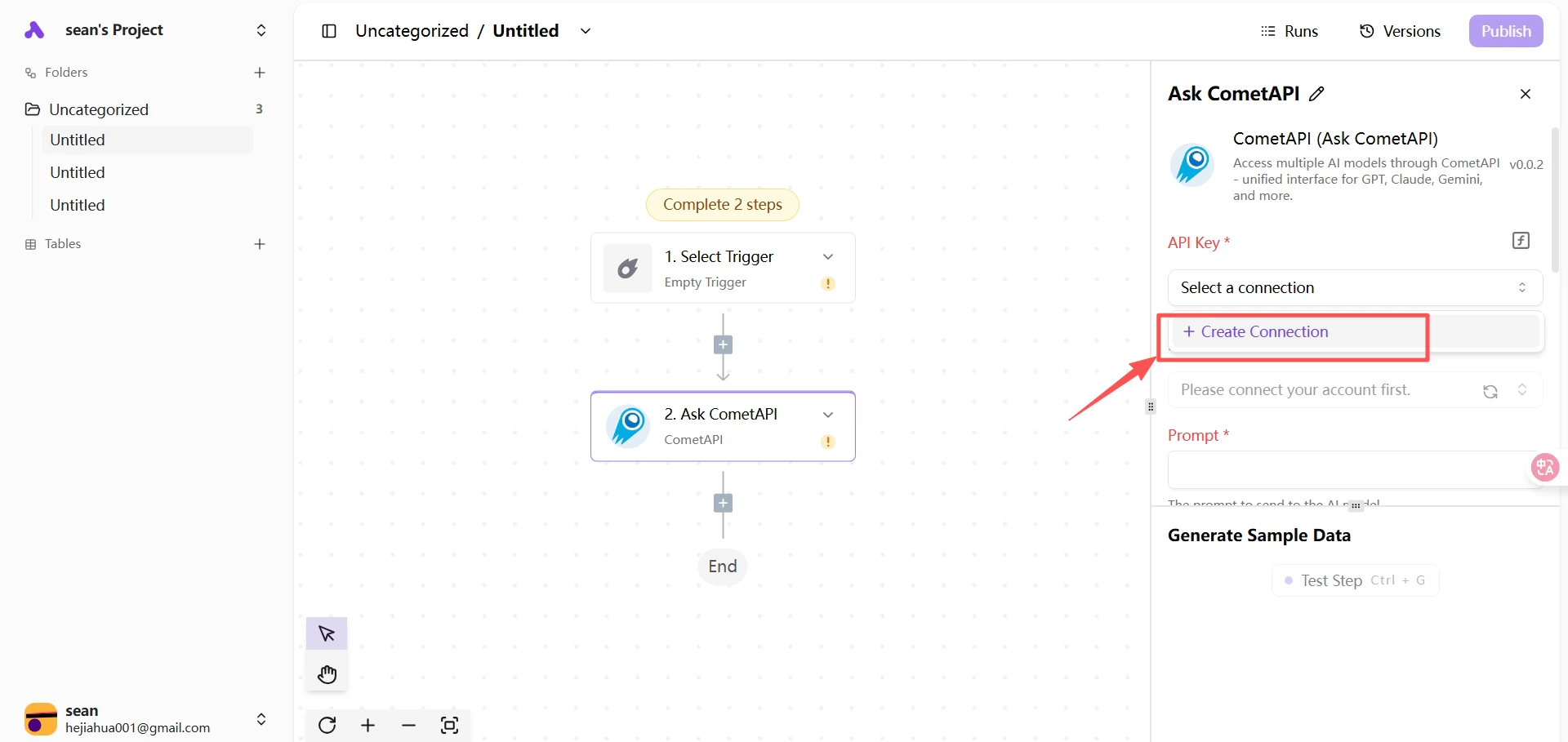
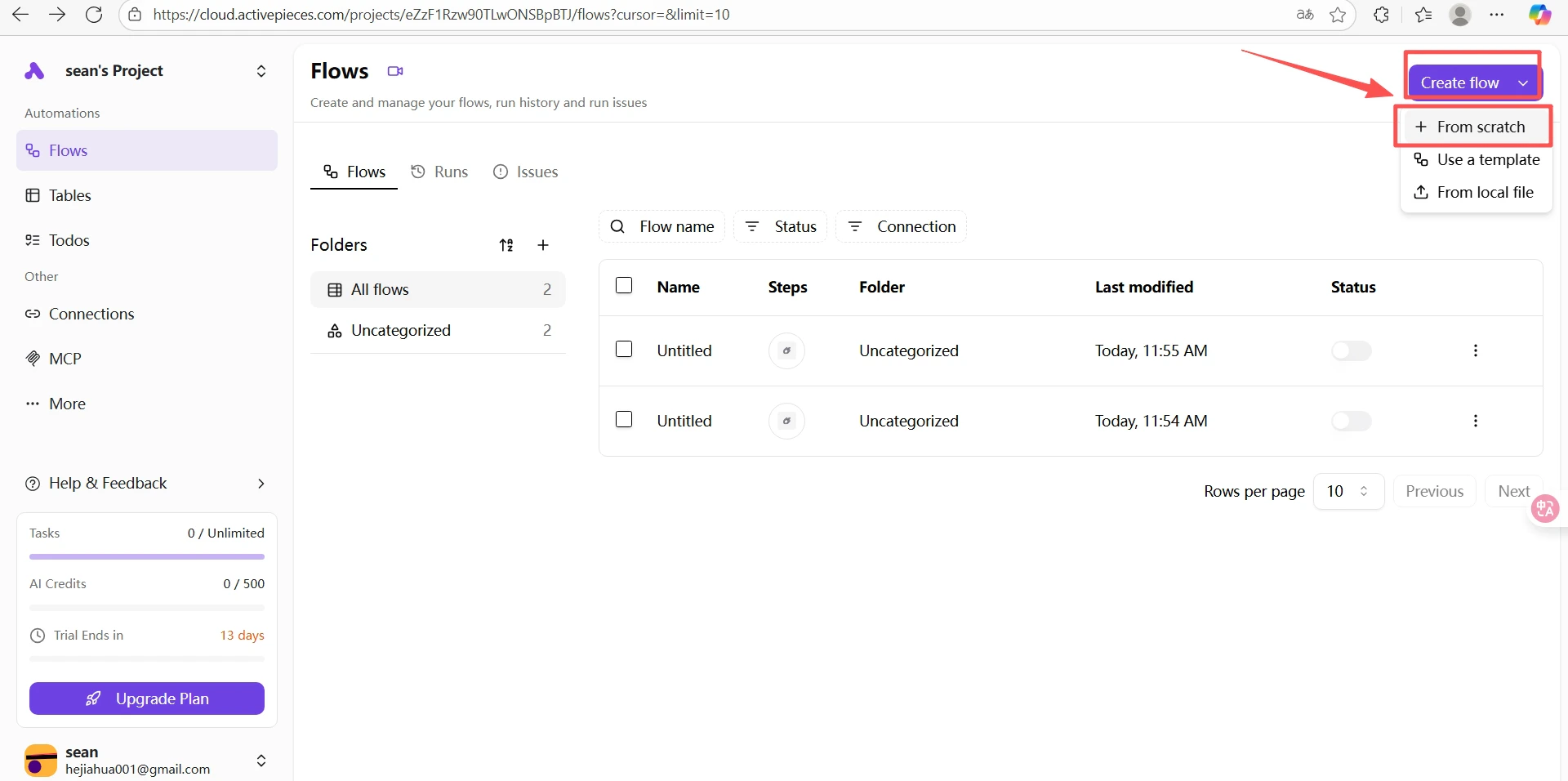
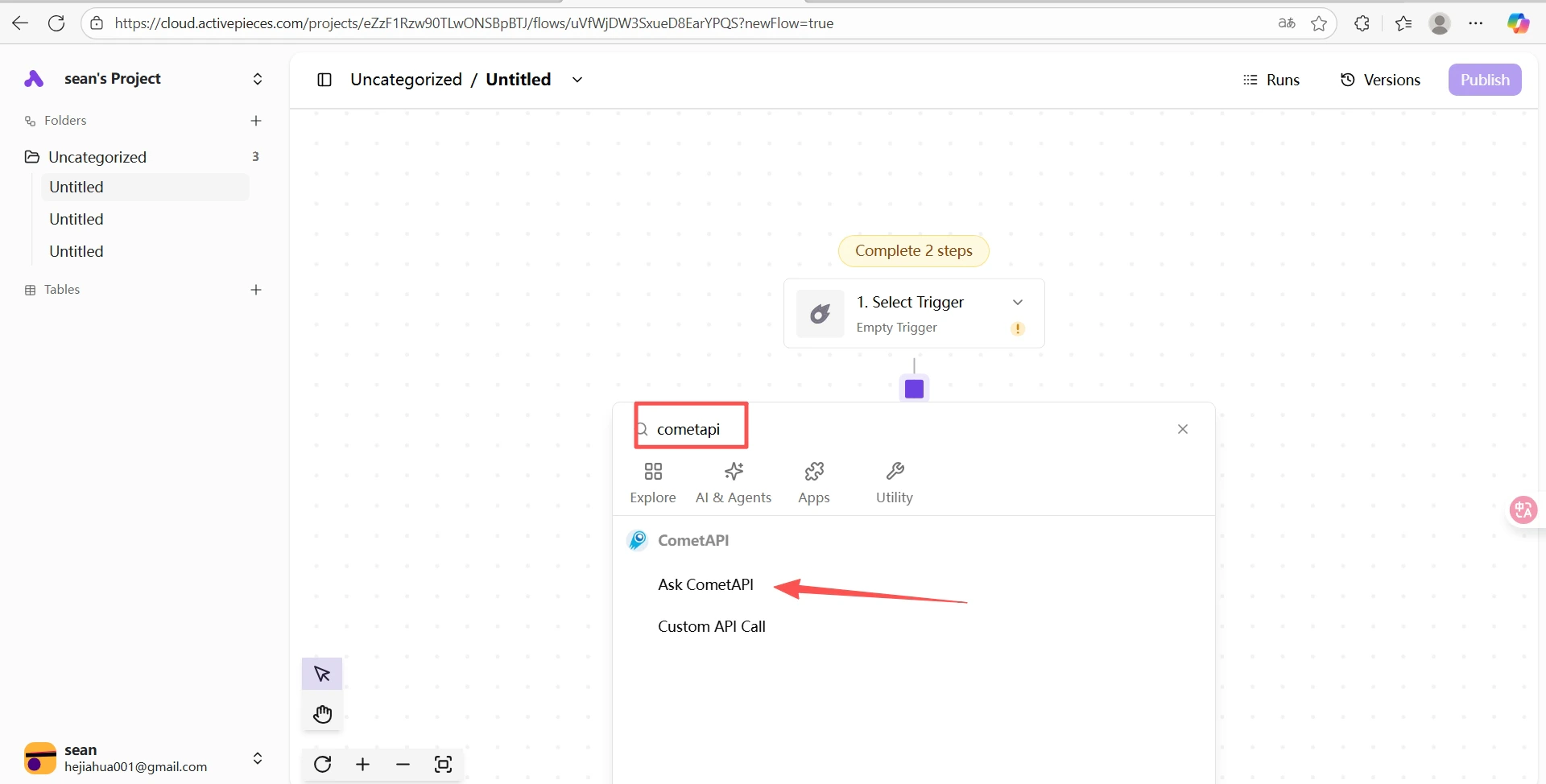
    Di project Activepieces Anda, klik **Create Flow** → **From Scratch**. Klik tombol **+** di canvas, cari `cometapi`, lalu pilih **Ask CometAPI**.
    <Frame>
      <img src="https://mintcdn.com/cometapi/SZhlxZhCnMLn__BW/images/integrations/810968_361326.png?fit=max&auto=format&n=SZhlxZhCnMLn__BW&q=85&s=20fd998714bb23dc7c28dbad4315c152" alt="Canvas Activepieces dengan tombol + untuk menambahkan langkah" width="1920" height="956" data-path="images/integrations/810968_361326.png" />
    </Frame>

    <Frame>
      <img src="https://mintcdn.com/cometapi/SZhlxZhCnMLn__BW/images/integrations/810968_361327.png?fit=max&auto=format&n=SZhlxZhCnMLn__BW&q=85&s=084735cca2fbbb0b5e49672c029ff34c" alt="Hasil pencarian yang menampilkan konektor CometAPI" width="1920" height="974" data-path="images/integrations/810968_361327.png" />
    </Frame>

    <Frame>
      <img src="https://mintcdn.com/cometapi/SZhlxZhCnMLn__BW/images/integrations/810968_361328.png?fit=max&auto=format&n=SZhlxZhCnMLn__BW&q=85&s=a68000d40dcdfdd14af3a0954ab0c34b" alt="Langkah Ask CometAPI dipilih dalam daftar konektor" width="1920" height="909" data-path="images/integrations/810968_361328.png" />
    </Frame>
  </Step>

  <Step title="Konfigurasikan langkah CometAPI">
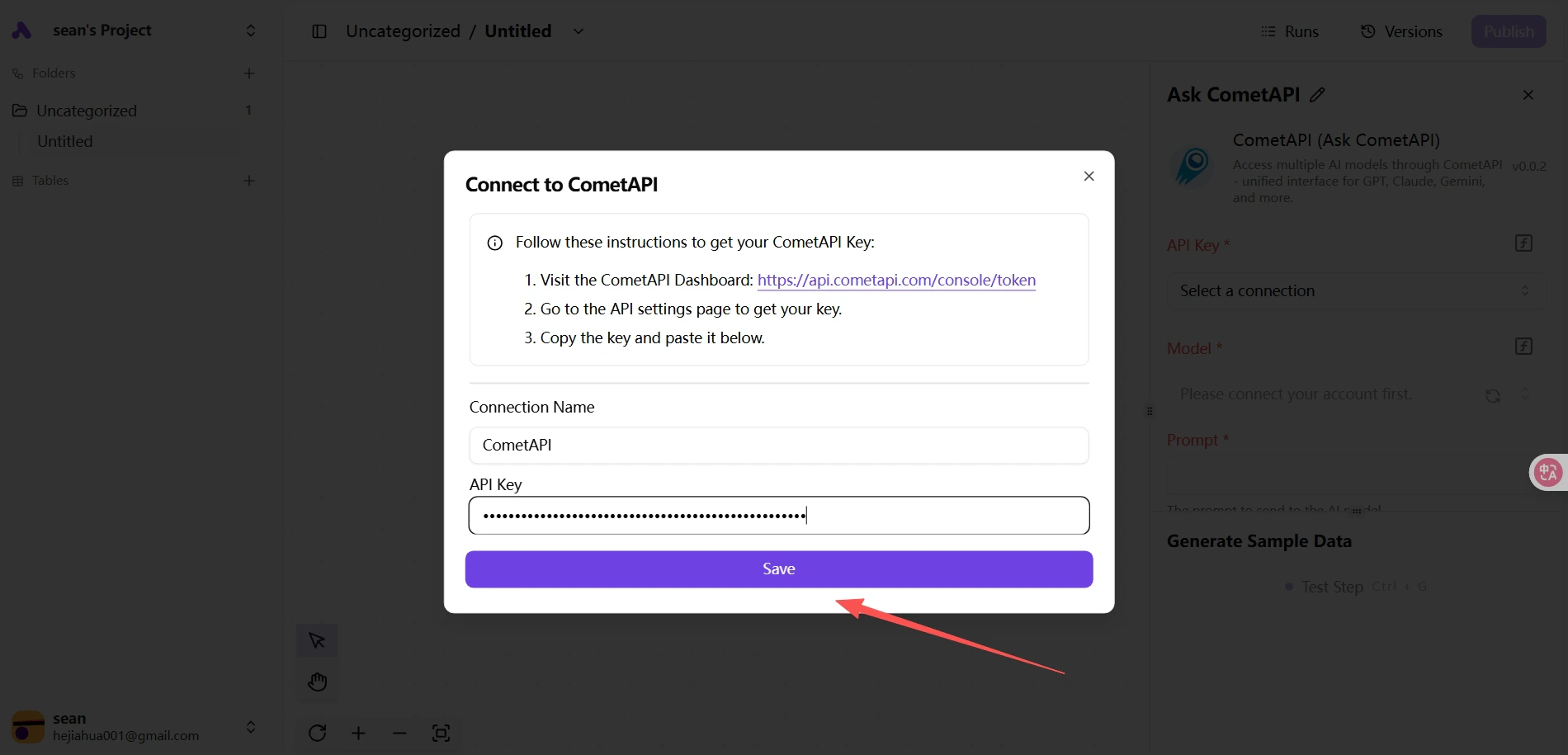
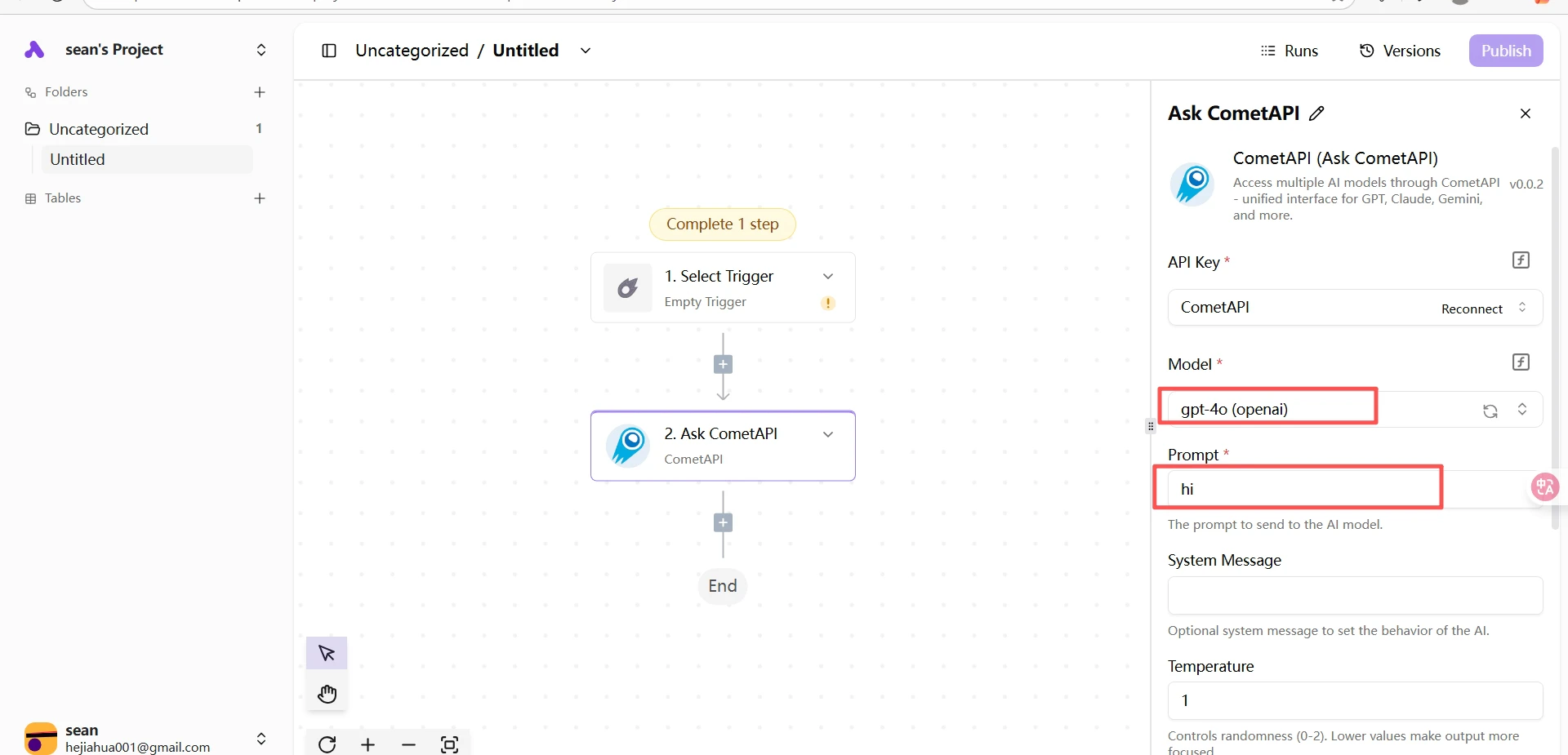
    Tempelkan API key Anda ke kolom **API Key**. Pilih model saat ini yang ingin Anda gunakan dan isi prompt Anda.
    <Frame>
      <img src="https://mintcdn.com/cometapi/SZhlxZhCnMLn__BW/images/integrations/810968_361329.png?fit=max&auto=format&n=SZhlxZhCnMLn__BW&q=85&s=b3ea4a155f705dfb8cd0956a3cfc7fc8" alt="Langkah CometAPI — API key dan pemilihan model" width="1900" height="915" data-path="images/integrations/810968_361329.png" />
    </Frame>

    <Frame>
      <img src="https://mintcdn.com/cometapi/SZhlxZhCnMLn__BW/images/integrations/810968_361330.png?fit=max&auto=format&n=SZhlxZhCnMLn__BW&q=85&s=344e62888e22f3ef1d34109e95ee8baf" alt="Konfigurasi prompt untuk langkah Ask CometAPI" width="1920" height="925" data-path="images/integrations/810968_361330.png" />
    </Frame>
  </Step>

  <Step title="Uji flow">
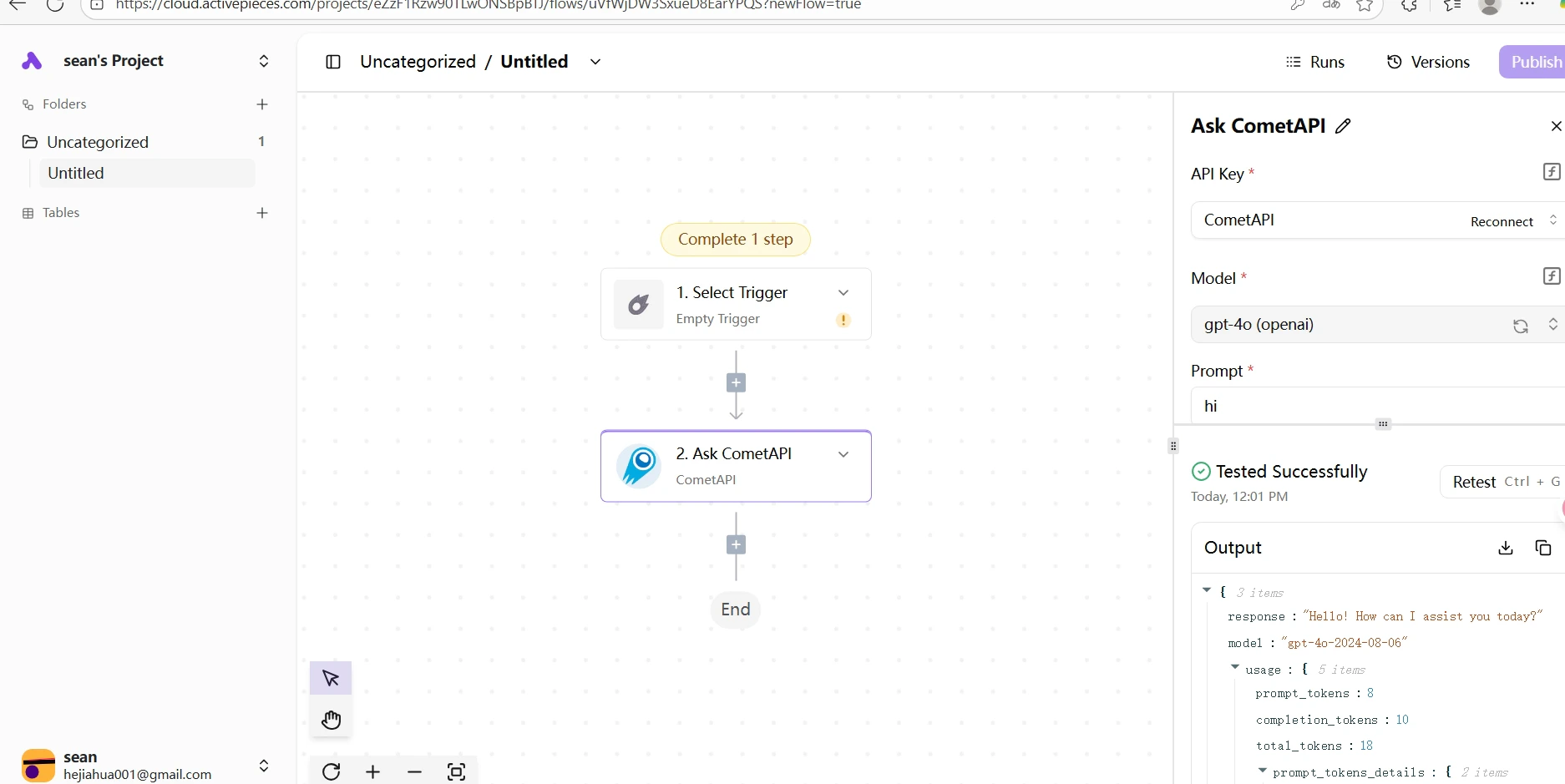
    Klik **Test** untuk menjalankan langkah tersebut. Respons yang berhasil mengonfirmasi bahwa integrasi berfungsi.
    <Frame>
      <img src="https://mintcdn.com/cometapi/SZhlxZhCnMLn__BW/images/integrations/810968_361331.png?fit=max&auto=format&n=SZhlxZhCnMLn__BW&q=85&s=92fd6c62bcf33f681b053668a9ac6687" alt="Respons pengujian berhasil dari langkah CometAPI" width="1874" height="939" data-path="images/integrations/810968_361331.png" />
    </Frame>
  </Step>
</Steps>

<Note>
  Jika pengujian gagal, pastikan API key Anda benar dan akun Anda memiliki saldo yang tersedia. Hubungi [dukungan CometAPI](https://www.cometapi.com) jika masalah tetap berlanjut.
</Note>

<script type="application/ld+json">
  {`
    {
    "@context": "https://schema.org",
    "@graph": [
      {
        "@type": "HowTo",
        "@id": "https://apidoc.cometapi.com/integrations/activepieces#howto",
        "name": "Hubungkan Activepieces ke CometAPI",
        "description": "Gunakan panduan ini untuk menghubungkan Activepieces ke CometAPI dengan mengatur base URL, API key, serta opsi model atau penyedia.",
        "step": [
          {
            "@type": "HowToStep",
            "@id": "https://apidoc.cometapi.com/integrations/activepieces#step-1",
            "position": 1,
            "name": "Dapatkan API key CometAPI Anda",
            "text": "Buat atau buka akun CometAPI Anda, lalu salin API key yang aktif dari dashboard."
          },
          {
            "@type": "HowToStep",
            "@id": "https://apidoc.cometapi.com/integrations/activepieces#step-2",
            "position": 2,
            "name": "Buat flow dan tambahkan langkah CometAPI",
            "text": "Selesaikan langkah Buat flow dan tambahkan langkah CometAPI di panduan Hubungkan Activepieces ke CometAPI."
          },
          {
            "@type": "HowToStep",
            "@id": "https://apidoc.cometapi.com/integrations/activepieces#step-3",
            "position": 3,
            "name": "Konfigurasikan langkah CometAPI",
            "text": "Selesaikan langkah Konfigurasikan langkah CometAPI di panduan Hubungkan Activepieces ke CometAPI."
          },
          {
            "@type": "HowToStep",
            "@id": "https://apidoc.cometapi.com/integrations/activepieces#step-4",
            "position": 4,
            "name": "Uji flow",
            "text": "Selesaikan langkah Uji flow di panduan Hubungkan Activepieces ke CometAPI."
          }
        ]
      },
      {
        "@type": "BreadcrumbList",
        "itemListElement": [
          {
            "@type": "ListItem",
            "position": 1,
            "name": "Dokumentasi CometAPI",
            "item": "https://apidoc.cometapi.com/"
          },
          {
            "@type": "ListItem",
            "position": 2,
            "name": "Integrasi",
            "item": "https://apidoc.cometapi.com/integrations"
          },
          {
            "@type": "ListItem",
            "position": 3,
            "name": "Hubungkan Activepieces ke CometAPI",
            "item": "https://apidoc.cometapi.com/integrations/activepieces"
          }
        ]
      }
    ]
    }
    `}
</script>