> ## Documentation Index
> Fetch the complete documentation index at: https://apidoc.cometapi.com/llms.txt
> Use this file to discover all available pages before exploring further.

# Gunakan LobeChat dengan CometAPI

> Gunakan panduan ini untuk mengonfigurasi LobeChat dengan CometAPI dengan menetapkan base URL, API key, serta opsi model atau provider.

[Lobe-Chat](https://chat-preview.lobehub.com/) adalah aplikasi chat AI open-source yang kaya fitur dengan dukungan bawaan untuk CometAPI — tidak perlu konfigurasi URL manual.

## Prasyarat

* [Lobe-Chat](https://chat-preview.lobehub.com/) (cloud atau self-hosted)
* Akun [CometAPI](https://www.cometapi.com) dengan API key yang aktif

## Penyiapan

<Steps>
  <Step title="Dapatkan API key CometAPI Anda">
    Masuk ke [dashboard CometAPI](https://www.cometapi.com/console). Klik **Add API Key** lalu salin key Anda.


    <Frame>
      <img src="https://mintcdn.com/cometapi/SZhlxZhCnMLn__BW/images/overview/810968_364191.png?fit=max&auto=format&n=SZhlxZhCnMLn__BW&q=85&s=aef81a83f29f8eb16655ed4060425f50" alt="Dashboard CometAPI — Add API Key" width="3824" height="1892" data-path="images/overview/810968_364191.png" />
    </Frame>

    <Frame>
      <img src="https://mintcdn.com/cometapi/HhtmQffktazbxUvS/images/overview/810968_364193.png?fit=max&auto=format&n=HhtmQffktazbxUvS&q=85&s=d893f659267150d0faf45f99eb5dffc1" alt="API key CometAPI dan base URL" width="2434" height="1232" data-path="images/overview/810968_364193.png" />
    </Frame>
  </Step>

  <Step title="Pilih CometAPI sebagai penyedia model">
    Di Lobe-Chat, klik avatar Anda → **Application Settings** → **Model Providers**. Pilih **CometAPI**, tempel API key Anda, lalu aktifkan penyedia tersebut. Kemudian pilih model untuk mengaktifkannya.
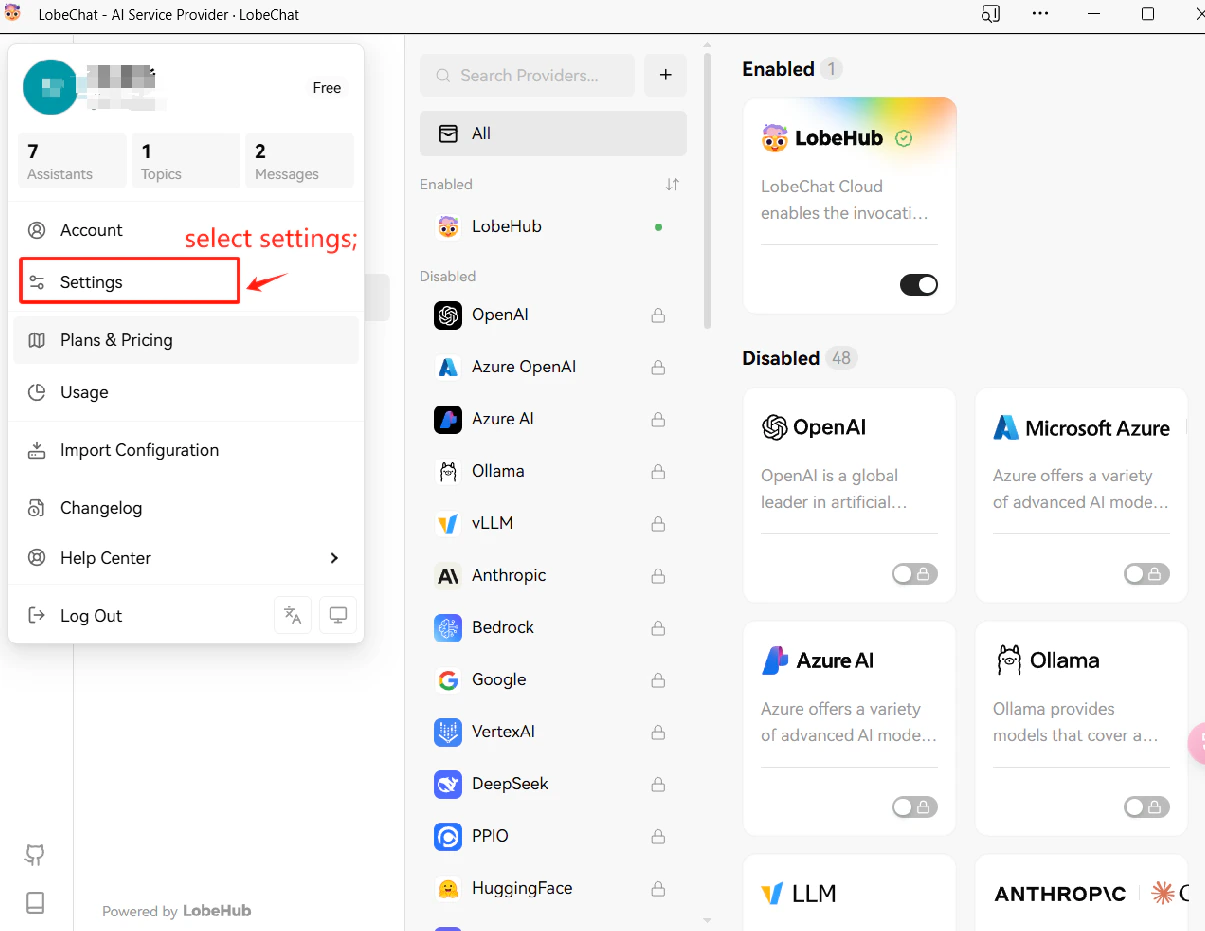
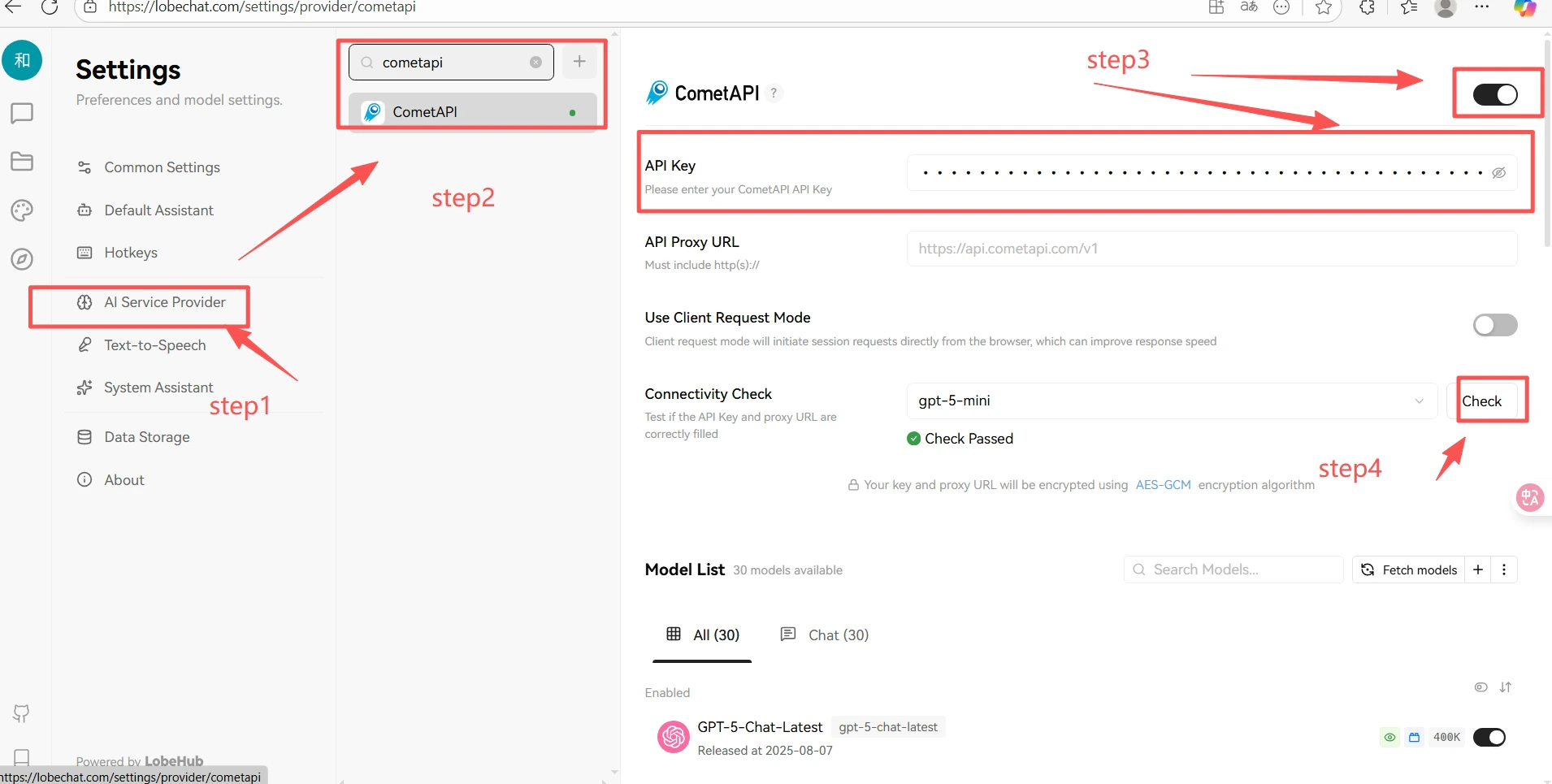
    <Frame>
      <img src="https://mintcdn.com/cometapi/E4FFvyMYmaOZoldp/images/integrations/810968_360319.png?fit=max&auto=format&n=E4FFvyMYmaOZoldp&q=85&s=299c123baafc43c598449113a6723031" alt="Pengaturan aplikasi Lobe-Chat — daftar penyedia model" width="1205" height="931" data-path="images/integrations/810968_360319.png" />
    </Frame>

    <Frame>
      <img src="https://mintcdn.com/cometapi/SZhlxZhCnMLn__BW/images/integrations/810968_361341.png?fit=max&auto=format&n=SZhlxZhCnMLn__BW&q=85&s=dc0b478e91393dcb3a5db92f07360ece" alt="Pengaturan penyedia CometAPI di Lobe-Chat dengan API key yang sudah dimasukkan" width="1910" height="965" data-path="images/integrations/810968_361341.png" />
    </Frame>
  </Step>

  <Step title="Uji koneksi">
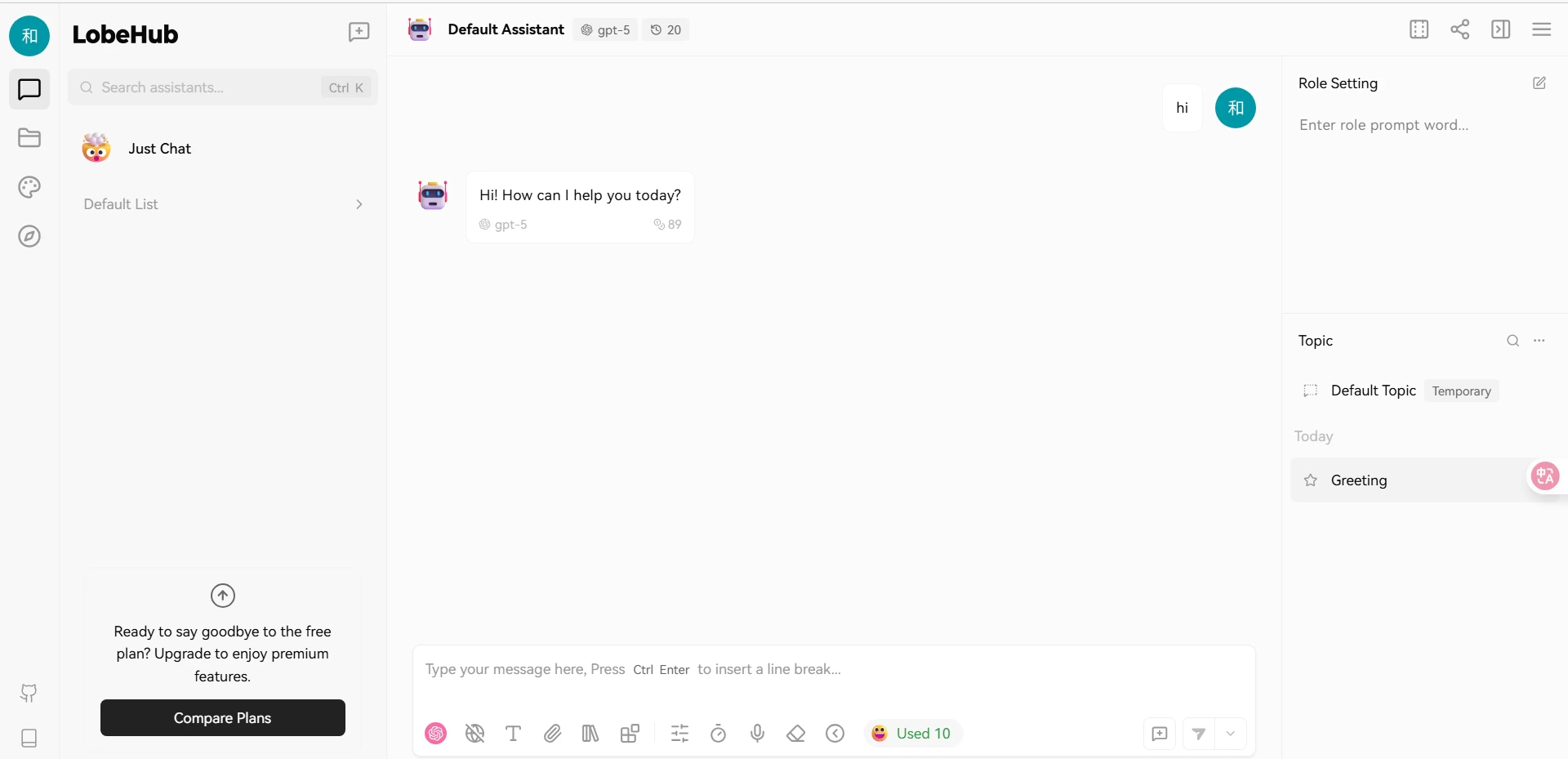
    Mulai chat dan kirim pesan uji. Respons yang berhasil mengonfirmasi bahwa integrasi berfungsi.
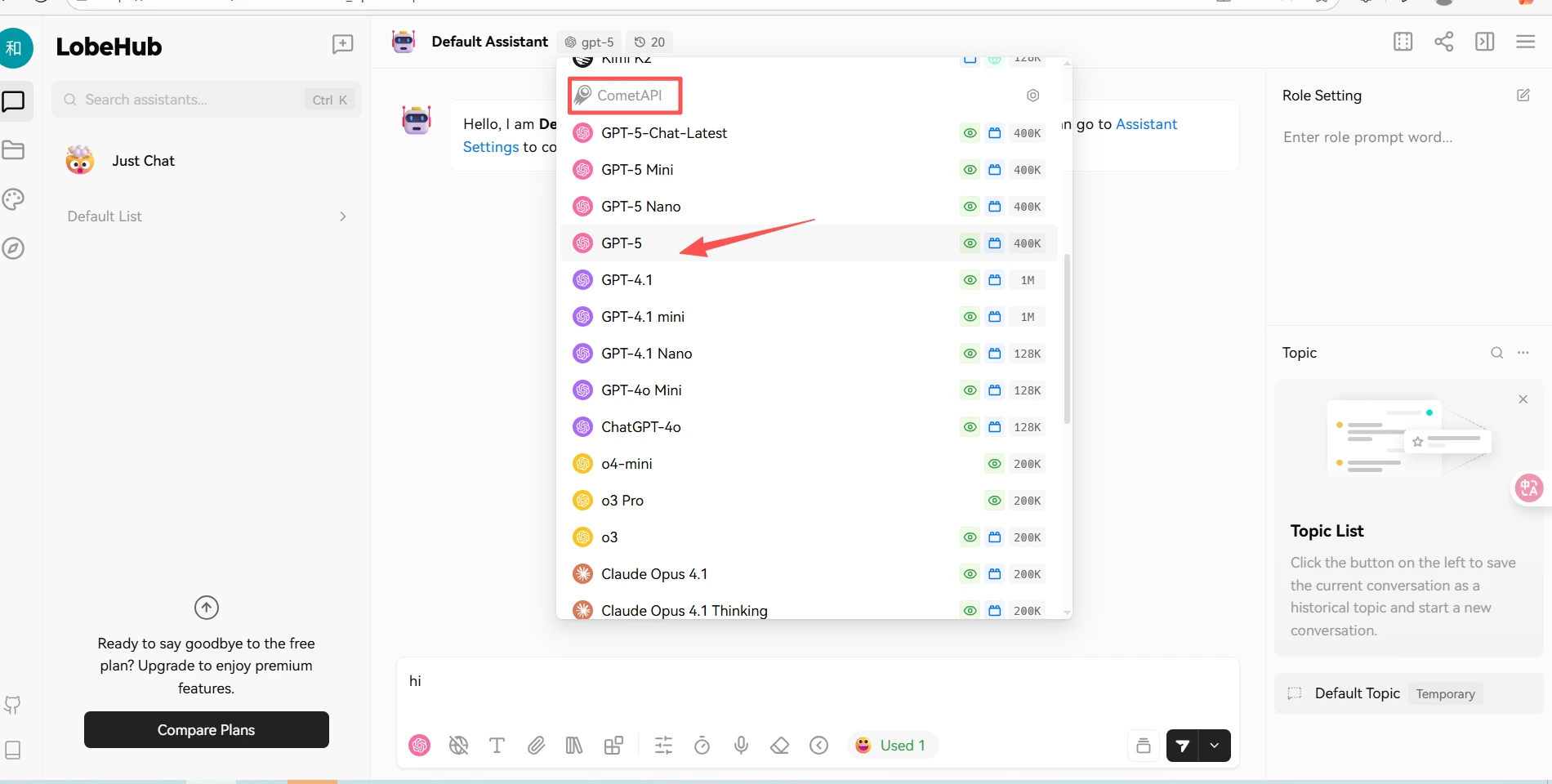
    <Frame>
      <img src="https://mintcdn.com/cometapi/SZhlxZhCnMLn__BW/images/integrations/810968_361342.png?fit=max&auto=format&n=SZhlxZhCnMLn__BW&q=85&s=5f804dee6dc6ac724164630e945a053d" alt="Percakapan Lobe-Chat yang menampilkan respons berhasil dari CometAPI" width="1900" height="960" data-path="images/integrations/810968_361342.png" />
    </Frame>

    <Frame>
      <img src="https://mintcdn.com/cometapi/SZhlxZhCnMLn__BW/images/integrations/810968_361343.png?fit=max&auto=format&n=SZhlxZhCnMLn__BW&q=85&s=3bdff04efc655f5235d11f34cb43b1b3" alt="Panel respons model Lobe-Chat" width="1920" height="929" data-path="images/integrations/810968_361343.png" />
    </Frame>
  </Step>
</Steps>

<script type="application/ld+json">
  {`
    {
    "@context": "https://schema.org",
    "@graph": [
      {
        "@type": "HowTo",
        "@id": "https://apidoc.cometapi.com/integrations/lobe-chat#howto",
        "name": "Gunakan LobeChat dengan CometAPI",
        "description": "Gunakan panduan ini untuk mengonfigurasi LobeChat dengan CometAPI dengan menetapkan base URL, API key, dan opsi model atau penyedia.",
        "step": [
          {
            "@type": "HowToStep",
            "@id": "https://apidoc.cometapi.com/integrations/lobe-chat#step-1",
            "position": 1,
            "name": "Dapatkan API key CometAPI Anda",
            "text": "Buat atau buka akun CometAPI Anda, lalu salin API key aktif dari dashboard."
          },
          {
            "@type": "HowToStep",
            "@id": "https://apidoc.cometapi.com/integrations/lobe-chat#step-2",
            "position": 2,
            "name": "Pilih CometAPI sebagai penyedia model",
            "text": "Selesaikan langkah Pilih CometAPI sebagai penyedia model dalam panduan Gunakan LobeChat dengan CometAPI."
          },
          {
            "@type": "HowToStep",
            "@id": "https://apidoc.cometapi.com/integrations/lobe-chat#step-3",
            "position": 3,
            "name": "Uji koneksi",
            "text": "Pilih model ID saat ini dari halaman Model CometAPI, lalu kirim permintaan uji dari integrasi."
          }
        ]
      },
      {
        "@type": "BreadcrumbList",
        "itemListElement": [
          {
            "@type": "ListItem",
            "position": 1,
            "name": "Dokumentasi CometAPI",
            "item": "https://apidoc.cometapi.com/"
          },
          {
            "@type": "ListItem",
            "position": 2,
            "name": "Integrasi",
            "item": "https://apidoc.cometapi.com/integrations"
          },
          {
            "@type": "ListItem",
            "position": 3,
            "name": "Gunakan LobeChat dengan CometAPI",
            "item": "https://apidoc.cometapi.com/integrations/lobe-chat"
          }
        ]
      }
    ]
    }
    `}
</script>