> ## Documentation Index
> Fetch the complete documentation index at: https://apidoc.cometapi.com/llms.txt
> Use this file to discover all available pages before exploring further.
# Use LangChain with CometAPI
> Use this guide to configure LangChain with CometAPI by setting the base URL, API key, and model or provider options.
[LangChain](https://www.langchain.com/) is a popular framework for building LLM-powered applications. CometAPI is fully compatible with `langchain-openai` — just point it at our base URL.
## Prerequisites
* Python 3.8+ and `langchain-openai` installed (`pip install langchain-openai`)
* A [CometAPI](https://www.cometapi.com) account with an active API key
## Setup
Log in to the [CometAPI dashboard](https://www.cometapi.com/console). Click **Add API Key** and copy your key and base URL (`https://api.cometapi.com`).

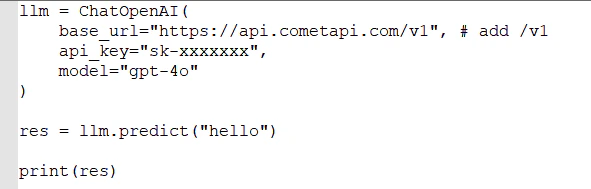
 Set your CometAPI key and base URL when initializing `ChatOpenAI`.
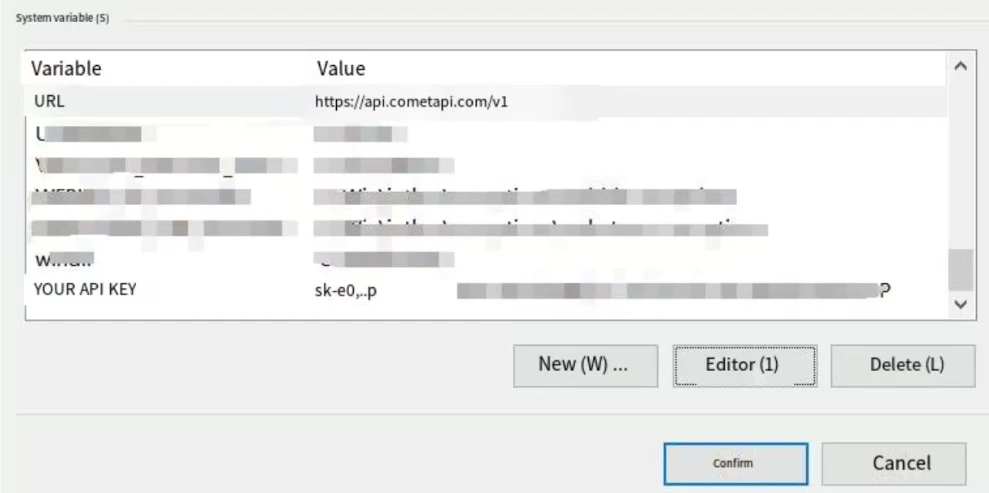
**Option A — Environment variables (recommended)**:
```bash theme={null}
export OPENAI_API_KEY=$COMETAPI_KEY
export OPENAI_API_BASE=https://api.cometapi.com/v1
```
**Option B — Inline configuration**:
Set your CometAPI key and base URL when initializing `ChatOpenAI`.
**Option A — Environment variables (recommended)**:
```bash theme={null}
export OPENAI_API_KEY=$COMETAPI_KEY
export OPENAI_API_BASE=https://api.cometapi.com/v1
```
**Option B — Inline configuration**:
 Run a simple chain (e.g., a prompt asking for the current date). A successful response confirms CometAPI is connected.
Use `base_url="https://api.cometapi.com/v1"` and `api_key=os.environ["COMETAPI_KEY"]` when initializing `ChatOpenAI` or `OpenAI` from `langchain-openai`. Any model ID from the [CometAPI model list](/overview/models) will work.
Run a simple chain (e.g., a prompt asking for the current date). A successful response confirms CometAPI is connected.
Use `base_url="https://api.cometapi.com/v1"` and `api_key=os.environ["COMETAPI_KEY"]` when initializing `ChatOpenAI` or `OpenAI` from `langchain-openai`. Any model ID from the [CometAPI model list](/overview/models) will work.