> ## Documentation Index
> Fetch the complete documentation index at: https://apidoc.cometapi.com/llms.txt
> Use this file to discover all available pages before exploring further.

# Connect Zapier to CometAPI

> Use this guide to connect Zapier to CometAPI by setting the base URL, API key, and model or provider options.

Zapier connects CometAPI to thousands of apps — automate AI-powered workflows without writing code.

## Prerequisites

* A CometAPI account with an active API key — [get yours here](https://www.cometapi.com/console/token)
* A Zapier account — [sign up here](https://zapier.com/app/home)

<Steps>
  <Step title="Get your CometAPI API key">
    Log in to the [CometAPI console](https://www.cometapi.com/console/token). Click **Add API Key** and copy your CometAPI API key.


    <Frame>
      <img src="https://mintcdn.com/cometapi/SZhlxZhCnMLn__BW/images/overview/810968_364191.png?fit=max&auto=format&n=SZhlxZhCnMLn__BW&q=85&s=aef81a83f29f8eb16655ed4060425f50" alt="CometAPI dashboard showing the Add API Key button" width="3824" height="1892" data-path="images/overview/810968_364191.png" />
    </Frame>

    <Frame>
      <img src="https://mintcdn.com/cometapi/HhtmQffktazbxUvS/images/overview/810968_364193.png?fit=max&auto=format&n=HhtmQffktazbxUvS&q=85&s=d893f659267150d0faf45f99eb5dffc1" alt="CometAPI API key details with base URL" width="2434" height="1232" data-path="images/overview/810968_364193.png" />
    </Frame>
  </Step>

  <Step title="Add CometAPI as a Zap step">
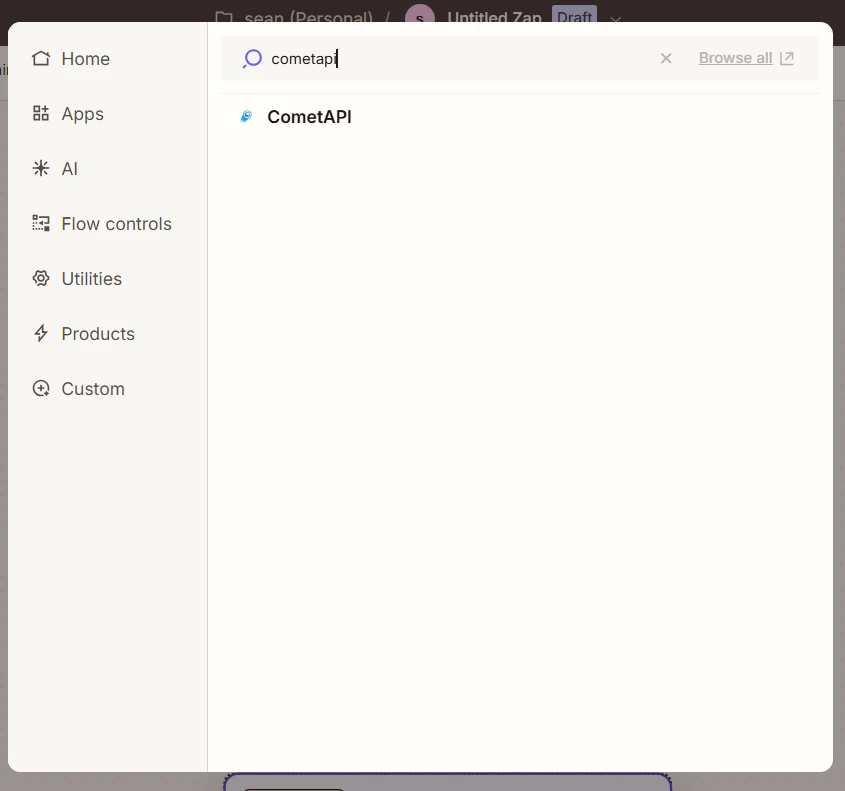
    In Zapier, create a new Zap. In the workflow editor, click **Add Step** and search for **CometAPI**.
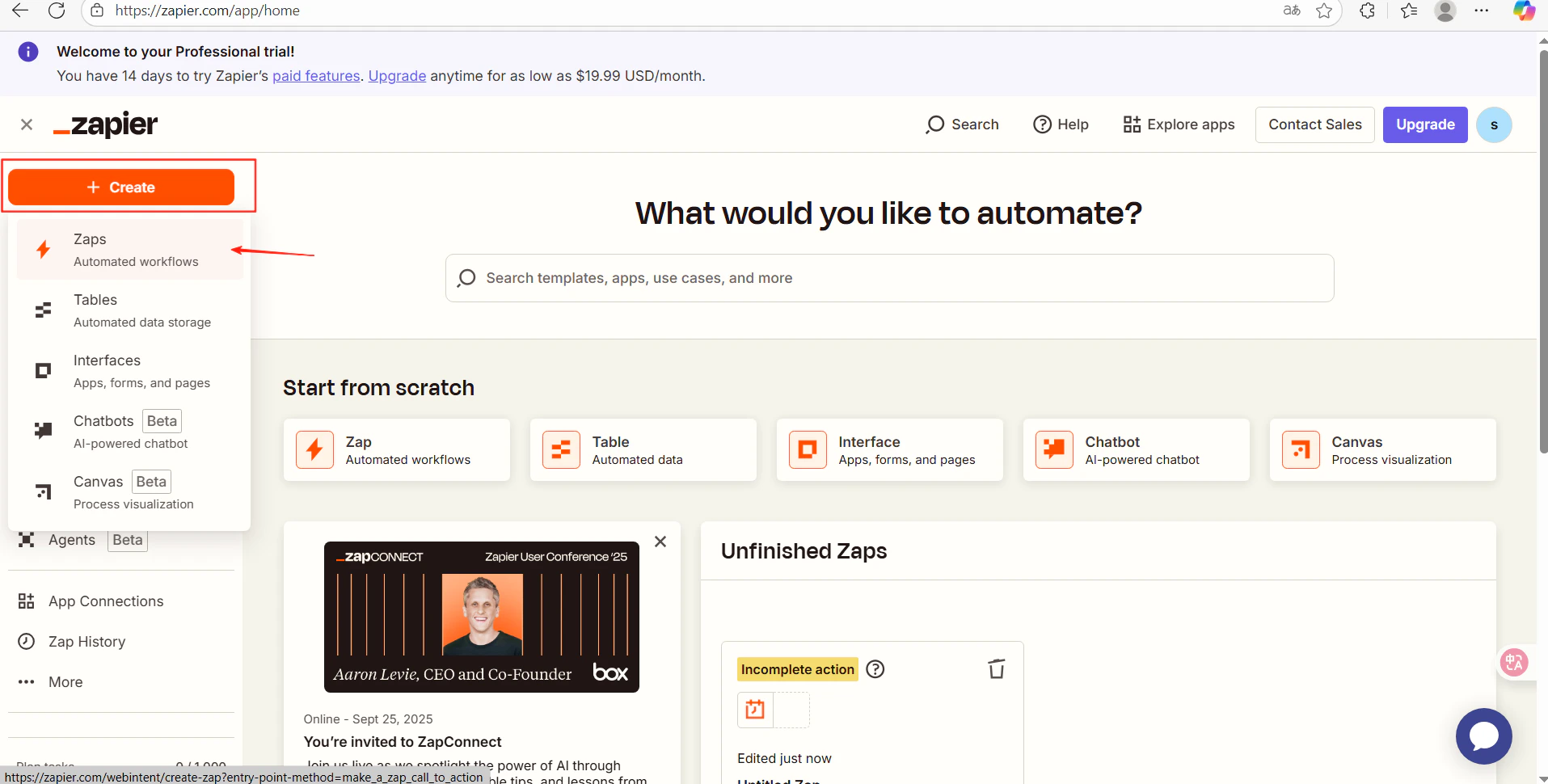
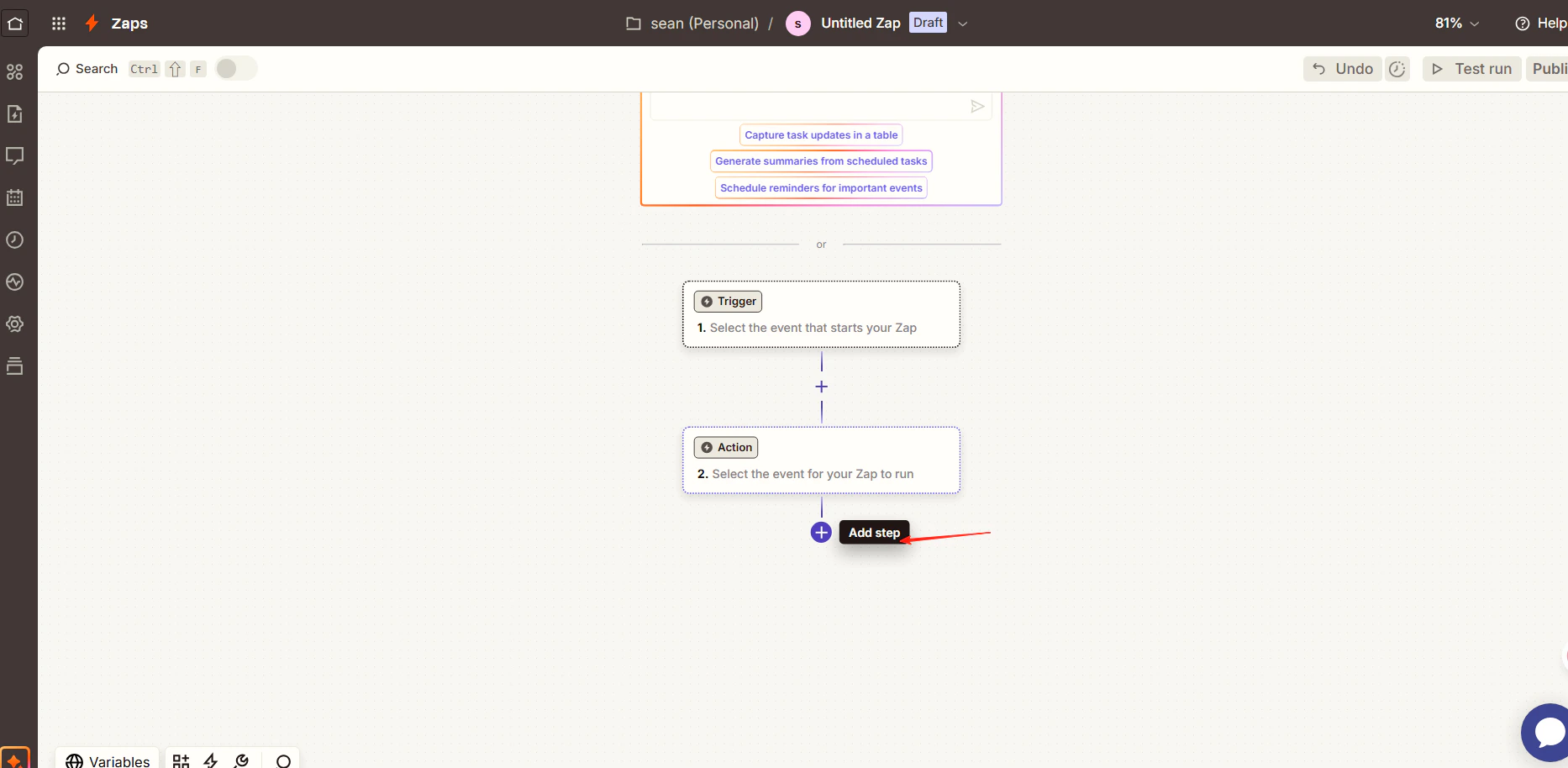
    <Frame>
      <img src="https://mintcdn.com/cometapi/E4FFvyMYmaOZoldp/images/integrations/810968_360288.png?fit=max&auto=format&n=E4FFvyMYmaOZoldp&q=85&s=e0f9acf9b0c6c296ba4590b3f94a8ca1" alt="Zapier workflow editor with Add Step button" width="1915" height="970" data-path="images/integrations/810968_360288.png" />
    </Frame>

    <Frame>
      <img src="https://mintcdn.com/cometapi/E4FFvyMYmaOZoldp/images/integrations/810968_360289.png?fit=max&auto=format&n=E4FFvyMYmaOZoldp&q=85&s=f4a3fa5bf0e19ad96248a4b1dbfc2220" alt="Zapier search results showing the CometAPI app" width="1866" height="914" data-path="images/integrations/810968_360289.png" />
    </Frame>

    <Frame>
      <img src="https://mintcdn.com/cometapi/E4FFvyMYmaOZoldp/images/integrations/810968_360293.png?fit=max&auto=format&n=E4FFvyMYmaOZoldp&q=85&s=826cddfb18b75c459896d25e30ec69b4" alt="CometAPI action selection screen" width="845" height="791" data-path="images/integrations/810968_360293.png" />
    </Frame>
  </Step>

  <Step title="Configure the action and connect your account">
    * **Action Event**: select **Generate AI Response**
    * **Account**: click **Connect a new account** and paste your CometAPI API key
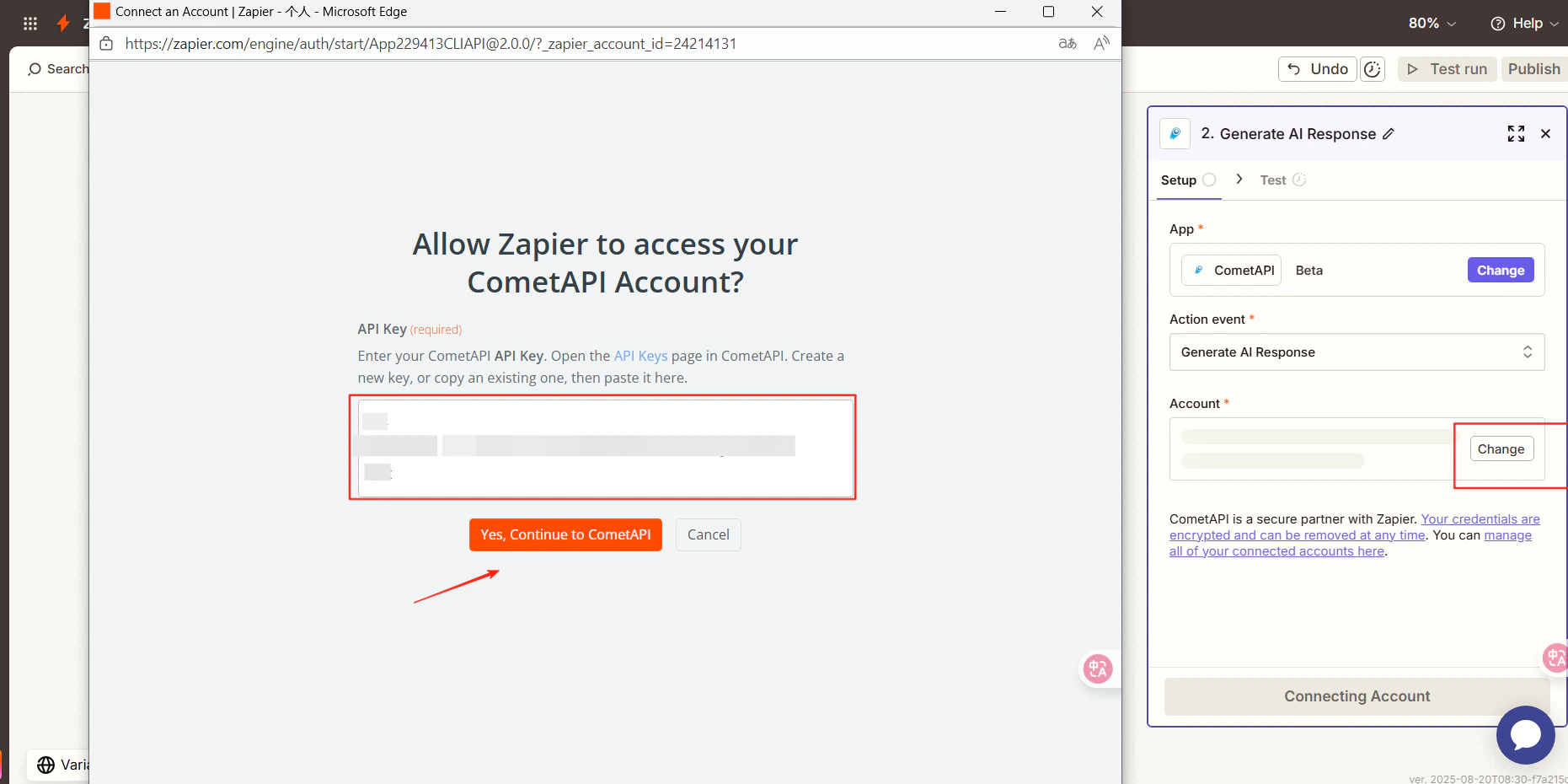
    <Frame>
      <img src="https://mintcdn.com/cometapi/E4FFvyMYmaOZoldp/images/integrations/810968_360290.png?fit=max&auto=format&n=E4FFvyMYmaOZoldp&q=85&s=7512d3317a69a9387b59799e064f0060" alt="Zapier account connection dialog with API key field" width="1861" height="930" data-path="images/integrations/810968_360290.png" />
    </Frame>
  </Step>

  <Step title="Select a model and test">
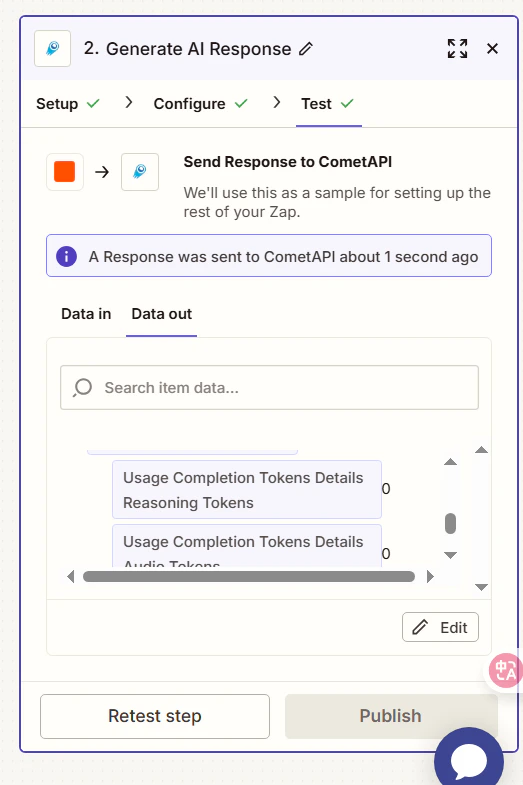
    Click **Continue**, choose the current model you want to use, then click **Continue** again and run **Test Step**.
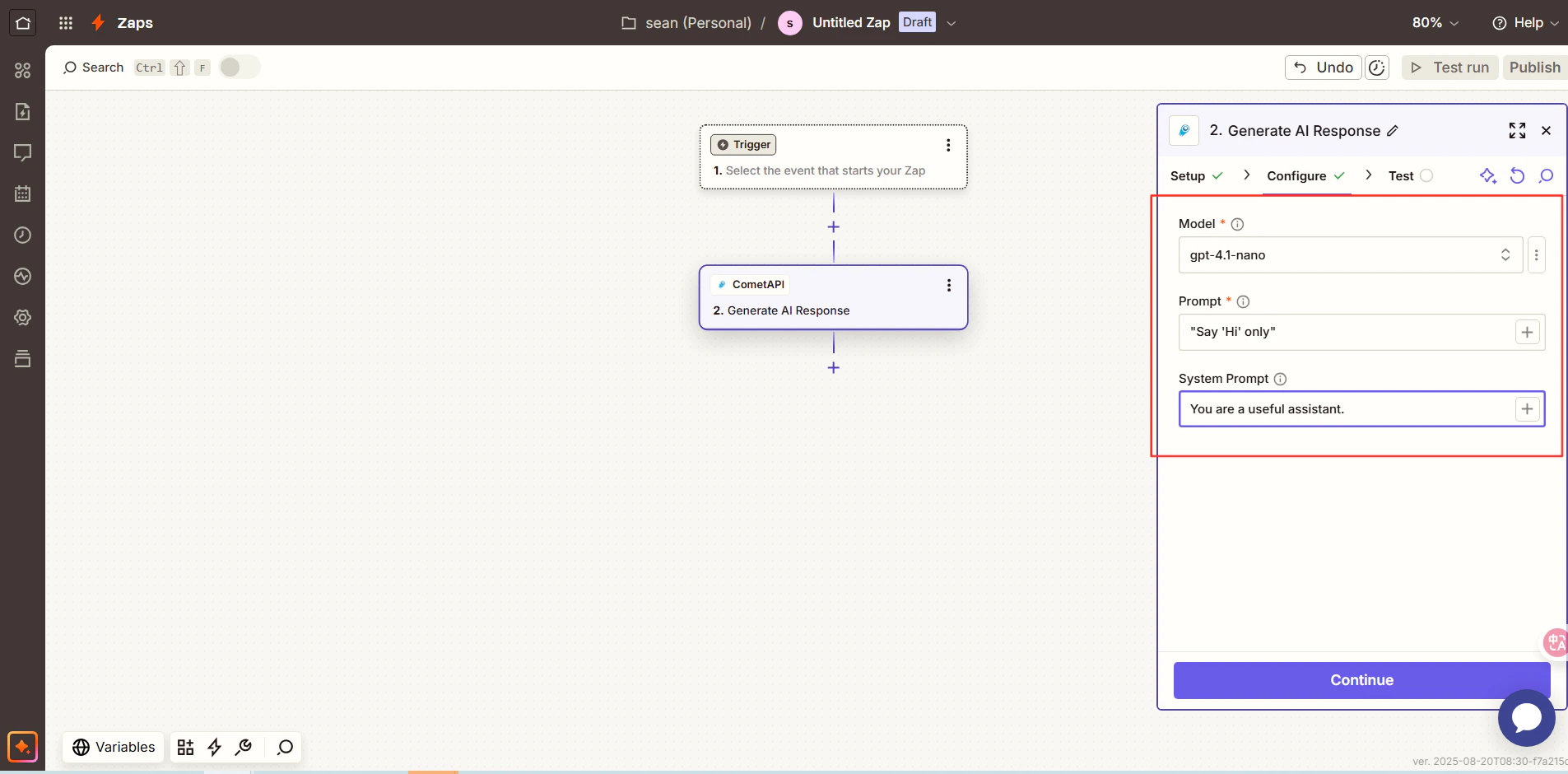
    <Frame>
      <img src="https://mintcdn.com/cometapi/E4FFvyMYmaOZoldp/images/integrations/810968_360291.png?fit=max&auto=format&n=E4FFvyMYmaOZoldp&q=85&s=478bf8b48bd4e762807eeec15eb11785" alt="Zapier model selection step" width="1905" height="940" data-path="images/integrations/810968_360291.png" />
    </Frame>

    <Frame>
      <img src="https://mintcdn.com/cometapi/E4FFvyMYmaOZoldp/images/integrations/810968_360292.png?fit=max&auto=format&n=E4FFvyMYmaOZoldp&q=85&s=18713a41c1a86a980c2bde6a6e072e48" alt="Zapier test result showing a successful AI response" width="523" height="785" data-path="images/integrations/810968_360292.png" />
    </Frame>

    A successful test result confirms the integration. Click **Publish** to activate your Zap.

    If the call fails, double-check your API key, or contact [CometAPI support](https://www.cometapi.com).
  </Step>
</Steps>

<Tip>
  CometAPI appears as a native Zapier app, so no custom HTTP action is needed. You can chain it with Gmail, Google Sheets, Slack, and thousands of other Zapier integrations.
</Tip>