> ## Documentation Index
> Fetch the complete documentation index at: https://apidoc.cometapi.com/llms.txt
> Use this file to discover all available pages before exploring further.

# CometAPI와 함께 uTools ChatGPT Friend 사용하기

> 이 가이드를 사용해 base URL, API key, model 또는 provider 옵션을 설정하여 uTools ChatGPT Friend를 CometAPI와 함께 구성하세요.

uTools ChatGPT Friend는 AI 채팅을 데스크톱 빠른 실행 바에 제공하는 uTools 플러그인입니다. CometAPI에 연결한 다음, [Models page](/ko/overview/models)에서 원하는 모델을 선택하세요.

## 사전 준비 사항

* 활성 API 키가 있는 CometAPI 계정 — [여기에서 발급받기](https://www.cometapi.com/console/token)
* 설치된 uTools — [여기에서 다운로드](https://u.tools/)
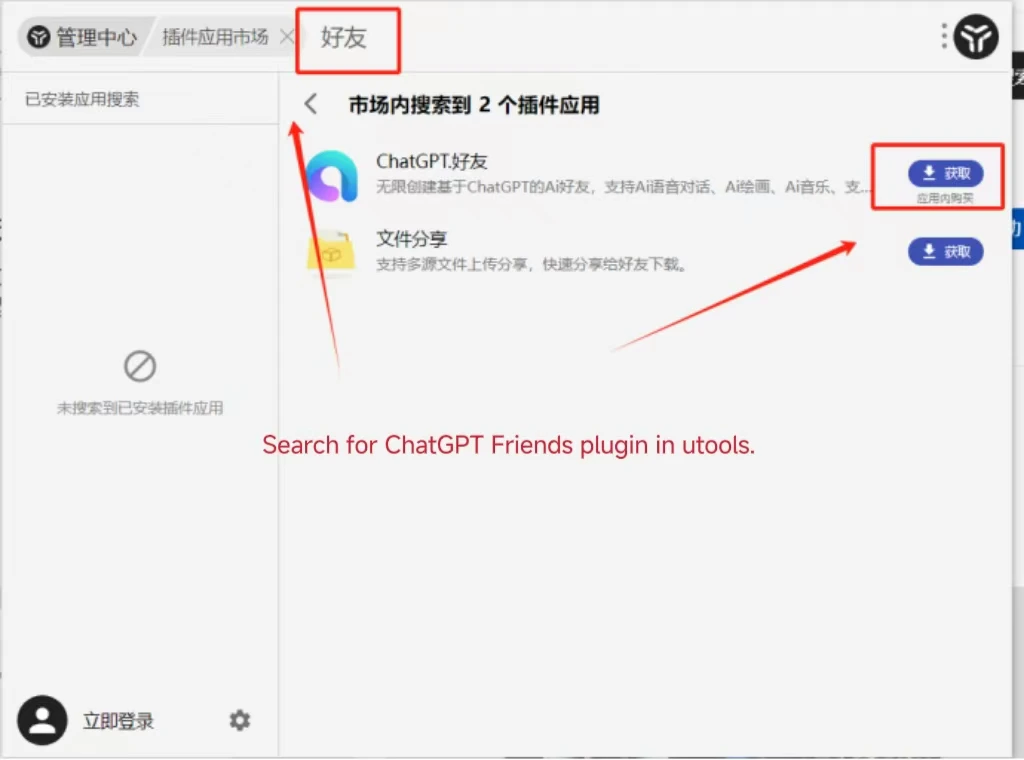
* ChatGPT Friend 플러그인 — [여기에서 받기](https://www.u-tools.cn/plugins/detail/ChatGPT.%E5%A5%BD%E5%8F%8B/index.html)

<Steps>
  <Step title="CometAPI API 키 받기">
    [CometAPI 콘솔](https://www.cometapi.com/console/token)에 로그인합니다. **Add API Key**를 클릭하고 CometAPI API 키를 복사합니다.


    <Frame>
      <img src="https://mintcdn.com/cometapi/SZhlxZhCnMLn__BW/images/overview/810968_364191.png?fit=max&auto=format&n=SZhlxZhCnMLn__BW&q=85&s=aef81a83f29f8eb16655ed4060425f50" alt="Add API Key 버튼이 표시된 CometAPI 대시보드" width="3824" height="1892" data-path="images/overview/810968_364191.png" />
    </Frame>

    <Frame>
      <img src="https://mintcdn.com/cometapi/HhtmQffktazbxUvS/images/overview/810968_364193.png?fit=max&auto=format&n=HhtmQffktazbxUvS&q=85&s=d893f659267150d0faf45f99eb5dffc1" alt="base URL이 포함된 CometAPI API 키 상세 정보" width="2434" height="1232" data-path="images/overview/810968_364193.png" />
    </Frame>
  </Step>

  <Step title="ChatGPT Friend 구성">
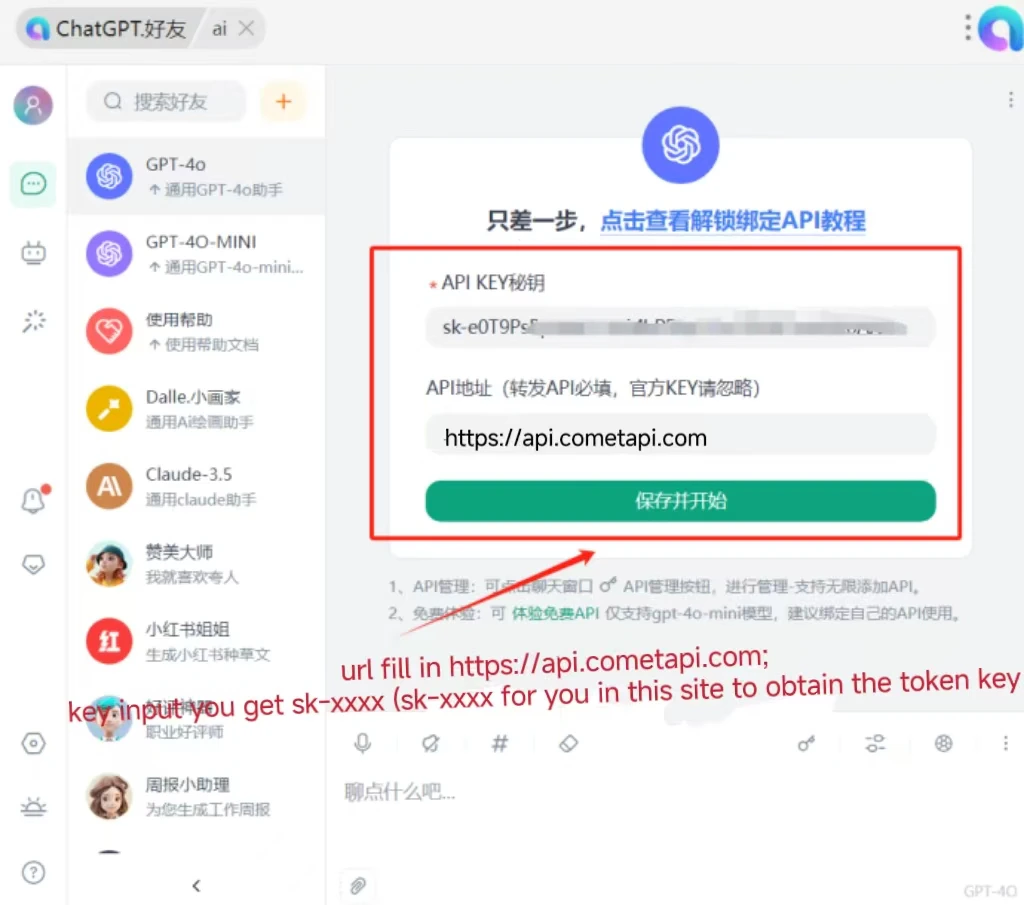
    uTools에서 ChatGPT Friend 플러그인을 엽니다. 설정에서 다음을 입력합니다:

    * **Interface Address**: `https://api.cometapi.com`
    * **API Key**: CometAPI API 키 붙여넣기

    **Save**를 클릭합니다.
    <Frame>
      <img src="https://mintcdn.com/cometapi/mA1ovj6s0e3RM42l/images/integrations/810968_351617.png?fit=max&auto=format&n=mA1ovj6s0e3RM42l&q=85&s=007fd1da30f9ca6c807caf2d01205422" alt="인터페이스 주소와 API 키가 입력된 ChatGPT Friend 설정 화면" width="1024" height="760" data-path="images/integrations/810968_351617.png" />
    </Frame>
  </Step>

  <Step title="연결 테스트">
    채팅 입력창에 메시지를 입력하고 전송합니다. 응답이 정상적으로 오면 통합이 올바르게 작동하는 것입니다.
    <Frame>
      <img src="https://mintcdn.com/cometapi/mA1ovj6s0e3RM42l/images/integrations/810968_351618.png?fit=max&auto=format&n=mA1ovj6s0e3RM42l&q=85&s=2f2aecbecc80d2f3042f84d8e9d13d48" alt="성공적인 AI 응답을 표시하는 ChatGPT Friend" width="1024" height="905" data-path="images/integrations/810968_351618.png" />
    </Frame>

    호출에 실패하면 API 키와 인터페이스 주소를 확인하거나, [CometAPI 지원팀](https://www.cometapi.com)에 문의하세요.
  </Step>
</Steps>

<script type="application/ld+json">
  {`
    {
    "@context": "https://schema.org",
    "@graph": [
      {
        "@type": "HowTo",
        "@id": "https://apidoc.cometapi.com/integrations/utools-chatgpt-friend#howto",
        "name": "CometAPI와 함께 uTools ChatGPT Friend 사용하기",
        "description": "이 가이드를 사용해 base URL, API 키, model 또는 provider 옵션을 설정하여 CometAPI와 함께 uTools ChatGPT Friend를 구성하세요.",
        "step": [
          {
            "@type": "HowToStep",
            "@id": "https://apidoc.cometapi.com/integrations/utools-chatgpt-friend#step-1",
            "position": 1,
            "name": "CometAPI API 키 받기",
            "text": "CometAPI 계정을 만들거나 열고, 대시보드에서 활성 API 키를 복사합니다."
          },
          {
            "@type": "HowToStep",
            "@id": "https://apidoc.cometapi.com/integrations/utools-chatgpt-friend#step-2",
            "position": 2,
            "name": "ChatGPT Friend 구성",
            "text": "CometAPI와 함께 uTools ChatGPT Friend 사용하기 가이드에서 ChatGPT Friend 구성 단계를 완료합니다."
          },
          {
            "@type": "HowToStep",
            "@id": "https://apidoc.cometapi.com/integrations/utools-chatgpt-friend#step-3",
            "position": 3,
            "name": "연결 테스트",
            "text": "CometAPI Models 페이지에서 현재 model ID를 선택한 다음, 통합에서 테스트 요청을 보냅니다."
          }
        ]
      },
      {
        "@type": "BreadcrumbList",
        "itemListElement": [
          {
            "@type": "ListItem",
            "position": 1,
            "name": "CometAPI 문서",
            "item": "https://apidoc.cometapi.com/"
          },
          {
            "@type": "ListItem",
            "position": 2,
            "name": "통합",
            "item": "https://apidoc.cometapi.com/integrations"
          },
          {
            "@type": "ListItem",
            "position": 3,
            "name": "CometAPI와 함께 uTools ChatGPT Friend 사용하기",
            "item": "https://apidoc.cometapi.com/integrations/utools-chatgpt-friend"
          }
        ]
      }
    ]
    }
    `}
</script>
