> ## Documentation Index
> Fetch the complete documentation index at: https://apidoc.cometapi.com/llms.txt
> Use this file to discover all available pages before exploring further.

# Koble Activepieces til CometAPI

> Bruk denne veiledningen til å koble Activepieces til CometAPI ved å angi base-URL, API-nøkkel og modell- eller leverandøralternativer.

[Activepieces](https://cloud.activepieces.com/) er en åpen kildekode-basert automatiseringsplattform. Med den innebygde CometAPI-koblingen kan du legge til AI-trinn i enhver arbeidsflyt på få sekunder.

## Forutsetninger

* En [Activepieces](https://cloud.activepieces.com/)-konto
* En [CometAPI](https://www.cometapi.com)-konto med en aktiv API-nøkkel

## Oppsett

<Steps>
  <Step title="Hent CometAPI API-nøkkelen din">
    Logg inn på [CometAPI-dashbordet](https://www.cometapi.com/console). Klikk på **Add API Key** og kopier nøkkelen din.


    <Frame>
      <img src="https://mintcdn.com/cometapi/SZhlxZhCnMLn__BW/images/overview/810968_364191.png?fit=max&auto=format&n=SZhlxZhCnMLn__BW&q=85&s=aef81a83f29f8eb16655ed4060425f50" alt="CometAPI-dashbord — Add API Key-knapp" width="3824" height="1892" data-path="images/overview/810968_364191.png" />
    </Frame>

    <Frame>
      <img src="https://mintcdn.com/cometapi/HhtmQffktazbxUvS/images/overview/810968_364193.png?fit=max&auto=format&n=HhtmQffktazbxUvS&q=85&s=d893f659267150d0faf45f99eb5dffc1" alt="CometAPI API-nøkkeldetaljer og base-URL" width="2434" height="1232" data-path="images/overview/810968_364193.png" />
    </Frame>
  </Step>

  <Step title="Opprett en flow og legg til CometAPI-steget">
    I Activepieces-prosjektet ditt klikker du **Create Flow** → **From Scratch**. Klikk på **+**-knappen på lerretet, søk etter `cometapi`, og velg **Ask CometAPI**.
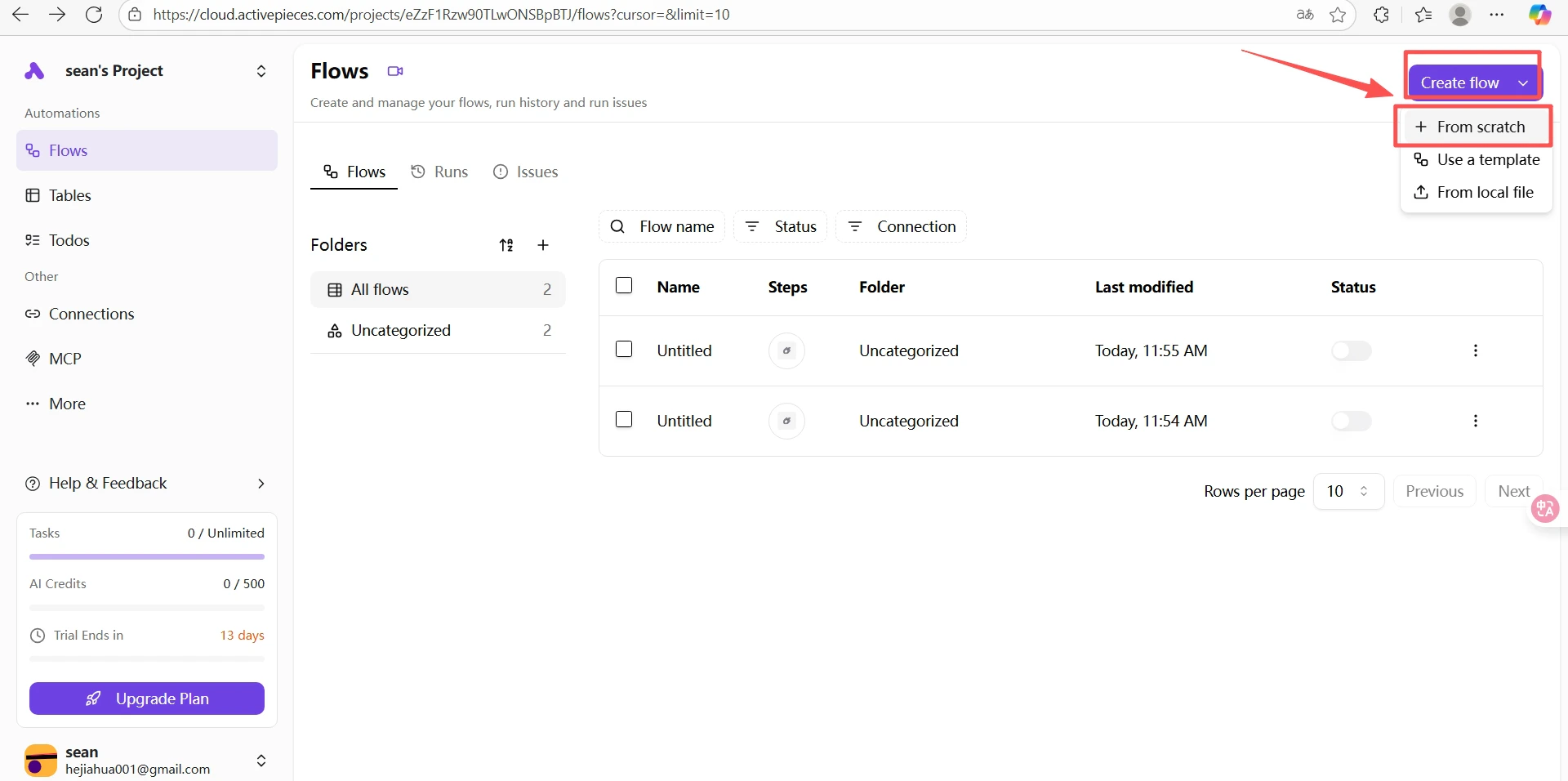
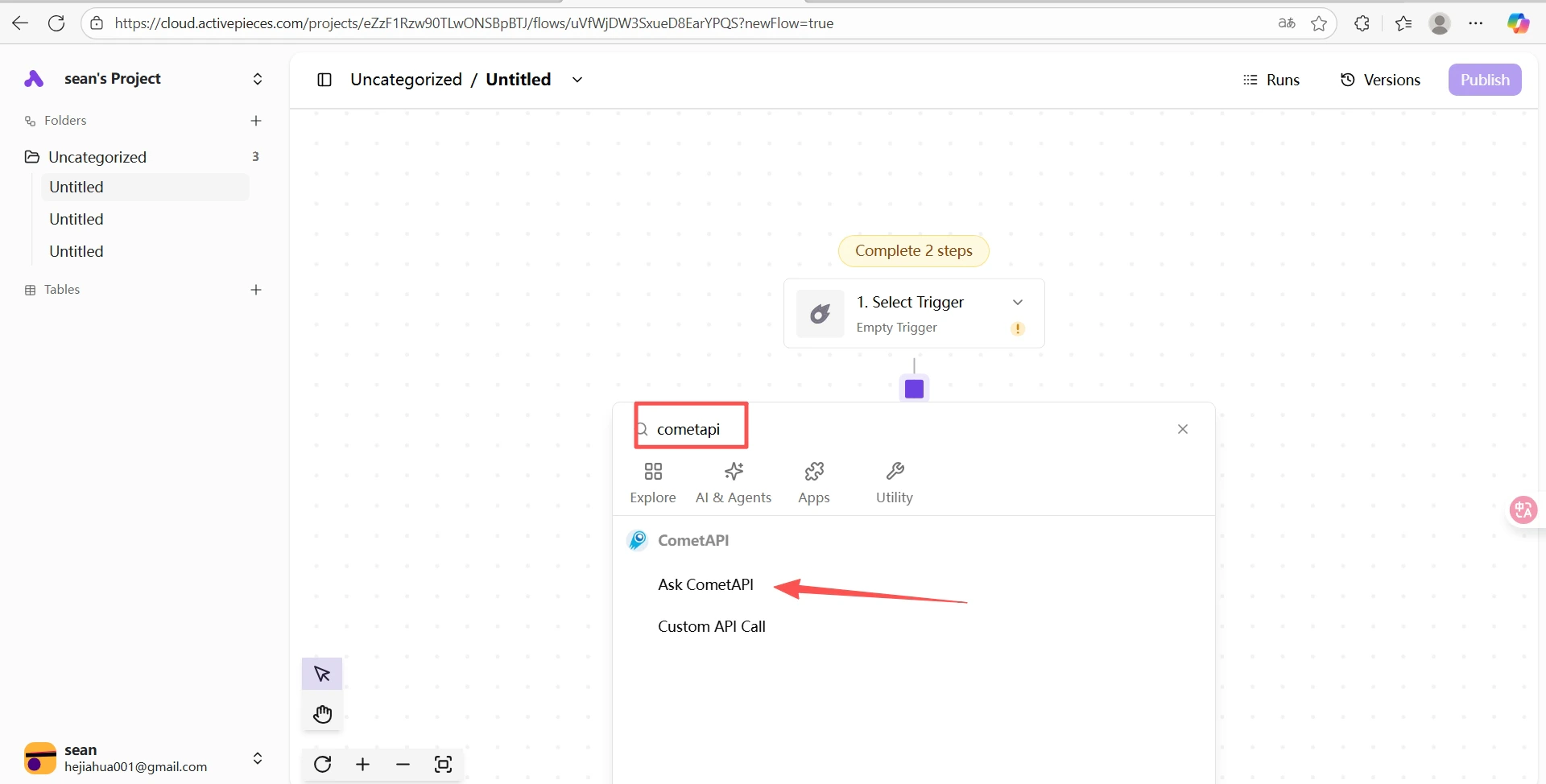
    <Frame>
      <img src="https://mintcdn.com/cometapi/SZhlxZhCnMLn__BW/images/integrations/810968_361326.png?fit=max&auto=format&n=SZhlxZhCnMLn__BW&q=85&s=20fd998714bb23dc7c28dbad4315c152" alt="Activepieces-lerret med +-knappen for å legge til et steg" width="1920" height="956" data-path="images/integrations/810968_361326.png" />
    </Frame>

    <Frame>
      <img src="https://mintcdn.com/cometapi/SZhlxZhCnMLn__BW/images/integrations/810968_361327.png?fit=max&auto=format&n=SZhlxZhCnMLn__BW&q=85&s=084735cca2fbbb0b5e49672c029ff34c" alt="Søkeresultater som viser CometAPI-koblingen" width="1920" height="974" data-path="images/integrations/810968_361327.png" />
    </Frame>

    <Frame>
      <img src="https://mintcdn.com/cometapi/SZhlxZhCnMLn__BW/images/integrations/810968_361328.png?fit=max&auto=format&n=SZhlxZhCnMLn__BW&q=85&s=a68000d40dcdfdd14af3a0954ab0c34b" alt="Ask CometAPI-steget valgt i koblingslisten" width="1920" height="909" data-path="images/integrations/810968_361328.png" />
    </Frame>
  </Step>

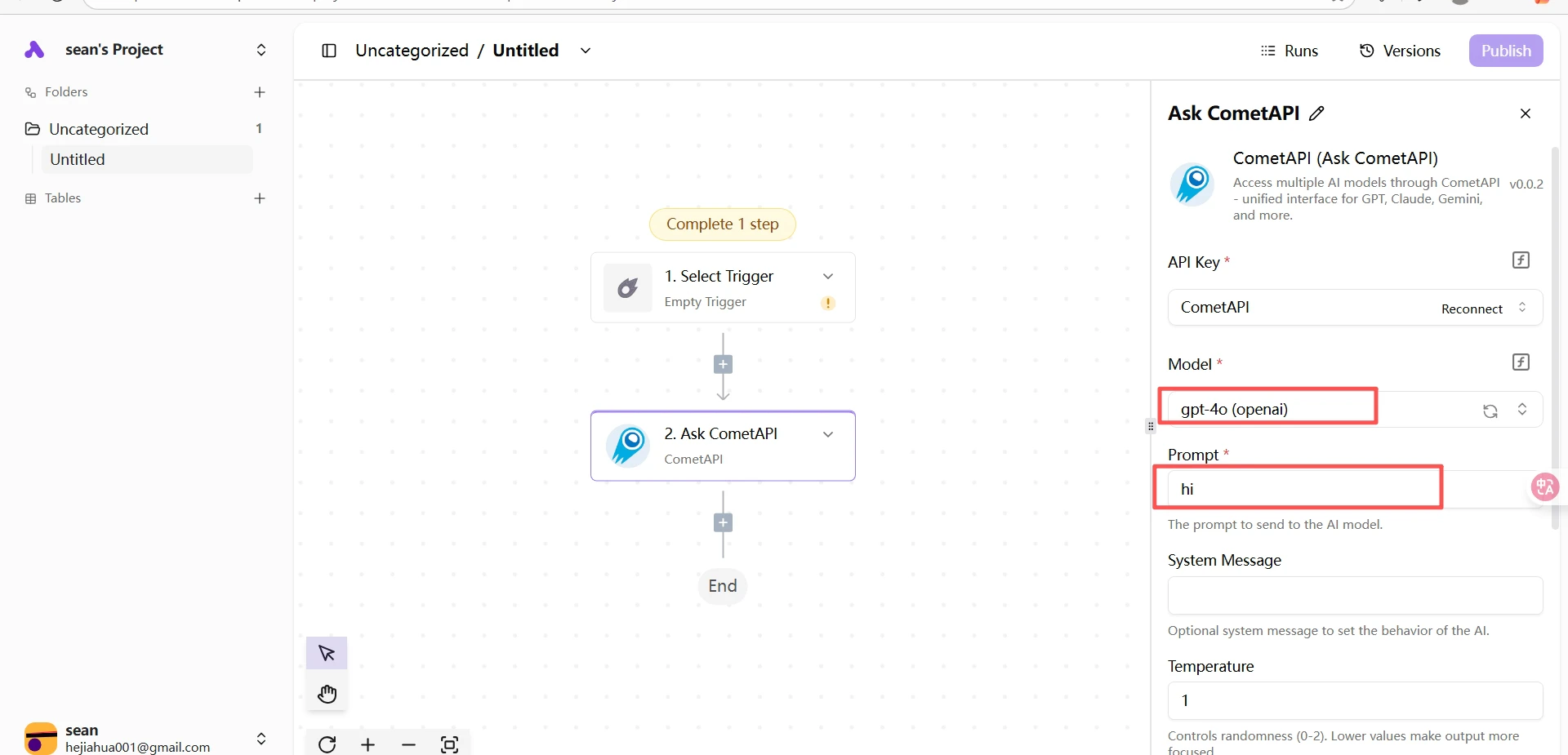
  <Step title="Konfigurer CometAPI-steget">
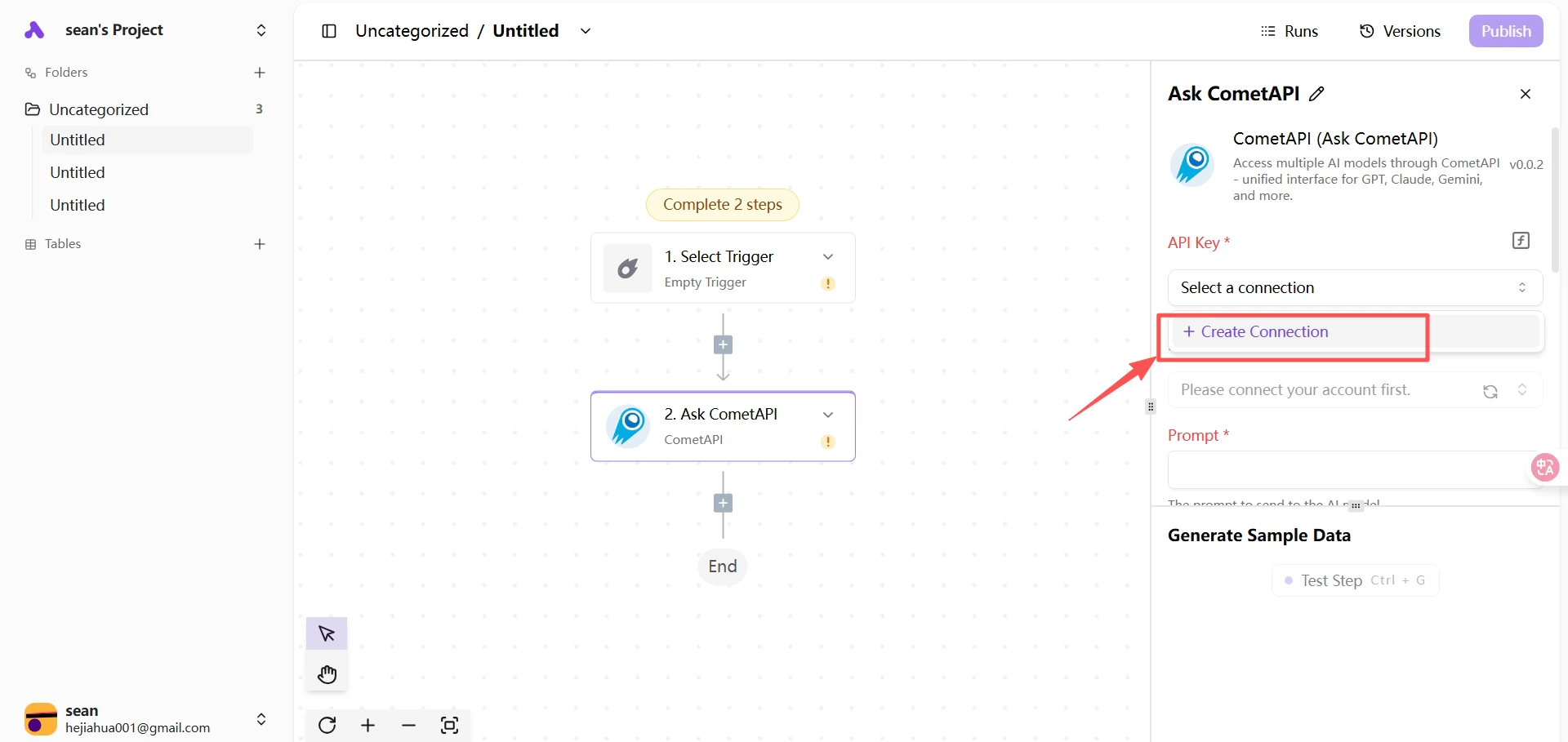
    Lim inn API-nøkkelen din i feltet **API Key**. Velg den gjeldende modellen du vil bruke, og fyll inn prompten din.
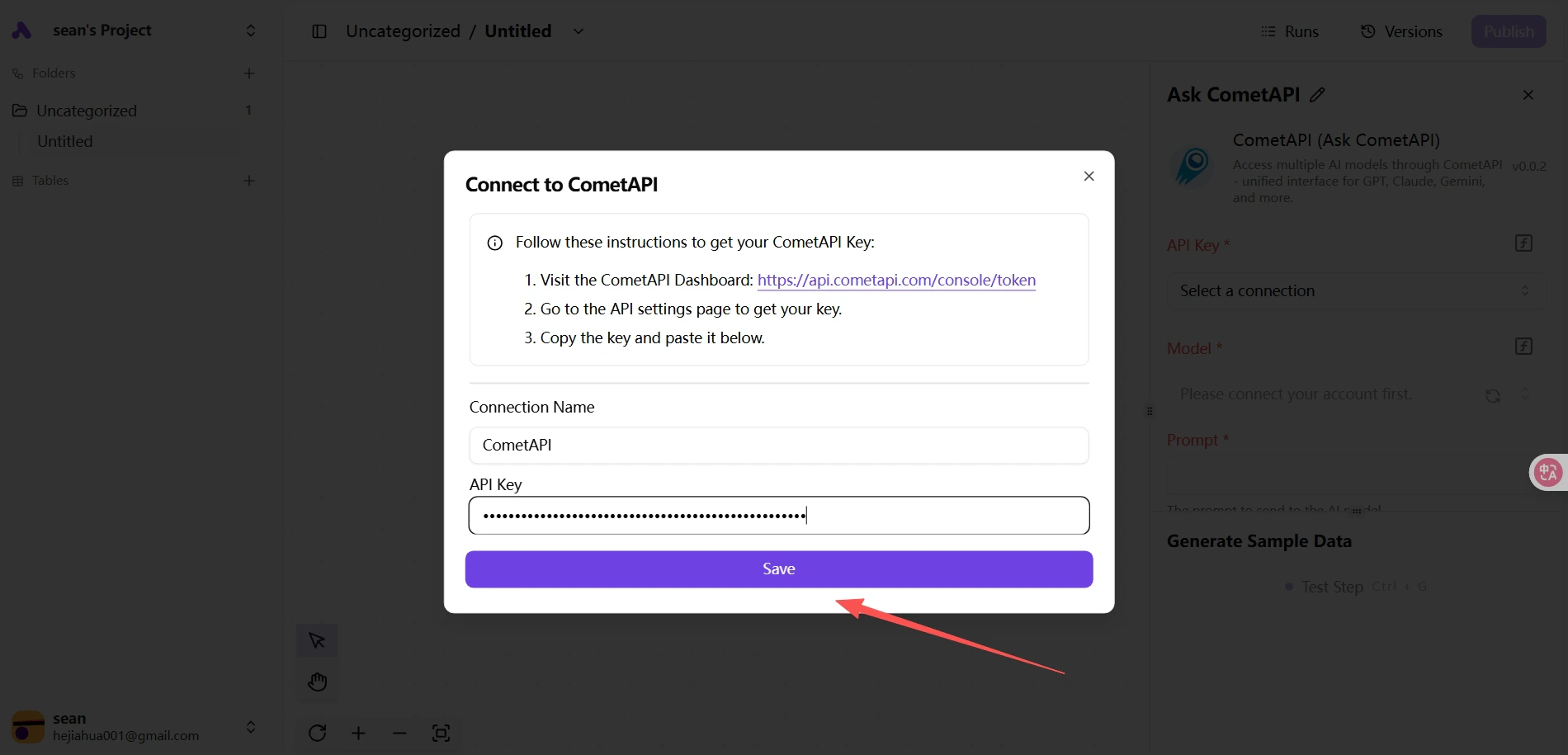
    <Frame>
      <img src="https://mintcdn.com/cometapi/SZhlxZhCnMLn__BW/images/integrations/810968_361329.png?fit=max&auto=format&n=SZhlxZhCnMLn__BW&q=85&s=b3ea4a155f705dfb8cd0956a3cfc7fc8" alt="CometAPI-steg — API-nøkkel og modellvalg" width="1900" height="915" data-path="images/integrations/810968_361329.png" />
    </Frame>

    <Frame>
      <img src="https://mintcdn.com/cometapi/SZhlxZhCnMLn__BW/images/integrations/810968_361330.png?fit=max&auto=format&n=SZhlxZhCnMLn__BW&q=85&s=344e62888e22f3ef1d34109e95ee8baf" alt="Prompt-konfigurasjon for Ask CometAPI-steget" width="1920" height="925" data-path="images/integrations/810968_361330.png" />
    </Frame>
  </Step>

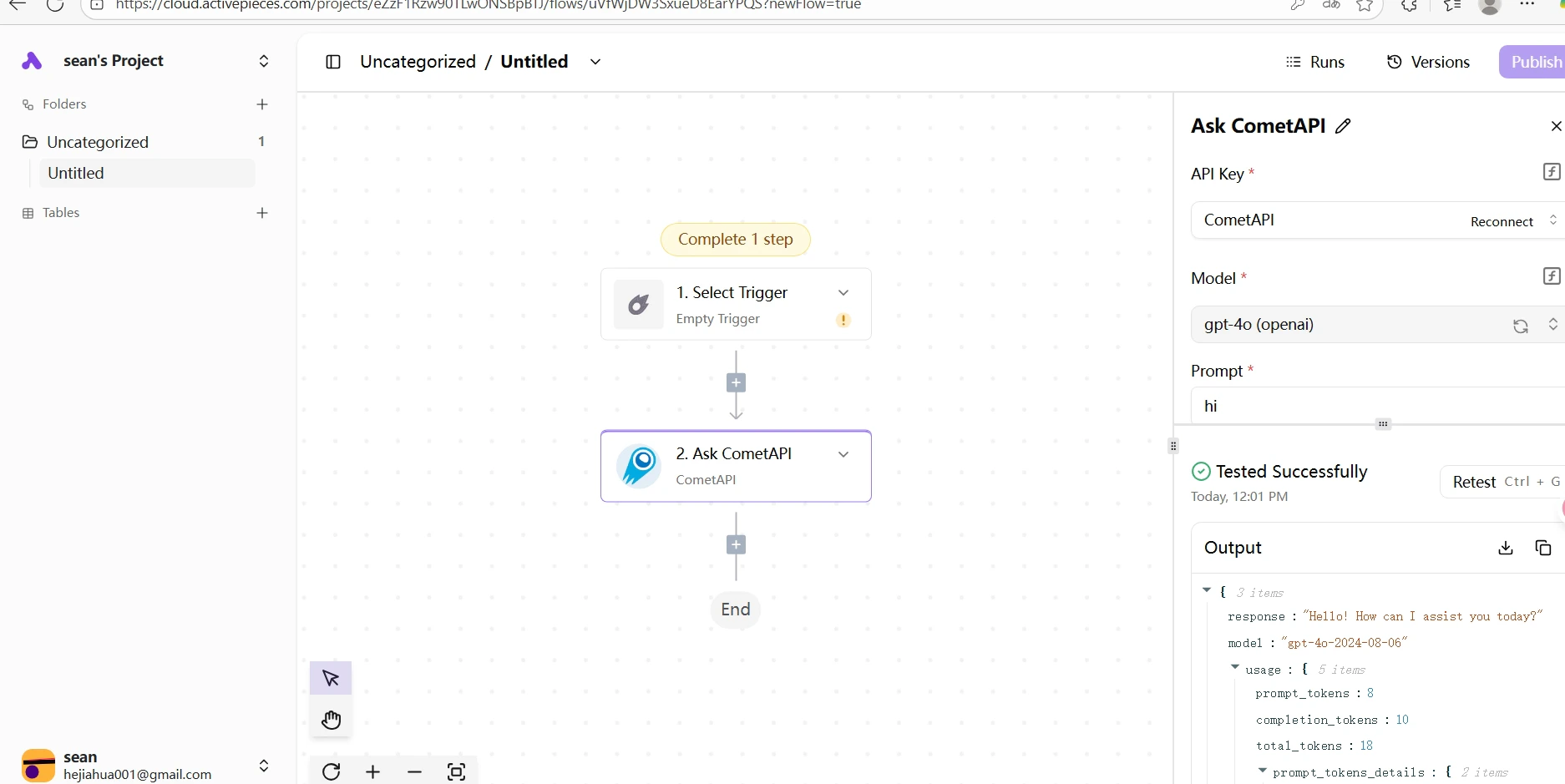
  <Step title="Test flowen">
    Klikk på **Test** for å kjøre steget. Et vellykket svar bekrefter at integrasjonen fungerer.
    <Frame>
      <img src="https://mintcdn.com/cometapi/SZhlxZhCnMLn__BW/images/integrations/810968_361331.png?fit=max&auto=format&n=SZhlxZhCnMLn__BW&q=85&s=92fd6c62bcf33f681b053668a9ac6687" alt="Vellykket testsvar fra CometAPI-steget" width="1874" height="939" data-path="images/integrations/810968_361331.png" />
    </Frame>
  </Step>
</Steps>

<Note>
  Hvis testen mislykkes, må du kontrollere at API-nøkkelen din er riktig og at kontoen din har tilgjengelig saldo. Kontakt [CometAPI support](https://www.cometapi.com) hvis problemet vedvarer.
</Note>

<script type="application/ld+json">
  {`
    {
    "@context": "https://schema.org",
    "@graph": [
      {
        "@type": "HowTo",
        "@id": "https://apidoc.cometapi.com/integrations/activepieces#howto",
        "name": "Koble Activepieces til CometAPI",
        "description": "Bruk denne veiledningen for å koble Activepieces til CometAPI ved å angi base-URL, API-nøkkel og modell- eller leverandøralternativer.",
        "step": [
          {
            "@type": "HowToStep",
            "@id": "https://apidoc.cometapi.com/integrations/activepieces#step-1",
            "position": 1,
            "name": "Hent CometAPI API-nøkkelen din",
            "text": "Opprett eller åpne CometAPI-kontoen din, og kopier deretter en aktiv API-nøkkel fra dashbordet."
          },
          {
            "@type": "HowToStep",
            "@id": "https://apidoc.cometapi.com/integrations/activepieces#step-2",
            "position": 2,
            "name": "Opprett en flow og legg til CometAPI-steget",
            "text": "Fullfør steget Opprett en flow og legg til CometAPI-steget i veiledningen Koble Activepieces til CometAPI."
          },
          {
            "@type": "HowToStep",
            "@id": "https://apidoc.cometapi.com/integrations/activepieces#step-3",
            "position": 3,
            "name": "Konfigurer CometAPI-steget",
            "text": "Fullfør steget Konfigurer CometAPI-steget i veiledningen Koble Activepieces til CometAPI."
          },
          {
            "@type": "HowToStep",
            "@id": "https://apidoc.cometapi.com/integrations/activepieces#step-4",
            "position": 4,
            "name": "Test flowen",
            "text": "Fullfør steget Test flowen i veiledningen Koble Activepieces til CometAPI."
          }
        ]
      },
      {
        "@type": "BreadcrumbList",
        "itemListElement": [
          {
            "@type": "ListItem",
            "position": 1,
            "name": "CometAPI-dokumentasjon",
            "item": "https://apidoc.cometapi.com/"
          },
          {
            "@type": "ListItem",
            "position": 2,
            "name": "Integrasjoner",
            "item": "https://apidoc.cometapi.com/integrations"
          },
          {
            "@type": "ListItem",
            "position": 3,
            "name": "Koble Activepieces til CometAPI",
            "item": "https://apidoc.cometapi.com/integrations/activepieces"
          }
        ]
      }
    ]
    }
    `}
</script>