> ## Documentation Index
> Fetch the complete documentation index at: https://apidoc.cometapi.com/llms.txt
> Use this file to discover all available pages before exploring further.
# Gemini image modellerini kullanın
> Metinden görsele, görselden görsele ve çoklu görsel kompozisyonu için Google Gen AI SDK kullanarak CometAPI üzerinde Gemini image modellerini (Nano Banana 2 / Pro) çağırın.
Bu rehber, **Google Gen AI SDK** kullanarak CometAPI üzerinden Gemini image modellerinin nasıl kullanılacağını gösterir. Şunları kapsar:
* Metinden görsel üretimi
* Görselden görsele düzenleme
* Çoklu görsel kompozisyonu
* Üretilen görselleri kaydetme
- **Base URL:** `https://api.cometapi.com`
- SDK'yi yükleyin: `pip install google-genai` (Python) veya `npm install @google/genai` (Node.js)
***
## Kurulum
İstemciyi CometAPI'nin base URL'i ile başlatın:
```python Python theme={null}
from google import genai
from google.genai import types
import os
COMETAPI_KEY = os.environ["COMETAPI_KEY"]
client = genai.Client(
http_options={"api_version": "v1beta", "base_url": "https://api.cometapi.com"},
api_key=COMETAPI_KEY,
)
```
```javascript Node.js theme={null}
import { GoogleGenAI } from "@google/genai";
const COMETAPI_KEY = process.env.COMETAPI_KEY;
const ai = new GoogleGenAI({
apiKey: COMETAPI_KEY,
httpOptions: { apiVersion: "v1beta", baseUrl: "https://api.cometapi.com" },
});
```
```go Go theme={null}
package main
import (
"context"
"os"
"google.golang.org/genai"
)
func main() {
ctx := context.Background()
apiKey := os.Getenv("COMETAPI_KEY")
client, _ := genai.NewClient(ctx, &genai.ClientConfig{
APIKey: apiKey,
Backend: genai.BackendGeminiAPI,
HTTPOptions: genai.HTTPOptions{
BaseURL: "https://api.cometapi.com",
},
})
// use client below...
}
```
***
## Metinden görüntü oluşturma
Bir metin isteminden görüntü oluşturun ve bunu bir dosyaya kaydedin.
```python Python theme={null}
from google import genai
from google.genai import types
from PIL import Image
import os
client = genai.Client(
http_options={"api_version": "v1beta", "base_url": "https://api.cometapi.com"},
api_key=os.environ.get("COMETAPI_KEY"),
)
response = client.models.generate_content(
model="gemini-3.1-flash-image-preview",
contents="Create a picture of a nano banana dish in a fancy restaurant with a Gemini theme",
config=types.GenerateContentConfig(
response_modalities=["TEXT", "IMAGE"],
),
)
final_image = None
for part in response.parts:
if getattr(part, "thought", False):
continue
if part.text is not None:
print(part.text)
elif part.inline_data is not None:
final_image = part.as_image()
if final_image:
final_image.save("generated_image.png")
print("Image saved to generated_image.png")
```
```javascript Node.js theme={null}
import { GoogleGenAI } from "@google/genai";
import * as fs from "fs";
const ai = new GoogleGenAI({
apiKey: process.env.COMETAPI_KEY,
httpOptions: { apiVersion: "v1beta", baseUrl: "https://api.cometapi.com" },
});
const response = await ai.models.generateContent({
model: "gemini-3.1-flash-image-preview",
contents: "Create a picture of a nano banana dish in a fancy restaurant with a Gemini theme",
config: { responseModalities: ["TEXT", "IMAGE"] },
});
let finalImagePart;
for (const part of response.candidates[0].content.parts) {
if (part.thought === true) {
continue;
}
if (part.text) {
console.log(part.text);
}
if (part.inlineData) {
finalImagePart = part;
}
}
if (finalImagePart) {
const buffer = Buffer.from(finalImagePart.inlineData.data, "base64");
fs.writeFileSync("generated_image.png", buffer);
console.log("Image saved to generated_image.png");
}
```
```bash Shell theme={null}
curl -s -X POST \
"https://api.cometapi.com/v1beta/models/gemini-3.1-flash-image-preview:generateContent" \
-H "Authorization: Bearer $COMETAPI_KEY" \
-H "Content-Type: application/json" \
-d '{
"contents": [{
"parts": [{"text": "Create a picture of a nano banana dish in a fancy restaurant with a Gemini theme"}]
}],
"generationConfig": {
"responseModalities": ["TEXT", "IMAGE"]
}
}'
```
**Nihai görüntü bölümünü kaydetme:**
Görüntü verisi `candidates[0].content.parts` içindedir; burada metin ve/veya görüntü bölümleri bulunabilir. Gemini görüntü modelleri, özellikle hem metin hem de görüntü istediğinizde veya düşünme çıktısını açıkça etkinleştirdiğinizde, nihai görüntüden önce ara düşünce bölümleri de döndürebilir. İlk `inlineData` öğesini körü körüne kaydetmeyin; `thought` değeri `true` olan bölümleri atlayın, ardından kalan son görüntü bölümünü kaydedin.
Yalnızca nihai görüntüyü içeren tipik yanıt:
```json theme={null}
{
"candidates": [{
"content": {
"parts": [
{ "text": "Here is your image..." },
{
"inlineData": {
"mimeType": "image/png",
"data": ""
}
}
]
}
}]
}
```
Bir metin bölümü, ara düşünce görüntüsü ve nihai görüntü içeren yanıt:
```json theme={null}
{
"candidates": [{
"content": {
"role": "model",
"parts": [
{ "text": "Here is your image..." },
{
"inlineData": {
"mimeType": "image/jpeg",
"data": ""
},
"thought": true
},
{
"inlineData": {
"mimeType": "image/jpeg",
"data": ""
},
"thought": false,
"thoughtSignature": ""
}
]
},
"finishReason": "STOP"
}]
}
```
Her Gemini görüntü yanıtı için bu ayrıştırma kuralını kullanın:
```javascript theme={null}
const imageParts = response.candidates[0].content.parts.filter(
(part) => part.inlineData && part.thought !== true,
);
const finalImagePart = imageParts.at(-1);
```
***
## Görüntüden görüntü üretimi
Bir giriş görüntüsü yükleyin ve bunu bir metin prompt’u ile dönüştürün.
```python Python theme={null}
from google import genai
from google.genai import types
from PIL import Image
import os
client = genai.Client(
http_options={"api_version": "v1beta", "base_url": "https://api.cometapi.com"},
api_key=os.environ.get("COMETAPI_KEY"),
)
# Load the source image
source_image = Image.open("source.jpg")
response = client.models.generate_content(
model="gemini-3.1-flash-image-preview",
contents=["Transform this into a watercolor painting", source_image],
config=types.GenerateContentConfig(
response_modalities=["TEXT", "IMAGE"],
),
)
final_image = None
for part in response.parts:
if getattr(part, "thought", False):
continue
if part.text is not None:
print(part.text)
elif part.inline_data is not None:
final_image = part.as_image()
if final_image:
final_image.save("watercolor_output.png")
```
```javascript Node.js theme={null}
import { GoogleGenAI } from "@google/genai";
import * as fs from "fs";
const ai = new GoogleGenAI({
apiKey: process.env.COMETAPI_KEY,
httpOptions: { apiVersion: "v1beta", baseUrl: "https://api.cometapi.com" },
});
const imageData = fs.readFileSync("source.jpg").toString("base64");
const response = await ai.models.generateContent({
model: "gemini-3.1-flash-image-preview",
contents: [
{ text: "Transform this into a watercolor painting" },
{ inlineData: { mimeType: "image/jpeg", data: imageData } },
],
config: { responseModalities: ["TEXT", "IMAGE"] },
});
const imageParts = response.candidates[0].content.parts.filter(
(part) => part.inlineData && part.thought !== true,
);
const finalImagePart = imageParts.at(-1);
if (finalImagePart) {
fs.writeFileSync("watercolor_output.png", Buffer.from(finalImagePart.inlineData.data, "base64"));
}
```
```bash Shell theme={null}
curl -s -X POST \
"https://api.cometapi.com/v1beta/models/gemini-3.1-flash-image-preview:generateContent" \
-H "Authorization: Bearer $COMETAPI_KEY" \
-H "Content-Type: application/json" \
-d '{
"contents": [{
"role": "user",
"parts": [
{ "text": "Transform this into a watercolor painting" },
{ "inline_data": { "mime_type": "image/jpeg", "data": "" } }
]
}],
"generationConfig": { "responseModalities": ["TEXT", "IMAGE"] }
}'
```
* Python SDK, `PIL.Image` nesnelerini doğrudan kabul eder — manuel Base64 kodlaması gerekmez.
* Ham Base64 string’leri geçirirken `data:image/jpeg;base64,` önekini **eklemeyin**.
***
## Çoklu görüntü kompozisyonu
Birden fazla giriş görüntüsünden yeni bir görüntü oluşturun. CometAPI iki yaklaşımı destekler:
### Yöntem 1: Tek kolaj görüntüsü
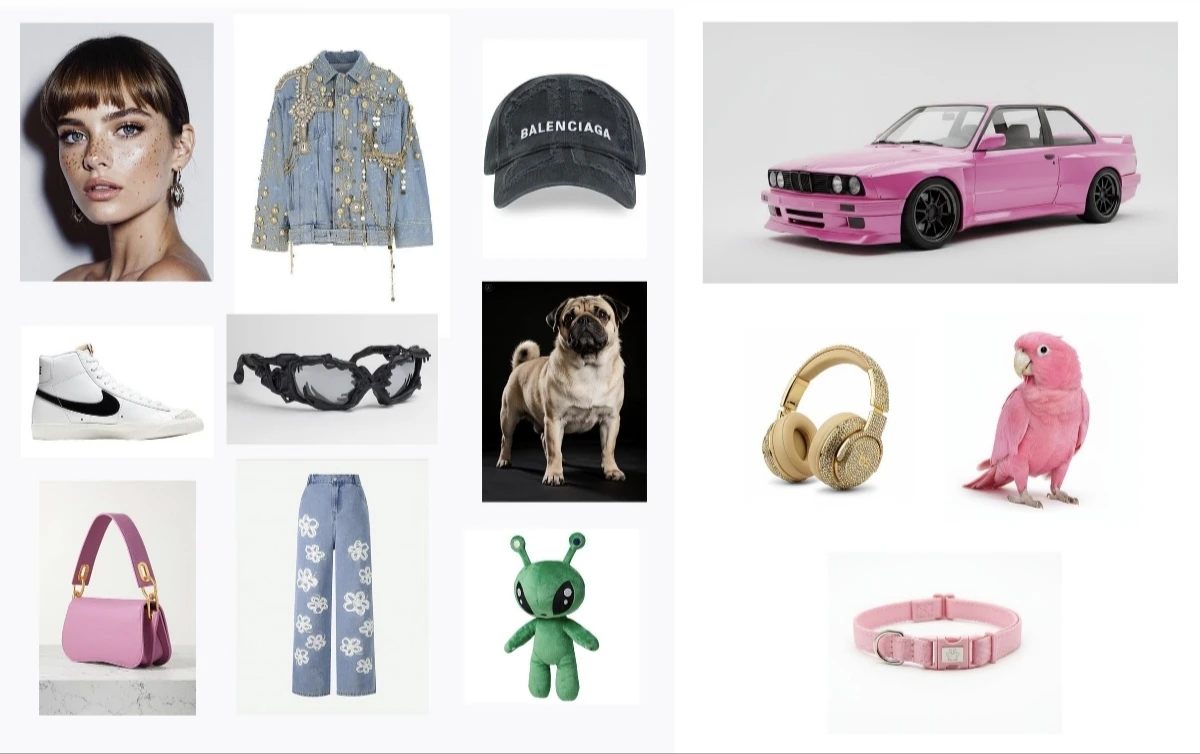
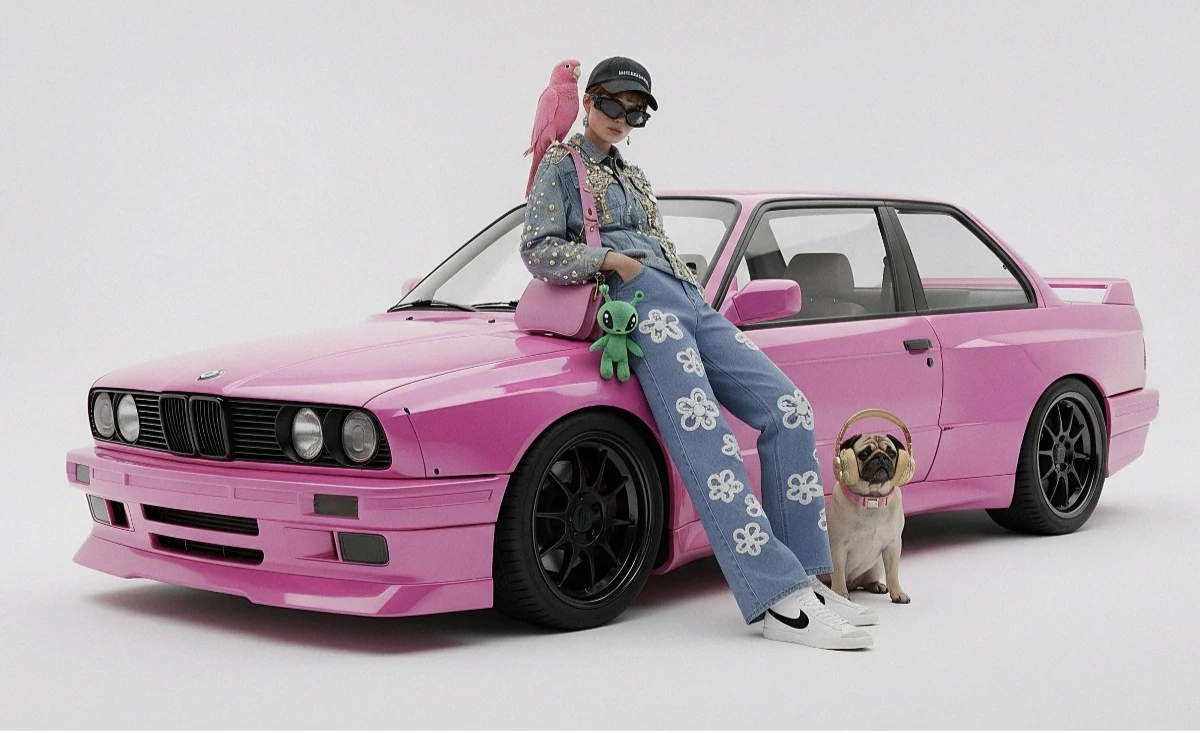
Birden fazla kaynak görüntüyü tek bir kolajda birleştirin, ardından istenen çıktıyı açıklayın.
 ```python Python theme={null}
from google import genai
from google.genai import types
from PIL import Image
import os
client = genai.Client(
http_options={"api_version": "v1beta", "base_url": "https://api.cometapi.com"},
api_key=os.environ.get("COMETAPI_KEY"),
)
collage = Image.open("collage.jpg")
response = client.models.generate_content(
model="gemini-3.1-flash-image-preview",
contents=[
"A model is posing and leaning against a pink BMW with a green alien keychain attached to a pink handbag, a pink parrot on her shoulder, and a pug wearing a pink collar and gold headphones",
collage,
],
config=types.GenerateContentConfig(
response_modalities=["TEXT", "IMAGE"],
),
)
final_image = None
for part in response.parts:
if getattr(part, "thought", False):
continue
if part.inline_data is not None:
final_image = part.as_image()
if final_image:
final_image.save("composition_output.png")
```
```bash Shell theme={null}
curl -s -X POST \
"https://api.cometapi.com/v1beta/models/gemini-3.1-flash-image-preview:generateContent" \
-H "Authorization: Bearer $COMETAPI_KEY" \
-H "Content-Type: application/json" \
-d '{
"contents": [{
"role": "user",
"parts": [
{ "text": "A model is posing and leaning against a pink BMW with a green alien keychain attached to a pink handbag, a pink parrot on her shoulder, and a pug wearing a pink collar and gold headphones" },
{ "inline_data": { "mime_type": "image/jpeg", "data": "" } }
]
}],
"generationConfig": { "responseModalities": ["TEXT", "IMAGE"] }
}'
```
### Yöntem 2: Birden fazla ayrı görüntü (14'e kadar)
Birden fazla görüntüyü doğrudan iletin. Gemini 3 modelleri en fazla 14 referans görüntüsünü destekler (nesneler + karakterler):
```python Python theme={null}
from google import genai
from google.genai import types
from PIL import Image
import os
client = genai.Client(
http_options={"api_version": "v1beta", "base_url": "https://api.cometapi.com"},
api_key=os.environ.get("COMETAPI_KEY"),
)
image1 = Image.open("image1.jpg")
image2 = Image.open("image2.jpg")
image3 = Image.open("image3.jpg")
response = client.models.generate_content(
model="gemini-3.1-flash-image-preview",
contents=["Merge the three images", image1, image2, image3],
config=types.GenerateContentConfig(
response_modalities=["TEXT", "IMAGE"],
),
)
final_image = None
for part in response.parts:
if getattr(part, "thought", False):
continue
if part.inline_data is not None:
final_image = part.as_image()
if final_image:
final_image.save("merged_output.png")
```
```bash Shell theme={null}
curl -s -X POST \
"https://api.cometapi.com/v1beta/models/gemini-3.1-flash-image-preview:generateContent" \
-H "Authorization: Bearer $COMETAPI_KEY" \
-H "Content-Type: application/json" \
-d '{
"contents": [{
"role": "user",
"parts": [
{ "text": "Merge the three images" },
{ "inline_data": { "mime_type": "image/jpeg", "data": "" } },
{ "inline_data": { "mime_type": "image/jpeg", "data": "" } },
{ "inline_data": { "mime_type": "image/jpeg", "data": "" } }
]
}],
"generationConfig": { "responseModalities": ["TEXT", "IMAGE"] }
}'
```
```python Python theme={null}
from google import genai
from google.genai import types
from PIL import Image
import os
client = genai.Client(
http_options={"api_version": "v1beta", "base_url": "https://api.cometapi.com"},
api_key=os.environ.get("COMETAPI_KEY"),
)
collage = Image.open("collage.jpg")
response = client.models.generate_content(
model="gemini-3.1-flash-image-preview",
contents=[
"A model is posing and leaning against a pink BMW with a green alien keychain attached to a pink handbag, a pink parrot on her shoulder, and a pug wearing a pink collar and gold headphones",
collage,
],
config=types.GenerateContentConfig(
response_modalities=["TEXT", "IMAGE"],
),
)
final_image = None
for part in response.parts:
if getattr(part, "thought", False):
continue
if part.inline_data is not None:
final_image = part.as_image()
if final_image:
final_image.save("composition_output.png")
```
```bash Shell theme={null}
curl -s -X POST \
"https://api.cometapi.com/v1beta/models/gemini-3.1-flash-image-preview:generateContent" \
-H "Authorization: Bearer $COMETAPI_KEY" \
-H "Content-Type: application/json" \
-d '{
"contents": [{
"role": "user",
"parts": [
{ "text": "A model is posing and leaning against a pink BMW with a green alien keychain attached to a pink handbag, a pink parrot on her shoulder, and a pug wearing a pink collar and gold headphones" },
{ "inline_data": { "mime_type": "image/jpeg", "data": "" } }
]
}],
"generationConfig": { "responseModalities": ["TEXT", "IMAGE"] }
}'
```
### Yöntem 2: Birden fazla ayrı görüntü (14'e kadar)
Birden fazla görüntüyü doğrudan iletin. Gemini 3 modelleri en fazla 14 referans görüntüsünü destekler (nesneler + karakterler):
```python Python theme={null}
from google import genai
from google.genai import types
from PIL import Image
import os
client = genai.Client(
http_options={"api_version": "v1beta", "base_url": "https://api.cometapi.com"},
api_key=os.environ.get("COMETAPI_KEY"),
)
image1 = Image.open("image1.jpg")
image2 = Image.open("image2.jpg")
image3 = Image.open("image3.jpg")
response = client.models.generate_content(
model="gemini-3.1-flash-image-preview",
contents=["Merge the three images", image1, image2, image3],
config=types.GenerateContentConfig(
response_modalities=["TEXT", "IMAGE"],
),
)
final_image = None
for part in response.parts:
if getattr(part, "thought", False):
continue
if part.inline_data is not None:
final_image = part.as_image()
if final_image:
final_image.save("merged_output.png")
```
```bash Shell theme={null}
curl -s -X POST \
"https://api.cometapi.com/v1beta/models/gemini-3.1-flash-image-preview:generateContent" \
-H "Authorization: Bearer $COMETAPI_KEY" \
-H "Content-Type: application/json" \
-d '{
"contents": [{
"role": "user",
"parts": [
{ "text": "Merge the three images" },
{ "inline_data": { "mime_type": "image/jpeg", "data": "" } },
{ "inline_data": { "mime_type": "image/jpeg", "data": "" } },
{ "inline_data": { "mime_type": "image/jpeg", "data": "" } }
]
}],
"generationConfig": { "responseModalities": ["TEXT", "IMAGE"] }
}'
```
 ***
## 4K görsel oluşturma
Yüksek çözünürlüklü çıktı için `aspect_ratio` ve `image_size` ile `image_config` belirtin:
```python Python theme={null}
from google import genai
from google.genai import types
import os
client = genai.Client(
http_options={"api_version": "v1beta", "base_url": "https://api.cometapi.com"},
api_key=os.environ.get("COMETAPI_KEY"),
)
response = client.models.generate_content(
model="gemini-3.1-flash-image-preview",
contents="Da Vinci style anatomical sketch of a Monarch butterfly on textured parchment",
config=types.GenerateContentConfig(
response_modalities=["TEXT", "IMAGE"],
image_config=types.ImageConfig(
aspect_ratio="1:1",
image_size="4K",
),
),
)
final_image = None
for part in response.parts:
if getattr(part, "thought", False):
continue
if part.text is not None:
print(part.text)
elif image := part.as_image():
final_image = image
if final_image:
final_image.save("butterfly_4k.png")
```
```javascript Node.js theme={null}
import { GoogleGenAI } from "@google/genai";
import * as fs from "fs";
const ai = new GoogleGenAI({
apiKey: process.env.COMETAPI_KEY,
httpOptions: { apiVersion: "v1beta", baseUrl: "https://api.cometapi.com" },
});
const response = await ai.models.generateContent({
model: "gemini-3.1-flash-image-preview",
contents: "Da Vinci style anatomical sketch of a Monarch butterfly on textured parchment",
config: {
responseModalities: ["TEXT", "IMAGE"],
imageConfig: { aspectRatio: "1:1", imageSize: "4K" },
},
});
const imageParts = response.candidates[0].content.parts.filter(
(part) => part.inlineData && part.thought !== true,
);
const finalImagePart = imageParts.at(-1);
if (finalImagePart) {
fs.writeFileSync("butterfly_4k.png", Buffer.from(finalImagePart.inlineData.data, "base64"));
}
```
```bash Shell theme={null}
curl -s -X POST \
"https://api.cometapi.com/v1beta/models/gemini-3.1-flash-image-preview:generateContent" \
-H "Authorization: Bearer $COMETAPI_KEY" \
-H "Content-Type: application/json" \
-d '{
"contents": [{"parts": [{"text": "Da Vinci style anatomical sketch of a Monarch butterfly on textured parchment"}]}],
"generationConfig": {
"responseModalities": ["TEXT", "IMAGE"],
"imageConfig": {"aspectRatio": "1:1", "imageSize": "4K"}
}
}'
```
Yüksek çözünürlüklü isteklerde, çıktıyı düşünce olmayan son görsel part'a göre değerlendirin. Entegrasyonunuz ilk `inlineData` part'ını kaydediyorsa, istenen `imageSize` değerinden daha düşük çözünürlüklü bir ara düşünce görselini kaydedebilir.
***
## Çok turlu görsel düzenleme (sohbet)
Görselleri yinelemeli olarak iyileştirmek için SDK'nın chat özelliğini kullanın:
```python Python theme={null}
from google import genai
from google.genai import types
import os
client = genai.Client(
http_options={"api_version": "v1beta", "base_url": "https://api.cometapi.com"},
api_key=os.environ.get("COMETAPI_KEY"),
)
chat = client.chats.create(
model="gemini-3.1-flash-image-preview",
config=types.GenerateContentConfig(
response_modalities=["TEXT", "IMAGE"],
),
)
## First turn: Generate
response = chat.send_message(
"Create a vibrant infographic explaining photosynthesis as a recipe, styled like a colorful kids cookbook"
)
final_image = None
for part in response.parts:
if getattr(part, "thought", False):
continue
if part.text is not None:
print(part.text)
elif image := part.as_image():
final_image = image
if final_image:
final_image.save("photosynthesis.png")
```
## İkinci tur: İyileştirme
response = chat.send\_message("Bu infografiği İspanyolca olacak şekilde güncelle. Başka hiçbir öğeyi değiştirme.")
final\_image = None
for part in response.parts:
if getattr(part, "thought", False):
continue
if part.text is not None:
print(part.text)
elif image := part.as\_image():
final\_image = image
if final\_image:
final\_image.save("photosynthesis\_spanish.png")
````
```javascript Node.js
import { GoogleGenAI } from "@google/genai";
import * as fs from "fs";
const ai = new GoogleGenAI({
apiKey: process.env.COMETAPI_KEY,
httpOptions: { apiVersion: "v1beta", baseUrl: "https://api.cometapi.com" },
});
const chat = ai.chats.create({
model: "gemini-3.1-flash-image-preview",
config: { responseModalities: ["TEXT", "IMAGE"] },
});
// First turn: generate
const response1 = await chat.sendMessage(
"Create a vibrant infographic explaining photosynthesis as a recipe, styled like a colorful kids cookbook"
);
const imageParts1 = response1.candidates[0].content.parts.filter(
(part) => part.inlineData && part.thought !== true,
);
const finalImagePart1 = imageParts1.at(-1);
if (finalImagePart1) {
fs.writeFileSync("photosynthesis.png", Buffer.from(finalImagePart1.inlineData.data, "base64"));
}
// Second turn: refine
const response2 = await chat.sendMessage(
"Update this infographic to be in Spanish. Do not change any other elements."
);
const imageParts2 = response2.candidates[0].content.parts.filter(
(part) => part.inlineData && part.thought !== true,
);
const finalImagePart2 = imageParts2.at(-1);
if (finalImagePart2) {
fs.writeFileSync("photosynthesis_spanish.png", Buffer.from(finalImagePart2.inlineData.data, "base64"));
}
````
***
## İpuçları
Stil anahtar kelimelerini (ör. "cyberpunk, film grain, low contrast"), en-boy oranını, özneyi, arka planı, aydınlatmayı ve ayrıntı seviyesini belirtin.
Ham HTTP kullanırken `data:image/png;base64,` önekini eklemeyin — yalnızca ham Base64 dizesini kullanın. Python SDK bunu `PIL.Image` nesneleriyle otomatik olarak işler.
Metin olmadan görüntü çıktısını garanti etmek için `"responseModalities"` değerini yalnızca `["IMAGE"]` olarak ayarlayın.
Kodunuzun ara bir thought görüntüsü kaydedip kaydetmediğini kontrol edin. Gemini görüntü yanıtları, `thought` değeri `true` olan görüntü parçaları içerebilir; bunlar nihai çıktı değildir. `thought: true` parçalarını atlayın ve `inlineData` bulunan ve `thought` değeri `true` olmayan son görüntü parçasını kaydedin. Metin çıktısına ihtiyacınız yoksa, karışık metin/görüntü yanıtı işlemeyi azaltmak için `"responseModalities": ["IMAGE"]` isteğinde bulunun.
Daha fazla ayrıntı için [API Referansı](/api/image/gemini/gemini-generates-image) sayfasına bakın.
**Resmi dokümantasyon:** [Nano Banana görüntü oluşturma](https://ai.google.dev/gemini-api/docs/image-generation)
* [Gemini Image Understanding](https://ai.google.dev/gemini-api/docs/image-understanding)
***
## 4K görsel oluşturma
Yüksek çözünürlüklü çıktı için `aspect_ratio` ve `image_size` ile `image_config` belirtin:
```python Python theme={null}
from google import genai
from google.genai import types
import os
client = genai.Client(
http_options={"api_version": "v1beta", "base_url": "https://api.cometapi.com"},
api_key=os.environ.get("COMETAPI_KEY"),
)
response = client.models.generate_content(
model="gemini-3.1-flash-image-preview",
contents="Da Vinci style anatomical sketch of a Monarch butterfly on textured parchment",
config=types.GenerateContentConfig(
response_modalities=["TEXT", "IMAGE"],
image_config=types.ImageConfig(
aspect_ratio="1:1",
image_size="4K",
),
),
)
final_image = None
for part in response.parts:
if getattr(part, "thought", False):
continue
if part.text is not None:
print(part.text)
elif image := part.as_image():
final_image = image
if final_image:
final_image.save("butterfly_4k.png")
```
```javascript Node.js theme={null}
import { GoogleGenAI } from "@google/genai";
import * as fs from "fs";
const ai = new GoogleGenAI({
apiKey: process.env.COMETAPI_KEY,
httpOptions: { apiVersion: "v1beta", baseUrl: "https://api.cometapi.com" },
});
const response = await ai.models.generateContent({
model: "gemini-3.1-flash-image-preview",
contents: "Da Vinci style anatomical sketch of a Monarch butterfly on textured parchment",
config: {
responseModalities: ["TEXT", "IMAGE"],
imageConfig: { aspectRatio: "1:1", imageSize: "4K" },
},
});
const imageParts = response.candidates[0].content.parts.filter(
(part) => part.inlineData && part.thought !== true,
);
const finalImagePart = imageParts.at(-1);
if (finalImagePart) {
fs.writeFileSync("butterfly_4k.png", Buffer.from(finalImagePart.inlineData.data, "base64"));
}
```
```bash Shell theme={null}
curl -s -X POST \
"https://api.cometapi.com/v1beta/models/gemini-3.1-flash-image-preview:generateContent" \
-H "Authorization: Bearer $COMETAPI_KEY" \
-H "Content-Type: application/json" \
-d '{
"contents": [{"parts": [{"text": "Da Vinci style anatomical sketch of a Monarch butterfly on textured parchment"}]}],
"generationConfig": {
"responseModalities": ["TEXT", "IMAGE"],
"imageConfig": {"aspectRatio": "1:1", "imageSize": "4K"}
}
}'
```
Yüksek çözünürlüklü isteklerde, çıktıyı düşünce olmayan son görsel part'a göre değerlendirin. Entegrasyonunuz ilk `inlineData` part'ını kaydediyorsa, istenen `imageSize` değerinden daha düşük çözünürlüklü bir ara düşünce görselini kaydedebilir.
***
## Çok turlu görsel düzenleme (sohbet)
Görselleri yinelemeli olarak iyileştirmek için SDK'nın chat özelliğini kullanın:
```python Python theme={null}
from google import genai
from google.genai import types
import os
client = genai.Client(
http_options={"api_version": "v1beta", "base_url": "https://api.cometapi.com"},
api_key=os.environ.get("COMETAPI_KEY"),
)
chat = client.chats.create(
model="gemini-3.1-flash-image-preview",
config=types.GenerateContentConfig(
response_modalities=["TEXT", "IMAGE"],
),
)
## First turn: Generate
response = chat.send_message(
"Create a vibrant infographic explaining photosynthesis as a recipe, styled like a colorful kids cookbook"
)
final_image = None
for part in response.parts:
if getattr(part, "thought", False):
continue
if part.text is not None:
print(part.text)
elif image := part.as_image():
final_image = image
if final_image:
final_image.save("photosynthesis.png")
```
## İkinci tur: İyileştirme
response = chat.send\_message("Bu infografiği İspanyolca olacak şekilde güncelle. Başka hiçbir öğeyi değiştirme.")
final\_image = None
for part in response.parts:
if getattr(part, "thought", False):
continue
if part.text is not None:
print(part.text)
elif image := part.as\_image():
final\_image = image
if final\_image:
final\_image.save("photosynthesis\_spanish.png")
````
```javascript Node.js
import { GoogleGenAI } from "@google/genai";
import * as fs from "fs";
const ai = new GoogleGenAI({
apiKey: process.env.COMETAPI_KEY,
httpOptions: { apiVersion: "v1beta", baseUrl: "https://api.cometapi.com" },
});
const chat = ai.chats.create({
model: "gemini-3.1-flash-image-preview",
config: { responseModalities: ["TEXT", "IMAGE"] },
});
// First turn: generate
const response1 = await chat.sendMessage(
"Create a vibrant infographic explaining photosynthesis as a recipe, styled like a colorful kids cookbook"
);
const imageParts1 = response1.candidates[0].content.parts.filter(
(part) => part.inlineData && part.thought !== true,
);
const finalImagePart1 = imageParts1.at(-1);
if (finalImagePart1) {
fs.writeFileSync("photosynthesis.png", Buffer.from(finalImagePart1.inlineData.data, "base64"));
}
// Second turn: refine
const response2 = await chat.sendMessage(
"Update this infographic to be in Spanish. Do not change any other elements."
);
const imageParts2 = response2.candidates[0].content.parts.filter(
(part) => part.inlineData && part.thought !== true,
);
const finalImagePart2 = imageParts2.at(-1);
if (finalImagePart2) {
fs.writeFileSync("photosynthesis_spanish.png", Buffer.from(finalImagePart2.inlineData.data, "base64"));
}
````
***
## İpuçları
Stil anahtar kelimelerini (ör. "cyberpunk, film grain, low contrast"), en-boy oranını, özneyi, arka planı, aydınlatmayı ve ayrıntı seviyesini belirtin.
Ham HTTP kullanırken `data:image/png;base64,` önekini eklemeyin — yalnızca ham Base64 dizesini kullanın. Python SDK bunu `PIL.Image` nesneleriyle otomatik olarak işler.
Metin olmadan görüntü çıktısını garanti etmek için `"responseModalities"` değerini yalnızca `["IMAGE"]` olarak ayarlayın.
Kodunuzun ara bir thought görüntüsü kaydedip kaydetmediğini kontrol edin. Gemini görüntü yanıtları, `thought` değeri `true` olan görüntü parçaları içerebilir; bunlar nihai çıktı değildir. `thought: true` parçalarını atlayın ve `inlineData` bulunan ve `thought` değeri `true` olmayan son görüntü parçasını kaydedin. Metin çıktısına ihtiyacınız yoksa, karışık metin/görüntü yanıtı işlemeyi azaltmak için `"responseModalities": ["IMAGE"]` isteğinde bulunun.
Daha fazla ayrıntı için [API Referansı](/api/image/gemini/gemini-generates-image) sayfasına bakın.
**Resmi dokümantasyon:** [Nano Banana görüntü oluşturma](https://ai.google.dev/gemini-api/docs/image-generation)
* [Gemini Image Understanding](https://ai.google.dev/gemini-api/docs/image-understanding)