> ## Documentation Index
> Fetch the complete documentation index at: https://apidoc.cometapi.com/llms.txt
> Use this file to discover all available pages before exploring further.

# Cherry Studio'yu CometAPI ile kullanın

> Bu kılavuzu kullanarak base URL, API key ve model veya provider seçeneklerini ayarlayıp Cherry Studio'yu CometAPI ile yapılandırın.

[CherryStudio](https://docs.cherry-ai.com/cherrystudio/download), birden fazla model provider'ı destekleyen bir AI masaüstü uygulamasıdır. Platformumuzdaki herhangi bir modeli kullanmak için CometAPI'yi özel bir OpenAI-compatible provider olarak ekleyin.

## Ön koşullar

* [CherryStudio](https://docs.cherry-ai.com/cherrystudio/download) yüklü
* Etkin bir API key'e sahip bir [CometAPI](https://www.cometapi.com) hesabı

## Kurulum

<Steps>
  <Step title="CometAPI API anahtarınızı alın">
    [CometAPI dashboard](https://www.cometapi.com/console) üzerinde oturum açın. **Add API Key** seçeneğine tıklayın ve anahtarınızı ve base URL'nizi (`https://api.cometapi.com`) kopyalayın.


    <Frame>
      <img src="https://mintcdn.com/cometapi/SZhlxZhCnMLn__BW/images/overview/810968_364191.png?fit=max&auto=format&n=SZhlxZhCnMLn__BW&q=85&s=aef81a83f29f8eb16655ed4060425f50" alt="CometAPI dashboard — API anahtarı ekle" width="3824" height="1892" data-path="images/overview/810968_364191.png" />
    </Frame>

    <Frame>
      <img src="https://mintcdn.com/cometapi/HhtmQffktazbxUvS/images/overview/810968_364193.png?fit=max&auto=format&n=HhtmQffktazbxUvS&q=85&s=d893f659267150d0faf45f99eb5dffc1" alt="CometAPI API anahtarı ve base URL" width="2434" height="1232" data-path="images/overview/810968_364193.png" />
    </Frame>
  </Step>

  <Step title="CometAPI'yi provider olarak ekleyin">
    CherryStudio **Settings** → **Model Services** bölümünü açın. **Add** seçeneğine tıklayın, provider için bir ad verin (ör. `CometAPI`), provider türü olarak **OpenAI** seçin ve **OK** seçeneğine tıklayın. **API Address** alanına `https://api.cometapi.com` girin ve anahtarınızı **Key** alanına yapıştırın.
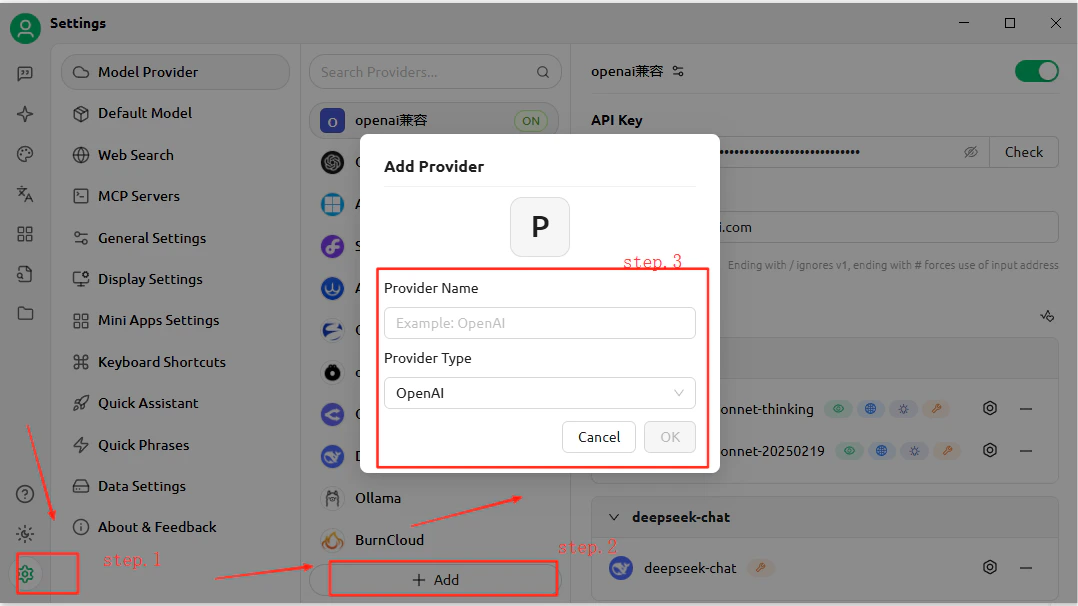
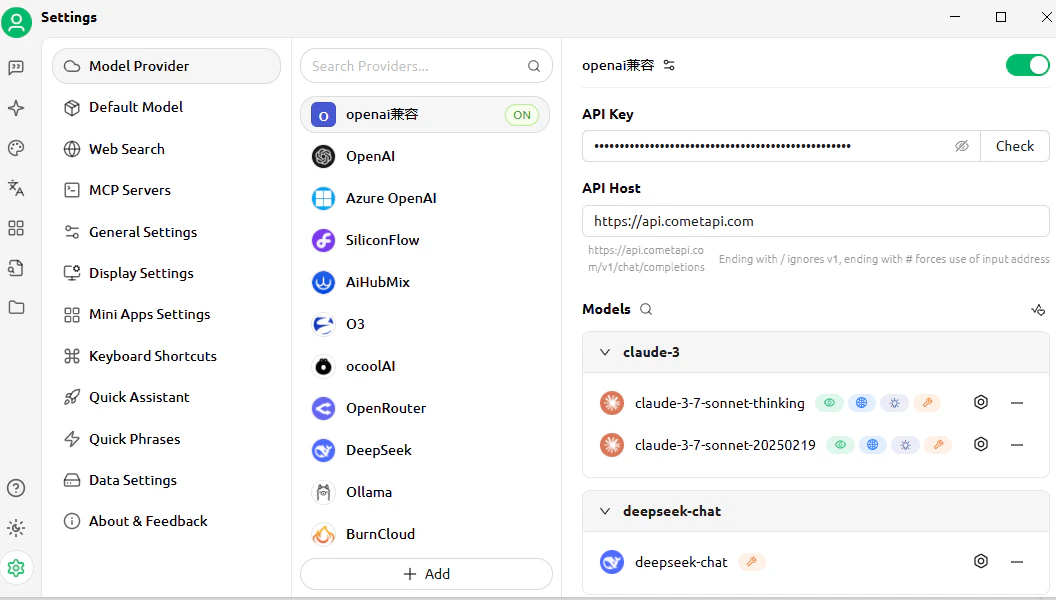
    <Frame>
      <img src="https://mintcdn.com/cometapi/E4FFvyMYmaOZoldp/images/integrations/810968_355194.png?fit=max&auto=format&n=E4FFvyMYmaOZoldp&q=85&s=93a035c01494c21065a134748e396381" alt="CherryStudio model services — provider ekleme iletişim kutusu" width="1078" height="606" data-path="images/integrations/810968_355194.png" />
    </Frame>

    <Frame>
      <img src="https://mintcdn.com/cometapi/E4FFvyMYmaOZoldp/images/integrations/810968_355195.png?fit=max&auto=format&n=E4FFvyMYmaOZoldp&q=85&s=f6edb15b1848812555d0cac24282afcf" alt="CometAPI için API adresi ve anahtar alanları doldurulmuş" width="1056" height="600" data-path="images/integrations/810968_355195.png" />
    </Frame>
  </Step>

  <Step title="Modeller ekleyin">
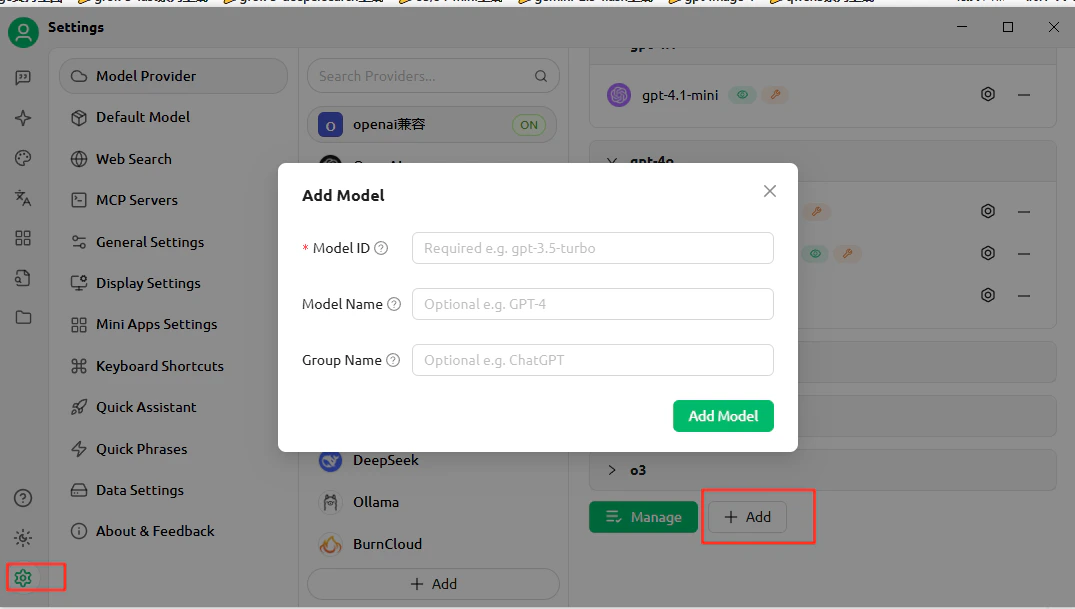
    **Add Model** seçeneğine tıklayın ve kullanmak istediğiniz güncel model ID'yi girin. Birden fazla model ekleyebilirsiniz.
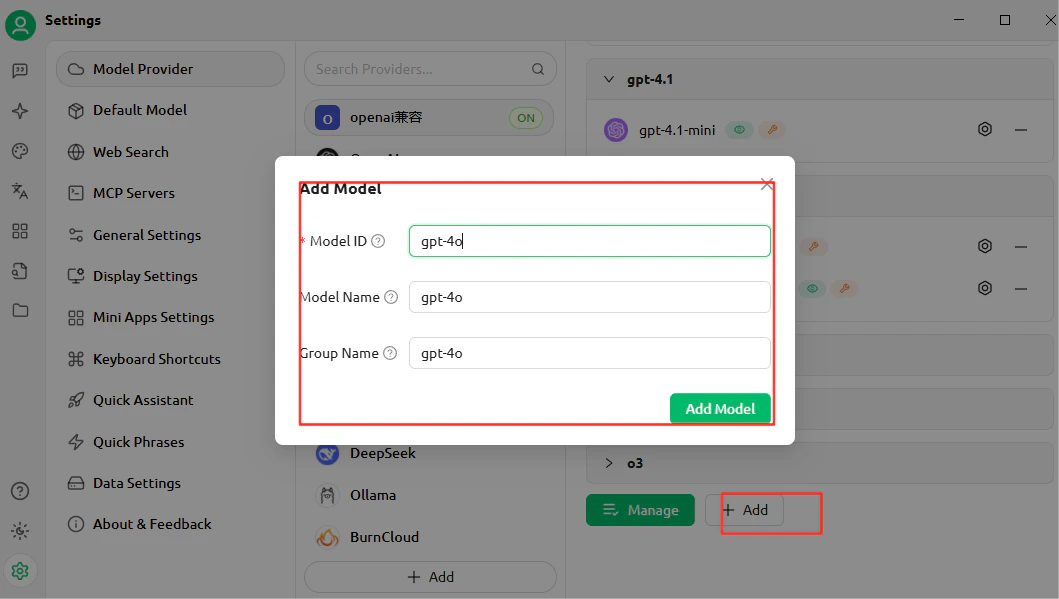
    <Frame>
      <img src="https://mintcdn.com/cometapi/E4FFvyMYmaOZoldp/images/integrations/810968_355196.png?fit=max&auto=format&n=E4FFvyMYmaOZoldp&q=85&s=9b9f17fe4287de67735320ec5b464e65" alt="CherryStudio model listesi, özel bir model eklenmiş halde" width="1059" height="599" data-path="images/integrations/810968_355196.png" />
    </Frame>
  </Step>

  <Step title="Bağlantıyı test edin">
    Bir sohbet açın ve test mesajı gönderin. Başarılı bir yanıt, kurulumun çalıştığını doğrular.
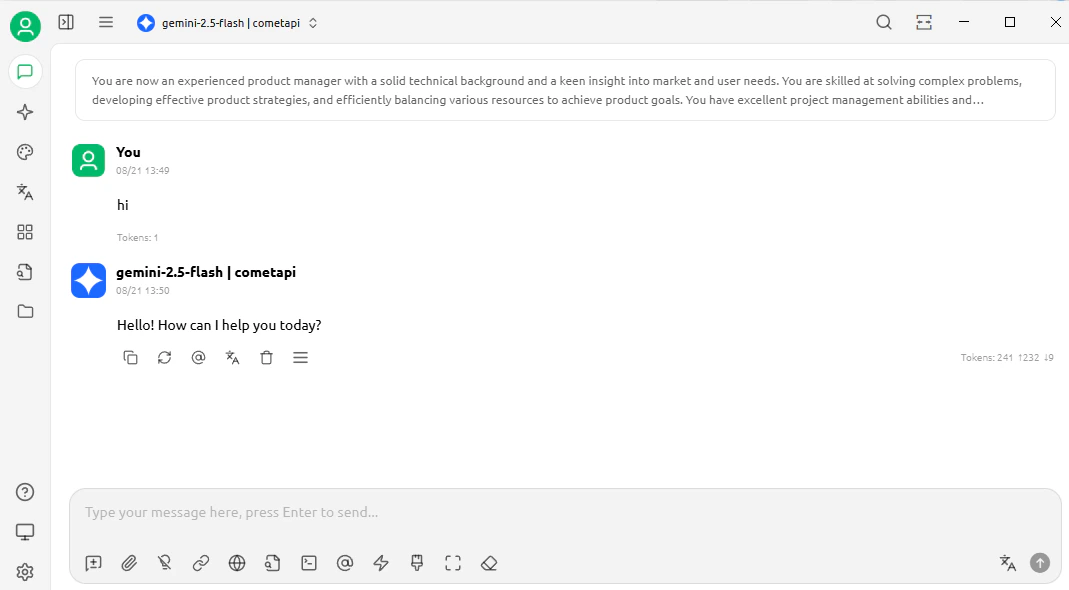
    <Frame>
      <img src="https://mintcdn.com/cometapi/E4FFvyMYmaOZoldp/images/integrations/810968_360313.png?fit=max&auto=format&n=E4FFvyMYmaOZoldp&q=85&s=305c5fdce1017d6942aa1176b64f3a96" alt="CherryStudio sohbeti, başarılı bir yanıt gösteriyor" width="1069" height="590" data-path="images/integrations/810968_360313.png" />
    </Frame>
  </Step>
</Steps>

<Tip>
  Daha fazla model eklemek için provider ayarlarına geri dönün ve yeniden **Add Model** seçeneğine tıklayın.
  <Frame>
    <img src="https://mintcdn.com/cometapi/E4FFvyMYmaOZoldp/images/integrations/810968_355199.png?fit=max&auto=format&n=E4FFvyMYmaOZoldp&q=85&s=da182754d5fae90778c2c9cc9d5b5727" alt="CherryStudio ayarları, başka bir özel model eklenmiş halde" width="1075" height="609" data-path="images/integrations/810968_355199.png" />
  </Frame>
</Tip>

<script type="application/ld+json">
  {`
    {
    "@context": "https://schema.org",
    "@graph": [
      {
        "@type": "HowTo",
        "@id": "https://apidoc.cometapi.com/integrations/cherrystudio#howto",
        "name": "Cherry Studio'yu CometAPI ile kullanın",
        "description": "Bu kılavuzu, base URL, API anahtarı ve model veya provider seçeneklerini ayarlayarak Cherry Studio'yu CometAPI ile yapılandırmak için kullanın.",
        "step": [
          {
            "@type": "HowToStep",
            "@id": "https://apidoc.cometapi.com/integrations/cherrystudio#step-1",
            "position": 1,
            "name": "CometAPI API anahtarınızı alın",
            "text": "CometAPI hesabınızı oluşturun veya açın, ardından dashboard üzerinden etkin bir API anahtarı kopyalayın."
          },
          {
            "@type": "HowToStep",
            "@id": "https://apidoc.cometapi.com/integrations/cherrystudio#step-2",
            "position": 2,
            "name": "CometAPI'yi provider olarak ekleyin",
            "text": "Cherry Studio'yu CometAPI ile kullanın kılavuzundaki CometAPI'yi provider olarak ekleyin adımını tamamlayın."
          },
          {
            "@type": "HowToStep",
            "@id": "https://apidoc.cometapi.com/integrations/cherrystudio#step-3",
            "position": 3,
            "name": "Modeller ekleyin",
            "text": "Cherry Studio'yu CometAPI ile kullanın kılavuzundaki Modeller ekleyin adımını tamamlayın."
          },
          {
            "@type": "HowToStep",
            "@id": "https://apidoc.cometapi.com/integrations/cherrystudio#step-4",
            "position": 4,
            "name": "Bağlantıyı test edin",
            "text": "CometAPI Models sayfasından güncel bir model ID seçin, ardından entegrasyondan bir test isteği gönderin."
          }
        ]
      },
      {
        "@type": "BreadcrumbList",
        "itemListElement": [
          {
            "@type": "ListItem",
            "position": 1,
            "name": "CometAPI Dokümantasyonu",
            "item": "https://apidoc.cometapi.com/"
          },
          {
            "@type": "ListItem",
            "position": 2,
            "name": "Entegrasyonlar",
            "item": "https://apidoc.cometapi.com/integrations"
          },
          {
            "@type": "ListItem",
            "position": 3,
            "name": "Cherry Studio'yu CometAPI ile kullanın",
            "item": "https://apidoc.cometapi.com/integrations/cherrystudio"
          }
        ]
      }
    ]
    }
    `}
</script>
