> ## Documentation Index
> Fetch the complete documentation index at: https://apidoc.cometapi.com/llms.txt
> Use this file to discover all available pages before exploring further.

# Open WebUI'yi CometAPI ile kullanın

> Bu kılavuzu kullanarak base URL, API key ve model veya provider seçeneklerini ayarlayıp Open WebUI'yi CometAPI ile yapılandırın.

[Open WebUI](https://openwebui.com/), AI modelleri için self-hosted bir web arayüzüdür. CometAPI'yi harici, OpenAI-compatible bir bağlantı olarak kullanacak şekilde yapılandırın.

## Ön koşullar

* [Open WebUI](https://openwebui.com/) çalışıyor olmalı (self-hosted veya [open.zetatechs.online](https://openwebui.com/) üzerindeki demo aracılığıyla)
* Etkin bir API key'e sahip bir [CometAPI](https://www.cometapi.com) hesabı

## Kurulum

<Steps>
  <Step title="CometAPI API key'inizi alın">
    [CometAPI dashboard](https://www.cometapi.com/console)'a giriş yapın. **Add API Key**'e tıklayın ve anahtarınızı ve base URL'nizi (`https://api.cometapi.com`) kopyalayın.


    <Frame>
      <img src="https://mintcdn.com/cometapi/SZhlxZhCnMLn__BW/images/overview/810968_364191.png?fit=max&auto=format&n=SZhlxZhCnMLn__BW&q=85&s=aef81a83f29f8eb16655ed4060425f50" alt="CometAPI dashboard — API Key ekle" width="3824" height="1892" data-path="images/overview/810968_364191.png" />
    </Frame>

    <Frame>
      <img src="https://mintcdn.com/cometapi/HhtmQffktazbxUvS/images/overview/810968_364193.png?fit=max&auto=format&n=HhtmQffktazbxUvS&q=85&s=d893f659267150d0faf45f99eb5dffc1" alt="CometAPI API key ve base URL" width="2434" height="1232" data-path="images/overview/810968_364193.png" />
    </Frame>
  </Step>

  <Step title="Harici bir OpenAI bağlantısı ekleyin">
    Open WebUI'de **Admin Panel** → **Settings** → **External Connections** bölümüne gidin. **External Link OpenAI API** seçeneğini etkinleştirin, **API Address** alanına `https://api.cometapi.com/v1` girin, anahtarınızı **Key** alanına yapıştırın ve **Save**'e tıklayın.
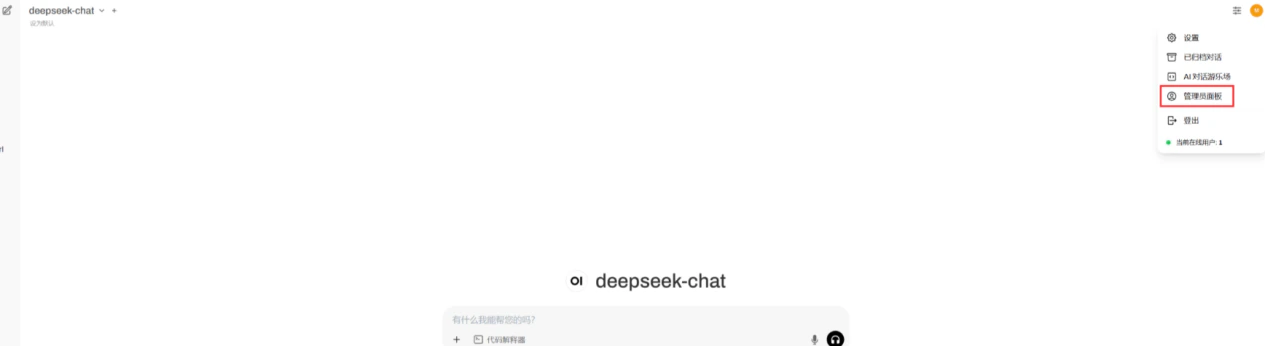
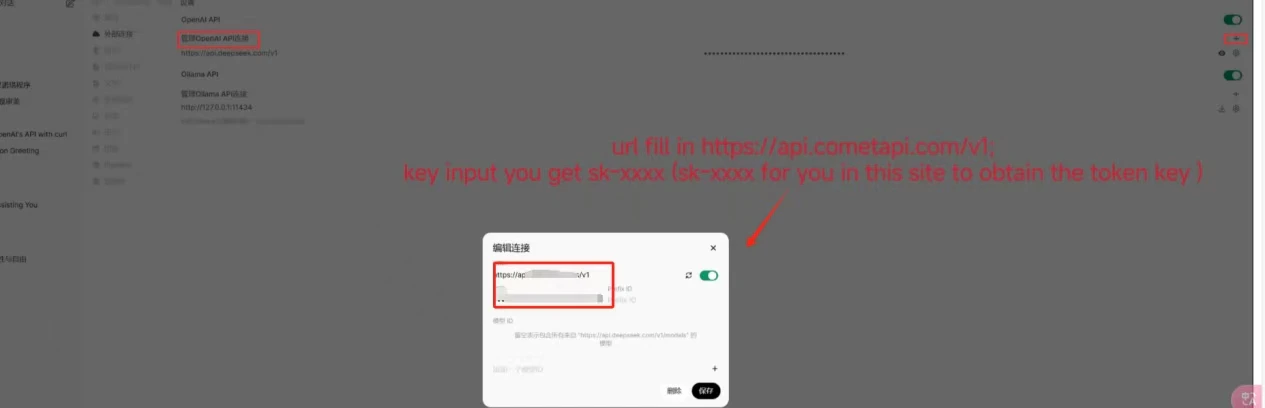
    <Frame>
      <img src="https://mintcdn.com/cometapi/mA1ovj6s0e3RM42l/images/integrations/810968_351624.png?fit=max&auto=format&n=mA1ovj6s0e3RM42l&q=85&s=4878931888f1deeda5365545bc35a01a" alt="CometAPI URL'si girilmiş Open WebUI external connections ayarları" width="1265" height="346" data-path="images/integrations/810968_351624.png" />
    </Frame>

    <Frame>
      <img src="https://mintcdn.com/cometapi/mA1ovj6s0e3RM42l/images/integrations/810968_351625.png?fit=max&auto=format&n=mA1ovj6s0e3RM42l&q=85&s=40e7df7cb60b43a4b585ededa36847f2" alt="CometAPI bağlantısı etkin şekilde kaydedilmiş Open WebUI ayarları" width="1265" height="408" data-path="images/integrations/810968_351625.png" />
    </Frame>
  </Step>

  <Step title="Bağlantıyı test edin">
    Bir sohbet başlatın ve test mesajı gönderin. Başarılı bir yanıt, entegrasyonun çalıştığını doğrular.
  </Step>
</Steps>

<script type="application/ld+json">
  {`
    {
    "@context": "https://schema.org",
    "@graph": [
      {
        "@type": "HowTo",
        "@id": "https://apidoc.cometapi.com/integrations/open-webui#howto",
        "name": "Open WebUI'yi CometAPI ile kullanın",
        "description": "Bu kılavuzu kullanarak base URL, API key ve model veya provider seçeneklerini ayarlayıp Open WebUI'yi CometAPI ile yapılandırın.",
        "step": [
          {
            "@type": "HowToStep",
            "@id": "https://apidoc.cometapi.com/integrations/open-webui#step-1",
            "position": 1,
            "name": "CometAPI API key'inizi alın",
            "text": "CometAPI hesabınızı oluşturun veya açın, ardından dashboard'dan etkin bir API key kopyalayın."
          },
          {
            "@type": "HowToStep",
            "@id": "https://apidoc.cometapi.com/integrations/open-webui#step-2",
            "position": 2,
            "name": "Harici bir OpenAI bağlantısı ekleyin",
            "text": "Open WebUI'yi CometAPI ile kullanın kılavuzundaki Harici bir OpenAI bağlantısı ekleyin adımını tamamlayın."
          },
          {
            "@type": "HowToStep",
            "@id": "https://apidoc.cometapi.com/integrations/open-webui#step-3",
            "position": 3,
            "name": "Bağlantıyı test edin",
            "text": "CometAPI Models sayfasından geçerli bir model ID seçin, ardından entegrasyondan bir test isteği gönderin."
          }
        ]
      },
      {
        "@type": "BreadcrumbList",
        "itemListElement": [
          {
            "@type": "ListItem",
            "position": 1,
            "name": "CometAPI Dokümantasyonu",
            "item": "https://apidoc.cometapi.com/"
          },
          {
            "@type": "ListItem",
            "position": 2,
            "name": "Entegrasyonlar",
            "item": "https://apidoc.cometapi.com/integrations"
          },
          {
            "@type": "ListItem",
            "position": 3,
            "name": "Open WebUI'yi CometAPI ile kullanın",
            "item": "https://apidoc.cometapi.com/integrations/open-webui"
          }
        ]
      }
    ]
    }
    `}
</script>
