> ## Documentation Index
> Fetch the complete documentation index at: https://apidoc.cometapi.com/llms.txt
> Use this file to discover all available pages before exploring further.

# uTools ChatGPT Friend’ı CometAPI ile kullanın

> Bu kılavuzu kullanarak base URL, API key ve model veya provider seçeneklerini ayarlayarak uTools ChatGPT Friend’ı CometAPI ile yapılandırın.

uTools ChatGPT Friend, masaüstü hızlı başlatma çubuğunuza AI sohbeti getiren bir uTools eklentisidir. Bunu CometAPI’ye bağlayın, ardından [Models page](/tr/overview/models) üzerinden istediğiniz modeli seçin.

## Ön koşullar

* Etkin bir API anahtarına sahip bir CometAPI hesabı — [buradan edinin](https://www.cometapi.com/console/token)
* uTools kurulu olmalı — [buradan indirin](https://u.tools/)
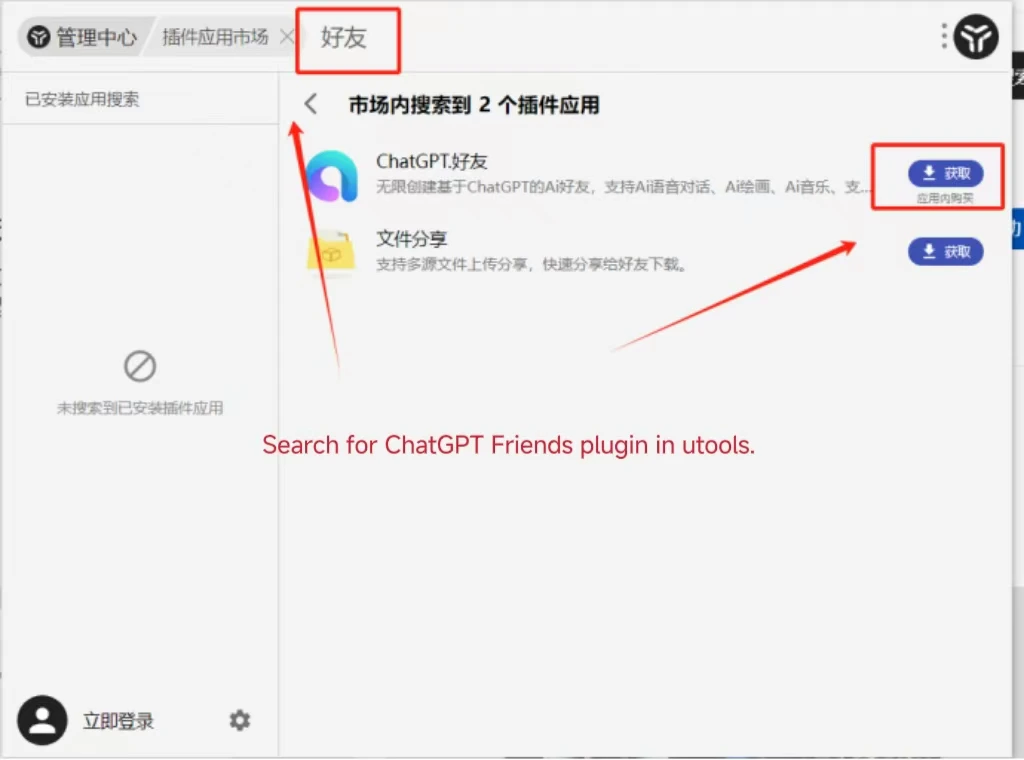
* ChatGPT Friend eklentisi — [buradan edinin](https://www.u-tools.cn/plugins/detail/ChatGPT.%E5%A5%BD%E5%8F%8B/index.html)

<Steps>
  <Step title="CometAPI API anahtarınızı alın">
    [CometAPI konsolunda](https://www.cometapi.com/console/token) oturum açın. **Add API Key** seçeneğine tıklayın ve CometAPI API anahtarınızı kopyalayın.


    <Frame>
      <img src="https://mintcdn.com/cometapi/SZhlxZhCnMLn__BW/images/overview/810968_364191.png?fit=max&auto=format&n=SZhlxZhCnMLn__BW&q=85&s=aef81a83f29f8eb16655ed4060425f50" alt="Add API Key düğmesini gösteren CometAPI kontrol paneli" width="3824" height="1892" data-path="images/overview/810968_364191.png" />
    </Frame>

    <Frame>
      <img src="https://mintcdn.com/cometapi/HhtmQffktazbxUvS/images/overview/810968_364193.png?fit=max&auto=format&n=HhtmQffktazbxUvS&q=85&s=d893f659267150d0faf45f99eb5dffc1" alt="base URL ile CometAPI API anahtarı ayrıntıları" width="2434" height="1232" data-path="images/overview/810968_364193.png" />
    </Frame>
  </Step>

  <Step title="ChatGPT Friend'ı yapılandırın">
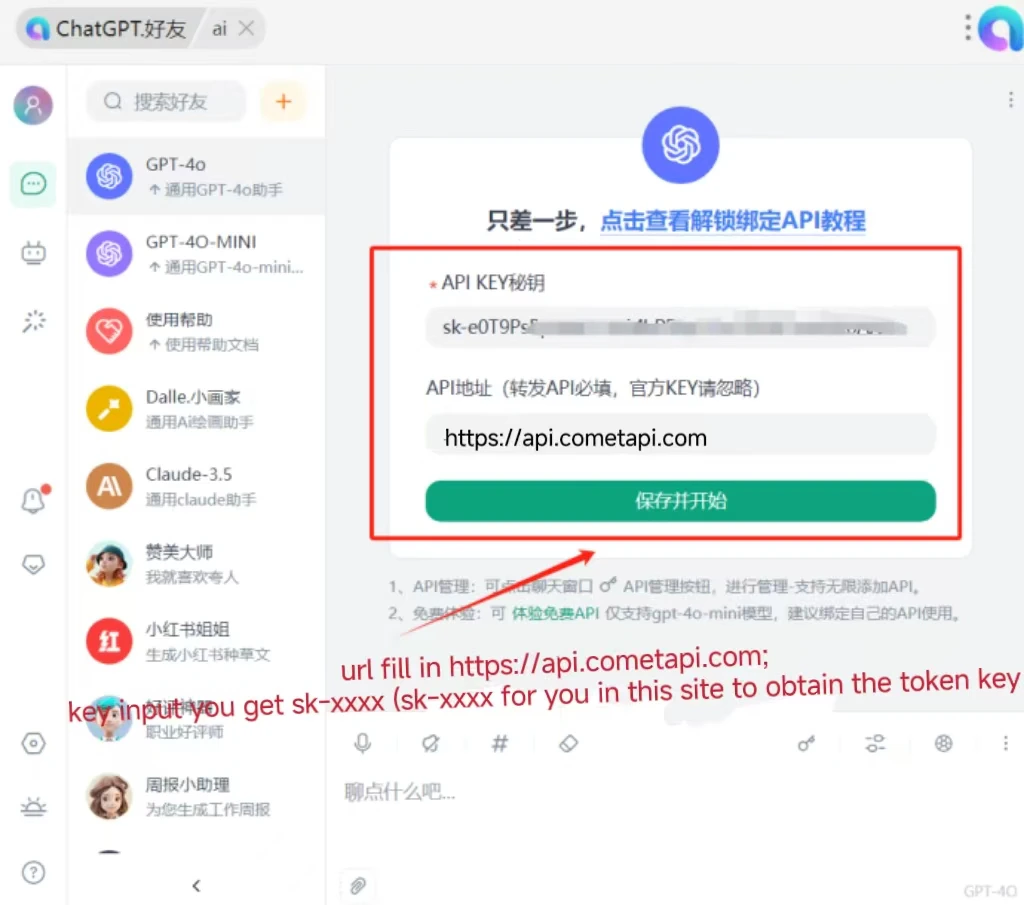
    uTools içinde ChatGPT Friend eklentisini açın. Ayarlarda:

    * **Interface Address**: `https://api.cometapi.com`
    * **API Key**: CometAPI API anahtarınızı yapıştırın

    **Save** seçeneğine tıklayın.
    <Frame>
      <img src="https://mintcdn.com/cometapi/mA1ovj6s0e3RM42l/images/integrations/810968_351617.png?fit=max&auto=format&n=mA1ovj6s0e3RM42l&q=85&s=007fd1da30f9ca6c807caf2d01205422" alt="Interface Address ve API Key doldurulmuş ChatGPT Friend ayarları" width="1024" height="760" data-path="images/integrations/810968_351617.png" />
    </Frame>
  </Step>

  <Step title="Bağlantıyı test edin">
    Sohbet girişine bir mesaj yazın ve gönderin. Başarılı bir yanıt, entegrasyonun çalıştığını doğrular.
    <Frame>
      <img src="https://mintcdn.com/cometapi/mA1ovj6s0e3RM42l/images/integrations/810968_351618.png?fit=max&auto=format&n=mA1ovj6s0e3RM42l&q=85&s=2f2aecbecc80d2f3042f84d8e9d13d48" alt="Başarılı bir AI yanıtı gösteren ChatGPT Friend" width="1024" height="905" data-path="images/integrations/810968_351618.png" />
    </Frame>

    Çağrı başarısız olursa API anahtarınızı ve interface address değerini doğrulayın veya [CometAPI desteğiyle](https://www.cometapi.com) iletişime geçin.
  </Step>
</Steps>

<script type="application/ld+json">
  {`
    {
    "@context": "https://schema.org",
    "@graph": [
      {
        "@type": "HowTo",
        "@id": "https://apidoc.cometapi.com/integrations/utools-chatgpt-friend#howto",
        "name": "uTools ChatGPT Friend'ı CometAPI ile kullanın",
        "description": "Bu kılavuzu, base URL, API key ve model veya provider seçeneklerini ayarlayarak uTools ChatGPT Friend'ı CometAPI ile yapılandırmak için kullanın.",
        "step": [
          {
            "@type": "HowToStep",
            "@id": "https://apidoc.cometapi.com/integrations/utools-chatgpt-friend#step-1",
            "position": 1,
            "name": "CometAPI API anahtarınızı alın",
            "text": "CometAPI hesabınızı oluşturun veya açın, ardından kontrol panelinden etkin bir API anahtarını kopyalayın."
          },
          {
            "@type": "HowToStep",
            "@id": "https://apidoc.cometapi.com/integrations/utools-chatgpt-friend#step-2",
            "position": 2,
            "name": "ChatGPT Friend'ı yapılandırın",
            "text": "uTools ChatGPT Friend'ı CometAPI ile kullanın kılavuzundaki ChatGPT Friend'ı yapılandırın adımını tamamlayın."
          },
          {
            "@type": "HowToStep",
            "@id": "https://apidoc.cometapi.com/integrations/utools-chatgpt-friend#step-3",
            "position": 3,
            "name": "Bağlantıyı test edin",
            "text": "CometAPI Models sayfasından güncel bir model ID seçin, ardından entegrasyondan bir test isteği gönderin."
          }
        ]
      },
      {
        "@type": "BreadcrumbList",
        "itemListElement": [
          {
            "@type": "ListItem",
            "position": 1,
            "name": "CometAPI Dokümantasyonu",
            "item": "https://apidoc.cometapi.com/"
          },
          {
            "@type": "ListItem",
            "position": 2,
            "name": "Entegrasyonlar",
            "item": "https://apidoc.cometapi.com/integrations"
          },
          {
            "@type": "ListItem",
            "position": 3,
            "name": "uTools ChatGPT Friend'ı CometAPI ile kullanın",
            "item": "https://apidoc.cometapi.com/integrations/utools-chatgpt-friend"
          }
        ]
      }
    ]
    }
    `}
</script>
