> ## Documentation Index
> Fetch the complete documentation index at: https://apidoc.cometapi.com/llms.txt
> Use this file to discover all available pages before exploring further.

# Використання Continue з CometAPI

> Скористайтеся цим посібником, щоб налаштувати Continue з CometAPI, вказавши API key, а також параметри model або provider.

[Continue](https://continue.dev) — це open-source розширення для VS Code для допомоги в програмуванні на основі ШІ. Воно має власний provider CometAPI — ручне налаштування URL не потрібне.

## Передумови

* [Continue](https://marketplace.visualstudio.com/items?itemName=Continue.continue) встановлено у VS Code
* Обліковий запис [CometAPI](https://www.cometapi.com) з активним API key

## Налаштування

<Steps>
  <Step title="Встановіть Continue у VS Code">
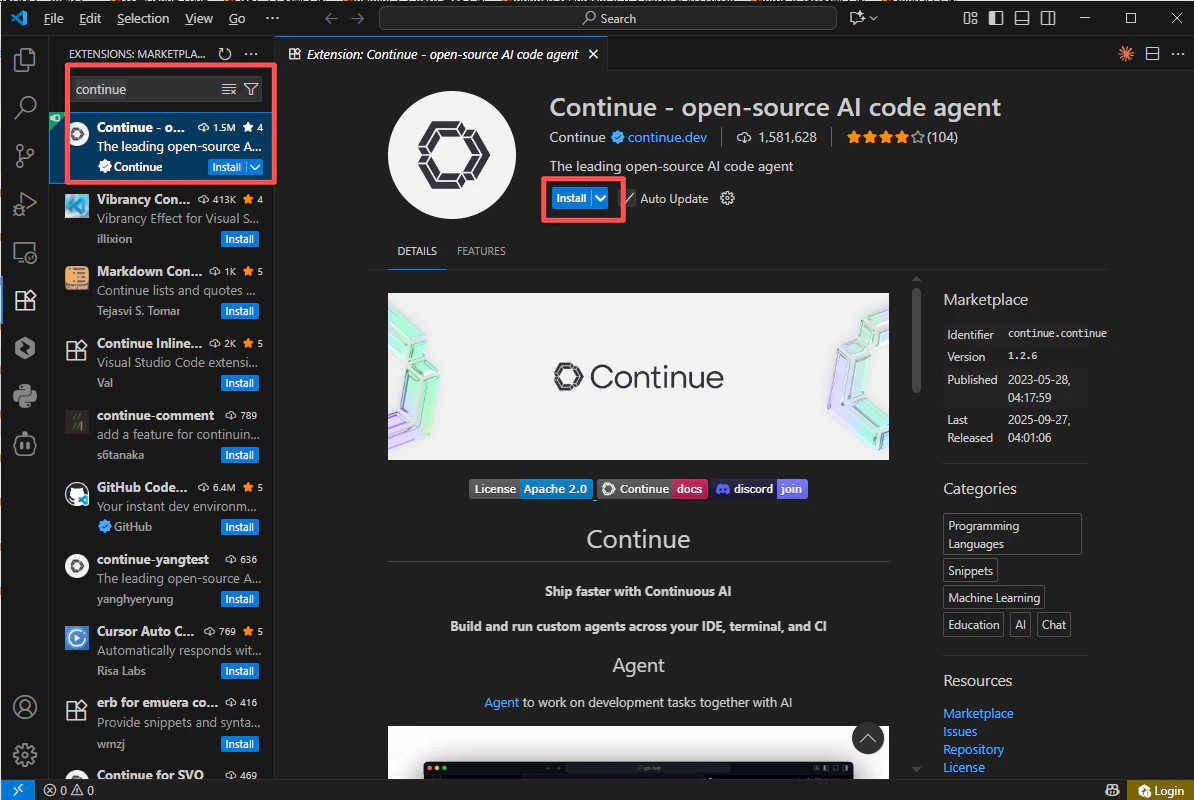
    Знайдіть **Continue** у панелі розширень VS Code і встановіть його.
    <Frame>
      <img src="https://mintcdn.com/cometapi/SZhlxZhCnMLn__BW/images/integrations/810968_362621.png?fit=max&auto=format&n=SZhlxZhCnMLn__BW&q=85&s=6e94ab329f18d8e02387dc6fe8c798e3" alt="Панель розширень VS Code з розширенням Continue" width="1194" height="800" data-path="images/integrations/810968_362621.png" />
    </Frame>
  </Step>

  <Step title="Отримайте свій API key CometAPI">
    Увійдіть до [панелі CometAPI](https://www.cometapi.com/console). Натисніть **Add API Key** і скопіюйте свій ключ.


    <Frame>
      <img src="https://mintcdn.com/cometapi/SZhlxZhCnMLn__BW/images/overview/810968_364191.png?fit=max&auto=format&n=SZhlxZhCnMLn__BW&q=85&s=aef81a83f29f8eb16655ed4060425f50" alt="Панель CometAPI — Add API Key" width="3824" height="1892" data-path="images/overview/810968_364191.png" />
    </Frame>

    <Frame>
      <img src="https://mintcdn.com/cometapi/HhtmQffktazbxUvS/images/overview/810968_364193.png?fit=max&auto=format&n=HhtmQffktazbxUvS&q=85&s=d893f659267150d0faf45f99eb5dffc1" alt="API key і base URL CometAPI" width="2434" height="1232" data-path="images/overview/810968_364193.png" />
    </Frame>
  </Step>

  <Step title="Додайте CometAPI як провайдера">
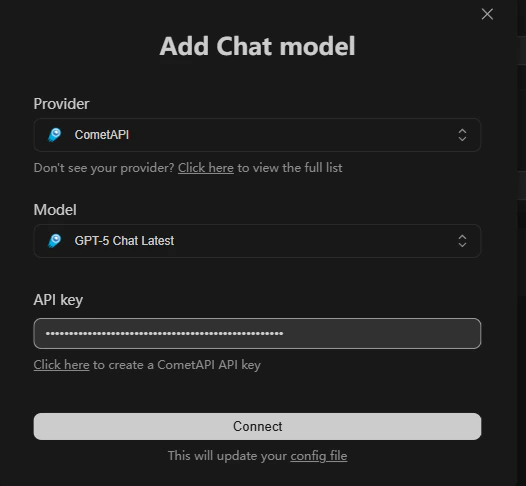
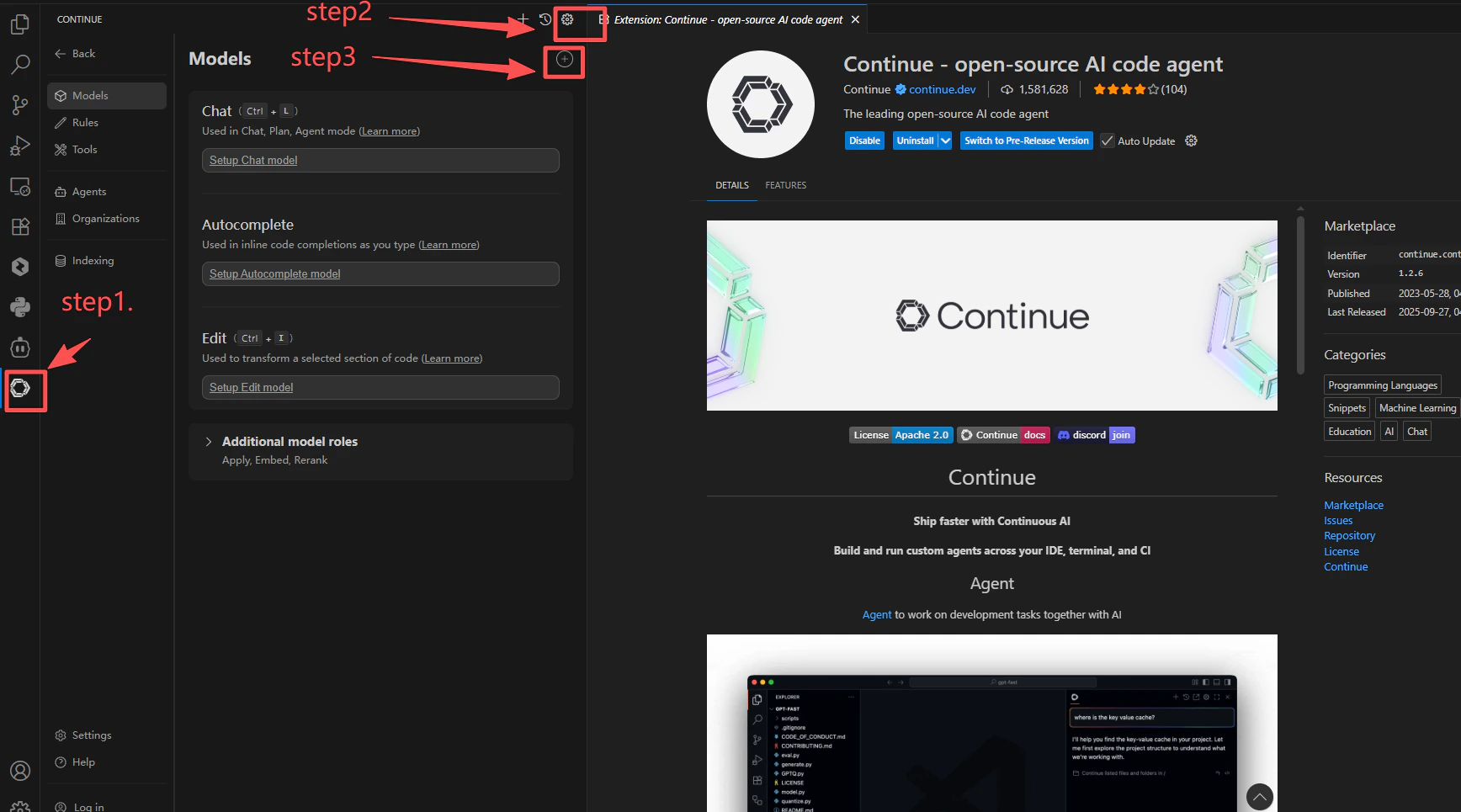
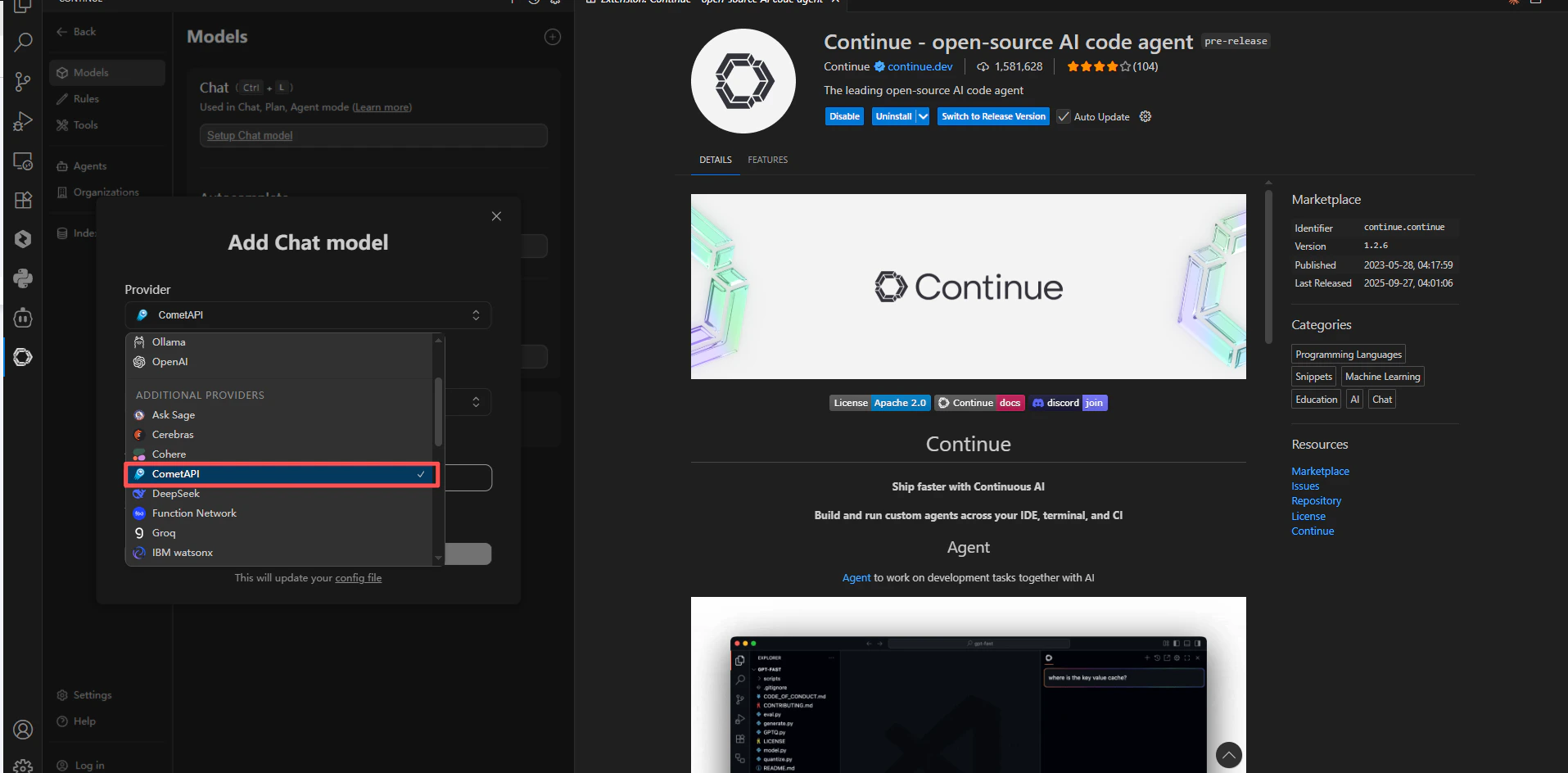
    Відкрийте **Settings** Continue → **Models** → **+**. Знайдіть `cometapi` у списку провайдерів і виберіть його. Вставте свій API key і виберіть моделі, які хочете використовувати.
    <Frame>
      <img src="https://mintcdn.com/cometapi/SZhlxZhCnMLn__BW/images/integrations/810968_362622.png?fit=max&auto=format&n=SZhlxZhCnMLn__BW&q=85&s=7d9ad8d97240036f8eabad68ac872f7e" alt="Налаштування Continue — пошук провайдера з вибраним cometapi" width="1736" height="965" data-path="images/integrations/810968_362622.png" />
    </Frame>

    <Frame>
      <img src="https://mintcdn.com/cometapi/SZhlxZhCnMLn__BW/images/integrations/810968_362623.png?fit=max&auto=format&n=SZhlxZhCnMLn__BW&q=85&s=53d3b5b690328196cbc0c7aeeb39ad9b" alt="Конфігурація провайдера CometAPI у Continue" width="1915" height="944" data-path="images/integrations/810968_362623.png" />
    </Frame>

    <Frame>
      <img src="https://mintcdn.com/cometapi/SZhlxZhCnMLn__BW/images/integrations/810968_362624.png?fit=max&auto=format&n=SZhlxZhCnMLn__BW&q=85&s=e9fee9dd542d42a4415f0a41827124e5" alt="Вибір моделі в Continue з провайдером CometAPI" width="526" height="486" data-path="images/integrations/810968_362624.png" />
    </Frame>
  </Step>

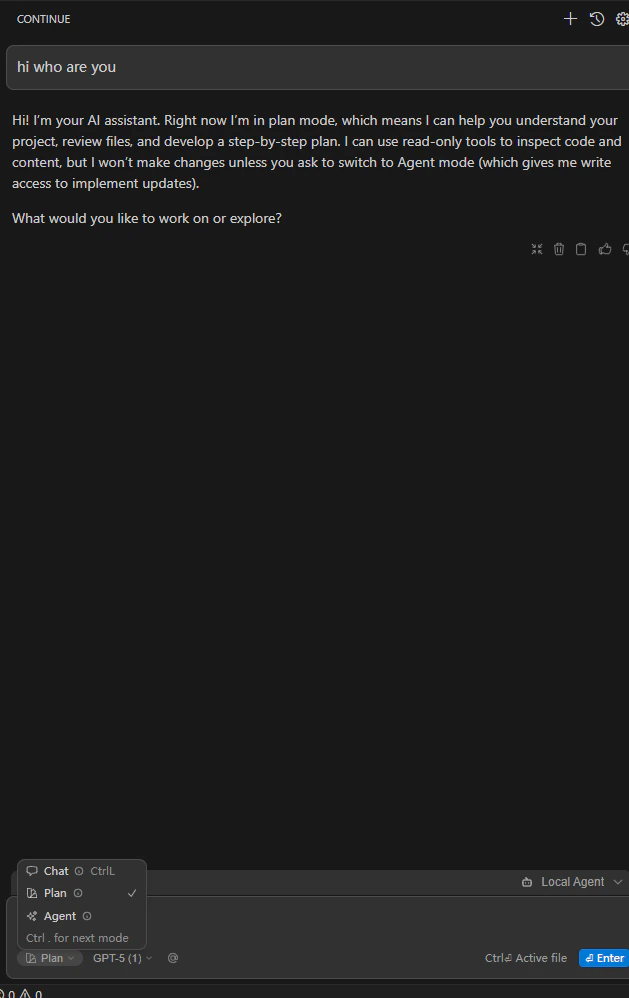
  <Step title="Перевірте підключення">
    Відкрийте файл і надішліть тестовий Prompt через Continue. Успішна відповідь підтвердить, що інтеграція працює.
    <Frame>
      <img src="https://mintcdn.com/cometapi/SZhlxZhCnMLn__BW/images/integrations/810968_362626.png?fit=max&auto=format&n=SZhlxZhCnMLn__BW&q=85&s=765ce3c34f80b122bab7b763d970bd4f" alt="Чат Continue з успішною відповіддю від CometAPI" width="629" height="998" data-path="images/integrations/810968_362626.png" />
    </Frame>
  </Step>
</Steps>

<Note>
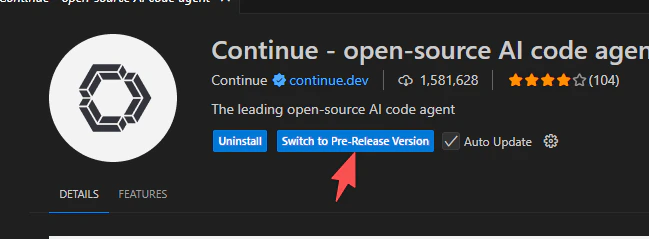
  Якщо CometAPI не відображається у списку провайдерів, перемкніть Continue на версію **Preview** і знову відкрийте розширення.
  <Frame>
    <img src="https://mintcdn.com/cometapi/SZhlxZhCnMLn__BW/images/integrations/810968_362627.png?fit=max&auto=format&n=SZhlxZhCnMLn__BW&q=85&s=54d4157b18c9134ec966daf66ec36e45" alt="Панель розширення Continue з перемикачем версії Preview" width="649" height="239" data-path="images/integrations/810968_362627.png" />
  </Frame>
</Note>

<script type="application/ld+json">
  {`
    {
    "@context": "https://schema.org",
    "@graph": [
      {
        "@type": "HowTo",
        "@id": "https://apidoc.cometapi.com/integrations/continue#howto",
        "name": "Використання Continue з CometAPI",
        "description": "Скористайтеся цим посібником, щоб налаштувати Continue з CometAPI, указавши base URL, API key і параметри моделі або провайдера.",
        "step": [
          {
            "@type": "HowToStep",
            "@id": "https://apidoc.cometapi.com/integrations/continue#step-1",
            "position": 1,
            "name": "Встановіть Continue у VS Code",
            "text": "Виконайте крок «Встановіть Continue у VS Code» у посібнику «Використання Continue з CometAPI»."
          },
          {
            "@type": "HowToStep",
            "@id": "https://apidoc.cometapi.com/integrations/continue#step-2",
            "position": 2,
            "name": "Отримайте свій API key CometAPI",
            "text": "Створіть або відкрийте свій акаунт CometAPI, а потім скопіюйте активний API key з панелі."
          },
          {
            "@type": "HowToStep",
            "@id": "https://apidoc.cometapi.com/integrations/continue#step-3",
            "position": 3,
            "name": "Додайте CometAPI як провайдера",
            "text": "Виконайте крок «Додайте CometAPI як провайдера» у посібнику «Використання Continue з CometAPI»."
          },
          {
            "@type": "HowToStep",
            "@id": "https://apidoc.cometapi.com/integrations/continue#step-4",
            "position": 4,
            "name": "Перевірте підключення",
            "text": "Виберіть актуальний model ID на сторінці моделей CometAPI, а потім надішліть тестовий запит з інтеграції."
          }
        ]
      },
      {
        "@type": "BreadcrumbList",
        "itemListElement": [
          {
            "@type": "ListItem",
            "position": 1,
            "name": "Документація CometAPI",
            "item": "https://apidoc.cometapi.com/"
          },
          {
            "@type": "ListItem",
            "position": 2,
            "name": "Інтеграції",
            "item": "https://apidoc.cometapi.com/integrations"
          },
          {
            "@type": "ListItem",
            "position": 3,
            "name": "Використання Continue з CometAPI",
            "item": "https://apidoc.cometapi.com/integrations/continue"
          }
        ]
      }
    ]
    }
    `}
</script>