> ## Documentation Index
> Fetch the complete documentation index at: https://apidoc.cometapi.com/llms.txt
> Use this file to discover all available pages before exploring further.

# Sử dụng ChatHub với CometAPI

> Sử dụng hướng dẫn này để cấu hình ChatHub với CometAPI bằng cách thiết lập base URL, API key và các tùy chọn model hoặc provider.

[ChatHub](https://chathub.gg) là một tiện ích mở rộng trên trình duyệt cho phép bạn trò chuyện với nhiều model AI cùng lúc. Thêm CometAPI làm provider tương thích với OpenAI, sau đó chọn model bạn muốn từ [trang Models](/vi/overview/models).

## Điều kiện tiên quyết

* Đã cài đặt tiện ích mở rộng trình duyệt [ChatHub](https://chathub.gg)
* Một tài khoản [CometAPI](https://www.cometapi.com) với API key đang hoạt động

## Thiết lập

<Steps>
  <Step title="Lấy CometAPI API key của bạn">
    Đăng nhập vào [bảng điều khiển CometAPI](https://www.cometapi.com/console). Nhấp vào **Add API Key** và sao chép key cùng base URL của bạn (`https://api.cometapi.com`).


    <Frame>
      <img src="https://mintcdn.com/cometapi/SZhlxZhCnMLn__BW/images/overview/810968_364191.png?fit=max&auto=format&n=SZhlxZhCnMLn__BW&q=85&s=aef81a83f29f8eb16655ed4060425f50" alt="Bảng điều khiển CometAPI — Add API Key" width="3824" height="1892" data-path="images/overview/810968_364191.png" />
    </Frame>

    <Frame>
      <img src="https://mintcdn.com/cometapi/HhtmQffktazbxUvS/images/overview/810968_364193.png?fit=max&auto=format&n=HhtmQffktazbxUvS&q=85&s=d893f659267150d0faf45f99eb5dffc1" alt="CometAPI API key và base URL" width="2434" height="1232" data-path="images/overview/810968_364193.png" />
    </Frame>
  </Step>

  <Step title="Cấu hình OpenAI trong ChatHub">
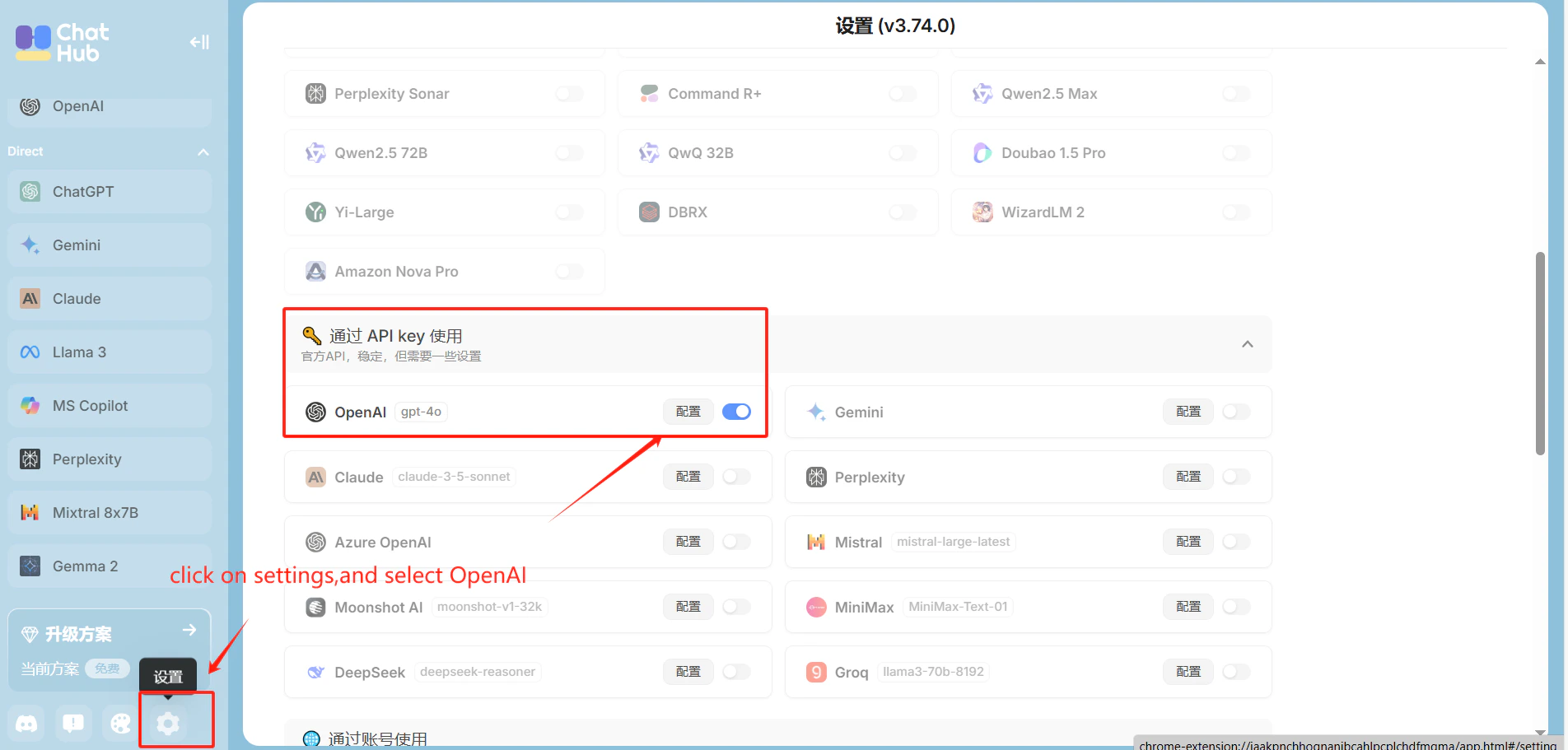
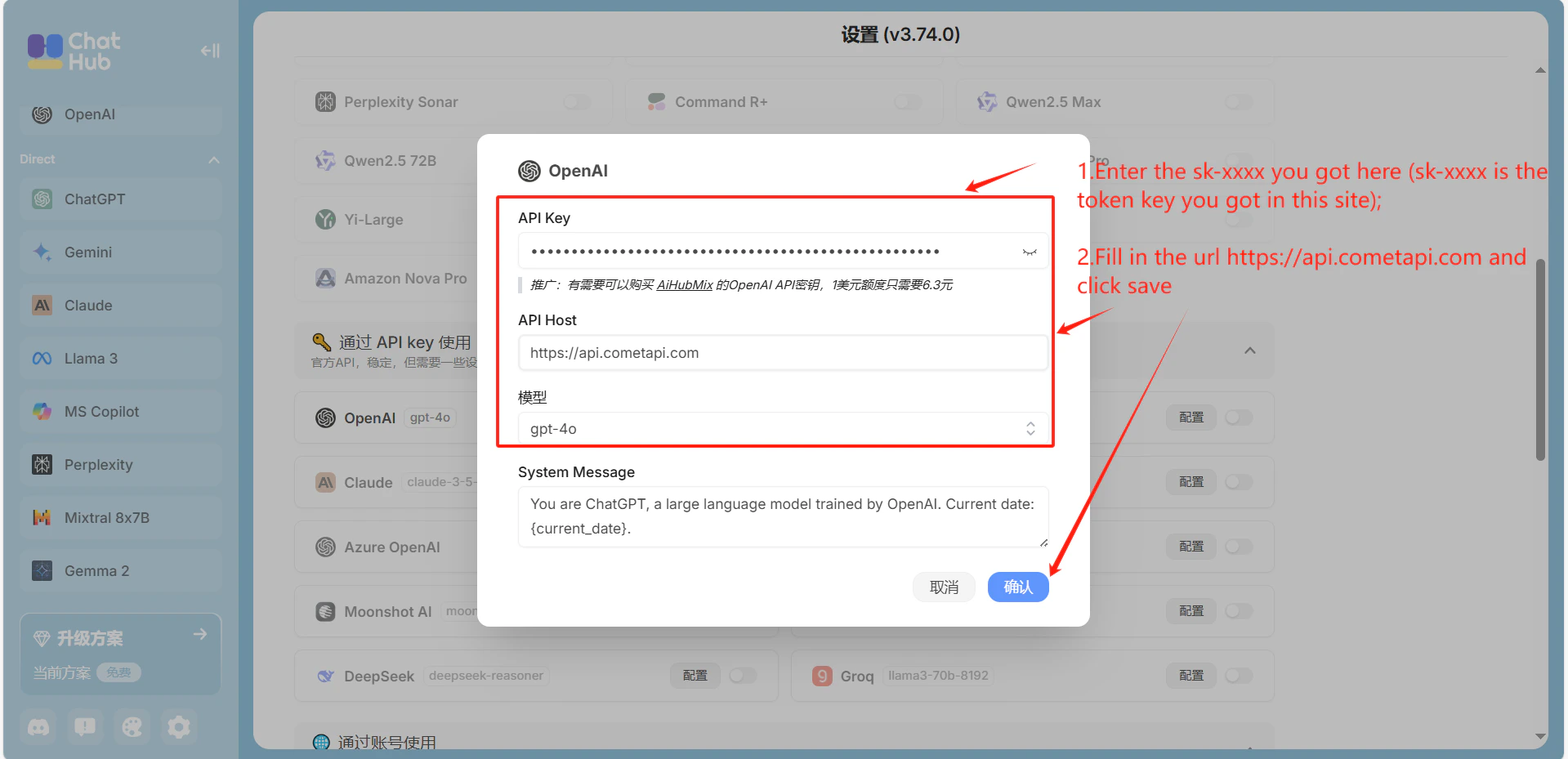
    Mở **Settings** → **OpenAI** trong ChatHub. Nhập `https://api.cometapi.com` vào trường **API Host**, dán CometAPI key của bạn vào **API Key**, rồi nhấp vào **Save**.
    <Frame>
      <img src="https://mintcdn.com/cometapi/mA1ovj6s0e3RM42l/images/integrations/810968_351578.png?fit=max&auto=format&n=mA1ovj6s0e3RM42l&q=85&s=c4e9ea57615cc53112942cd0eae366c8" alt="Cài đặt OpenAI trong ChatHub với host CometAPI đã được điền" width="1904" height="911" data-path="images/integrations/810968_351578.png" />
    </Frame>

    <Frame>
      <img src="https://mintcdn.com/cometapi/mA1ovj6s0e3RM42l/images/integrations/810968_351579.png?fit=max&auto=format&n=mA1ovj6s0e3RM42l&q=85&s=dd5c0367a6422ab9eaeea639db6dd55d" alt="Trường API key đã được điền trong cài đặt ChatHub" width="1919" height="929" data-path="images/integrations/810968_351579.png" />
    </Frame>
  </Step>

  <Step title="Kiểm tra kết nối">
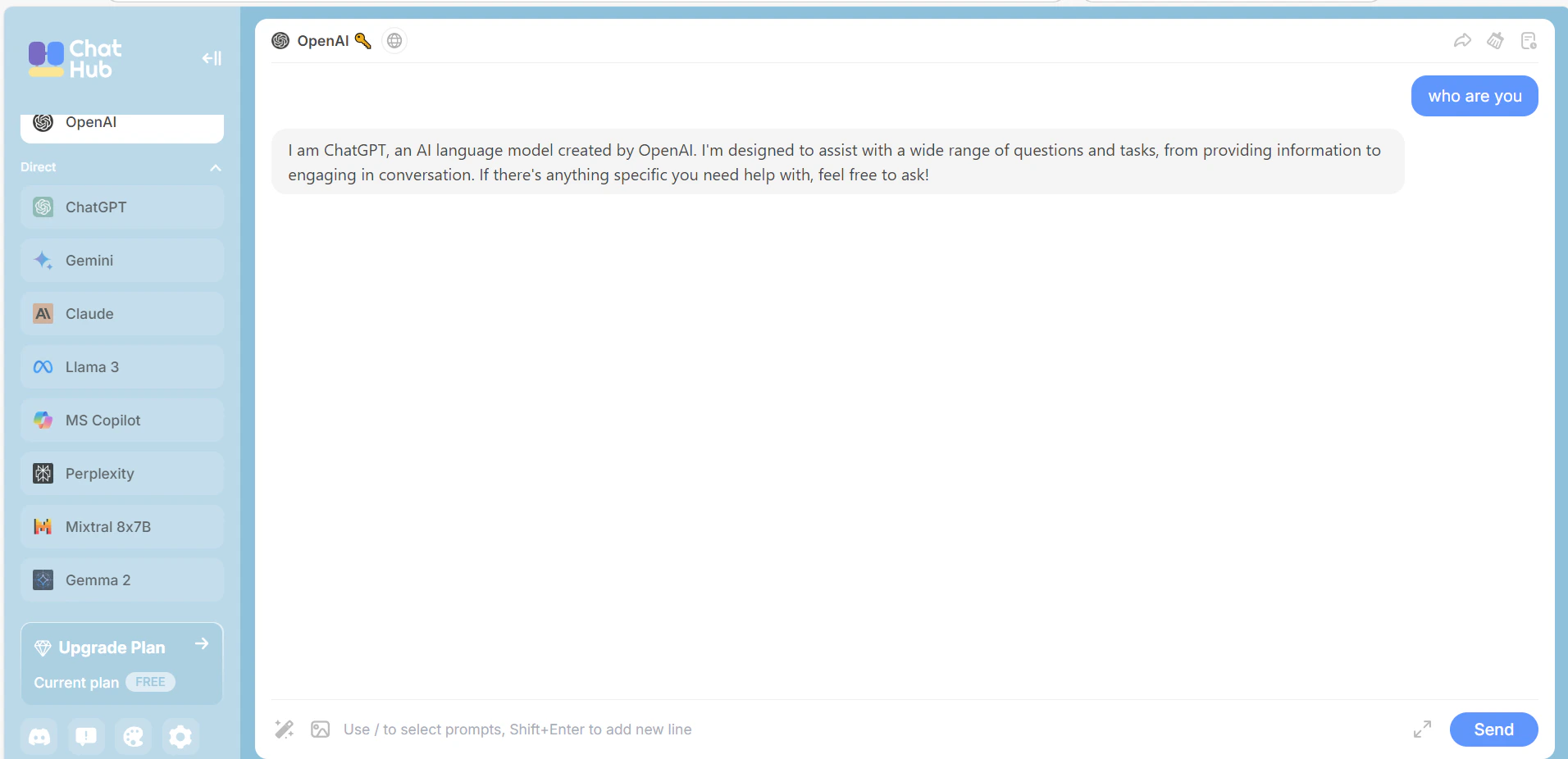
    Gửi một tin nhắn thử trong ChatHub. Phản hồi thành công xác nhận rằng tích hợp đang hoạt động.
    <Frame>
      <img src="https://mintcdn.com/cometapi/mA1ovj6s0e3RM42l/images/integrations/810968_351580.png?fit=max&auto=format&n=mA1ovj6s0e3RM42l&q=85&s=46845534e1d30cb2d4897b5d9047b0bf" alt="ChatHub hiển thị phản hồi thành công từ CometAPI" width="1912" height="926" data-path="images/integrations/810968_351580.png" />
    </Frame>
  </Step>
</Steps>

<script type="application/ld+json">
  {`
    {
    "@context": "https://schema.org",
    "@graph": [
      {
        "@type": "HowTo",
        "@id": "https://apidoc.cometapi.com/integrations/chathub#howto",
        "name": "Sử dụng ChatHub với CometAPI",
        "description": "Sử dụng hướng dẫn này để cấu hình ChatHub với CometAPI bằng cách thiết lập base URL, API key và các tùy chọn model hoặc provider.",
        "step": [
          {
            "@type": "HowToStep",
            "@id": "https://apidoc.cometapi.com/integrations/chathub#step-1",
            "position": 1,
            "name": "Lấy CometAPI API key của bạn",
            "text": "Tạo hoặc mở tài khoản CometAPI của bạn, sau đó sao chép một API key đang hoạt động từ bảng điều khiển."
          },
          {
            "@type": "HowToStep",
            "@id": "https://apidoc.cometapi.com/integrations/chathub#step-2",
            "position": 2,
            "name": "Cấu hình OpenAI trong ChatHub",
            "text": "Hoàn thành bước Cấu hình OpenAI trong ChatHub trong hướng dẫn Sử dụng ChatHub với CometAPI."
          },
          {
            "@type": "HowToStep",
            "@id": "https://apidoc.cometapi.com/integrations/chathub#step-3",
            "position": 3,
            "name": "Kiểm tra kết nối",
            "text": "Chọn một model ID hiện tại từ trang Models của CometAPI, sau đó gửi một yêu cầu thử từ phần tích hợp."
          }
        ]
      },
      {
        "@type": "BreadcrumbList",
        "itemListElement": [
          {
            "@type": "ListItem",
            "position": 1,
            "name": "Tài liệu CometAPI",
            "item": "https://apidoc.cometapi.com/"
          },
          {
            "@type": "ListItem",
            "position": 2,
            "name": "Tích hợp",
            "item": "https://apidoc.cometapi.com/integrations"
          },
          {
            "@type": "ListItem",
            "position": 3,
            "name": "Sử dụng ChatHub với CometAPI",
            "item": "https://apidoc.cometapi.com/integrations/chathub"
          }
        ]
      }
    ]
    }
    `}
</script>
