> ## Documentation Index
> Fetch the complete documentation index at: https://apidoc.cometapi.com/llms.txt
> Use this file to discover all available pages before exploring further.
# Kết nối Flowise với CometAPI
> Sử dụng hướng dẫn này để kết nối Flowise với CometAPI bằng cách thiết lập base URL, API key, và các tùy chọn model hoặc provider.
FlowiseAI là một nền tảng low-code để xây dựng các ứng dụng LLM theo cách trực quan. Sử dụng node **ChatCometAPI** gốc để kết nối CometAPI với chatflow, hệ thống hỏi đáp và quy trình RAG gọi các text chat model.
Hướng dẫn này bao gồm quy trình text chat và RAG. Không bao gồm quy trình tạo ảnh.
## Điều kiện tiên quyết
* Một tài khoản CometAPI với API key đang hoạt động - [lấy tại đây](https://www.cometapi.com/console/token)
* Một tài khoản FlowiseAI hoặc một phiên bản Flowise tự lưu trữ - [đăng nhập vào Flowise Cloud](https://cloud.flowiseai.com/chatflows)
* Một model ID text hiện tại từ [trang Models của CometAPI](/vi/overview/models)
* Với RAG, cần có một nguồn tài liệu cùng với một embeddings provider và vector store được Flowise hỗ trợ
## Cấu hình ChatCometAPI
Đăng nhập vào [CometAPI console](https://www.cometapi.com/console/token). Nhấp **Add API Key** và sao chép CometAPI API key của bạn.

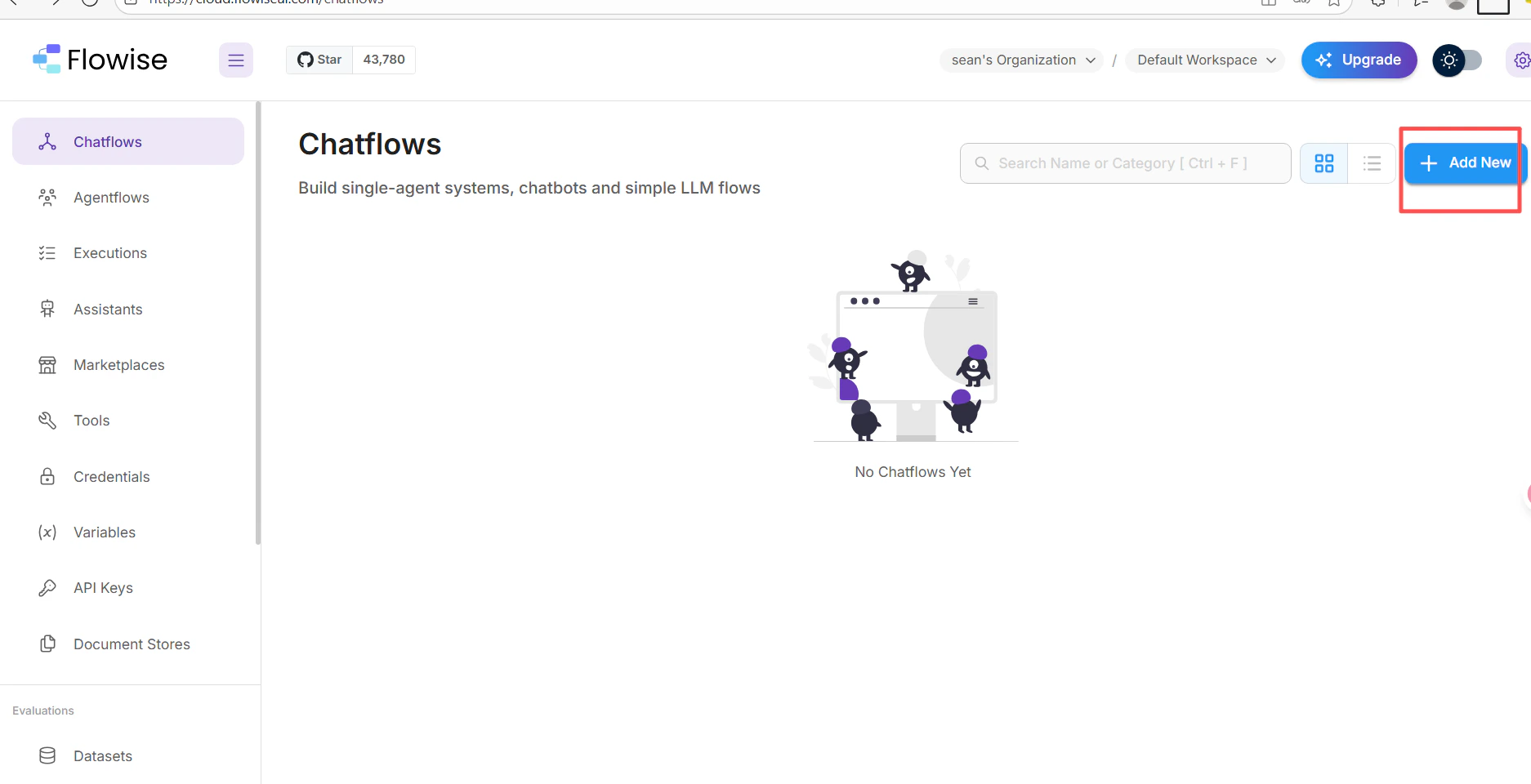
 1. Trong canvas chatflow của FlowiseAI, nhấp **Add New**.
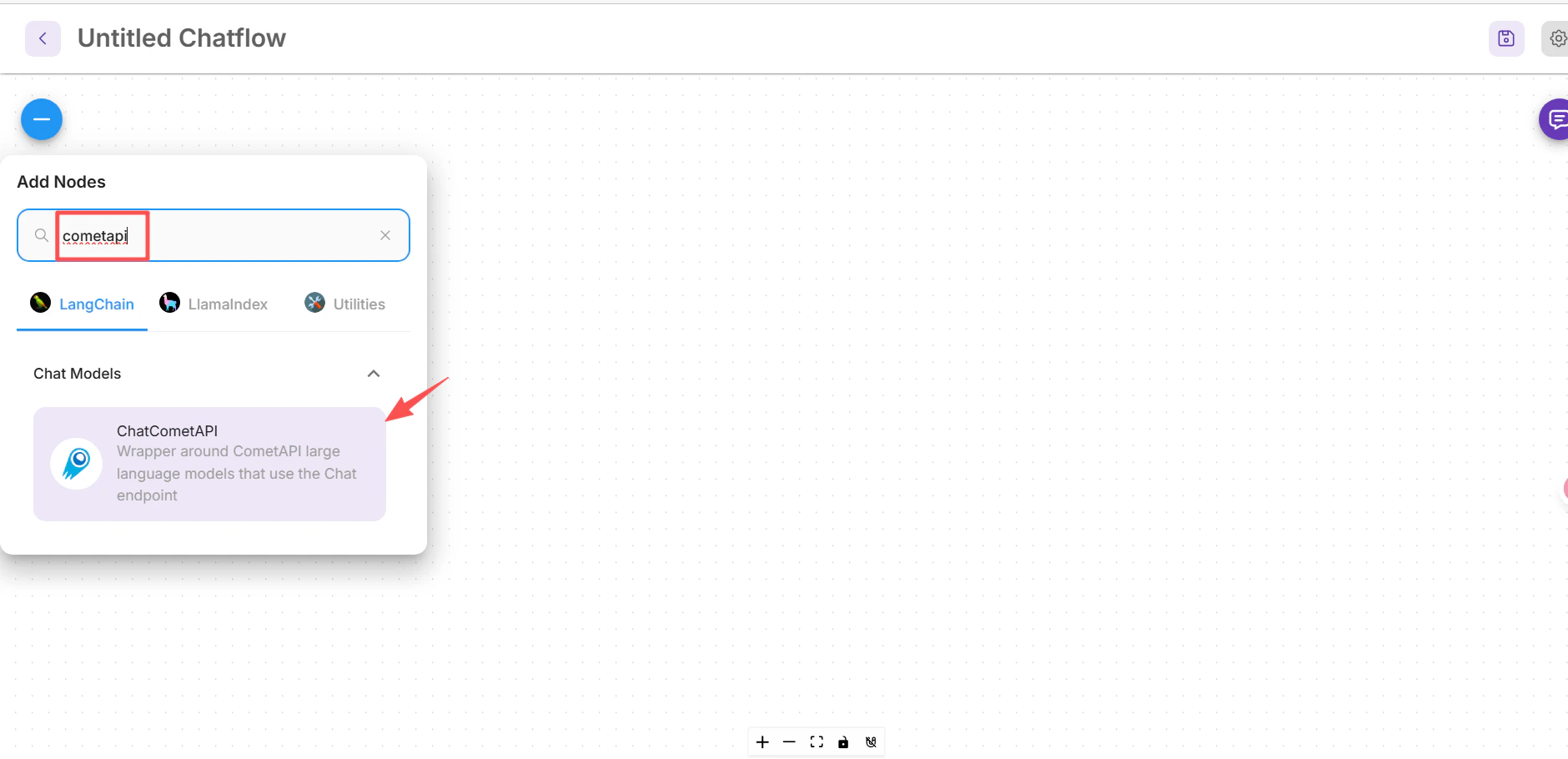
 2. Tìm kiếm **cometapi** và chọn node **ChatCometAPI**.
 3. Kéo node này vào canvas.
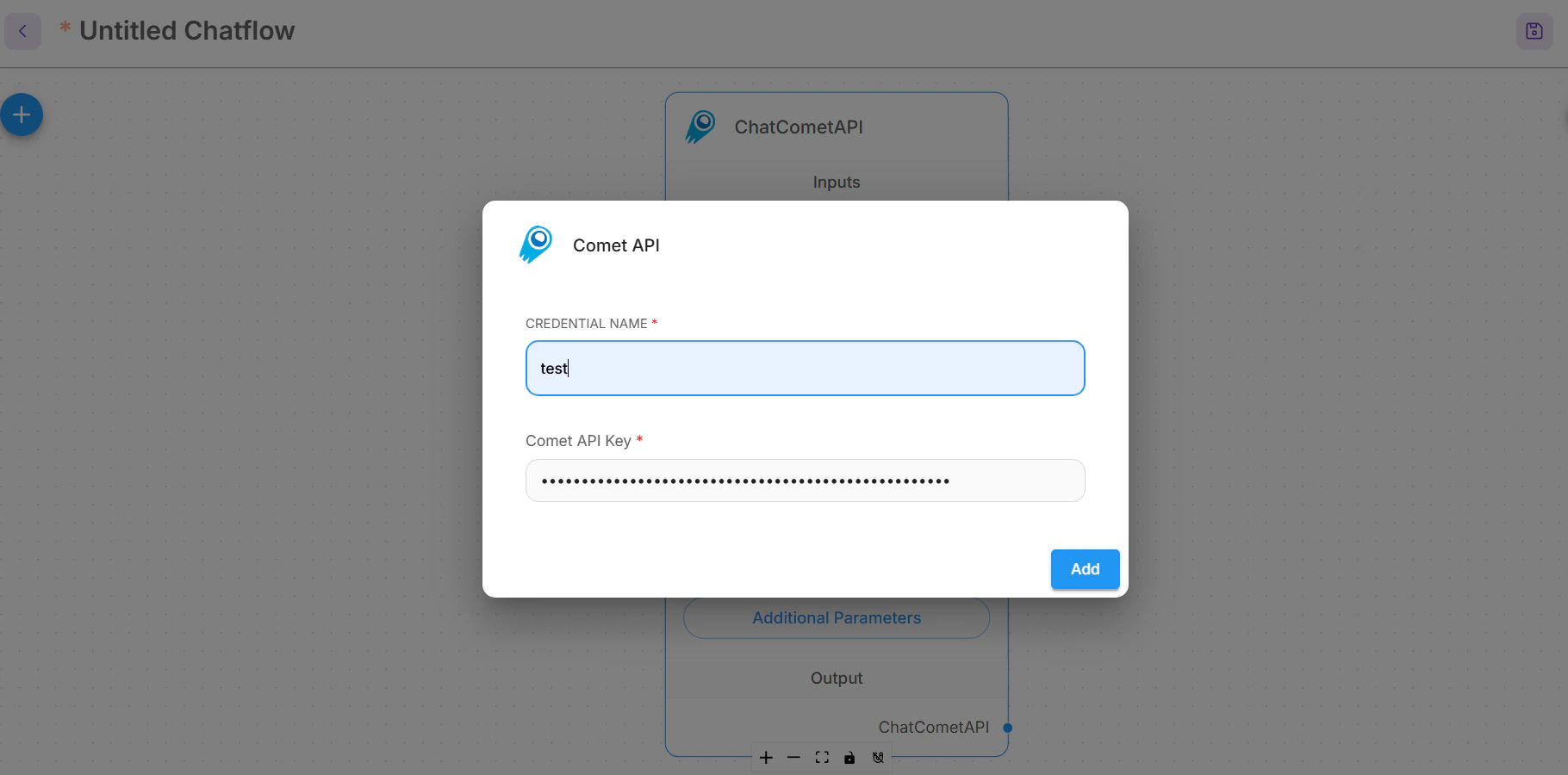
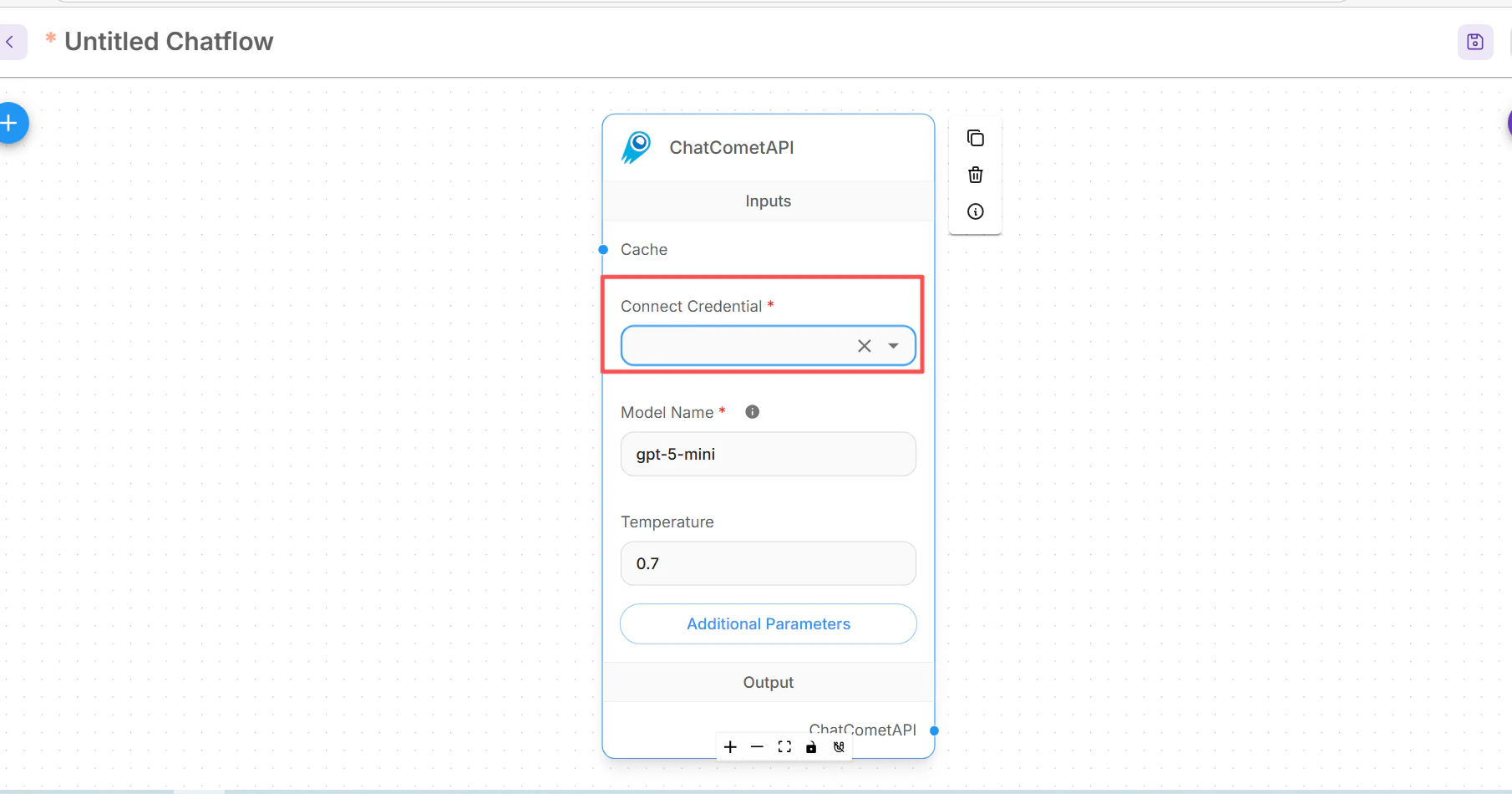 Trong node ChatCometAPI, mở **Connect Credential**, chọn **Create New**, dán CometAPI API key của bạn, rồi lưu credential.
 Mở rộng **Additional Parameters** trên node ChatCometAPI.
Nếu bản dựng Flowise của bạn hiển thị trường **Base Path**, hãy đặt thành:
```text theme={null}
https://api.cometapi.com/v1/
```
Nếu thay vào đó nó hiển thị **Base Options**, hãy thêm một mục `basePath`:
```json theme={null}
{
"basePath": "https://api.cometapi.com/v1/"
}
```
Đặt **Model Name** thành đúng text model ID mà bạn muốn gọi, ví dụ `your-model-id`, và chỉ điều chỉnh **Temperature** nếu quy trình của bạn cần mức độ biến thiên nhiều hơn hoặc ít hơn.
## Tạo một chatflow cơ bản
Thêm một node **Prompt Template** và xác định prompt mà chatflow của bạn sẽ gửi đến model.
```text theme={null}
Question: {question}
Answer clearly and concisely.
```
Mở rộng **Additional Parameters** trên node ChatCometAPI.
Nếu bản dựng Flowise của bạn hiển thị trường **Base Path**, hãy đặt thành:
```text theme={null}
https://api.cometapi.com/v1/
```
Nếu thay vào đó nó hiển thị **Base Options**, hãy thêm một mục `basePath`:
```json theme={null}
{
"basePath": "https://api.cometapi.com/v1/"
}
```
Đặt **Model Name** thành đúng text model ID mà bạn muốn gọi, ví dụ `your-model-id`, và chỉ điều chỉnh **Temperature** nếu quy trình của bạn cần mức độ biến thiên nhiều hơn hoặc ít hơn.
## Tạo một chatflow cơ bản
Thêm một node **Prompt Template** và xác định prompt mà chatflow của bạn sẽ gửi đến model.
```text theme={null}
Question: {question}
Answer clearly and concisely.
```
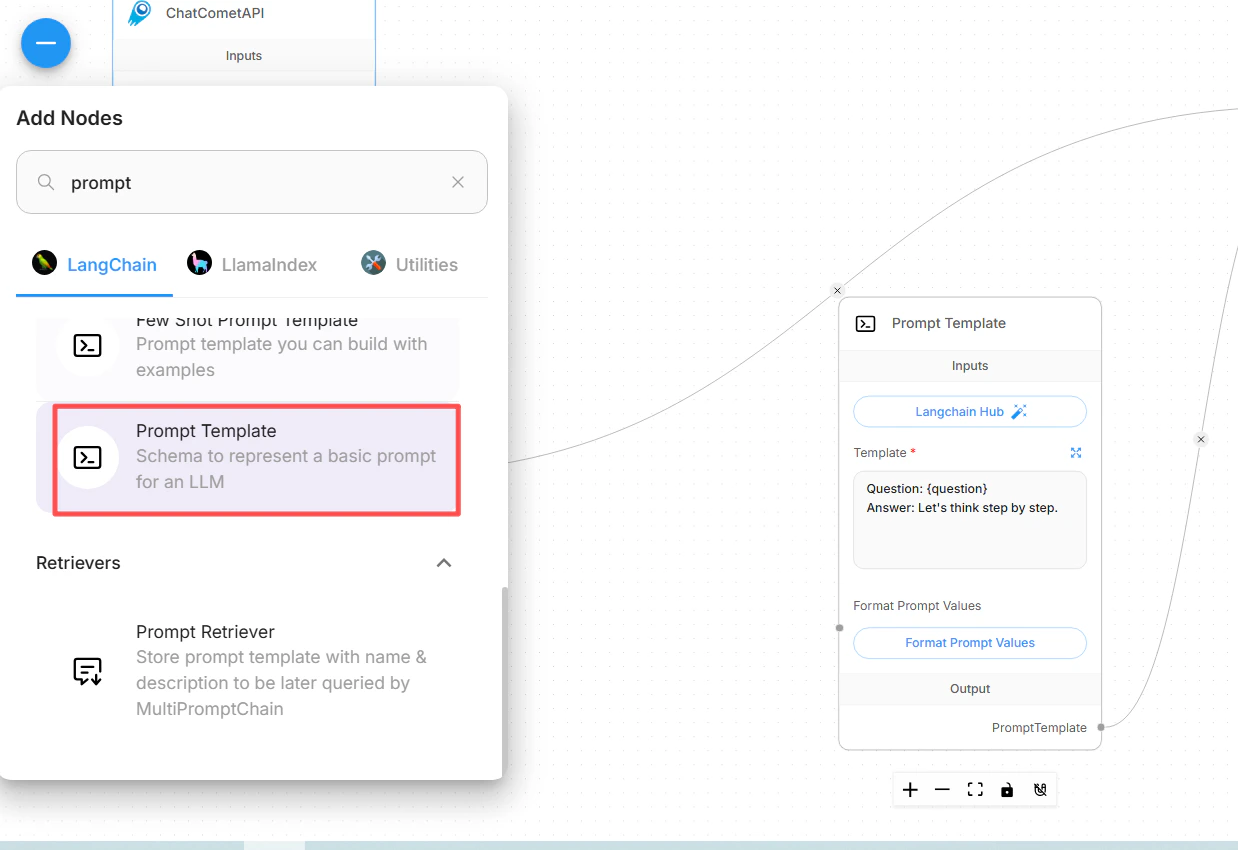
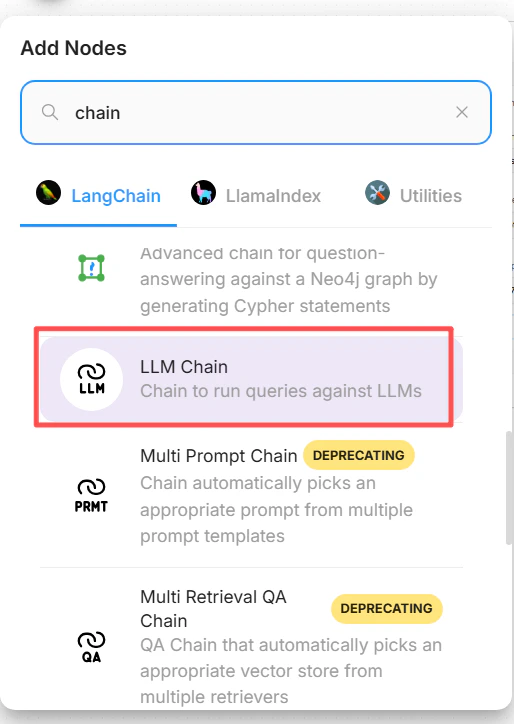
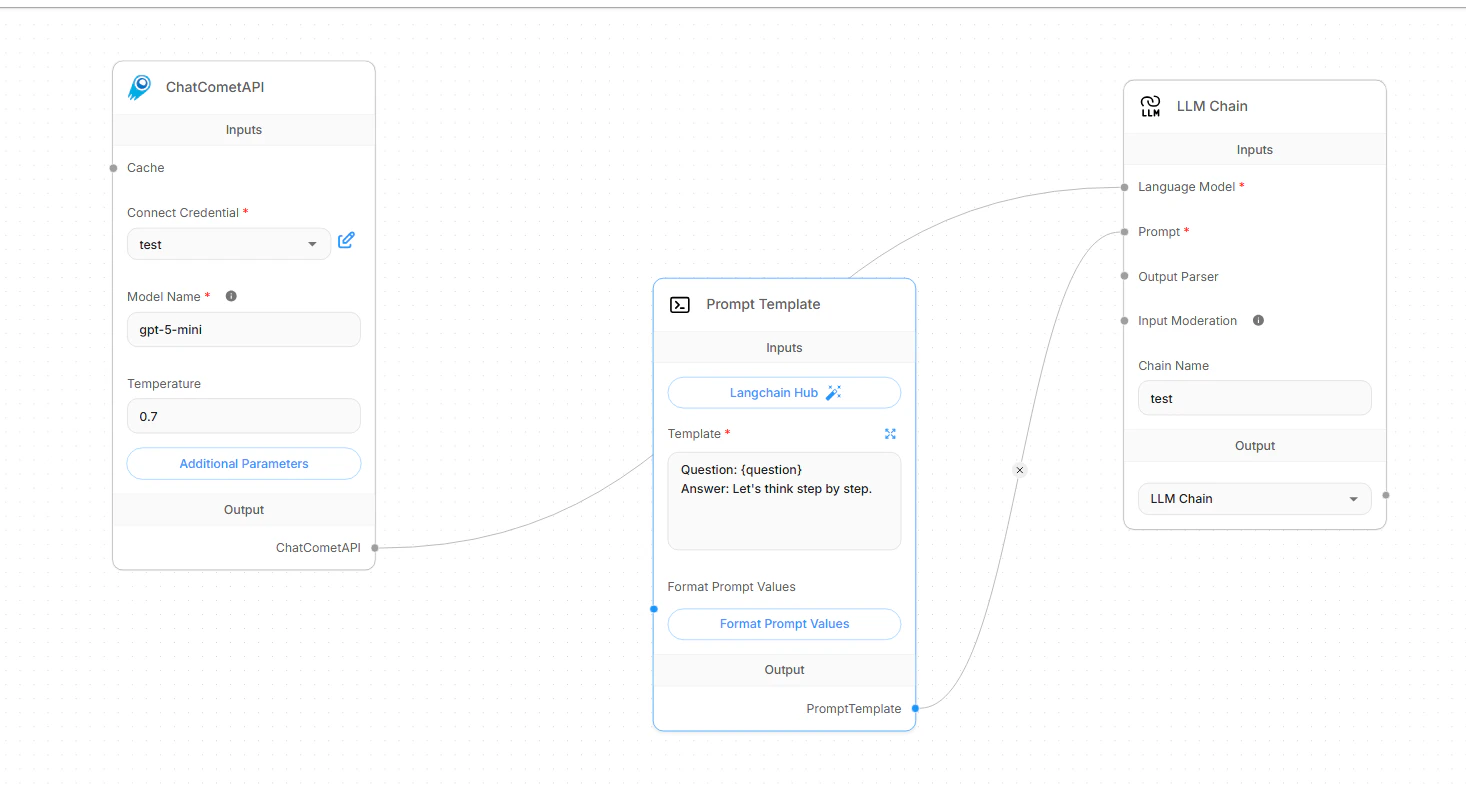
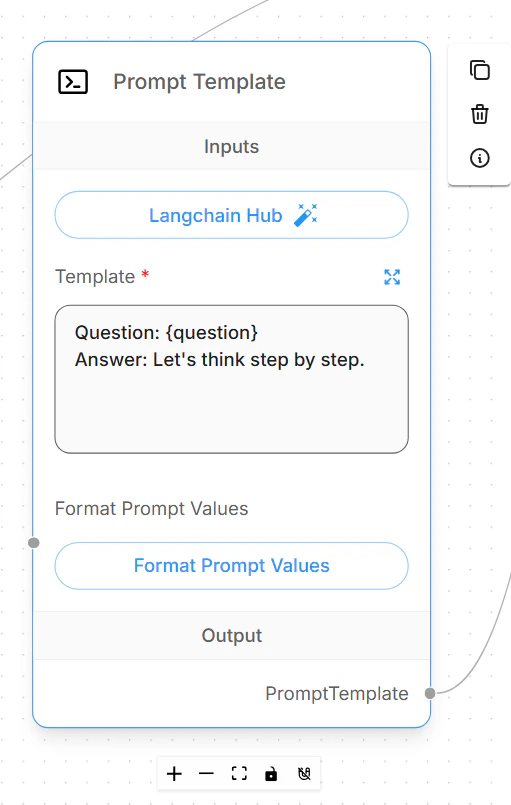 Thêm một node **LLM Chain**. Kết nối node **ChatCometAPI** với đầu vào **Language Model** của chain, sau đó kết nối node **Prompt Template** với đầu vào **Prompt** của chain.
 Lưu chatflow, mở phần xem trước chat và gửi một câu hỏi kiểm tra ngắn. Một cấu hình hoạt động bình thường sẽ trả về câu trả lời văn bản thông thường từ model CometAPI đã chọn.
 ## Chuyển model ID
Để chuyển model, giữ nguyên credential và base path của CometAPI, sau đó chỉ thay đổi trường model ID của ChatCometAPI.
Sử dụng model ID chính xác từ [trang CometAPI Models](/vi/overview/models). Tránh sao chép tên hiển thị, tên nhà cung cấp hoặc khoảng trắng thừa.
| Trường hợp sử dụng | Giá trị model ID |
| ----------------------- | ------------------------- |
| Họ model chat tổng quát | `your-chat-model-id` |
| Họ model suy luận | `your-reasoning-model-id` |
| Họ model lập trình | `your-coding-model-id` |
Sau khi thay đổi model ID, hãy lưu chatflow và chạy một prompt kiểm tra ngắn. Nếu bạn duy trì nhiều flow production, trước tiên hãy nhân bản chatflow và đặt cho mỗi bản sao một tên phản ánh họ model.
## Cấu hình retrieval-augmented generation
Flowise RAG có hai phần: trước tiên chuẩn bị và upsert tài liệu trong **Document Stores**, sau đó kết nối retriever đã được chuẩn bị với một chatflow. ChatCometAPI là chat model viết ra câu trả lời cuối cùng; Document Store vẫn cần một embeddings provider được Flowise hỗ trợ và vector store.
Trong Flowise, mở **Document Stores** và tạo một store mới. Thêm một document loader, chẳng hạn như **File Loader**, **PDF Loader**, **Web Scraper** hoặc loader khác phù hợp với nguồn của bạn. Thêm một text splitter khi tài liệu đủ dài để cần chia chunk, sau đó nhấp **Process** để xem trước các chunk được tạo.
Nhấp **Upsert** hoặc **Upsert All Chunks**. Chọn:
* **Embeddings**: một node embeddings của Flowise tương thích với dữ liệu và vector store của bạn.
* **Vector Store**: cơ sở dữ liệu vector nơi Flowise sẽ lưu trữ document embeddings.
* **Record Manager**: tùy chọn. Dùng khi bạn muốn các lần upsert lặp lại tránh tạo bản ghi trùng lặp.
Giữ cho dimension của embedding model khớp với dimension của index trong vector store. Sau khi upsert hoàn tất, dùng bài kiểm tra retrieval query của Document Store để xác nhận rằng các chunk liên quan được trả về trước khi xây dựng chatflow.
Trong một chatflow, thêm node **Document Store (Vector)** hoặc **Document Store Retriever** và chọn Document Store đã được xử lý. Đặt **Top K** thành số lượng chunk mà bạn muốn Flowise truy xuất cho mỗi câu hỏi.
Thêm **Conversational Retrieval QA Chain** và kết nối:
* Đầu vào **Language Model** từ **ChatCometAPI**.
* Đầu vào **Vector Store Retriever** từ retriever của Document Store.
* **Memory** chỉ khi chatflow của bạn cần lịch sử hội thoại.
Bật **Return Source Documents** khi bạn muốn câu trả lời bao gồm trích dẫn hoặc các chunk nguồn đã được truy xuất. Lưu flow và đặt một câu hỏi mà câu trả lời chỉ tồn tại trong tài liệu đã tải lên.
## Khắc phục sự cố
Hãy xác nhận rằng phiên bản Flowise của bạn có tích hợp chat model **ChatCometAPI**. Trong các bản triển khai Flowise cũ hơn hoặc đã được tùy chỉnh, hãy cập nhật Flowise hoặc kiểm tra xem quản trị viên có vô hiệu hóa tích hợp này hay không.
Đặt CometAPI base path thành `https://api.cometapi.com/v1/`. Trong một số bản dựng Flowise, đây là trường **Base Path**. Trong các bản khác, hãy thêm `basePath` bên trong **Base Options**.
Không dùng `https://api.cometapi.com` cho chatflow ChatCometAPI, vì chat node gọi các route OpenAI-compatible `/chat/completions` dưới `/v1`.
Sao chép lại key từ [CometAPI console](https://www.cometapi.com/console/token), tạo một credential Flowise mới, và đảm bảo chatflow sử dụng credential đó. Nếu cùng key đó hoạt động trong các lệnh gọi API trực tiếp nhưng thất bại trong Flowise, hãy kiểm tra xem có phải Flowise vẫn đang dùng một credential cũ hơn được gắn với node hay không.
Thay giá trị model ID trong node ChatCometAPI bằng một model ID văn bản hiện tại chính xác từ [trang Models của CometAPI](/vi/overview/models). Giá trị này không được bao gồm dấu ngoặc kép, tiền tố provider, nhãn hiển thị, hoặc khoảng trắng ở cuối.
ChatCometAPI là một chat model node cho các workflow văn bản. Hãy dùng nó cho chat, chain, agent và tạo câu trả lời RAG. Không sử dụng thiết lập Flowise này cho các node tạo ảnh hoặc các workflow chỉ dành cho ảnh.
Trước tiên, hãy kiểm thử truy vấn truy xuất của Document Store trước khi kiểm thử toàn bộ chatflow. Nếu khả năng truy xuất yếu, hãy tinh chỉnh text splitter, chunk size, chunk overlap, metadata filter và **Top K**. Nếu thiếu trích dẫn, hãy bật **Return Source Documents** trên **Conversational Retrieval QA Chain**.
Hãy kiểm tra rằng embedding provider, vector store và kích thước vector khớp nhau. Các vector store của Flowise Cloud thường yêu cầu URL dịch vụ và credential riêng có thể truy cập được; URL vector store chỉ chạy cục bộ như `localhost` sẽ không thể truy cập từ Flowise Cloud. Record Manager là tùy chọn, nhưng nếu bạn bật nó, hãy cấu hình kết nối cơ sở dữ liệu của nó riêng biệt.
Giảm **Top K** của truy xuất, giảm kích thước prompt, dùng chunk nhỏ hơn, hoặc chọn model ID nhanh hơn cho node ChatCometAPI. Với rate limit, hãy chờ rồi thử lại với mức đồng thời thấp hơn, sau đó kiểm tra mức sử dụng và giới hạn tài khoản trong CometAPI console.
## Chuyển model ID
Để chuyển model, giữ nguyên credential và base path của CometAPI, sau đó chỉ thay đổi trường model ID của ChatCometAPI.
Sử dụng model ID chính xác từ [trang CometAPI Models](/vi/overview/models). Tránh sao chép tên hiển thị, tên nhà cung cấp hoặc khoảng trắng thừa.
| Trường hợp sử dụng | Giá trị model ID |
| ----------------------- | ------------------------- |
| Họ model chat tổng quát | `your-chat-model-id` |
| Họ model suy luận | `your-reasoning-model-id` |
| Họ model lập trình | `your-coding-model-id` |
Sau khi thay đổi model ID, hãy lưu chatflow và chạy một prompt kiểm tra ngắn. Nếu bạn duy trì nhiều flow production, trước tiên hãy nhân bản chatflow và đặt cho mỗi bản sao một tên phản ánh họ model.
## Cấu hình retrieval-augmented generation
Flowise RAG có hai phần: trước tiên chuẩn bị và upsert tài liệu trong **Document Stores**, sau đó kết nối retriever đã được chuẩn bị với một chatflow. ChatCometAPI là chat model viết ra câu trả lời cuối cùng; Document Store vẫn cần một embeddings provider được Flowise hỗ trợ và vector store.
Trong Flowise, mở **Document Stores** và tạo một store mới. Thêm một document loader, chẳng hạn như **File Loader**, **PDF Loader**, **Web Scraper** hoặc loader khác phù hợp với nguồn của bạn. Thêm một text splitter khi tài liệu đủ dài để cần chia chunk, sau đó nhấp **Process** để xem trước các chunk được tạo.
Nhấp **Upsert** hoặc **Upsert All Chunks**. Chọn:
* **Embeddings**: một node embeddings của Flowise tương thích với dữ liệu và vector store của bạn.
* **Vector Store**: cơ sở dữ liệu vector nơi Flowise sẽ lưu trữ document embeddings.
* **Record Manager**: tùy chọn. Dùng khi bạn muốn các lần upsert lặp lại tránh tạo bản ghi trùng lặp.
Giữ cho dimension của embedding model khớp với dimension của index trong vector store. Sau khi upsert hoàn tất, dùng bài kiểm tra retrieval query của Document Store để xác nhận rằng các chunk liên quan được trả về trước khi xây dựng chatflow.
Trong một chatflow, thêm node **Document Store (Vector)** hoặc **Document Store Retriever** và chọn Document Store đã được xử lý. Đặt **Top K** thành số lượng chunk mà bạn muốn Flowise truy xuất cho mỗi câu hỏi.
Thêm **Conversational Retrieval QA Chain** và kết nối:
* Đầu vào **Language Model** từ **ChatCometAPI**.
* Đầu vào **Vector Store Retriever** từ retriever của Document Store.
* **Memory** chỉ khi chatflow của bạn cần lịch sử hội thoại.
Bật **Return Source Documents** khi bạn muốn câu trả lời bao gồm trích dẫn hoặc các chunk nguồn đã được truy xuất. Lưu flow và đặt một câu hỏi mà câu trả lời chỉ tồn tại trong tài liệu đã tải lên.
## Khắc phục sự cố
Hãy xác nhận rằng phiên bản Flowise của bạn có tích hợp chat model **ChatCometAPI**. Trong các bản triển khai Flowise cũ hơn hoặc đã được tùy chỉnh, hãy cập nhật Flowise hoặc kiểm tra xem quản trị viên có vô hiệu hóa tích hợp này hay không.
Đặt CometAPI base path thành `https://api.cometapi.com/v1/`. Trong một số bản dựng Flowise, đây là trường **Base Path**. Trong các bản khác, hãy thêm `basePath` bên trong **Base Options**.
Không dùng `https://api.cometapi.com` cho chatflow ChatCometAPI, vì chat node gọi các route OpenAI-compatible `/chat/completions` dưới `/v1`.
Sao chép lại key từ [CometAPI console](https://www.cometapi.com/console/token), tạo một credential Flowise mới, và đảm bảo chatflow sử dụng credential đó. Nếu cùng key đó hoạt động trong các lệnh gọi API trực tiếp nhưng thất bại trong Flowise, hãy kiểm tra xem có phải Flowise vẫn đang dùng một credential cũ hơn được gắn với node hay không.
Thay giá trị model ID trong node ChatCometAPI bằng một model ID văn bản hiện tại chính xác từ [trang Models của CometAPI](/vi/overview/models). Giá trị này không được bao gồm dấu ngoặc kép, tiền tố provider, nhãn hiển thị, hoặc khoảng trắng ở cuối.
ChatCometAPI là một chat model node cho các workflow văn bản. Hãy dùng nó cho chat, chain, agent và tạo câu trả lời RAG. Không sử dụng thiết lập Flowise này cho các node tạo ảnh hoặc các workflow chỉ dành cho ảnh.
Trước tiên, hãy kiểm thử truy vấn truy xuất của Document Store trước khi kiểm thử toàn bộ chatflow. Nếu khả năng truy xuất yếu, hãy tinh chỉnh text splitter, chunk size, chunk overlap, metadata filter và **Top K**. Nếu thiếu trích dẫn, hãy bật **Return Source Documents** trên **Conversational Retrieval QA Chain**.
Hãy kiểm tra rằng embedding provider, vector store và kích thước vector khớp nhau. Các vector store của Flowise Cloud thường yêu cầu URL dịch vụ và credential riêng có thể truy cập được; URL vector store chỉ chạy cục bộ như `localhost` sẽ không thể truy cập từ Flowise Cloud. Record Manager là tùy chọn, nhưng nếu bạn bật nó, hãy cấu hình kết nối cơ sở dữ liệu của nó riêng biệt.
Giảm **Top K** của truy xuất, giảm kích thước prompt, dùng chunk nhỏ hơn, hoặc chọn model ID nhanh hơn cho node ChatCometAPI. Với rate limit, hãy chờ rồi thử lại với mức đồng thời thấp hơn, sau đó kiểm tra mức sử dụng và giới hạn tài khoản trong CometAPI console.