> ## Documentation Index
> Fetch the complete documentation index at: https://apidoc.cometapi.com/llms.txt
> Use this file to discover all available pages before exploring further.

# Kết nối n8n với CometAPI

> Sử dụng hướng dẫn này để kết nối n8n với CometAPI bằng cách thiết lập base URL, API key và các tùy chọn model hoặc provider.

[n8n](https://n8n.io/) là một công cụ tự động hóa quy trình làm việc. Hãy kết nối nó với CometAPI bằng cách cấu hình thông tin xác thực tương thích OpenAI — tất cả các model của CometAPI đều hoạt động ngay lập tức.

## Điều kiện tiên quyết

* Một tài khoản [n8n](https://n8n.io/) (cloud hoặc self-hosted)
* Một tài khoản [CometAPI](https://www.cometapi.com) có API key đang hoạt động

<Note>
  Đối với n8n cục bộ/self-hosted với community node của CometAPI, hãy xem hướng dẫn [n8n Local Deployment](/vi/integrations/n8n-local-deployment).
</Note>

## Thiết lập

<Steps>
  <Step title="Lấy API key CometAPI của bạn">
    Đăng nhập vào [bảng điều khiển CometAPI](https://www.cometapi.com/console). Nhấp vào **Add API Key** và sao chép key cùng base URL của bạn (`https://api.cometapi.com`).


    <Frame>
      <img src="https://mintcdn.com/cometapi/SZhlxZhCnMLn__BW/images/overview/810968_364191.png?fit=max&auto=format&n=SZhlxZhCnMLn__BW&q=85&s=aef81a83f29f8eb16655ed4060425f50" alt="Bảng điều khiển CometAPI — Add API Key" width="3824" height="1892" data-path="images/overview/810968_364191.png" />
    </Frame>

    <Frame>
      <img src="https://mintcdn.com/cometapi/HhtmQffktazbxUvS/images/overview/810968_364193.png?fit=max&auto=format&n=HhtmQffktazbxUvS&q=85&s=d893f659267150d0faf45f99eb5dffc1" alt="API key và base URL của CometAPI" width="2434" height="1232" data-path="images/overview/810968_364193.png" />
    </Frame>
  </Step>

  <Step title="Tạo credential OpenAI">
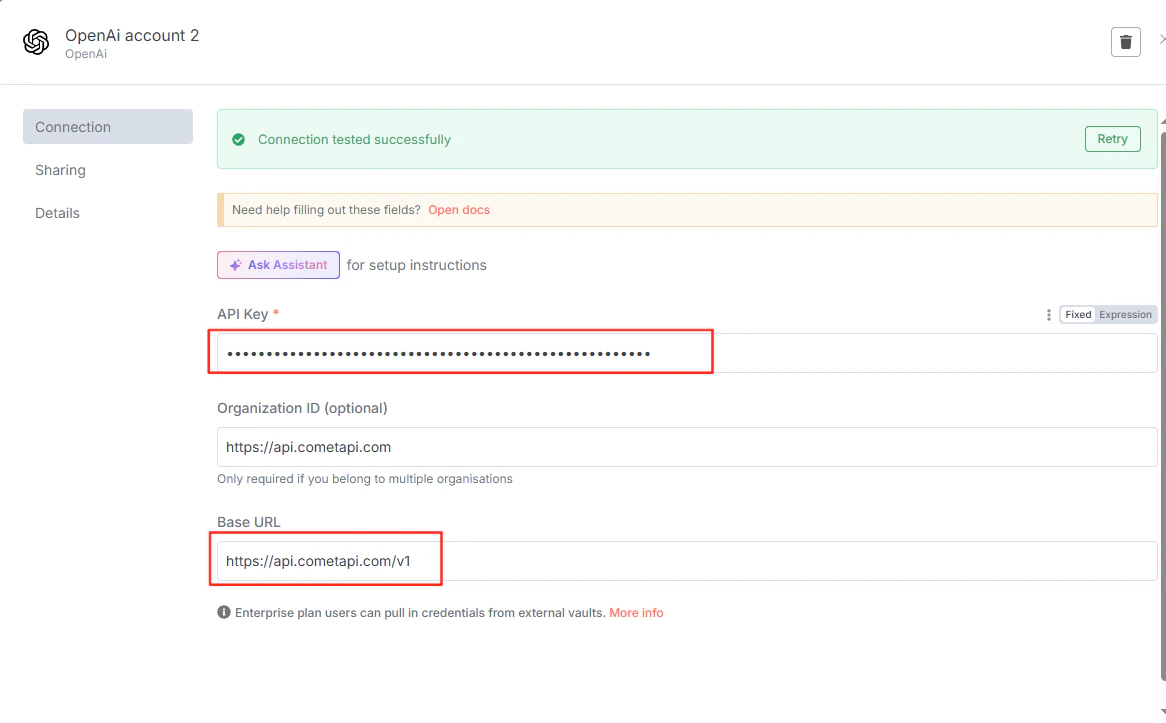
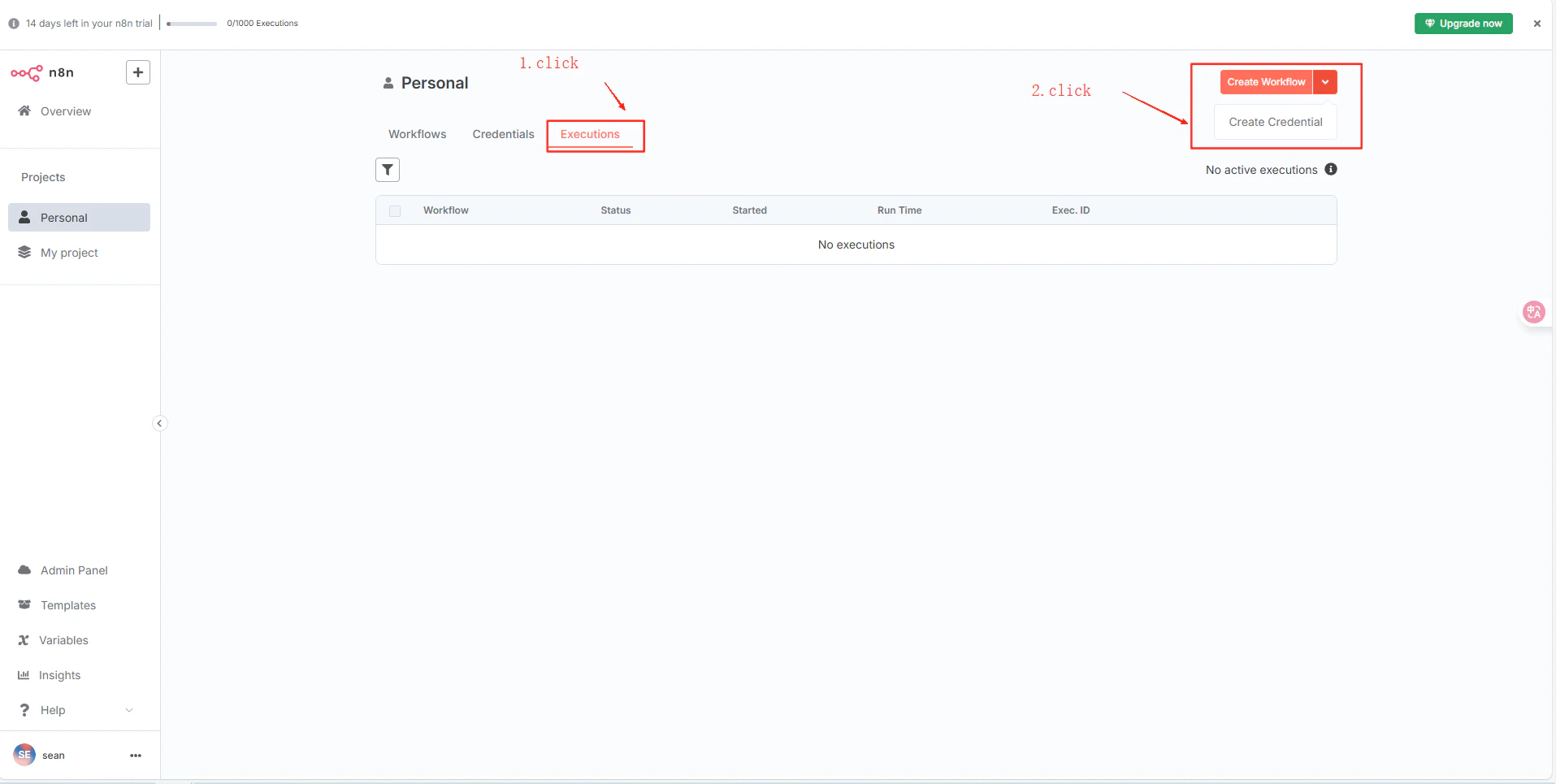
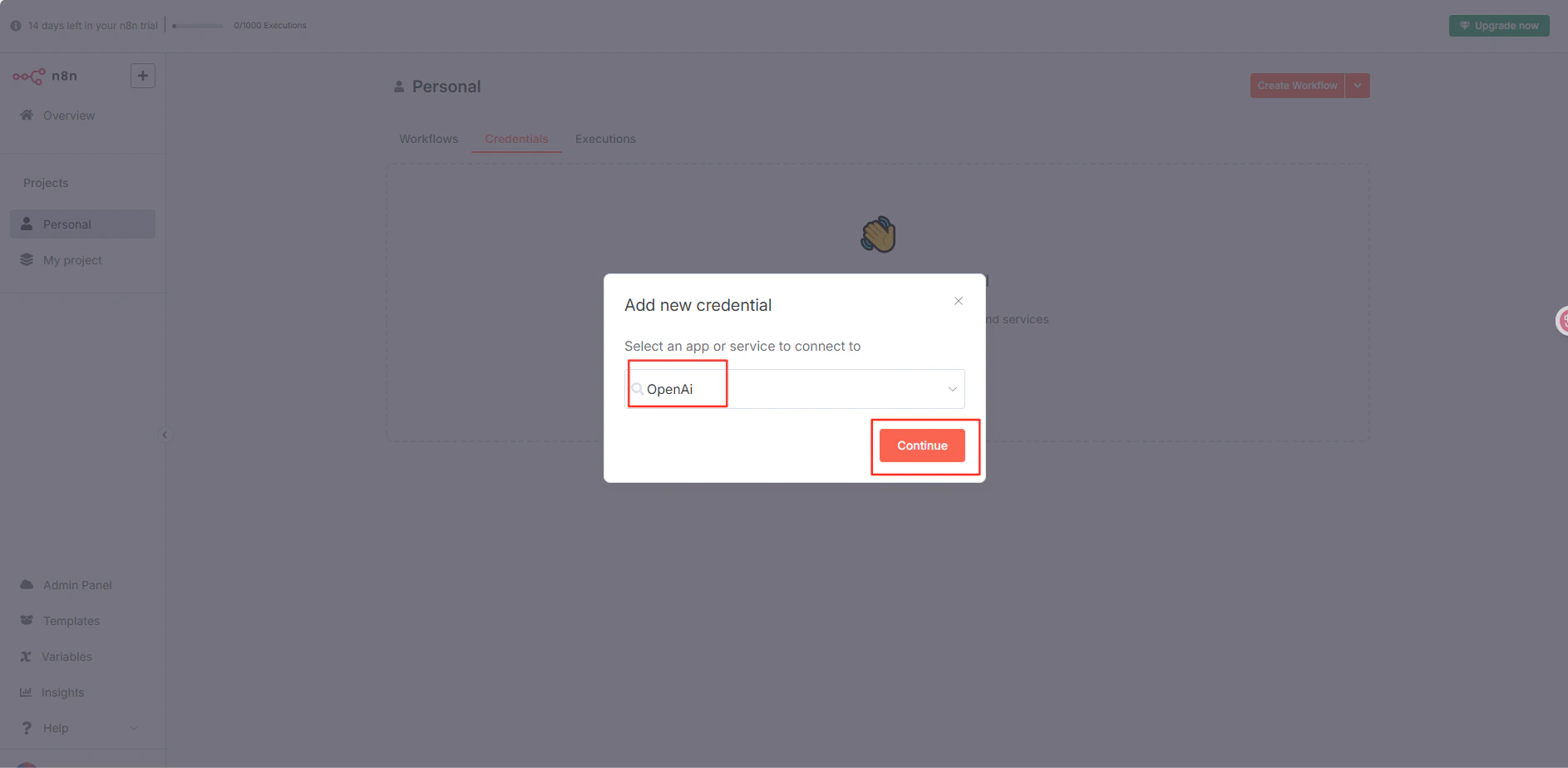
    Trong n8n, điều hướng đến dự án của bạn → **Credentials** → **Create Credential** → **OpenAI API**. Dán key CometAPI của bạn vào **API Key**, nhập `https://api.cometapi.com/v1` vào trường **Base URL**, rồi nhấp **Save**.
    <Frame>
      <img src="https://mintcdn.com/cometapi/mA1ovj6s0e3RM42l/images/integrations/810968_354031.png?fit=max&auto=format&n=mA1ovj6s0e3RM42l&q=85&s=915bfac17a897d2df0a6868a71fd1618" alt="Hộp thoại Create Credential của n8n với OpenAI API được chọn" width="1915" height="965" data-path="images/integrations/810968_354031.png" />
    </Frame>

    <Frame>
      <img src="https://mintcdn.com/cometapi/mA1ovj6s0e3RM42l/images/integrations/810968_354032.png?fit=max&auto=format&n=mA1ovj6s0e3RM42l&q=85&s=c94c58a1f8826554f7b703d376c3ce53" alt="Biểu mẫu credential OpenAI của n8n với key CometAPI và base URL đã được điền" width="1886" height="924" data-path="images/integrations/810968_354032.png" />
    </Frame>

    <Frame>
      <img src="https://mintcdn.com/cometapi/mA1ovj6s0e3RM42l/images/integrations/810968_354037.png?fit=max&auto=format&n=mA1ovj6s0e3RM42l&q=85&s=e46a7e333b897ec09a791a26bb8db13f" alt="Credential n8n đã được lưu thành công" width="1166" height="723" data-path="images/integrations/810968_354037.png" />
    </Frame>
  </Step>

  <Step title="Kiểm tra kết nối">
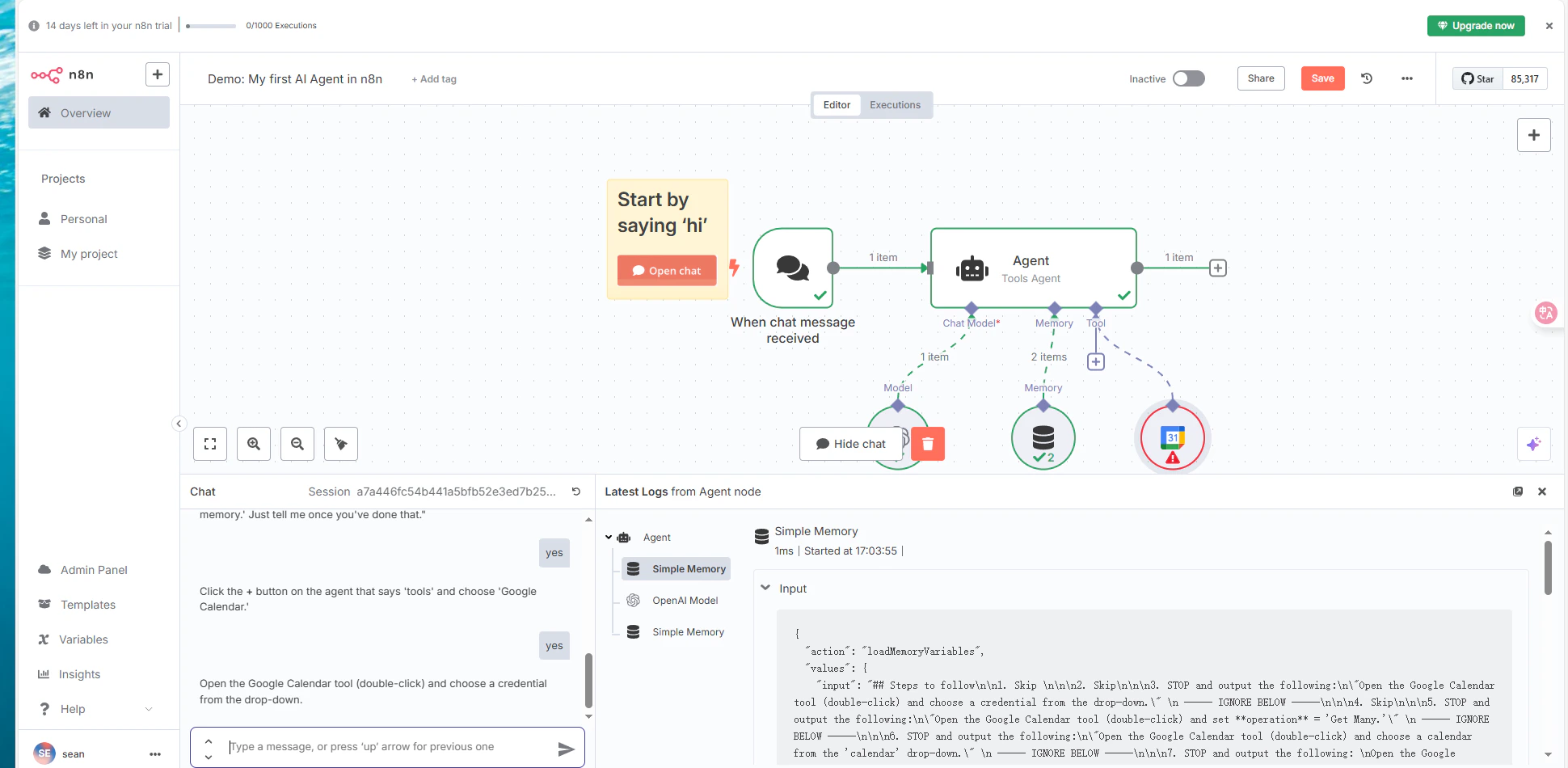
    Tạo một workflow với node OpenAI sử dụng credential đã lưu và thực thi nó. Phản hồi thành công xác nhận rằng thiết lập đang hoạt động.
    <Frame>
      <img src="https://mintcdn.com/cometapi/mA1ovj6s0e3RM42l/images/integrations/810968_354039.png?fit=max&auto=format&n=mA1ovj6s0e3RM42l&q=85&s=4707697d418bff1dec20eb42dd5a2c60" alt="Workflow n8n hiển thị phản hồi thành công từ CometAPI" width="1940" height="950" data-path="images/integrations/810968_354039.png" />
    </Frame>
  </Step>
</Steps>

<script type="application/ld+json">
  {`
    {
    "@context": "https://schema.org",
    "@graph": [
      {
        "@type": "HowTo",
        "@id": "https://apidoc.cometapi.com/integrations/n8n#howto",
        "name": "Kết nối n8n với CometAPI",
        "description": "Sử dụng hướng dẫn này để kết nối n8n với CometAPI bằng cách thiết lập base URL, API key và các tùy chọn model hoặc provider.",
        "step": [
          {
            "@type": "HowToStep",
            "@id": "https://apidoc.cometapi.com/integrations/n8n#step-1",
            "position": 1,
            "name": "Lấy API key CometAPI của bạn",
            "text": "Tạo hoặc mở tài khoản CometAPI của bạn, sau đó sao chép một API key đang hoạt động từ bảng điều khiển."
          },
          {
            "@type": "HowToStep",
            "@id": "https://apidoc.cometapi.com/integrations/n8n#step-2",
            "position": 2,
            "name": "Tạo credential OpenAI",
            "text": "Hoàn tất bước Tạo credential OpenAI trong hướng dẫn Kết nối n8n với CometAPI."
          },
          {
            "@type": "HowToStep",
            "@id": "https://apidoc.cometapi.com/integrations/n8n#step-3",
            "position": 3,
            "name": "Kiểm tra kết nối",
            "text": "Chọn một model ID hiện tại từ trang Models của CometAPI, sau đó gửi một yêu cầu kiểm thử từ tích hợp."
          }
        ]
      },
      {
        "@type": "BreadcrumbList",
        "itemListElement": [
          {
            "@type": "ListItem",
            "position": 1,
            "name": "Tài liệu CometAPI",
            "item": "https://apidoc.cometapi.com/"
          },
          {
            "@type": "ListItem",
            "position": 2,
            "name": "Tích hợp",
            "item": "https://apidoc.cometapi.com/integrations"
          },
          {
            "@type": "ListItem",
            "position": 3,
            "name": "Kết nối n8n với CometAPI",
            "item": "https://apidoc.cometapi.com/integrations/n8n"
          }
        ]
      }
    ]
    }
    `}
</script>