> ## Documentation Index
> Fetch the complete documentation index at: https://apidoc.cometapi.com/llms.txt
> Use this file to discover all available pages before exploring further.

# 使用 ChatHub 与 CometAPI

> 使用本指南通过设置 base URL、API key 以及模型或提供商选项来配置 ChatHub 与 CometAPI。

[ChatHub](https://chathub.gg) 是一个浏览器扩展，可让你同时与多个 AI 模型对话。将 CometAPI 添加为兼容 OpenAI 的提供商，然后从[模型页面](/zh-Hans/overview/models)选择你想使用的模型。

## 前提条件

* 已安装 [ChatHub](https://chathub.gg) 浏览器扩展
* 拥有一个已启用 API key 的 [CometAPI](https://www.cometapi.com) 账户

## 设置

<Steps>
  <Step title="获取你的 CometAPI API key">
    登录 [CometAPI 控制台](https://www.cometapi.com/console)。点击 **Add API Key**，然后复制你的 key 和 base URL（`https://api.cometapi.com`）。

    <Frame>
      <img src="https://mintcdn.com/cometapi/SZhlxZhCnMLn__BW/images/overview/810968_364191.png?fit=max&auto=format&n=SZhlxZhCnMLn__BW&q=85&s=aef81a83f29f8eb16655ed4060425f50" alt="CometAPI 控制台——添加 API Key" width="3824" height="1892" data-path="images/overview/810968_364191.png" />
    </Frame>

    <Frame>
      <img src="https://mintcdn.com/cometapi/HhtmQffktazbxUvS/images/overview/810968_364193.png?fit=max&auto=format&n=HhtmQffktazbxUvS&q=85&s=d893f659267150d0faf45f99eb5dffc1" alt="CometAPI API key 和 base URL" width="2434" height="1232" data-path="images/overview/810968_364193.png" />
    </Frame>
  </Step>

  <Step title="在 ChatHub 中配置 OpenAI">
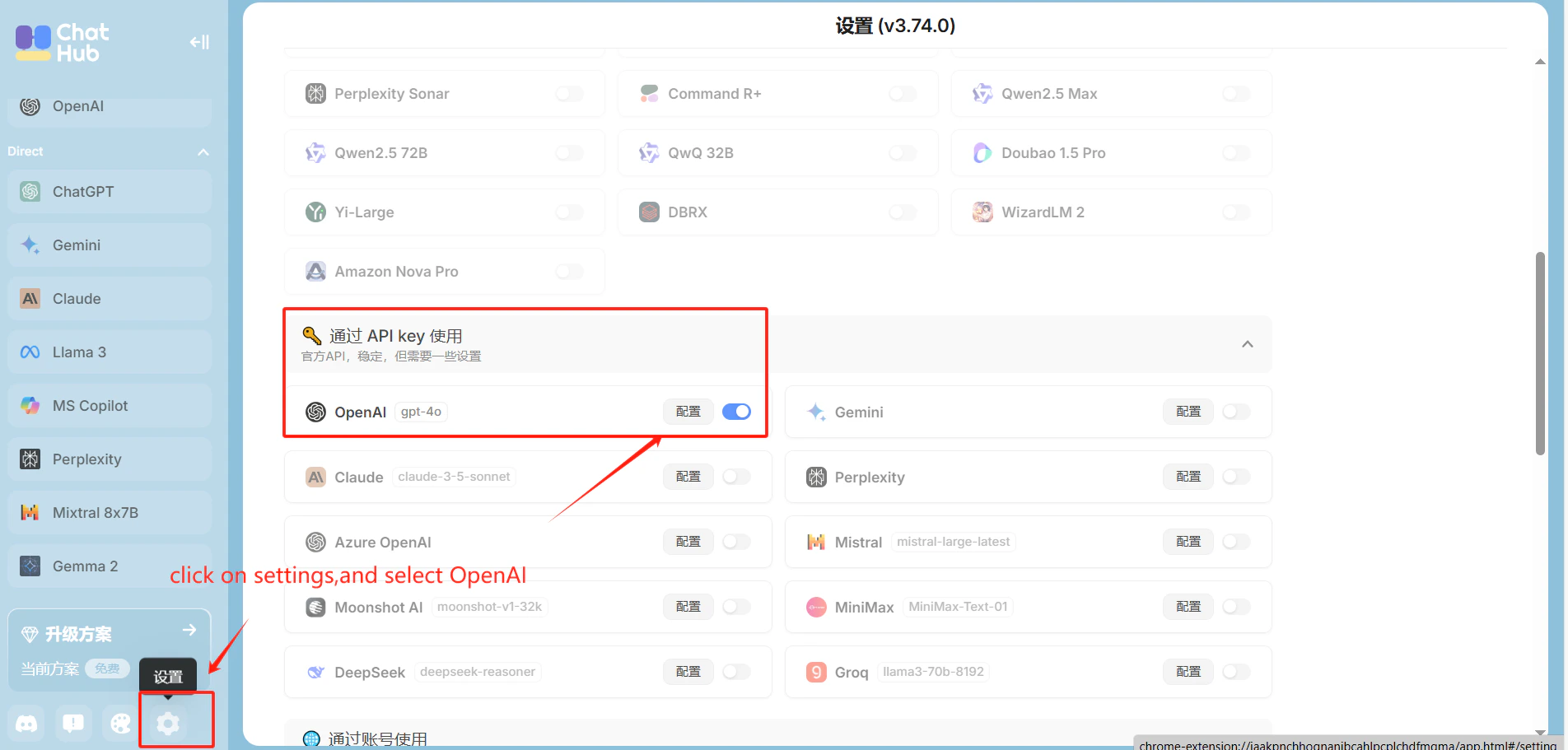
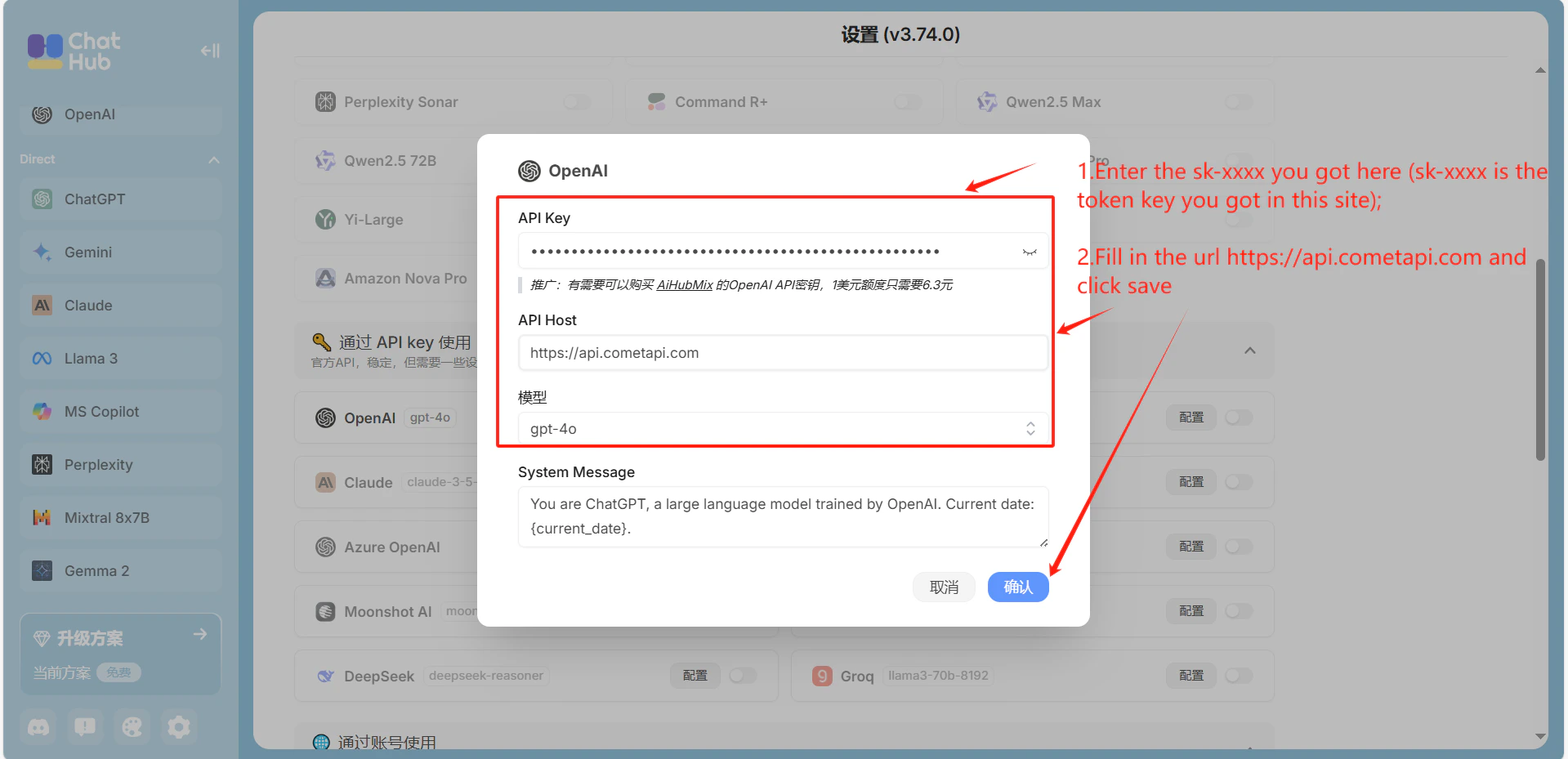
    打开 ChatHub 的 **Settings** → **OpenAI**。在 **API Host** 字段中输入 `https://api.cometapi.com`，将你的 CometAPI key 粘贴到 **API Key** 中，然后点击 **Save**。

    <Frame>
      <img src="https://mintcdn.com/cometapi/mA1ovj6s0e3RM42l/images/integrations/810968_351578.png?fit=max&auto=format&n=mA1ovj6s0e3RM42l&q=85&s=c4e9ea57615cc53112942cd0eae366c8" alt="在 ChatHub OpenAI 设置中填入 CometAPI host" width="1904" height="911" data-path="images/integrations/810968_351578.png" />
    </Frame>

    <Frame>
      <img src="https://mintcdn.com/cometapi/mA1ovj6s0e3RM42l/images/integrations/810968_351579.png?fit=max&auto=format&n=mA1ovj6s0e3RM42l&q=85&s=dd5c0367a6422ab9eaeea639db6dd55d" alt="在 ChatHub 设置中填入 API key 字段" width="1919" height="929" data-path="images/integrations/810968_351579.png" />
    </Frame>
  </Step>

  <Step title="测试连接">
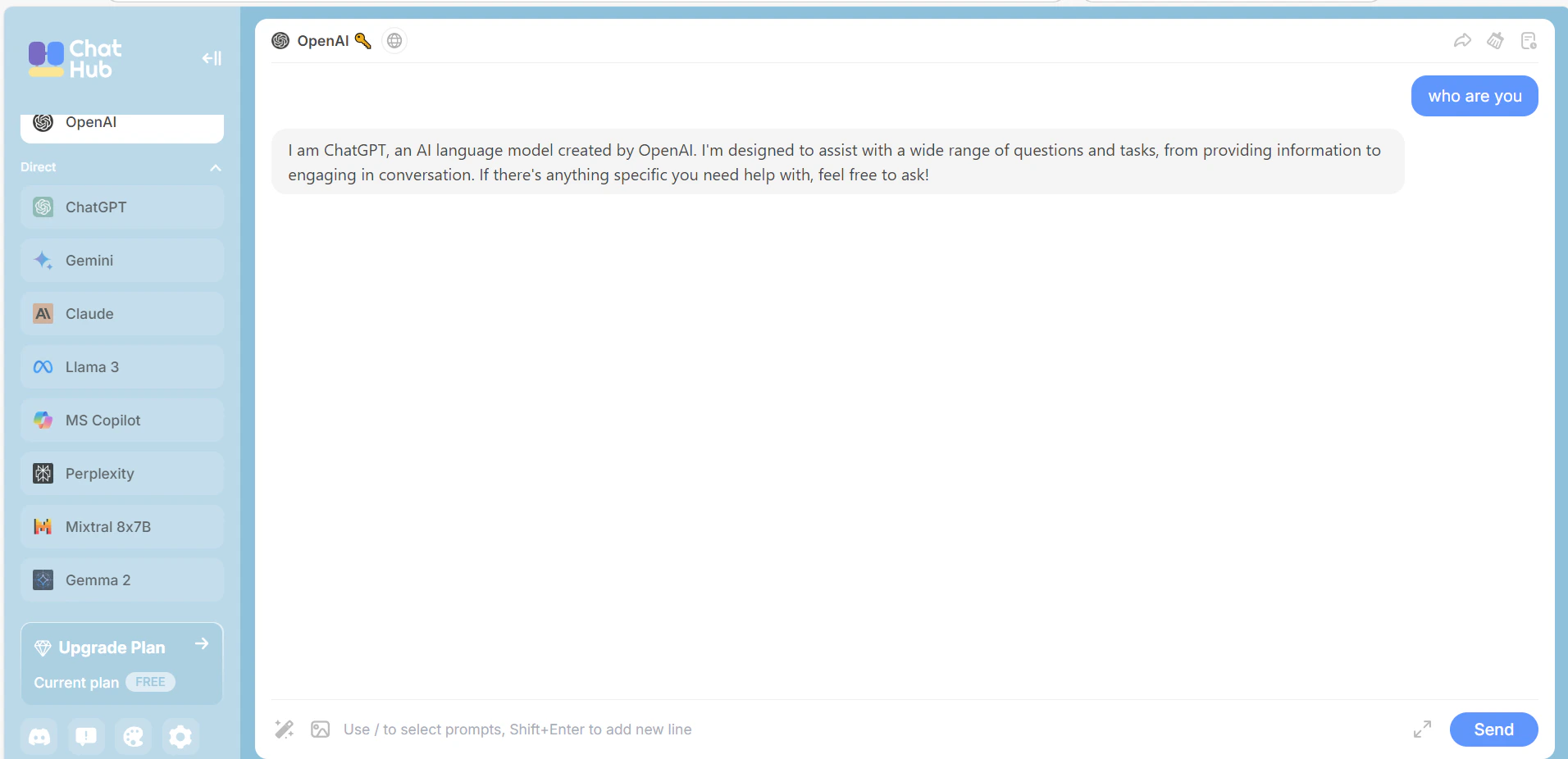
    在 ChatHub 中发送一条测试消息。成功收到回复即表示集成正常工作。

    <Frame>
      <img src="https://mintcdn.com/cometapi/mA1ovj6s0e3RM42l/images/integrations/810968_351580.png?fit=max&auto=format&n=mA1ovj6s0e3RM42l&q=85&s=46845534e1d30cb2d4897b5d9047b0bf" alt="ChatHub 显示来自 CometAPI 的成功响应" width="1912" height="926" data-path="images/integrations/810968_351580.png" />
    </Frame>
  </Step>
</Steps>

<script type="application/ld+json">
  {`
    {
    "@context": "https://schema.org",
    "@graph": [
      {
        "@type": "HowTo",
        "@id": "https://apidoc.cometapi.com/integrations/chathub#howto",
        "name": "使用 ChatHub 与 CometAPI",
        "description": "使用本指南通过设置 base URL、API key 以及模型或提供商选项来配置 ChatHub 与 CometAPI。",
        "step": [
          {
            "@type": "HowToStep",
            "@id": "https://apidoc.cometapi.com/integrations/chathub#step-1",
            "position": 1,
            "name": "获取你的 CometAPI API key",
            "text": "创建或打开你的 CometAPI 账户，然后从控制台复制一个可用的 API key。"
          },
          {
            "@type": "HowToStep",
            "@id": "https://apidoc.cometapi.com/integrations/chathub#step-2",
            "position": 2,
            "name": "在 ChatHub 中配置 OpenAI",
            "text": "完成《使用 ChatHub 与 CometAPI》指南中的“在 ChatHub 中配置 OpenAI”步骤。"
          },
          {
            "@type": "HowToStep",
            "@id": "https://apidoc.cometapi.com/integrations/chathub#step-3",
            "position": 3,
            "name": "测试连接",
            "text": "从 CometAPI 模型页面选择一个当前可用的 model ID，然后从集成中发送测试请求。"
          }
        ]
      },
      {
        "@type": "BreadcrumbList",
        "itemListElement": [
          {
            "@type": "ListItem",
            "position": 1,
            "name": "CometAPI 文档",
            "item": "https://apidoc.cometapi.com/"
          },
          {
            "@type": "ListItem",
            "position": 2,
            "name": "集成",
            "item": "https://apidoc.cometapi.com/integrations"
          },
          {
            "@type": "ListItem",
            "position": 3,
            "name": "使用 ChatHub 与 CometAPI",
            "item": "https://apidoc.cometapi.com/integrations/chathub"
          }
        ]
      }
    ]
    }
    `}
</script>