> ## Documentation Index
> Fetch the complete documentation index at: https://apidoc.cometapi.com/llms.txt
> Use this file to discover all available pages before exploring further.

# 将 Make 连接到 CometAPI

> 使用本指南，通过设置 base URL、API key 以及 model 或 provider 选项，将 Make 连接到 CometAPI。

Make（原 Integromat）是一个可视化自动化平台。连接 CometAPI，即可在数百个应用之间构建 AI 驱动的工作流——无需编写代码。

## 前提条件

* 一个拥有有效 API key 的 CometAPI 账户——[在这里获取](https://www.cometapi.com/console/token)
* 一个 Make 账户——[在这里注册](https://www.make.com/en/register)

<Steps>
  <Step title="获取你的 CometAPI API key">
    登录 [CometAPI 控制台](https://www.cometapi.com/console/token)。点击 **Add API Key** 并复制你的 CometAPI API key。


    <Frame>
      <img src="https://mintcdn.com/cometapi/SZhlxZhCnMLn__BW/images/overview/810968_364191.png?fit=max&auto=format&n=SZhlxZhCnMLn__BW&q=85&s=aef81a83f29f8eb16655ed4060425f50" alt="显示 Add API Key 按钮的 CometAPI 控制台" width="3824" height="1892" data-path="images/overview/810968_364191.png" />
    </Frame>

    <Frame>
      <img src="https://mintcdn.com/cometapi/HhtmQffktazbxUvS/images/overview/810968_364193.png?fit=max&auto=format&n=HhtmQffktazbxUvS&q=85&s=d893f659267150d0faf45f99eb5dffc1" alt="包含 base URL 的 CometAPI API key 详情" width="2434" height="1232" data-path="images/overview/810968_364193.png" />
    </Frame>
  </Step>

  <Step title="将 CometAPI 添加到场景">
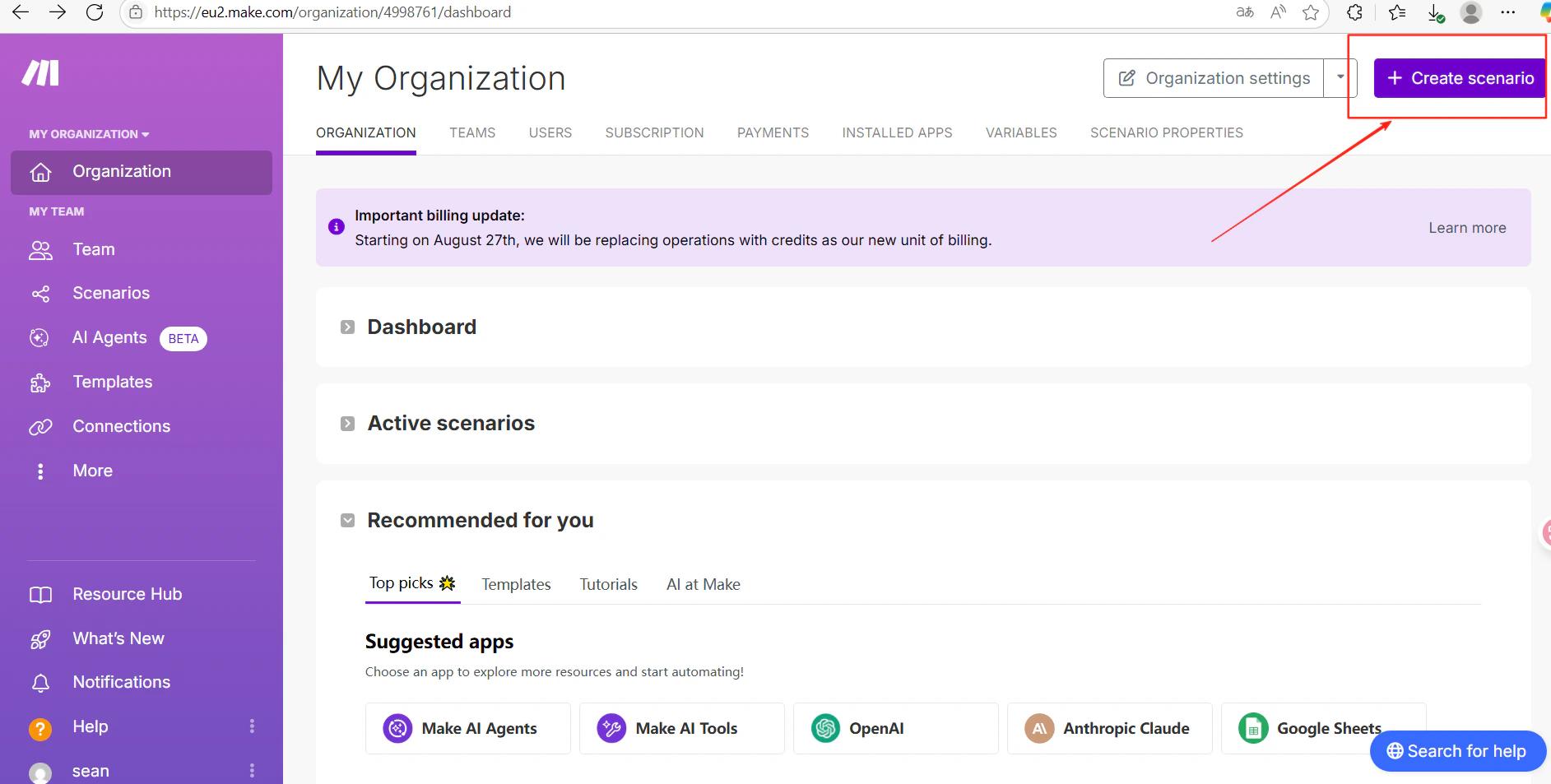
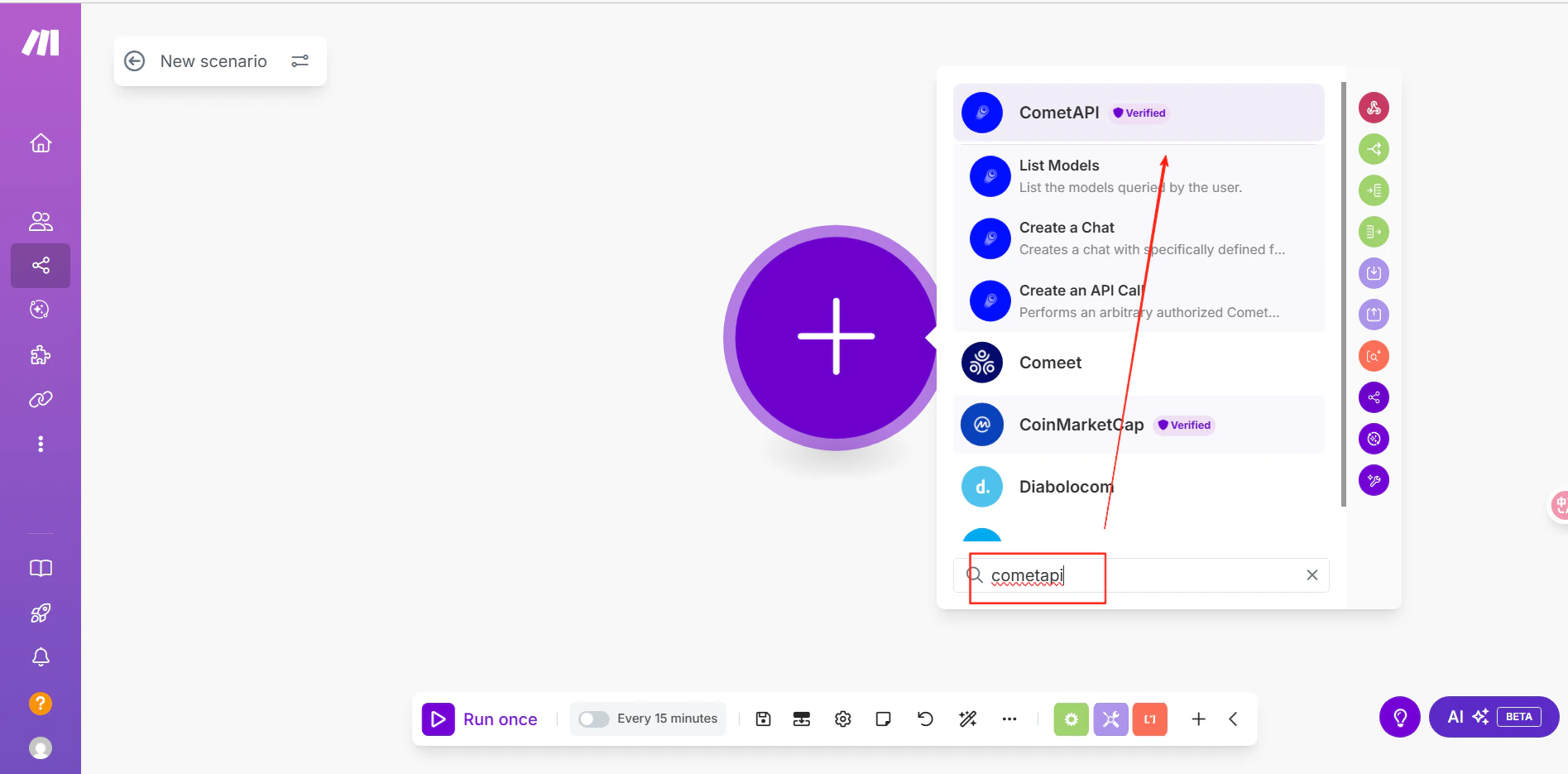
    在 Make 中，点击 **Create scenario**。在场景编辑器中，点击 **+** 图标并搜索 **CometAPI**。

    <Frame>
      <img src="https://mintcdn.com/cometapi/E4FFvyMYmaOZoldp/images/integrations/810968_360356.png?fit=max&auto=format&n=E4FFvyMYmaOZoldp&q=85&s=9a7600888fe9833ac94ab3dc1df47434" alt="打开模块搜索的 Make 场景编辑器" width="1885" height="953" data-path="images/integrations/810968_360356.png" />
    </Frame>

    <Frame>
      <img src="https://mintcdn.com/cometapi/E4FFvyMYmaOZoldp/images/integrations/810968_360357.png?fit=max&auto=format&n=E4FFvyMYmaOZoldp&q=85&s=45186c2db38fa62e2a1592ec722b044a" alt="显示 CometAPI 模块的 Make 搜索结果" width="1895" height="935" data-path="images/integrations/810968_360357.png" />
    </Frame>
  </Step>

  <Step title="连接你的 CometAPI 账户">
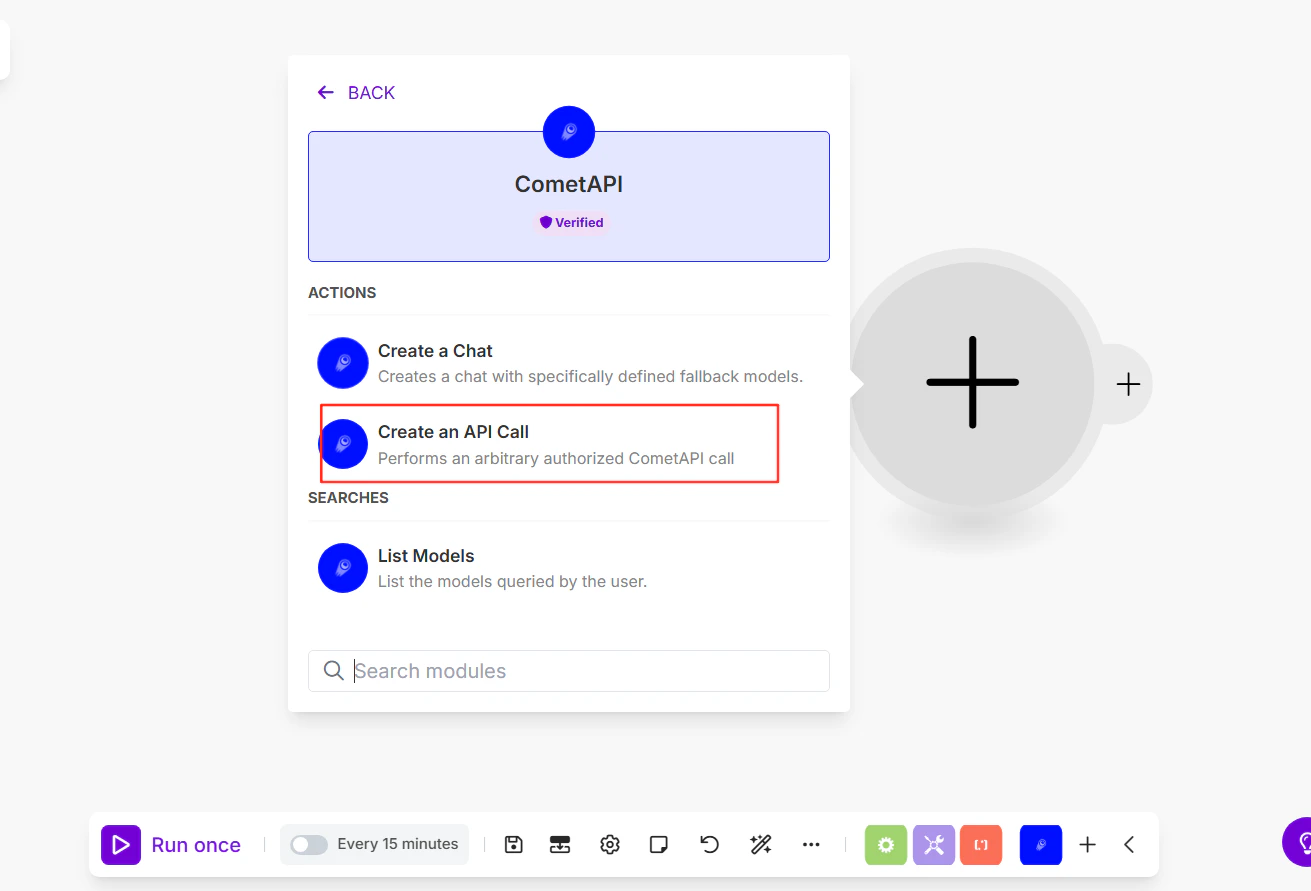
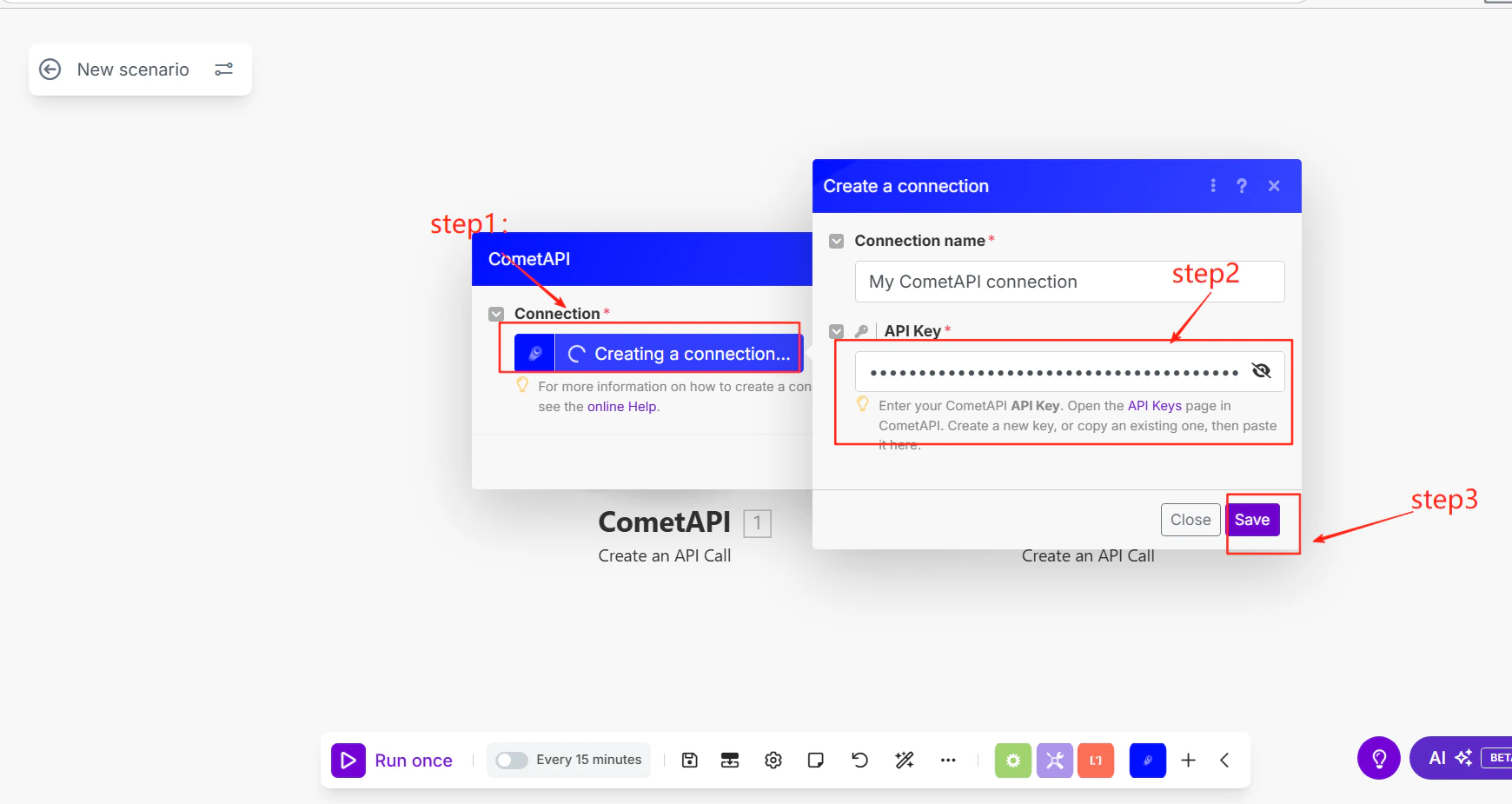
    选择 **Make an API Call** 作为操作。系统提示添加连接时，粘贴你的 CometAPI API key 并点击 **Save**。

    <Frame>
      <img src="https://mintcdn.com/cometapi/SZhlxZhCnMLn__BW/images/integrations/810968_360358.png?fit=max&auto=format&n=SZhlxZhCnMLn__BW&q=85&s=260de8318fa33dc6100ac98b8a2c9c34" alt="包含 API key 字段的 Make 连接对话框" width="1311" height="891" data-path="images/integrations/810968_360358.png" />
    </Frame>
  </Step>

  <Step title="配置 API 调用">
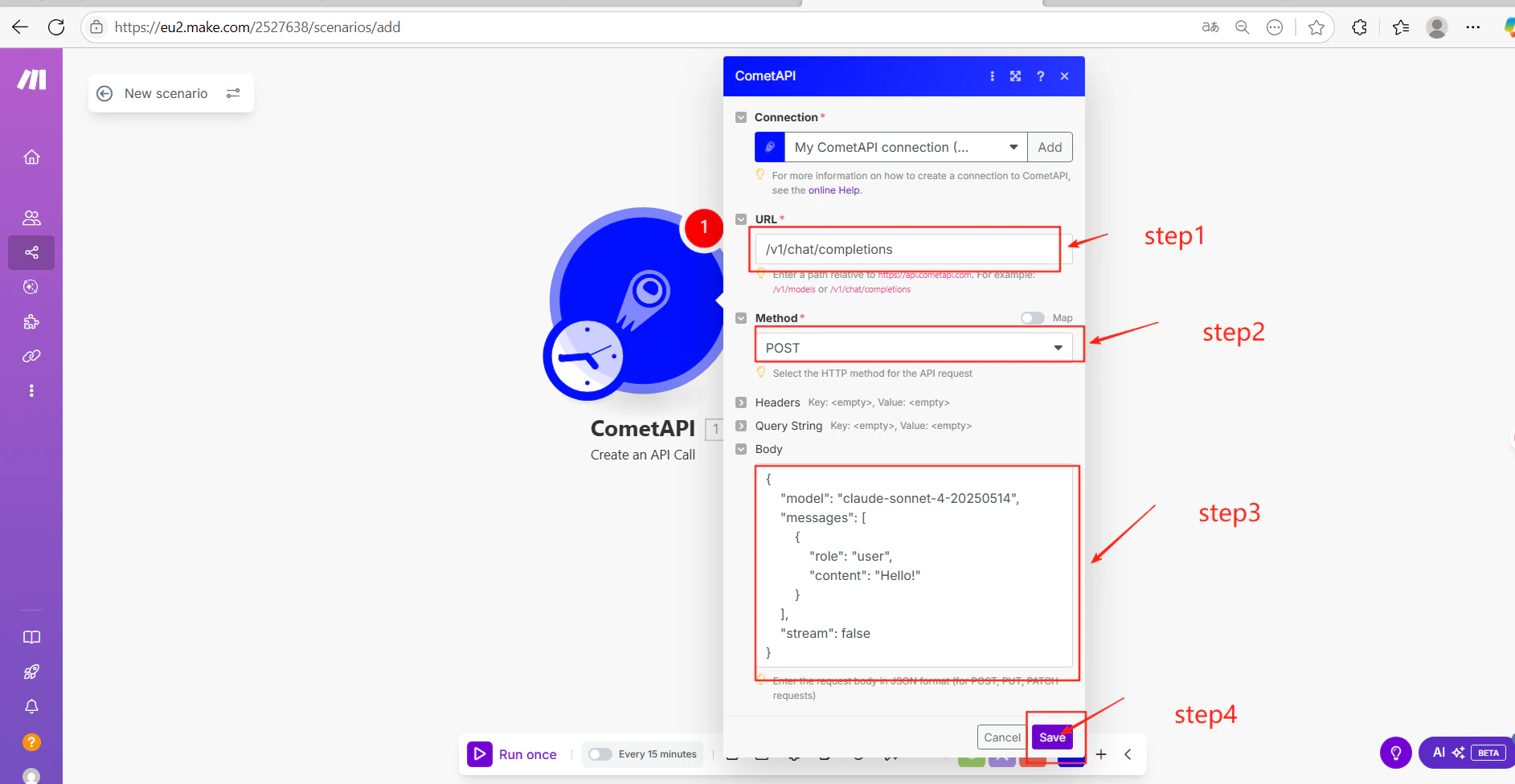
    填写模块设置：

    * **URL**: `/v1/chat/completions`
    * **Method**: `POST`
    * **Body**（JSON）:

    ```json theme={null}
    {
      "model": "your-model-id",
      "messages": [
        {
          "role": "user",
          "content": "Hello!"
        }
      ],
      "stream": false
    }
    ```

    点击 **Save**。将 `your-model-id` 替换为来自 [CometAPI 模型页面](/zh-Hans/overview/models) 的当前 model ID。
    <Frame>
      <img src="https://mintcdn.com/cometapi/SZhlxZhCnMLn__BW/images/integrations/810968_360359.png?fit=max&auto=format&n=SZhlxZhCnMLn__BW&q=85&s=951565cb41ecc00937654a7c418a9ec3" alt="已配置端点和 JSON 请求体的 Make 模块" width="1740" height="925" data-path="images/integrations/810968_360359.png" />
    </Frame>
  </Step>

  <Step title="测试并发布">
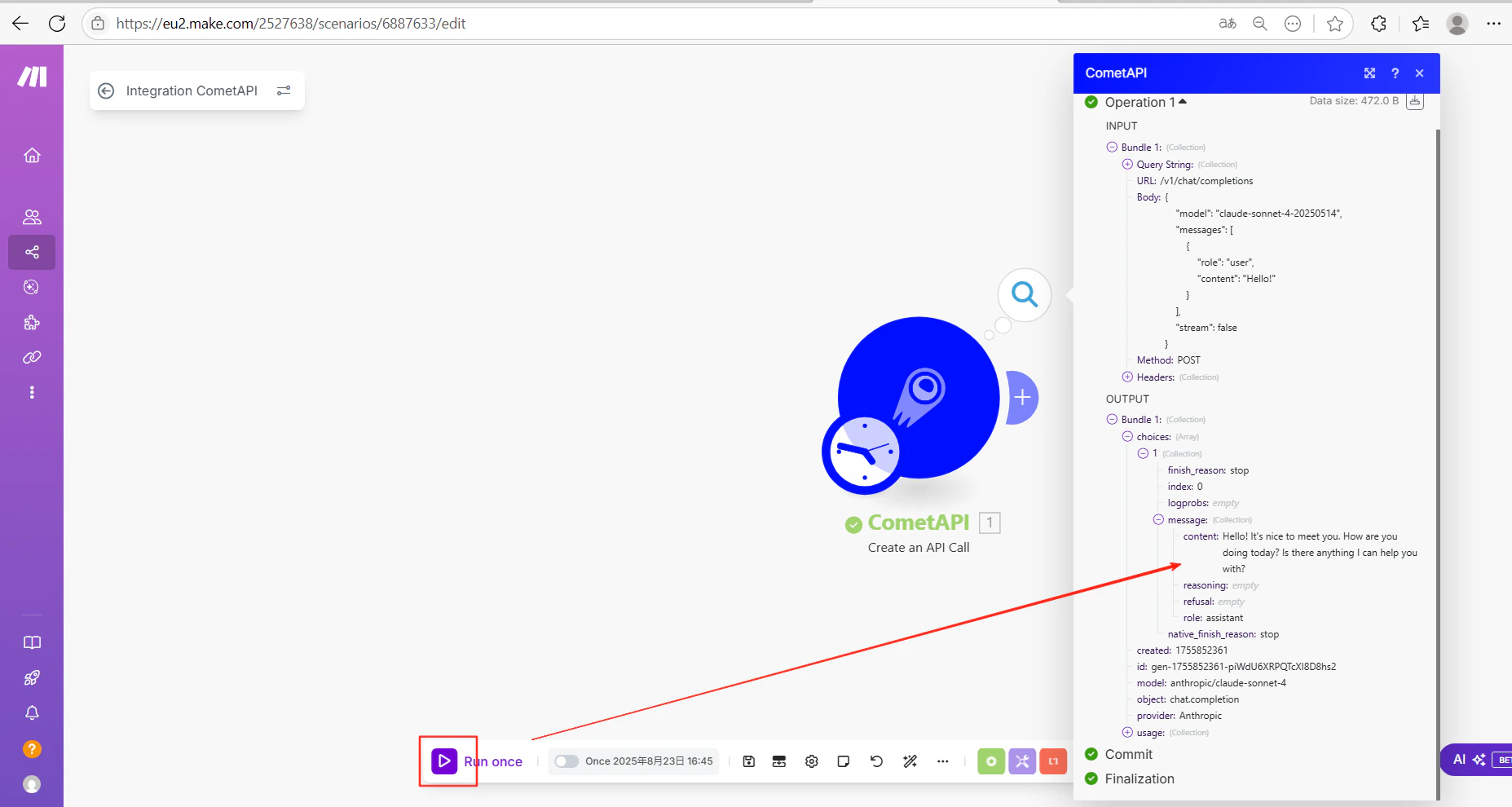
    点击 **Run once** 以执行场景。输出中成功的 AI 响应表明集成已正常工作。
    <Frame>
      <img src="https://mintcdn.com/cometapi/SZhlxZhCnMLn__BW/images/integrations/810968_360369.png?fit=max&auto=format&n=SZhlxZhCnMLn__BW&q=85&s=4bc0c56e0e80a8d9b60af213a5f7ecf3" alt="显示成功 CometAPI 响应的 Make 场景输出" width="1885" height="976" data-path="images/integrations/810968_360369.png" />
    </Frame>

    <Frame>
      <img src="https://mintcdn.com/cometapi/SZhlxZhCnMLn__BW/images/integrations/810968_360370.png?fit=max&auto=format&n=SZhlxZhCnMLn__BW&q=85&s=c2193af570a299525216ec10bd0ee008" alt="显示成功状态的 Make 场景运行历史" width="1855" height="990" data-path="images/integrations/810968_360370.png" />
    </Frame>

    如果调用失败，请检查你的 API key 和端点 URL，或联系 [CometAPI 支持](https://www.cometapi.com)。
  </Step>
</Steps>

<Tip>
  你可以将 `/v1/chat/completions` 端点替换为任何 CometAPI 端点——例如用于图像生成的 `/v1/images/generations`。请调整 JSON 请求体以匹配目标端点的参数。
</Tip>

<script type="application/ld+json">
  {`
    {
    "@context": "https://schema.org",
    "@graph": [
      {
        "@type": "HowTo",
        "@id": "https://apidoc.cometapi.com/integrations/make#howto",
        "name": "将 Make 连接到 CometAPI",
        "description": "使用本指南，通过设置 base URL、API key 以及 model 或 provider 选项，将 Make 连接到 CometAPI。",
        "step": [
          {
            "@type": "HowToStep",
            "@id": "https://apidoc.cometapi.com/integrations/make#step-1",
            "position": 1,
            "name": "获取你的 CometAPI API key",
            "text": "创建或打开你的 CometAPI 账户，然后从控制台复制一个有效的 API key。"
          },
          {
            "@type": "HowToStep",
            "@id": "https://apidoc.cometapi.com/integrations/make#step-2",
            "position": 2,
            "name": "将 CometAPI 添加到场景",
            "text": "完成“将 CometAPI 添加到场景”步骤。"
          },
          {
            "@type": "HowToStep",
            "@id": "https://apidoc.cometapi.com/integrations/make#step-3",
            "position": 3,
            "name": "连接你的 CometAPI 账户",
            "text": "完成“连接你的 CometAPI 账户”步骤。"
          },
          {
            "@type": "HowToStep",
            "@id": "https://apidoc.cometapi.com/integrations/make#step-4",
            "position": 4,
            "name": "配置 API 调用",
            "text": "完成“配置 API 调用”步骤。"
          },
          {
            "@type": "HowToStep",
            "@id": "https://apidoc.cometapi.com/integrations/make#step-5",
            "position": 5,
            "name": "测试并发布",
            "text": "完成“测试并发布”步骤。"
          }
        ]
      },
      {
        "@type": "BreadcrumbList",
        "itemListElement": [
          {
            "@type": "ListItem",
            "position": 1,
            "name": "CometAPI 文档",
            "item": "https://apidoc.cometapi.com/"
          },
          {
            "@type": "ListItem",
            "position": 2,
            "name": "集成",
            "item": "https://apidoc.cometapi.com/integrations"
          },
          {
            "@type": "ListItem",
            "position": 3,
            "name": "将 Make 连接到 CometAPI",
            "item": "https://apidoc.cometapi.com/integrations/make"
          }
        ]
      }
    ]
    }
    `}
</script>