> ## Documentation Index
> Fetch the complete documentation index at: https://apidoc.cometapi.com/llms.txt
> Use this file to discover all available pages before exploring further.

# 将 Pot 与 CometAPI 搭配使用

> 使用本指南，通过设置 base URL、API key 以及 model 或 provider 选项来配置 Pot 与 CometAPI 的集成。

Pot 是一款跨平台翻译和 OCR 应用。将其连接到 CometAPI，即可使用任意受支持的模型驱动 AI 翻译。

## 前提条件

* 拥有一个带有有效 API key 的 CometAPI 账户——[在此获取](https://www.cometapi.com/console/token)
* 已安装 Pot——[在此下载](https://pot-app.com/)

<Steps>
  <Step title="获取你的 CometAPI API key">
    登录 [CometAPI 控制台](https://www.cometapi.com/console/token)。点击 **Add API Key** 并复制你的 CometAPI API key。


    <Frame>
      <img src="https://mintcdn.com/cometapi/SZhlxZhCnMLn__BW/images/overview/810968_364191.png?fit=max&auto=format&n=SZhlxZhCnMLn__BW&q=85&s=aef81a83f29f8eb16655ed4060425f50" alt="显示 Add API Key 按钮的 CometAPI 仪表盘" width="3824" height="1892" data-path="images/overview/810968_364191.png" />
    </Frame>

    <Frame>
      <img src="https://mintcdn.com/cometapi/HhtmQffktazbxUvS/images/overview/810968_364193.png?fit=max&auto=format&n=HhtmQffktazbxUvS&q=85&s=d893f659267150d0faf45f99eb5dffc1" alt="带有 base URL 的 CometAPI API key 详情" width="2434" height="1232" data-path="images/overview/810968_364193.png" />
    </Frame>
  </Step>

  <Step title="在 Pot 中添加 OpenAI 服务">
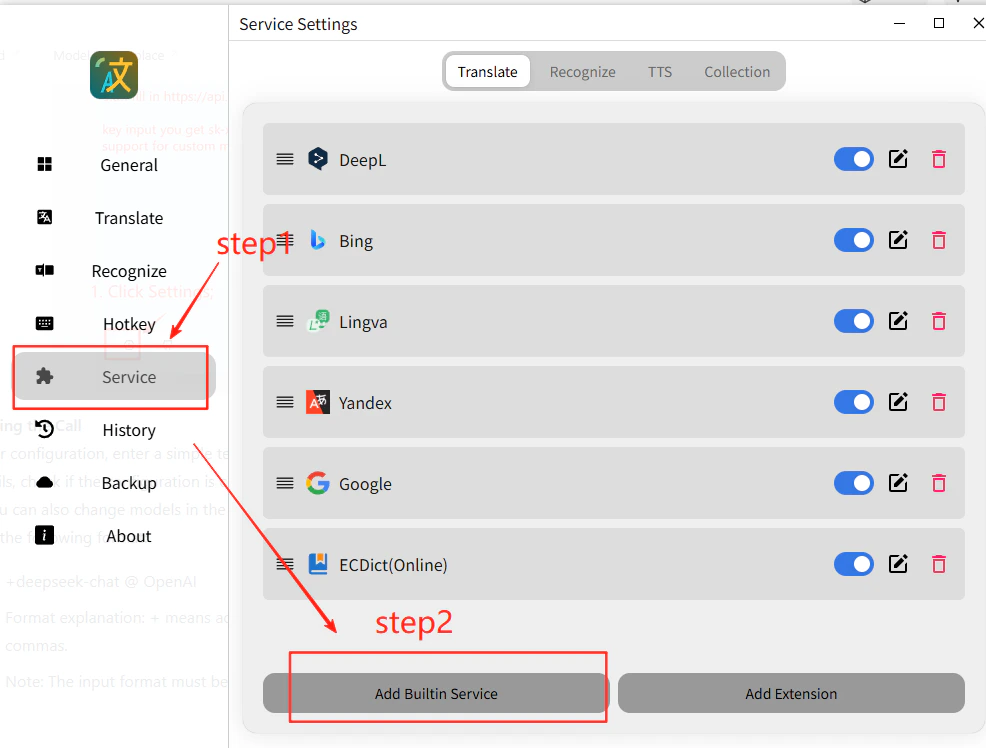
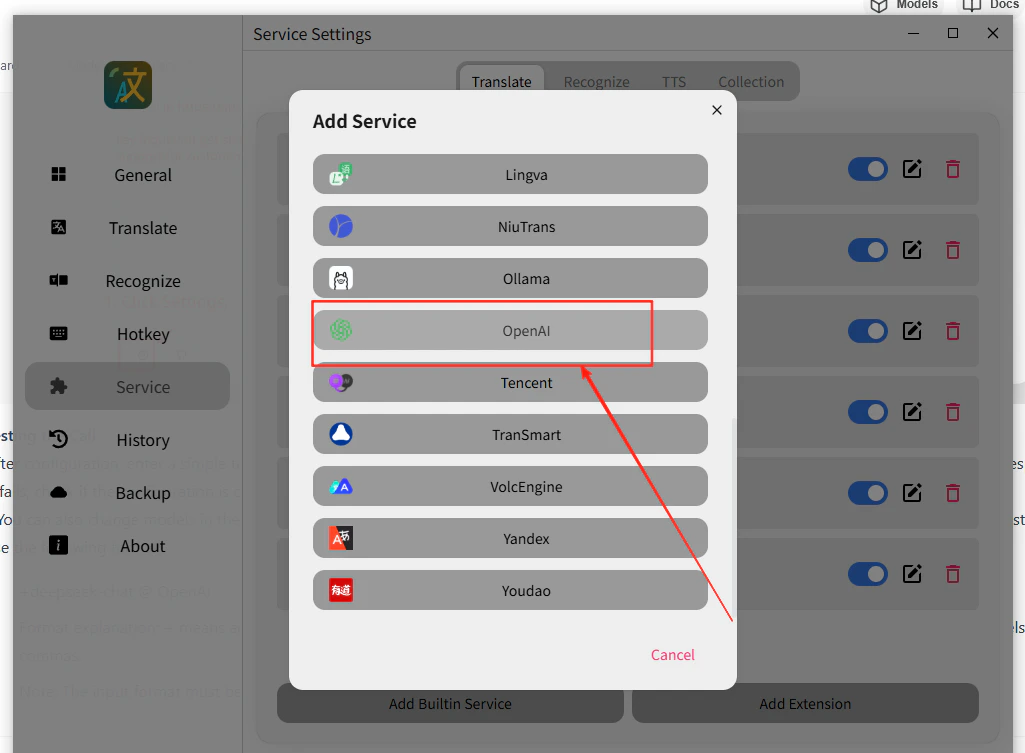
    打开 Pot 菜单，进入 **Service Settings → Add Built-in Service**，选择 **OpenAI**，并启用 **Stream Output**。

    <Frame>
      <img src="https://mintcdn.com/cometapi/E4FFvyMYmaOZoldp/images/integrations/810968_360328.png?fit=max&auto=format&n=E4FFvyMYmaOZoldp&q=85&s=09610d2bdcb807597f9231425f362f33" alt="Pot 服务设置面板" width="986" height="748" data-path="images/integrations/810968_360328.png" />
    </Frame>

    <Frame>
      <img src="https://mintcdn.com/cometapi/E4FFvyMYmaOZoldp/images/integrations/810968_360329.png?fit=max&auto=format&n=E4FFvyMYmaOZoldp&q=85&s=c56778e30c7e45b4846c29f032f31234" alt="选择 OpenAI 服务并启用流式输出" width="1025" height="753" data-path="images/integrations/810968_360329.png" />
    </Frame>
  </Step>

  <Step title="输入你的 API 凭证">
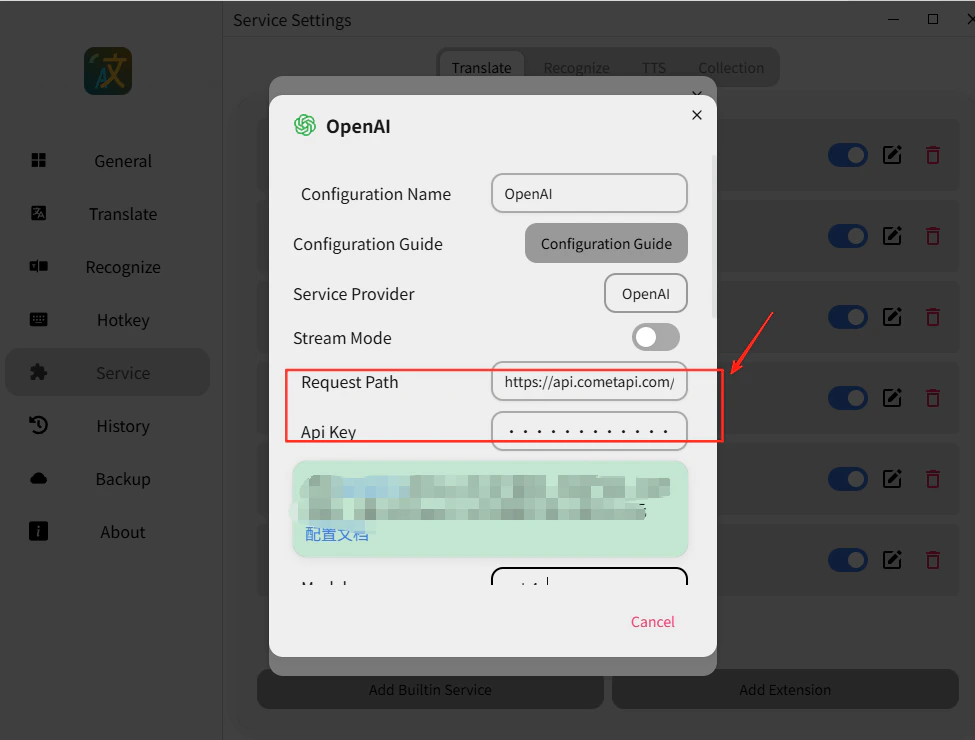
    * **API Address**: `https://api.cometapi.com/v1/chat/completions`
    * **API Key**: 粘贴你的 CometAPI API key
    * **Model**: 设置你想要使用的当前 model ID

    点击 **Save**。
    <Frame>
      <img src="https://mintcdn.com/cometapi/E4FFvyMYmaOZoldp/images/integrations/810968_360330.png?fit=max&auto=format&n=E4FFvyMYmaOZoldp&q=85&s=dde9ce700ffb17506a9ea8b7331cee1a" alt="已填写完成的 Pot API 配置字段" width="975" height="740" data-path="images/integrations/810968_360330.png" />
    </Frame>
  </Step>

  <Step title="测试翻译">
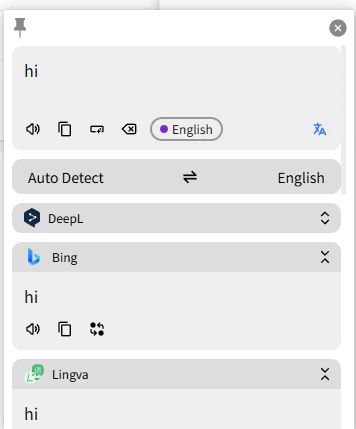
    选择任意文本并触发翻译。成功返回结果即表示集成工作正常。

    <Frame>
      <img src="https://mintcdn.com/cometapi/E4FFvyMYmaOZoldp/images/integrations/810968_360331.png?fit=max&auto=format&n=E4FFvyMYmaOZoldp&q=85&s=1c9343d3f829d67bf19214754eae1a67" alt="Pot 显示成功的 AI 翻译结果" width="356" height="429" data-path="images/integrations/810968_360331.png" />
    </Frame>

    如果调用失败，请再次检查你的 API key 和 endpoint URL，或联系 [CometAPI 支持](https://www.cometapi.com)。
  </Step>
</Steps>

<Tip>
  你可以将任何当前可用的 CometAPI model ID 直接输入到 **Model** 字段中——例如来自 [CometAPI Models 页面](/zh-Hans/overview/models) 的 GPT、Claude、Gemini 或 DeepSeek 模型。
</Tip>

<script type="application/ld+json">
  {`
    {
    "@context": "https://schema.org",
    "@graph": [
      {
        "@type": "HowTo",
        "@id": "https://apidoc.cometapi.com/integrations/pot-translation#howto",
        "name": "将 Pot 与 CometAPI 一起使用",
        "description": "使用本指南通过设置 base URL、API key 以及 model 或 provider 选项来配置 Pot 与 CometAPI。",
        "step": [
          {
            "@type": "HowToStep",
            "@id": "https://apidoc.cometapi.com/integrations/pot-translation#step-1",
            "position": 1,
            "name": "获取你的 CometAPI API key",
            "text": "创建或打开你的 CometAPI 账户，然后从仪表盘复制一个有效的 API key。"
          },
          {
            "@type": "HowToStep",
            "@id": "https://apidoc.cometapi.com/integrations/pot-translation#step-2",
            "position": 2,
            "name": "在 Pot 中添加 OpenAI 服务",
            "text": "完成“将 Pot 与 CometAPI 一起使用”指南中的“在 Pot 中添加 OpenAI 服务”步骤。"
          },
          {
            "@type": "HowToStep",
            "@id": "https://apidoc.cometapi.com/integrations/pot-translation#step-3",
            "position": 3,
            "name": "输入你的 API 凭证",
            "text": "完成“将 Pot 与 CometAPI 一起使用”指南中的“输入你的 API 凭证”步骤。"
          },
          {
            "@type": "HowToStep",
            "@id": "https://apidoc.cometapi.com/integrations/pot-translation#step-4",
            "position": 4,
            "name": "测试翻译",
            "text": "从 CometAPI Models 页面选择一个当前可用的 model ID，然后运行一个简短的翻译测试。"
          }
        ]
      },
      {
        "@type": "BreadcrumbList",
        "itemListElement": [
          {
            "@type": "ListItem",
            "position": 1,
            "name": "CometAPI 文档",
            "item": "https://apidoc.cometapi.com/"
          },
          {
            "@type": "ListItem",
            "position": 2,
            "name": "集成",
            "item": "https://apidoc.cometapi.com/integrations"
          },
          {
            "@type": "ListItem",
            "position": 3,
            "name": "将 Pot 与 CometAPI 一起使用",
            "item": "https://apidoc.cometapi.com/integrations/pot-translation"
          }
        ]
      }
    ]
    }
    `}
</script>