> ## Documentation Index
> Fetch the complete documentation index at: https://apidoc.cometapi.com/llms.txt
> Use this file to discover all available pages before exploring further.

# 將 BuildShip 連接到 CometAPI

> 使用本指南，透過設定 base URL、API key，以及 model 或 provider 選項，將 BuildShip 連接到 CometAPI。

BuildShip 是一個低程式碼的視覺化後端建置工具。使用社群提供的 **CometAPI Text Generator** 節點，將 AI 驅動的文字生成功能加入任何工作流程。

## 先決條件

* 擁有一個已啟用 API key 的 CometAPI 帳戶 — [在此取得](https://www.cometapi.com/console/token)
* 擁有一個 BuildShip 帳戶 — [在此登入](https://app.buildship.com)

<Steps>
  <Step title="取得你的 CometAPI API key">
    登入 [CometAPI 控制台](https://www.cometapi.com/console/token)。點擊 **Add API Key**，並複製你的 CometAPI API key。

    <Frame>
      <img src="https://mintcdn.com/cometapi/SZhlxZhCnMLn__BW/images/overview/810968_364191.png?fit=max&auto=format&n=SZhlxZhCnMLn__BW&q=85&s=aef81a83f29f8eb16655ed4060425f50" alt="顯示 Add API Key 按鈕的 CometAPI 儀表板" width="3824" height="1892" data-path="images/overview/810968_364191.png" />
    </Frame>

    <Frame>
      <img src="https://mintcdn.com/cometapi/HhtmQffktazbxUvS/images/overview/810968_364193.png?fit=max&auto=format&n=HhtmQffktazbxUvS&q=85&s=d893f659267150d0faf45f99eb5dffc1" alt="包含 base URL 的 CometAPI API key 詳細資訊" width="2434" height="1232" data-path="images/overview/810968_364193.png" />
    </Frame>
  </Step>

  <Step title="建立含有 REST API trigger 的工作流程">
    1. 在 BuildShip 儀表板中，點擊 **Create a new workflow → From Scratch**。
    2. 在畫布上，點擊 **Add Trigger** 並選擇 **REST API**。這會為工作流程產生一個可呼叫的端點。
  </Step>

  <Step title="新增 CometAPI Text Generator 節點">
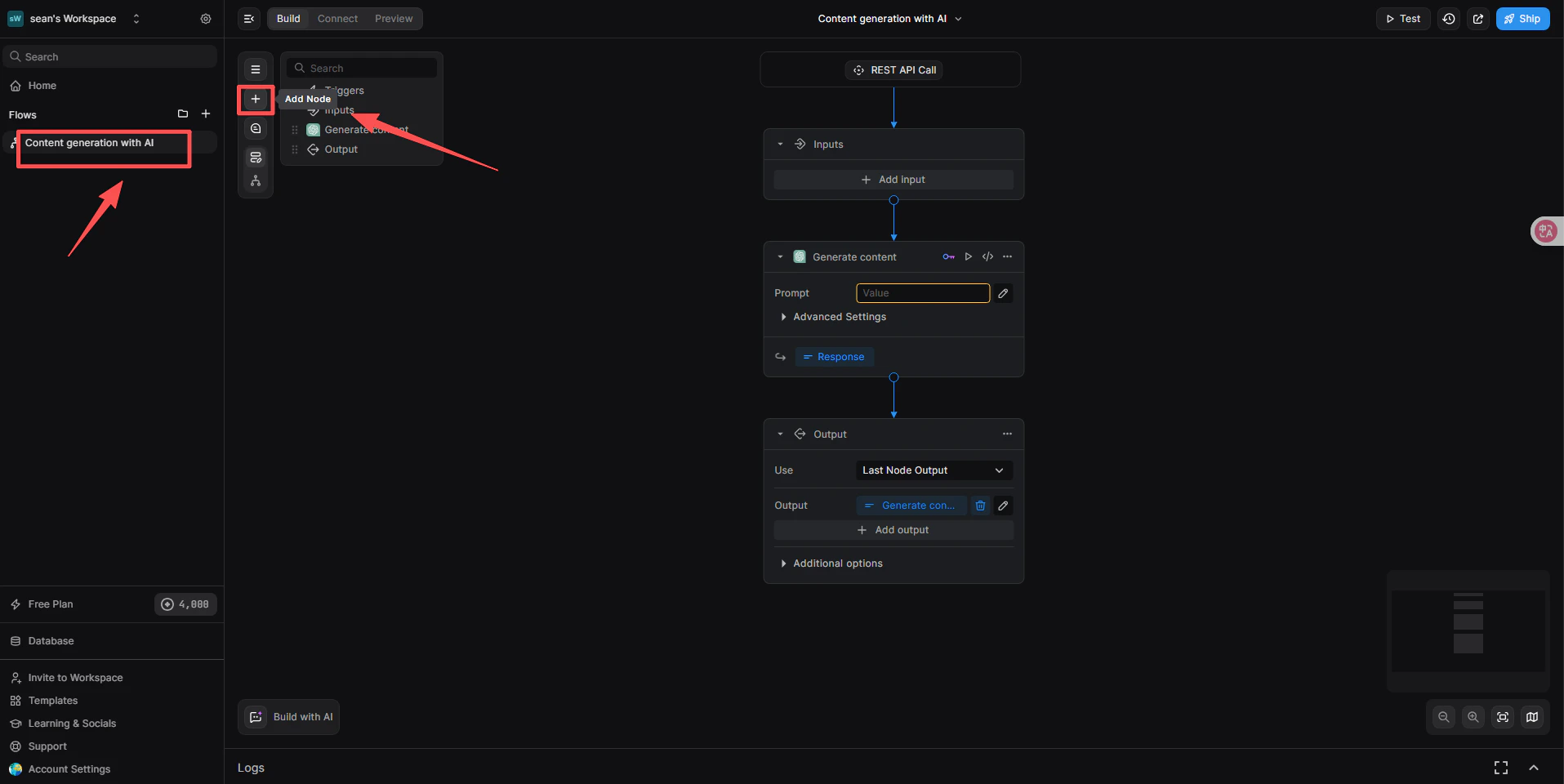
    1. 在 REST API trigger 下方，點擊 **+ Add a new step**。
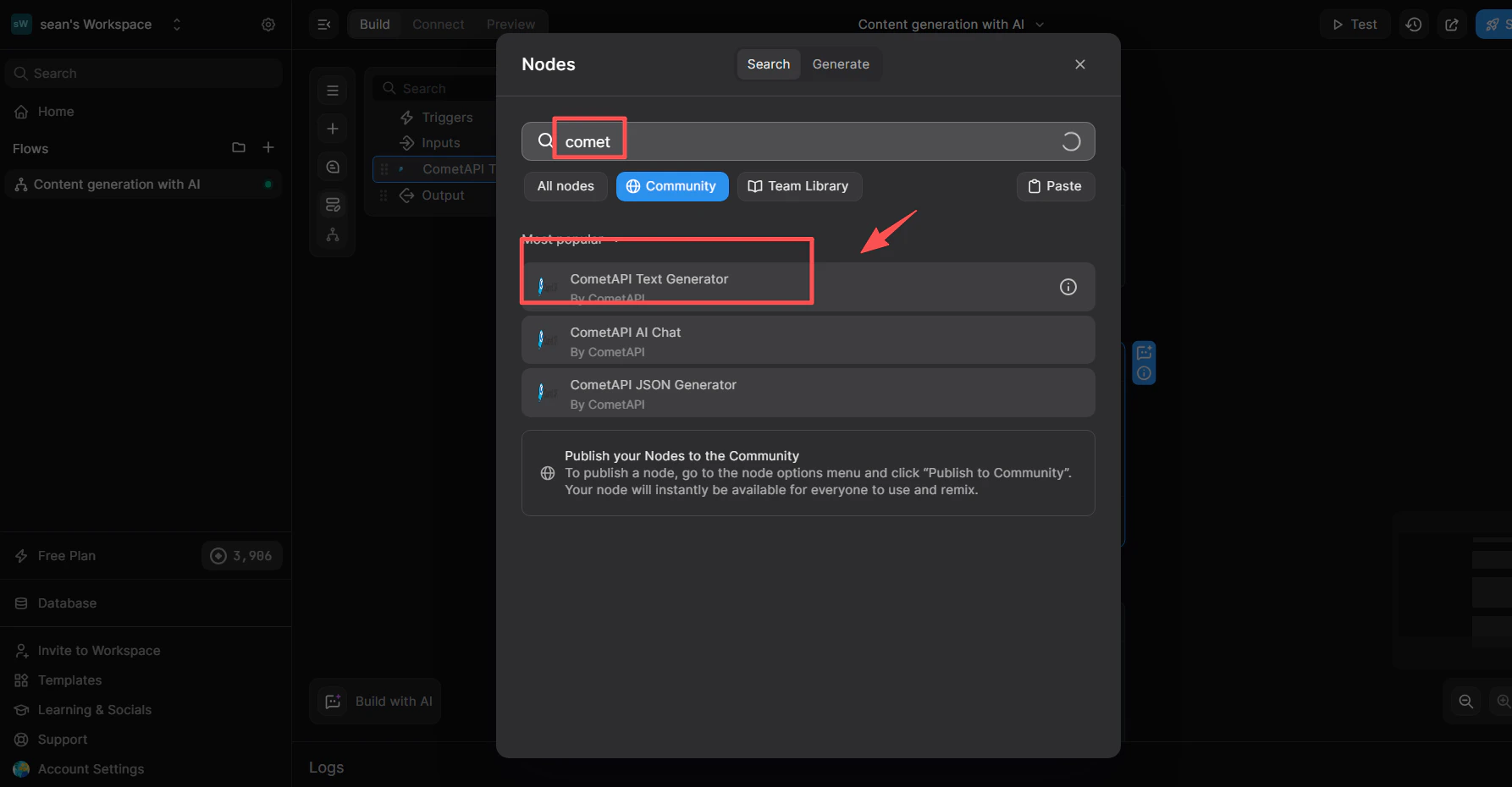
    2. 在節點庫搜尋框中，輸入 `cometapi`。
    3. 從 **Community** 清單中，選擇 **CometAPI Text Generator**。

    <Frame>
      <img src="https://mintcdn.com/cometapi/SZhlxZhCnMLn__BW/images/integrations/810968_360694.png?fit=max&auto=format&n=SZhlxZhCnMLn__BW&q=85&s=4ac17cb84e36a7f026f618e2b5229bf2" alt="BuildShip 節點庫搜尋結果中顯示 CometAPI Text Generator" width="1915" height="960" data-path="images/integrations/810968_360694.png" />
    </Frame>

    <Frame>
      <img src="https://mintcdn.com/cometapi/SZhlxZhCnMLn__BW/images/integrations/810968_360712.png?fit=max&auto=format&n=SZhlxZhCnMLn__BW&q=85&s=5da7aa2a5bef0d8a9ce45eceace876d1" alt="已新增到畫布上的 CometAPI Text Generator 節點" width="1786" height="930" data-path="images/integrations/810968_360712.png" />
    </Frame>
  </Step>

  <Step title="連結 CometAPI 整合">
    此步驟會告訴節點要使用哪一個 key 管理系統。

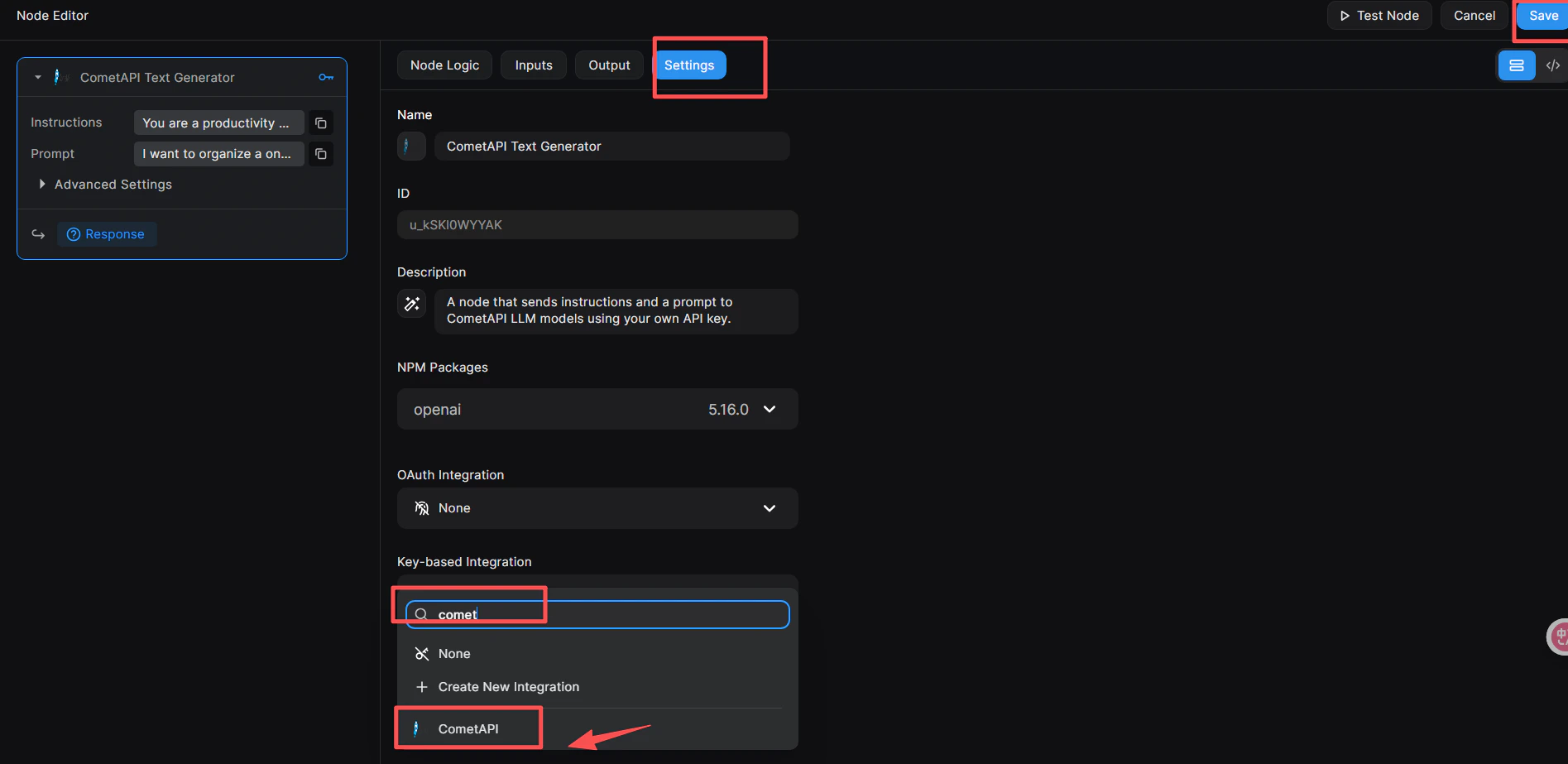
    1. 點擊節點，在右側開啟 **Node Editor**。
    2. 切換到 **Settings** 分頁。
    3. 在 **Key-based Integration** 中，開啟下拉選單並選擇 **CometAPI**。
    4. 點擊右上角藍色的 **Save** 按鈕。
    <Frame>
      <img src="https://mintcdn.com/cometapi/SZhlxZhCnMLn__BW/images/integrations/810968_360713.png?fit=max&auto=format&n=SZhlxZhCnMLn__BW&q=85&s=ceea3b9fec0cf8a1ab81f70547b0a499" alt="Node Editor 的 Settings 分頁，且 Key-based Integration 設為 CometAPI" width="1895" height="923" data-path="images/integrations/810968_360713.png" />
    </Frame>
  </Step>

  <Step title="將你的 API key 新增到節點">
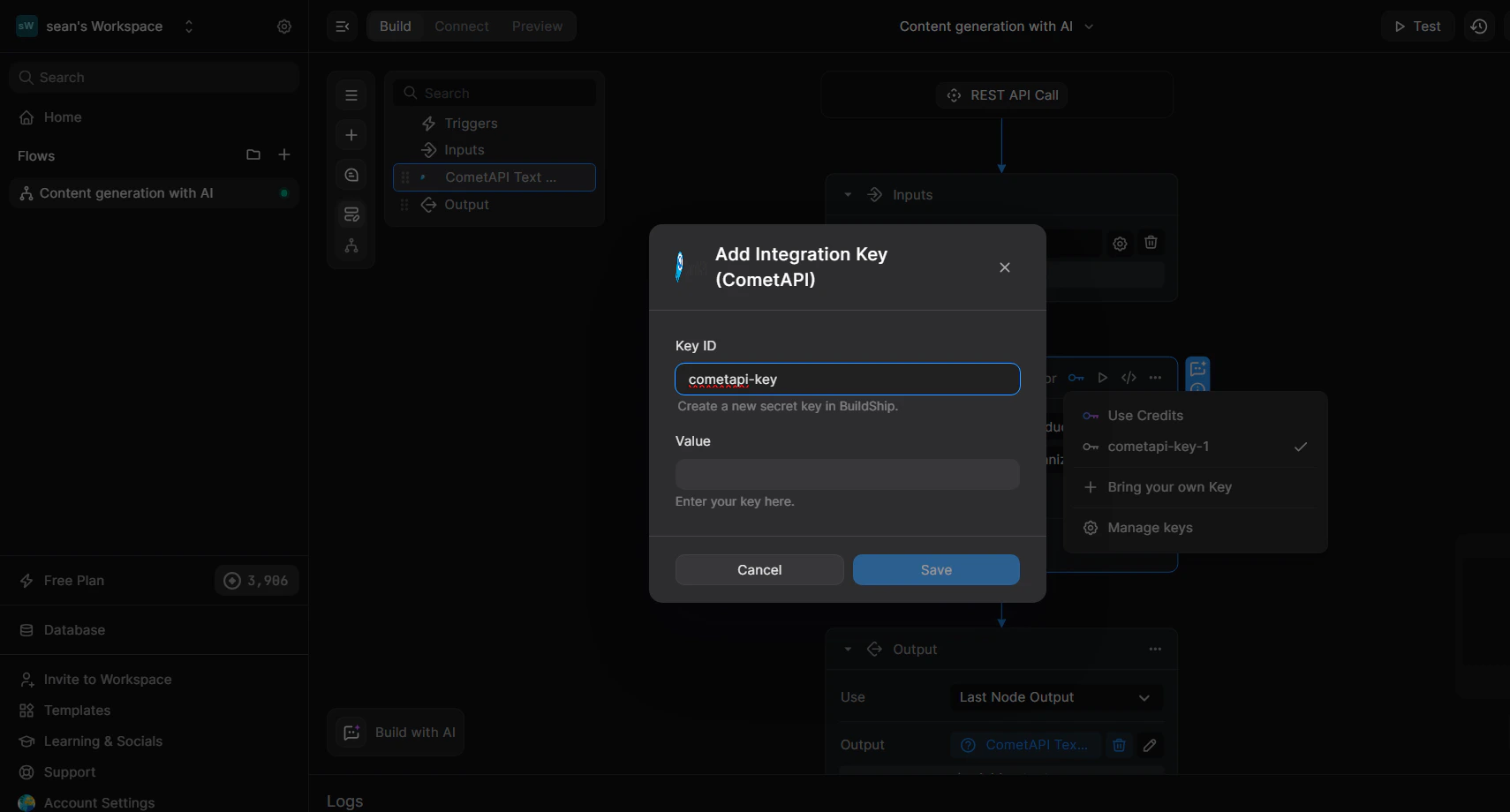
    1. 在 Node Editor 中，切換到 **Inputs** 分頁（或直接點擊節點）。
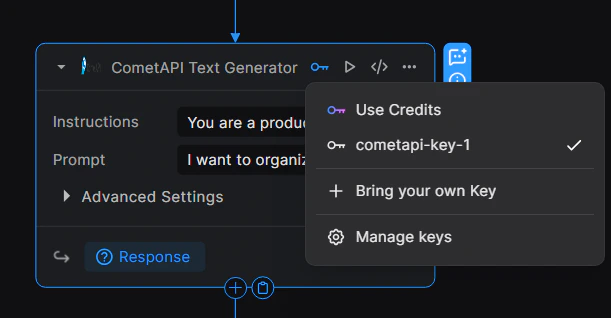
    2. 點擊節點右上角的 🔑 key 圖示以開啟 key 下拉選單。
    3. 選擇 **+ Bring your own Key**。
    4. 輸入 **Key ID**（例如 `cometapi-key-1`），並將你的 CometAPI API key 貼到 **Value**。
    5. 點擊 **Save**。
    <Frame>
      <img src="https://mintcdn.com/cometapi/SZhlxZhCnMLn__BW/images/integrations/810968_360715.png?fit=max&auto=format&n=SZhlxZhCnMLn__BW&q=85&s=25c09a874e2a0ceadf2a83e1192323ca" alt="已填入 Key ID 與 Value 欄位的 key 管理對話框" width="1710" height="920" data-path="images/integrations/810968_360715.png" />
    </Frame>

    <Frame>
      <img src="https://mintcdn.com/cometapi/SZhlxZhCnMLn__BW/images/integrations/810968_360714.png?fit=max&auto=format&n=SZhlxZhCnMLn__BW&q=85&s=7a946cdb3d110605b3a9f1d7d91e022b" alt="顯示 key 已成功綁定的節點" width="611" height="318" data-path="images/integrations/810968_360714.png" />
    </Frame>
  </Step>

  <Step title="設定輸入參數">
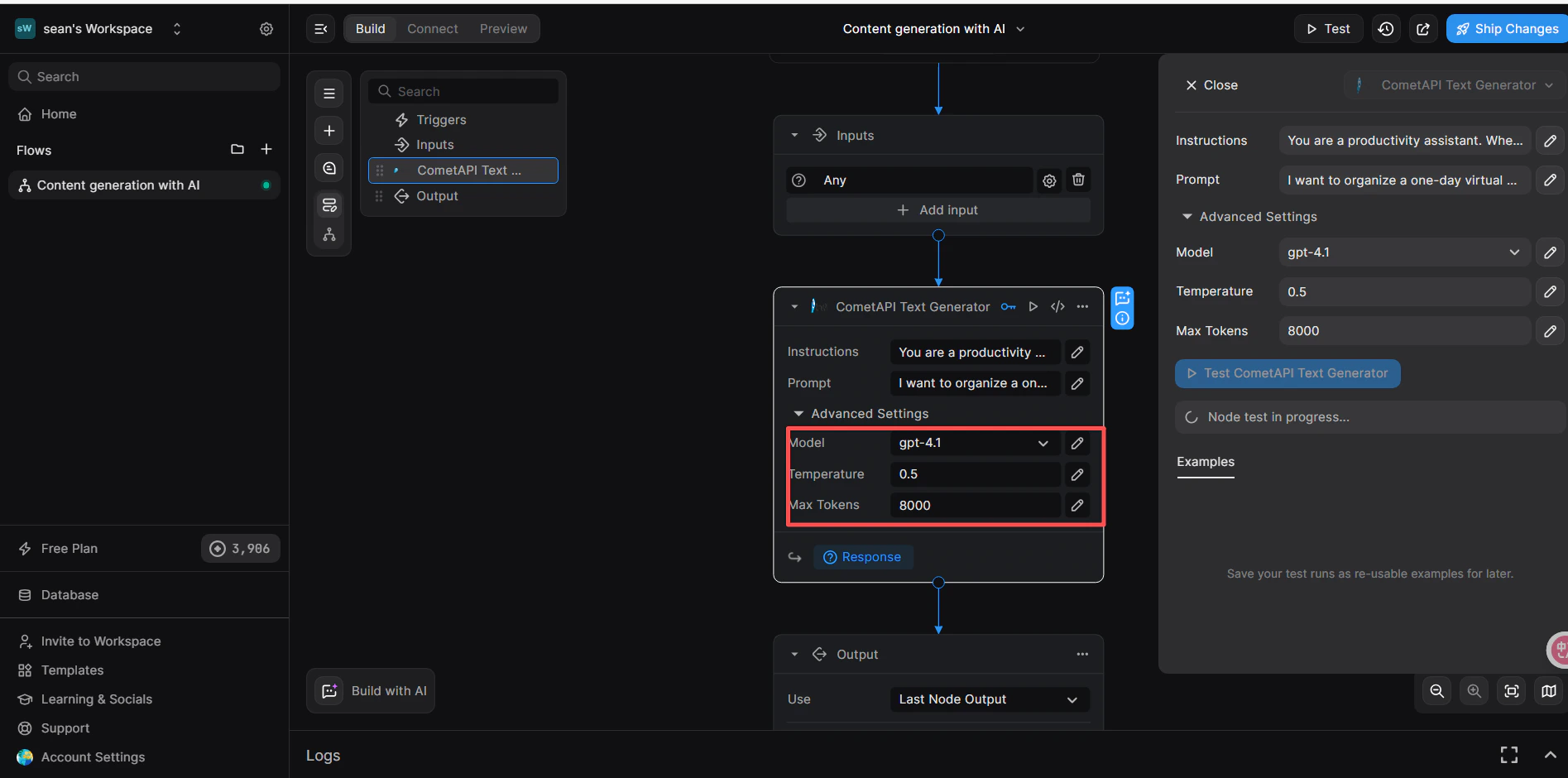
    在節點的 **Inputs** 分頁中：

    * **Instructions**（可選）：設定 system role，例如 `You are a productivity assistant.`
    * **Prompt**：點擊 **`</>`** 圖示，然後選擇 **Trigger → Body → prompt** 來映射傳入的 request body。
    * **Advanced → Model**：輸入你想使用的目前 model ID。

    <Frame>
      <img src="https://mintcdn.com/cometapi/SZhlxZhCnMLn__BW/images/integrations/810968_360716.png?fit=max&auto=format&n=SZhlxZhCnMLn__BW&q=85&s=71431b9496c396bbe5fa8d529ca57b27" alt="已設定 Instructions、Prompt 與 Model 的 CometAPI 節點" width="1895" height="940" data-path="images/integrations/810968_360716.png" />
    </Frame>
  </Step>

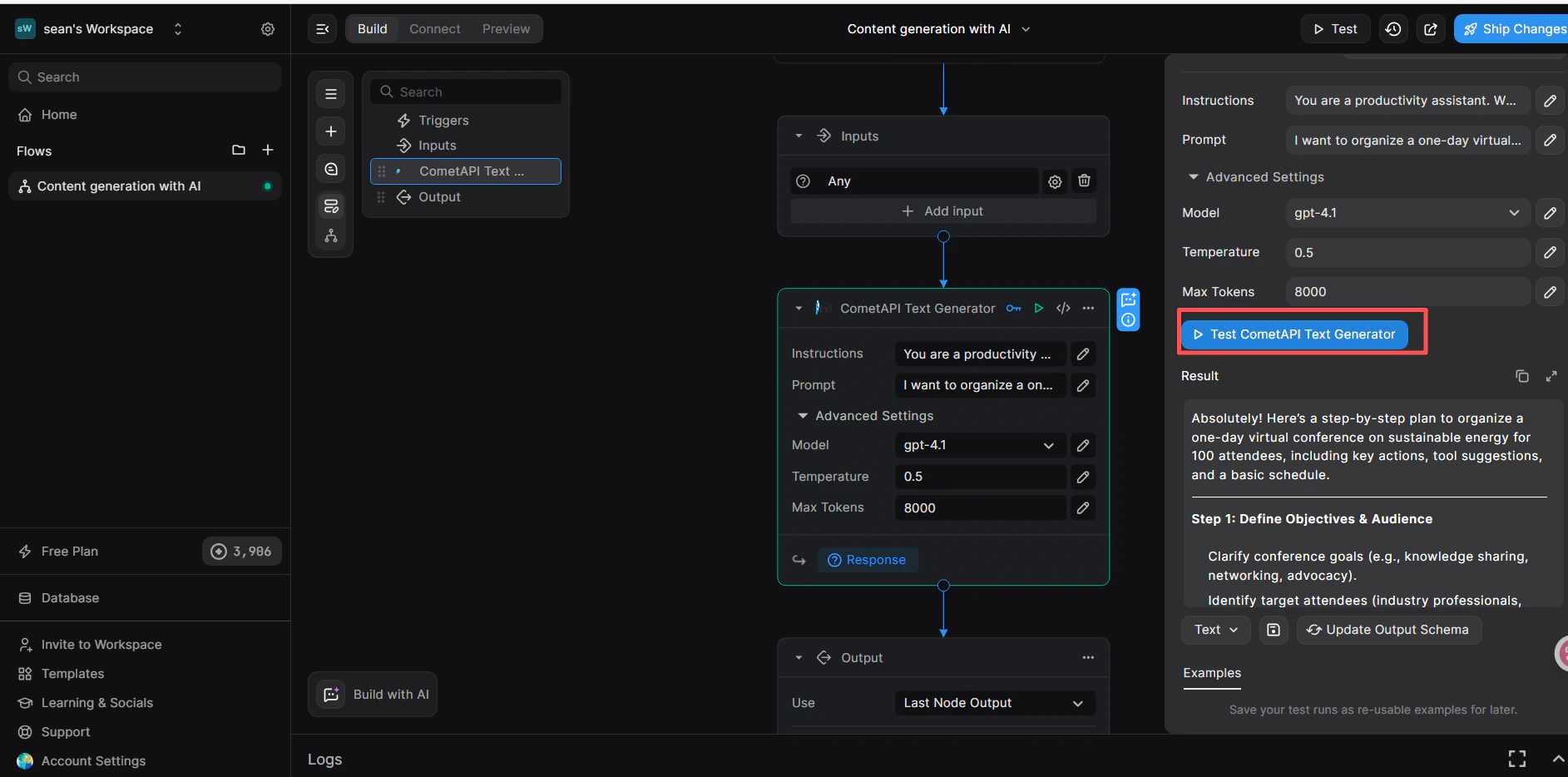
  <Step title="新增 Return Response 節點並測試">
    1. 在 CometAPI 節點下方，點擊 **+ Add a new step** 並選擇 **Return Response**。
    2. 在 **Body** 欄位中，點擊 **`</>`** 並從 CometAPI Text Generator 節點中選擇 `response` 變數。
    3. 點擊右上角的 **Test**，選擇 **JSON** 輸入格式，並送出：

    ```json theme={null}
    {
      "prompt": "hi"
    }
    ```

    4. **Result** 面板中出現成功回應，即可確認工作流程正常運作。

    <Frame>
      <img src="https://mintcdn.com/cometapi/SZhlxZhCnMLn__BW/images/integrations/810968_360717.png?fit=max&auto=format&n=SZhlxZhCnMLn__BW&q=85&s=561ea8bcdfd96a014dab4476840ee377" alt="顯示成功 CometAPI 回應的 BuildShip 測試面板" width="1885" height="934" data-path="images/integrations/810968_360717.png" />
    </Frame>

    如果呼叫失敗，請確認你的 API key，並確認 Key-based Integration 已設為 **CometAPI**，或聯絡 [CometAPI 支援](https://www.cometapi.com)。
  </Step>
</Steps>

<Tip>
  **Key-based Integration** 步驟（將節點連結到 CometAPI）是必要的——即使你的 API key 正確，跳過這一步仍會導致驗證錯誤。
</Tip>

<script type="application/ld+json">
  {`
    {
    "@context": "https://schema.org",
    "@graph": [
      {
        "@type": "HowTo",
        "@id": "https://apidoc.cometapi.com/integrations/buildship#howto",
        "name": "將 BuildShip 連接到 CometAPI",
        "description": "使用本指南，透過設定 base URL、API key，以及 model 或 provider 選項，將 BuildShip 連接到 CometAPI。",
        "step": [
          {
            "@type": "HowToStep",
            "@id": "https://apidoc.cometapi.com/integrations/buildship#step-1",
            "position": 1,
            "name": "取得你的 CometAPI API key",
            "text": "建立或開啟你的 CometAPI 帳戶，然後從儀表板複製一個已啟用的 API key。"
          },
          {
            "@type": "HowToStep",
            "@id": "https://apidoc.cometapi.com/integrations/buildship#step-2",
            "position": 2,
            "name": "建立含有 REST API trigger 的工作流程",
            "text": "完成「將 BuildShip 連接到 CometAPI」指南中的「建立含有 REST API trigger 的工作流程」步驟。"
          },
          {
            "@type": "HowToStep",
            "@id": "https://apidoc.cometapi.com/integrations/buildship#step-3",
            "position": 3,
            "name": "新增 CometAPI Text Generator 節點",
            "text": "完成「將 BuildShip 連接到 CometAPI」指南中的「新增 CometAPI Text Generator 節點」步驟。"
          },
          {
            "@type": "HowToStep",
            "@id": "https://apidoc.cometapi.com/integrations/buildship#step-4",
            "position": 4,
            "name": "連結 CometAPI 整合",
            "text": "完成「將 BuildShip 連接到 CometAPI」指南中的「連結 CometAPI 整合」步驟。"
          },
          {
            "@type": "HowToStep",
            "@id": "https://apidoc.cometapi.com/integrations/buildship#step-5",
            "position": 5,
            "name": "將你的 API key 新增到節點",
            "text": "完成「將 BuildShip 連接到 CometAPI」指南中的「將你的 API key 新增到節點」步驟。"
          },
          {
            "@type": "HowToStep",
            "@id": "https://apidoc.cometapi.com/integrations/buildship#step-6",
            "position": 6,
            "name": "設定輸入參數",
            "text": "完成「將 BuildShip 連接到 CometAPI」指南中的「設定輸入參數」步驟。"
          },
          {
            "@type": "HowToStep",
            "@id": "https://apidoc.cometapi.com/integrations/buildship#step-7",
            "position": 7,
            "name": "新增 Return Response 節點並測試",
            "text": "完成「將 BuildShip 連接到 CometAPI」指南中的「新增 Return Response 節點並測試」步驟。"
          }
        ]
      },
      {
        "@type": "BreadcrumbList",
        "itemListElement": [
          {
            "@type": "ListItem",
            "position": 1,
            "name": "CometAPI 文件",
            "item": "https://apidoc.cometapi.com/"
          },
          {
            "@type": "ListItem",
            "position": 2,
            "name": "整合",
            "item": "https://apidoc.cometapi.com/integrations"
          },
          {
            "@type": "ListItem",
            "position": 3,
            "name": "將 BuildShip 連接到 CometAPI",
            "item": "https://apidoc.cometapi.com/integrations/buildship"
          }
        ]
      }
    ]
    }
    `}
</script>