> ## Documentation Index
> Fetch the complete documentation index at: https://apidoc.cometapi.com/llms.txt
> Use this file to discover all available pages before exploring further.

# 使用 Cline 搭配 CometAPI

> 使用本指南透過設定 base URL、API key，以及 model 或 provider 選項，將 Cline 設定為搭配 CometAPI 使用。

[Cline](https://marketplace.visualstudio.com/items?itemName=saoudrizwan.claude-dev) 是一個 VS Code 擴充功能，可將 AI 程式設計輔助直接帶入你的編輯器中。將它設定為使用 CometAPI 作為自訂的 OpenAI 相容 provider。

## 先決條件

* 已在 VS Code 中安裝 [Cline](https://marketplace.visualstudio.com/items?itemName=saoudrizwan.claude-dev)
* 擁有已啟用 API key 的 [CometAPI](https://www.cometapi.com) 帳戶

## 設定

<Steps>
  <Step title="在 VS Code 中安裝 Cline">
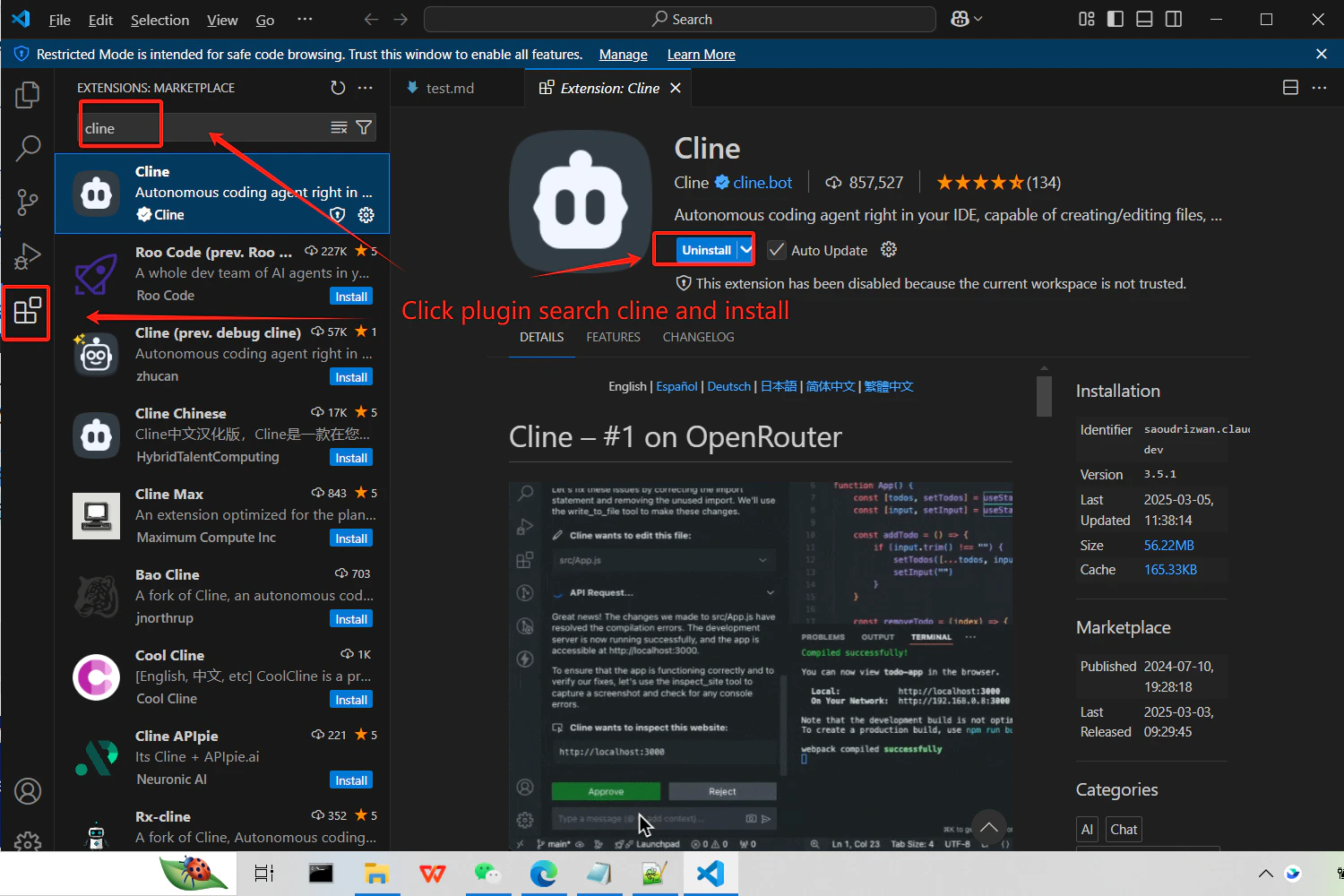
    在 VS Code 的 Extensions 面板中搜尋 **Cline** 並安裝。
    <Frame>
      <img src="https://mintcdn.com/cometapi/mA1ovj6s0e3RM42l/images/integrations/810968_351589.png?fit=max&auto=format&n=mA1ovj6s0e3RM42l&q=85&s=e7a42db3ea9dfa41a89ff14f23b75dc4" alt="顯示 Cline 擴充功能的 VS Code Extensions 面板" width="1500" height="1000" data-path="images/integrations/810968_351589.png" />
    </Frame>
  </Step>

  <Step title="取得你的 CometAPI API key">
    登入 [CometAPI 控制台](https://www.cometapi.com/console)。按一下 **Add API Key**，然後複製你的金鑰與 base URL（`https://api.cometapi.com`）。

    <Frame>
      <img src="https://mintcdn.com/cometapi/SZhlxZhCnMLn__BW/images/overview/810968_364191.png?fit=max&auto=format&n=SZhlxZhCnMLn__BW&q=85&s=aef81a83f29f8eb16655ed4060425f50" alt="CometAPI 控制台 — Add API Key" width="3824" height="1892" data-path="images/overview/810968_364191.png" />
    </Frame>

    <Frame>
      <img src="https://mintcdn.com/cometapi/HhtmQffktazbxUvS/images/overview/810968_364193.png?fit=max&auto=format&n=HhtmQffktazbxUvS&q=85&s=d893f659267150d0faf45f99eb5dffc1" alt="CometAPI API key 與 base URL" width="2434" height="1232" data-path="images/overview/810968_364193.png" />
    </Frame>
  </Step>

  <Step title="設定 API provider">
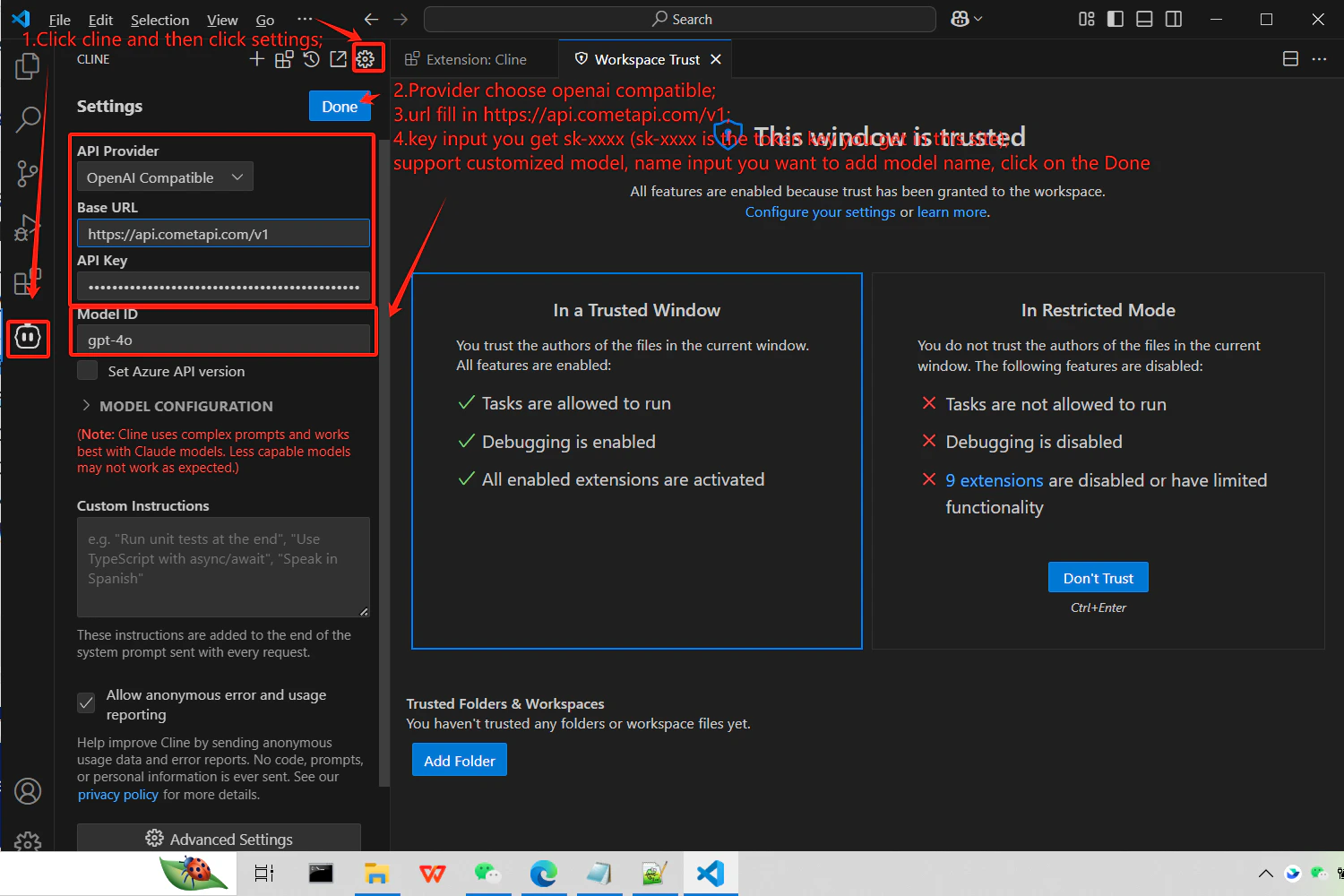
    開啟 Cline 設定，並選擇 **OpenAI Compatible** 作為 provider。在 **Base URL** 欄位中輸入 `https://api.cometapi.com/v1`，將你的金鑰貼到 **API Key**，並輸入你想使用的 model ID。

    <Frame>
      <img src="https://mintcdn.com/cometapi/mA1ovj6s0e3RM42l/images/integrations/810968_351590.png?fit=max&auto=format&n=mA1ovj6s0e3RM42l&q=85&s=37db10e7d84ac7c4eac050d7021adae4" alt="已選擇 OpenAI Compatible 並輸入 CometAPI base URL 的 Cline 設定" width="1500" height="1000" data-path="images/integrations/810968_351590.png" />
    </Frame>
  </Step>

  <Step title="測試連線">
    在 Cline 中送出測試 Prompt（例如，請它產生一個 hello world 函式）。成功的回應即可確認整合運作正常。
  </Step>
</Steps>

<script type="application/ld+json">
  {`
    {
    "@context": "https://schema.org",
    "@graph": [
      {
        "@type": "HowTo",
        "@id": "https://apidoc.cometapi.com/integrations/cline#howto",
        "name": "使用 Cline 搭配 CometAPI",
        "description": "使用本指南，透過設定 base URL、API key，以及 model 或 provider 選項來設定 Cline 與 CometAPI。",
        "step": [
          {
            "@type": "HowToStep",
            "@id": "https://apidoc.cometapi.com/integrations/cline#step-1",
            "position": 1,
            "name": "在 VS Code 中安裝 Cline",
            "text": "完成〈使用 Cline 搭配 CometAPI〉指南中的〈在 VS Code 中安裝 Cline〉步驟。"
          },
          {
            "@type": "HowToStep",
            "@id": "https://apidoc.cometapi.com/integrations/cline#step-2",
            "position": 2,
            "name": "取得你的 CometAPI API key",
            "text": "建立或開啟你的 CometAPI 帳戶，然後從控制台複製一組有效的 API key。"
          },
          {
            "@type": "HowToStep",
            "@id": "https://apidoc.cometapi.com/integrations/cline#step-3",
            "position": 3,
            "name": "設定 API provider",
            "text": "完成〈使用 Cline 搭配 CometAPI〉指南中的〈設定 API provider〉步驟。"
          },
          {
            "@type": "HowToStep",
            "@id": "https://apidoc.cometapi.com/integrations/cline#step-4",
            "position": 4,
            "name": "測試連線",
            "text": "從 CometAPI Models 頁面選擇目前可用的 model ID，然後從整合中送出測試請求。"
          }
        ]
      },
      {
        "@type": "BreadcrumbList",
        "itemListElement": [
          {
            "@type": "ListItem",
            "position": 1,
            "name": "CometAPI 文件",
            "item": "https://apidoc.cometapi.com/"
          },
          {
            "@type": "ListItem",
            "position": 2,
            "name": "整合",
            "item": "https://apidoc.cometapi.com/integrations"
          },
          {
            "@type": "ListItem",
            "position": 3,
            "name": "使用 Cline 搭配 CometAPI",
            "item": "https://apidoc.cometapi.com/integrations/cline"
          }
        ]
      }
    ]
    }
    `}
</script>