> ## Documentation Index
> Fetch the complete documentation index at: https://apidoc.cometapi.com/llms.txt
> Use this file to discover all available pages before exploring further.

# 使用 CometAPI 搭配 Immersive Translation

> 使用本指南透過設定 base URL、API key，以及 model 或 provider 選項，來配置 Immersive Translation 與 CometAPI 的整合。

[Immersive Translation](https://immersivetranslate.com/) 是一款用於雙語翻譯的瀏覽器擴充功能。將它連接到 CometAPI，即可使用我們平台上的任何模型來驅動翻譯。

## 先決條件

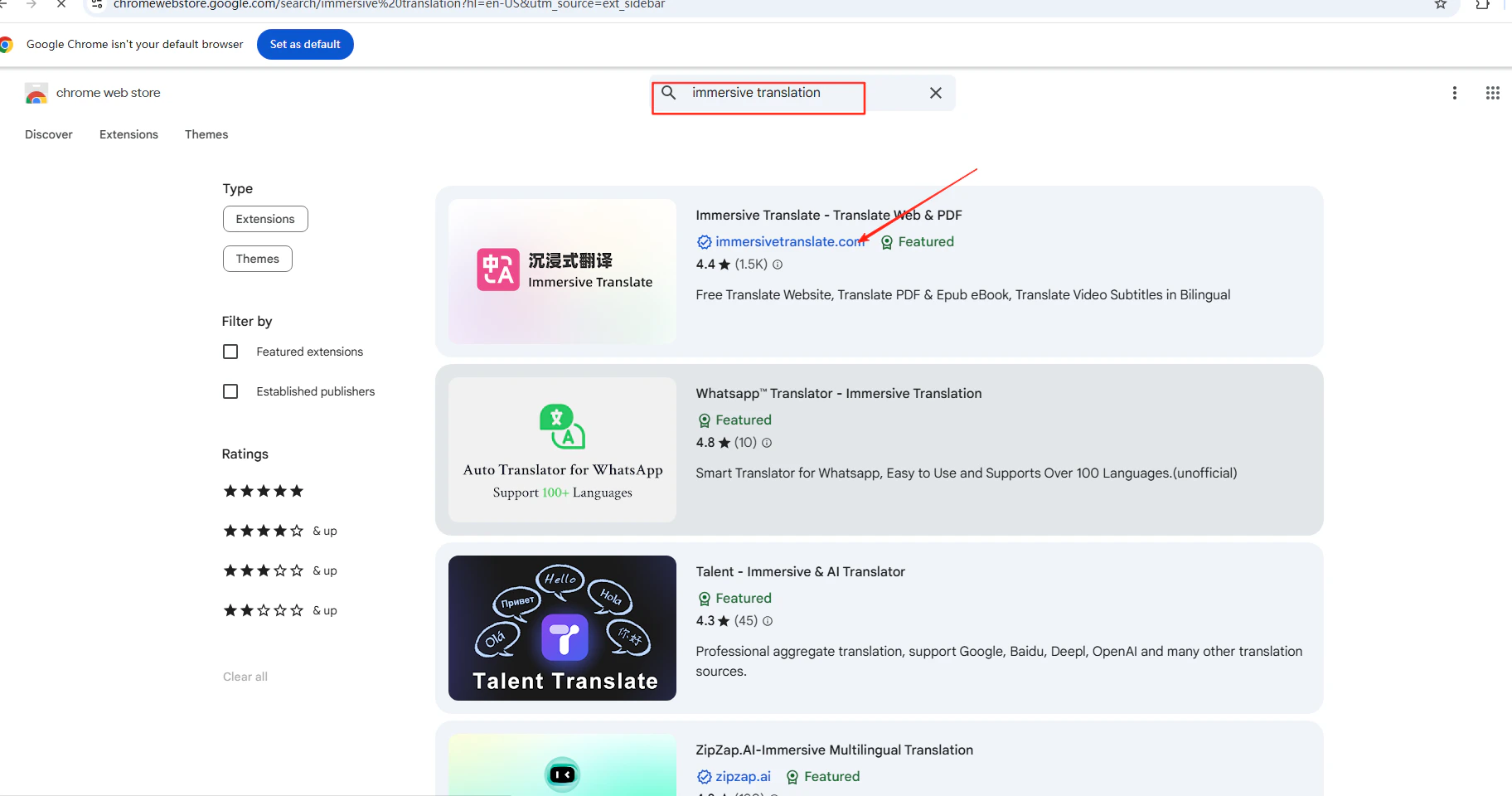
* 已安裝 Immersive Translation 瀏覽器擴充功能——可在你瀏覽器的擴充功能商店中搜尋它
  <Frame>
    <img src="https://mintcdn.com/cometapi/E4FFvyMYmaOZoldp/images/integrations/810968_360315.png?fit=max&auto=format&n=E4FFvyMYmaOZoldp&q=85&s=f922401fe2555358631fed147db49b0f" alt="顯示 Immersive Translation 的瀏覽器擴充功能商店" width="549" height="278" data-path="images/integrations/810968_360315.png" />
  </Frame>

  <Frame>
    <img src="https://mintcdn.com/cometapi/E4FFvyMYmaOZoldp/images/integrations/810968_360316.png?fit=max&auto=format&n=E4FFvyMYmaOZoldp&q=85&s=c504344ed770c68c806c17bca6b3084b" alt="Immersive Translation 擴充功能安裝頁面" width="1824" height="960" data-path="images/integrations/810968_360316.png" />
  </Frame>

* 擁有一個帶有有效 API key 的 [CometAPI](https://www.cometapi.com) 帳戶

## 設定

<Steps>
  <Step title="取得你的 CometAPI API key">
    登入 [CometAPI 控制台](https://www.cometapi.com/console)。按一下 **Add API Key**，並複製你的金鑰與基礎 URL（`https://api.cometapi.com`）。

    <Frame>
      <img src="https://mintcdn.com/cometapi/SZhlxZhCnMLn__BW/images/overview/810968_364191.png?fit=max&auto=format&n=SZhlxZhCnMLn__BW&q=85&s=aef81a83f29f8eb16655ed4060425f50" alt="CometAPI 控制台 — 新增 API Key" width="3824" height="1892" data-path="images/overview/810968_364191.png" />
    </Frame>

    <Frame>
      <img src="https://mintcdn.com/cometapi/HhtmQffktazbxUvS/images/overview/810968_364193.png?fit=max&auto=format&n=HhtmQffktazbxUvS&q=85&s=d893f659267150d0faf45f99eb5dffc1" alt="CometAPI API key 與基礎 URL" width="2434" height="1232" data-path="images/overview/810968_364193.png" />
    </Frame>
  </Step>

  <Step title="將 CometAPI 新增為 OpenAI 相容服務">
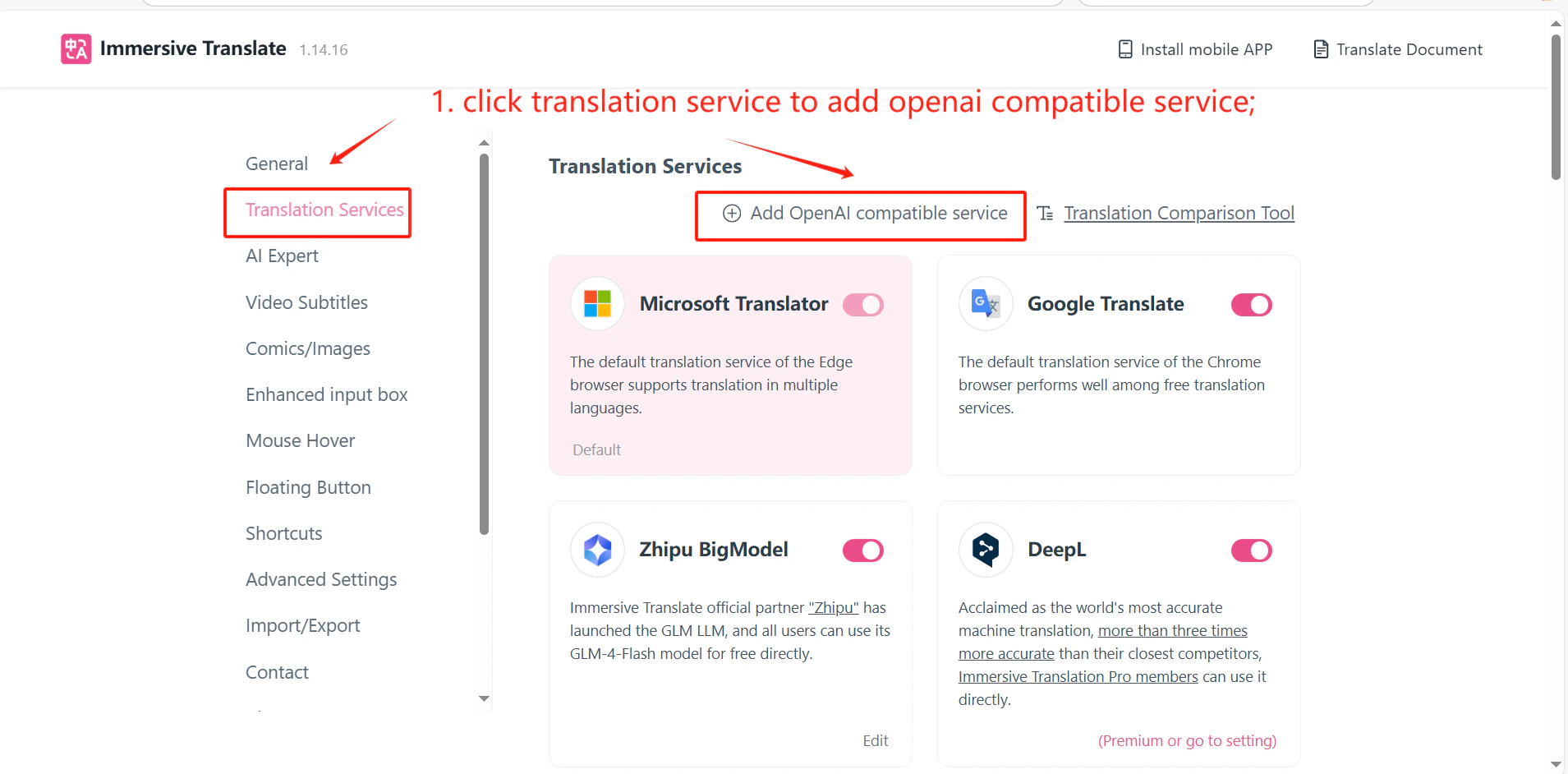
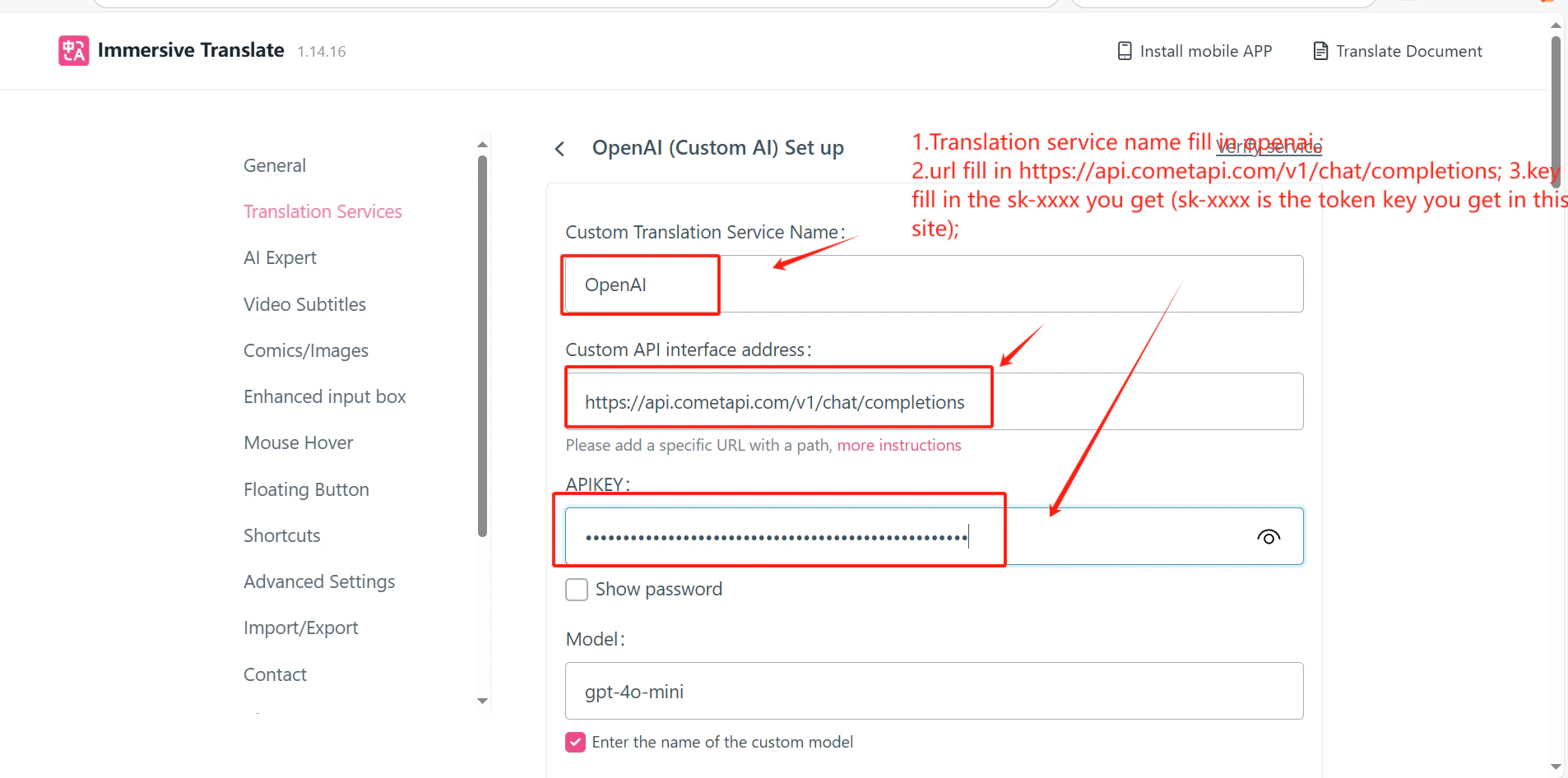
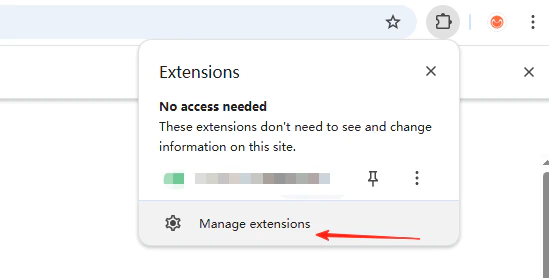
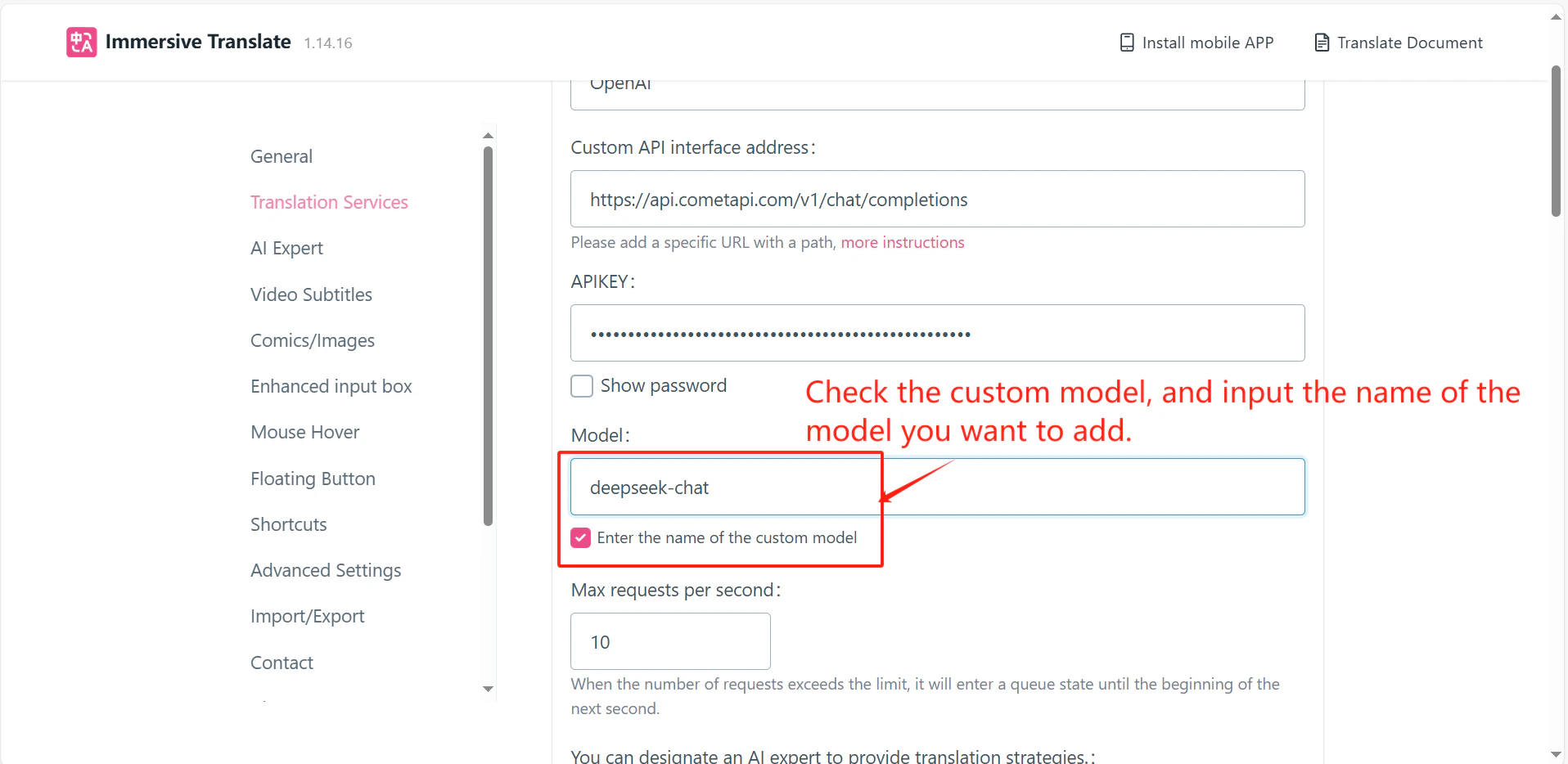
    在 Immersive Translation 擴充功能圖示上按一下滑鼠右鍵 → **Extension Settings** → **Translation Services**。按一下 **Add OpenAI Compatible Service**，在 **API Address** 欄位輸入 `https://api.cometapi.com/v1/chat/completions`，並將你的金鑰貼到 **API Key**。

    <Frame>
      <img src="https://mintcdn.com/cometapi/mA1ovj6s0e3RM42l/images/integrations/810968_351546.png?fit=max&auto=format&n=mA1ovj6s0e3RM42l&q=85&s=e4437b20cd9e8cdbedfa0410b0cf1d3c" alt="Immersive Translation 擴充功能設定 — 新增服務對話方塊" width="1909" height="942" data-path="images/integrations/810968_351546.png" />
    </Frame>

    <Frame>
      <img src="https://mintcdn.com/cometapi/mA1ovj6s0e3RM42l/images/integrations/810968_351547.png?fit=max&auto=format&n=mA1ovj6s0e3RM42l&q=85&s=75c2bc0d71731de1c0da744aa106a0d8" alt="已為 CometAPI 填入 API 位址與金鑰欄位" width="1906" height="946" data-path="images/integrations/810968_351547.png" />
    </Frame>
  </Step>

  <Step title="測試服務">
    在設定面板中按一下 **Test Service**。驗證成功即表示整合運作正常。
    <Frame>
      <img src="https://mintcdn.com/cometapi/mA1ovj6s0e3RM42l/images/integrations/810968_351548.png?fit=max&auto=format&n=mA1ovj6s0e3RM42l&q=85&s=d5f341f7b99ab31d939ac1f10f5ad06f" alt="Immersive Translation 服務測試顯示成功結果" width="1916" height="934" data-path="images/integrations/810968_351548.png" />
    </Frame>
  </Step>
</Steps>

<Tip>
  你也可以在設定頁面自訂 model ID，輸入你想使用的 model ID。
</Tip>

<script type="application/ld+json">
  {`
    {
    "@context": "https://schema.org",
    "@graph": [
      {
        "@type": "HowTo",
        "@id": "https://apidoc.cometapi.com/integrations/immersive-translation#howto",
        "name": "使用 CometAPI 搭配 Immersive Translation",
        "description": "使用本指南，透過設定基礎 URL、API key，以及 model 或 provider 選項，來設定 Immersive Translation 與 CometAPI。",
        "step": [
          {
            "@type": "HowToStep",
            "@id": "https://apidoc.cometapi.com/integrations/immersive-translation#step-1",
            "position": 1,
            "name": "取得你的 CometAPI API key",
            "text": "建立或開啟你的 CometAPI 帳戶，然後從控制台複製有效的 API key。"
          },
          {
            "@type": "HowToStep",
            "@id": "https://apidoc.cometapi.com/integrations/immersive-translation#step-2",
            "position": 2,
            "name": "將 CometAPI 新增為 OpenAI 相容服務",
            "text": "完成「使用 CometAPI 搭配 Immersive Translation」指南中的「將 CometAPI 新增為 OpenAI 相容服務」步驟。"
          },
          {
            "@type": "HowToStep",
            "@id": "https://apidoc.cometapi.com/integrations/immersive-translation#step-3",
            "position": 3,
            "name": "測試服務",
            "text": "完成「使用 CometAPI 搭配 Immersive Translation」指南中的「測試服務」步驟。"
          }
        ]
      },
      {
        "@type": "BreadcrumbList",
        "itemListElement": [
          {
            "@type": "ListItem",
            "position": 1,
            "name": "CometAPI 文件",
            "item": "https://apidoc.cometapi.com/"
          },
          {
            "@type": "ListItem",
            "position": 2,
            "name": "整合",
            "item": "https://apidoc.cometapi.com/integrations"
          },
          {
            "@type": "ListItem",
            "position": 3,
            "name": "使用 CometAPI 搭配 Immersive Translation",
            "item": "https://apidoc.cometapi.com/integrations/immersive-translation"
          }
        ]
      }
    ]
    }
    `}
</script>