

- 文字生圖
- 圖生圖編輯
- 多圖合成
- 儲存產生的圖片
- Base URL:
https://api.cometapi.com - 安裝 SDK:
pip install google-genai(Python)或npm install @google/genai(Node.js)
設定
使用 CometAPI 的 base URL 初始化 client:from google import genai
from google.genai import types
import os
COMETAPI_KEY = os.environ["COMETAPI_KEY"]
client = genai.Client(
http_options={"api_version": "v1beta", "base_url": "https://api.cometapi.com"},
api_key=COMETAPI_KEY,
)
import { GoogleGenAI } from "@google/genai";

const COMETAPI_KEY = process.env.COMETAPI_KEY;

const ai = new GoogleGenAI({
  apiKey: COMETAPI_KEY,
  httpOptions: { apiVersion: "v1beta", baseUrl: "https://api.cometapi.com" },
});
package main

import (
	"context"
	"os"
	"google.golang.org/genai"
)

func main() {
	ctx := context.Background()
	apiKey := os.Getenv("COMETAPI_KEY")

	client, _ := genai.NewClient(ctx, &genai.ClientConfig{
		APIKey:  apiKey,
		Backend: genai.BackendGeminiAPI,
		HTTPOptions: genai.HTTPOptions{
			BaseURL: "https://api.cometapi.com",
		},
	})
	// use client below...
}
文字轉圖片生成
根據文字 Prompt 生成圖片並將其儲存到檔案中。from google import genai
from google.genai import types
from PIL import Image
import os
client = genai.Client(
http_options={"api_version": "v1beta", "base_url": "https://api.cometapi.com"},
api_key=os.environ.get("COMETAPI_KEY"),
)
response = client.models.generate_content(
model="gemini-3.1-flash-image-preview",
contents="Create a picture of a nano banana dish in a fancy restaurant with a Gemini theme",
config=types.GenerateContentConfig(
response_modalities=["TEXT", "IMAGE"],
),
)
final_image = None
for part in response.parts:
if getattr(part, "thought", False):
continue
if part.text is not None:
print(part.text)
elif part.inline_data is not None:
final_image = part.as_image()
if final_image:
final_image.save("generated_image.png")
print("Image saved to generated_image.png")
import { GoogleGenAI } from "@google/genai";
import * as fs from "fs";

const ai = new GoogleGenAI({
  apiKey: process.env.COMETAPI_KEY,
  httpOptions: { apiVersion: "v1beta", baseUrl: "https://api.cometapi.com" },
});

const response = await ai.models.generateContent({
  model: "gemini-3.1-flash-image-preview",
  contents: "Create a picture of a nano banana dish in a fancy restaurant with a Gemini theme",
  config: { responseModalities: ["TEXT", "IMAGE"] },
});

let finalImagePart;
for (const part of response.candidates[0].content.parts) {
  if (part.thought === true) {
    continue;
  }
  if (part.text) {
    console.log(part.text);
  }
  if (part.inlineData) {
    finalImagePart = part;
  }
}

if (finalImagePart) {
  const buffer = Buffer.from(finalImagePart.inlineData.data, "base64");
  fs.writeFileSync("generated_image.png", buffer);
  console.log("Image saved to generated_image.png");
}
curl -s -X POST \
  "https://api.cometapi.com/v1beta/models/gemini-3.1-flash-image-preview:generateContent" \
  -H "Authorization: Bearer $COMETAPI_KEY" \
  -H "Content-Type: application/json" \
  -d '{
    "contents": [{
      "parts": [{"text": "Create a picture of a nano banana dish in a fancy restaurant with a Gemini theme"}]
    }],
    "generationConfig": {
      "responseModalities": ["TEXT", "IMAGE"]
    }
  }'
candidates[0].content.parts 中,其中可能包含文字和/或圖片部分。Gemini 圖片模型也可能在最終圖片之前回傳中間 thought 部分,特別是在你同時要求文字與圖片,或明確啟用 thinking 輸出時。不要盲目儲存第一個 inlineData;請略過 thought 為 true 的部分,然後儲存最後一個剩餘的圖片部分。
僅包含最終圖片的典型回應:
{
  "candidates": [{
    "content": {
      "parts": [
        { "text": "Here is your image..." },
        {
          "inlineData": {
            "mimeType": "image/png",
            "data": "<base64-encoded-image>"
          }
        }
      ]
    }
  }]
}
{
  "candidates": [{
    "content": {
      "role": "model",
      "parts": [
        { "text": "Here is your image..." },
        {
          "inlineData": {
            "mimeType": "image/jpeg",
            "data": "<base64-encoded-intermediate-image>"
          },
          "thought": true
        },
        {
          "inlineData": {
            "mimeType": "image/jpeg",
            "data": "<base64-encoded-final-image>"
          },
          "thought": false,
          "thoughtSignature": "<signature>"
        }
      ]
    },
    "finishReason": "STOP"
  }]
}
const imageParts = response.candidates[0].content.parts.filter(
  (part) => part.inlineData && part.thought !== true,
);
const finalImagePart = imageParts.at(-1);
圖生圖生成
上傳輸入影像,並使用文字提示詞對其進行轉換。from google import genai
from google.genai import types
from PIL import Image
import os
client = genai.Client(
http_options={"api_version": "v1beta", "base_url": "https://api.cometapi.com"},
api_key=os.environ.get("COMETAPI_KEY"),
)
# Load the source image
source_image = Image.open("source.jpg")
response = client.models.generate_content(
model="gemini-3.1-flash-image-preview",
contents=["Transform this into a watercolor painting", source_image],
config=types.GenerateContentConfig(
response_modalities=["TEXT", "IMAGE"],
),
)
final_image = None
for part in response.parts:
if getattr(part, "thought", False):
continue
if part.text is not None:
print(part.text)
elif part.inline_data is not None:
final_image = part.as_image()
if final_image:
final_image.save("watercolor_output.png")
import { GoogleGenAI } from "@google/genai";
import * as fs from "fs";

const ai = new GoogleGenAI({
  apiKey: process.env.COMETAPI_KEY,
  httpOptions: { apiVersion: "v1beta", baseUrl: "https://api.cometapi.com" },
});

const imageData = fs.readFileSync("source.jpg").toString("base64");

const response = await ai.models.generateContent({
  model: "gemini-3.1-flash-image-preview",
  contents: [
    { text: "Transform this into a watercolor painting" },
    { inlineData: { mimeType: "image/jpeg", data: imageData } },
  ],
  config: { responseModalities: ["TEXT", "IMAGE"] },
});

const imageParts = response.candidates[0].content.parts.filter(
  (part) => part.inlineData && part.thought !== true,
);
const finalImagePart = imageParts.at(-1);

if (finalImagePart) {
  fs.writeFileSync("watercolor_output.png", Buffer.from(finalImagePart.inlineData.data, "base64"));
}
curl -s -X POST \
  "https://api.cometapi.com/v1beta/models/gemini-3.1-flash-image-preview:generateContent" \
  -H "Authorization: Bearer $COMETAPI_KEY" \
  -H "Content-Type: application/json" \
  -d '{
    "contents": [{
      "role": "user",
      "parts": [
        { "text": "Transform this into a watercolor painting" },
        { "inline_data": { "mime_type": "image/jpeg", "data": "<base64-encoded-source-image>" } }
      ]
    }],
    "generationConfig": { "responseModalities": ["TEXT", "IMAGE"] }
  }'
- Python SDK 可直接接受
PIL.Image物件——不需要手動進行 Base64 編碼。 - 傳遞原始 Base64 字串時,不要包含
data:image/jpeg;base64,前綴。
多圖合成
從多張輸入圖片產生一張新圖片。CometAPI 支援兩種方式:方法 1:單一拼貼圖片
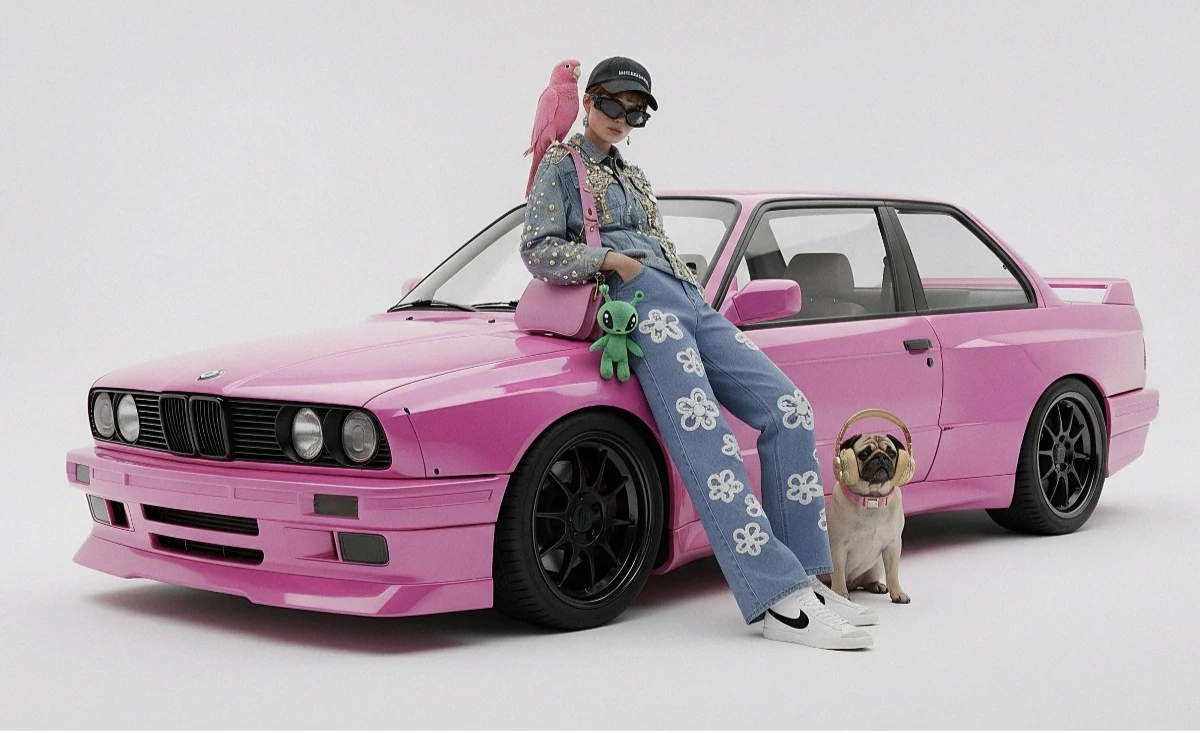
將多張來源圖片合併為一張拼貼圖,然後描述期望的輸出結果。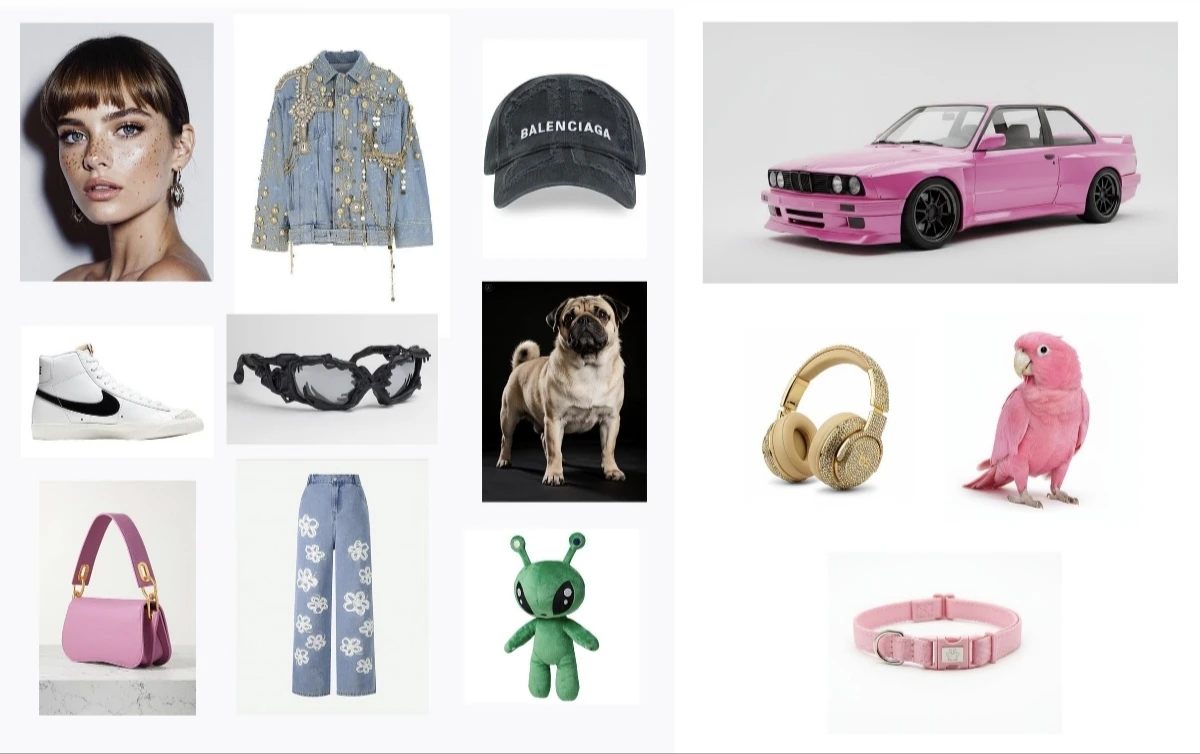
from google import genai
from google.genai import types
from PIL import Image
import os

client = genai.Client(
    http_options={"api_version": "v1beta", "base_url": "https://api.cometapi.com"},
    api_key=os.environ.get("COMETAPI_KEY"),
)

collage = Image.open("collage.jpg")

response = client.models.generate_content(
    model="gemini-3.1-flash-image-preview",
    contents=[
        "A model is posing and leaning against a pink BMW with a green alien keychain attached to a pink handbag, a pink parrot on her shoulder, and a pug wearing a pink collar and gold headphones",
        collage,
    ],
    config=types.GenerateContentConfig(
        response_modalities=["TEXT", "IMAGE"],
    ),
)

final_image = None
for part in response.parts:
    if getattr(part, "thought", False):
        continue
    if part.inline_data is not None:
        final_image = part.as_image()

if final_image:
    final_image.save("composition_output.png")
curl -s -X POST \
  "https://api.cometapi.com/v1beta/models/gemini-3.1-flash-image-preview:generateContent" \
  -H "Authorization: Bearer $COMETAPI_KEY" \
  -H "Content-Type: application/json" \
  -d '{
    "contents": [{
      "role": "user",
      "parts": [
        { "text": "A model is posing and leaning against a pink BMW with a green alien keychain attached to a pink handbag, a pink parrot on her shoulder, and a pug wearing a pink collar and gold headphones" },
        { "inline_data": { "mime_type": "image/jpeg", "data": "<base64-encoded-collage-image>" } }
      ]
    }],
    "generationConfig": { "responseModalities": ["TEXT", "IMAGE"] }
  }'
方法 2:多張獨立圖片(最多 14 張)
直接傳入多張圖片。Gemini 3 模型最多支援 14 張參考圖片(物件 + 角色):from google import genai
from google.genai import types
from PIL import Image
import os
client = genai.Client(
http_options={"api_version": "v1beta", "base_url": "https://api.cometapi.com"},
api_key=os.environ.get("COMETAPI_KEY"),
)
image1 = Image.open("image1.jpg")
image2 = Image.open("image2.jpg")
image3 = Image.open("image3.jpg")
response = client.models.generate_content(
model="gemini-3.1-flash-image-preview",
contents=["Merge the three images", image1, image2, image3],
config=types.GenerateContentConfig(
response_modalities=["TEXT", "IMAGE"],
),
)
final_image = None
for part in response.parts:
if getattr(part, "thought", False):
continue
if part.inline_data is not None:
final_image = part.as_image()
if final_image:
final_image.save("merged_output.png")
curl -s -X POST \
  "https://api.cometapi.com/v1beta/models/gemini-3.1-flash-image-preview:generateContent" \
  -H "Authorization: Bearer $COMETAPI_KEY" \
  -H "Content-Type: application/json" \
  -d '{
    "contents": [{
      "role": "user",
      "parts": [
        { "text": "Merge the three images" },
        { "inline_data": { "mime_type": "image/jpeg", "data": "<base64-image-1>" } },
        { "inline_data": { "mime_type": "image/jpeg", "data": "<base64-image-2>" } },
        { "inline_data": { "mime_type": "image/jpeg", "data": "<base64-image-3>" } }
      ]
    }],
    "generationConfig": { "responseModalities": ["TEXT", "IMAGE"] }
  }'
4K 圖像生成
指定具有aspect_ratio 與 image_size 的 image_config,以輸出高解析度結果:
from google import genai
from google.genai import types
import os

client = genai.Client(
    http_options={"api_version": "v1beta", "base_url": "https://api.cometapi.com"},
    api_key=os.environ.get("COMETAPI_KEY"),
)

response = client.models.generate_content(
    model="gemini-3.1-flash-image-preview",
    contents="Da Vinci style anatomical sketch of a Monarch butterfly on textured parchment",
    config=types.GenerateContentConfig(
        response_modalities=["TEXT", "IMAGE"],
        image_config=types.ImageConfig(
            aspect_ratio="1:1",
            image_size="4K",
        ),
    ),
)

final_image = None
for part in response.parts:
    if getattr(part, "thought", False):
        continue
    if part.text is not None:
        print(part.text)
    elif image := part.as_image():
        final_image = image

if final_image:
    final_image.save("butterfly_4k.png")
import { GoogleGenAI } from "@google/genai";
import * as fs from "fs";

const ai = new GoogleGenAI({
  apiKey: process.env.COMETAPI_KEY,
  httpOptions: { apiVersion: "v1beta", baseUrl: "https://api.cometapi.com" },
});

const response = await ai.models.generateContent({
  model: "gemini-3.1-flash-image-preview",
  contents: "Da Vinci style anatomical sketch of a Monarch butterfly on textured parchment",
  config: {
    responseModalities: ["TEXT", "IMAGE"],
    imageConfig: { aspectRatio: "1:1", imageSize: "4K" },
  },
});

const imageParts = response.candidates[0].content.parts.filter(
  (part) => part.inlineData && part.thought !== true,
);
const finalImagePart = imageParts.at(-1);

if (finalImagePart) {
  fs.writeFileSync("butterfly_4k.png", Buffer.from(finalImagePart.inlineData.data, "base64"));
}
curl -s -X POST \
  "https://api.cometapi.com/v1beta/models/gemini-3.1-flash-image-preview:generateContent" \
  -H "Authorization: Bearer $COMETAPI_KEY" \
  -H "Content-Type: application/json" \
  -d '{
    "contents": [{"parts": [{"text": "Da Vinci style anatomical sketch of a Monarch butterfly on textured parchment"}]}],
    "generationConfig": {
      "responseModalities": ["TEXT", "IMAGE"],
      "imageConfig": {"aspectRatio": "1:1", "imageSize": "4K"}
    }
  }'
對於高解析度請求,請以最後一個非 thought 的圖像部分作為輸出判斷依據。如果你的整合會儲存第一個
inlineData 部分,可能會存到中間的 thought 圖像,其解析度會低於所要求的 imageSize。多輪圖像編輯(聊天)
使用 SDK 的聊天功能來逐步精修圖像:from google import genai
from google.genai import types
import os
client = genai.Client(
http_options={"api_version": "v1beta", "base_url": "https://api.cometapi.com"},
api_key=os.environ.get("COMETAPI_KEY"),
)
chat = client.chats.create(
model="gemini-3.1-flash-image-preview",
config=types.GenerateContentConfig(
response_modalities=["TEXT", "IMAGE"],
),
)
## First turn: Generate
response = chat.send_message(
"Create a vibrant infographic explaining photosynthesis as a recipe, styled like a colorful kids cookbook"
)
final_image = None
for part in response.parts:
if getattr(part, "thought", False):
continue
if part.text is not None:
print(part.text)
elif image := part.as_image():
final_image = image
if final_image:
final_image.save("photosynthesis.png")
第二輪:精修
response = chat.send_message(“將這張資訊圖更新為西班牙文。不要更改任何其他元素。”)
final_image = None
for part in response.parts:
if getattr(part, “thought”, False):
continue
if part.text is not None:
print(part.text)
elif image := part.as_image():
final_image = image
if final_image:
final_image.save(“photosynthesis_spanish.png”)
```javascript Node.js
import { GoogleGenAI } from "@google/genai";
import * as fs from "fs";

const ai = new GoogleGenAI({
  apiKey: process.env.COMETAPI_KEY,
  httpOptions: { apiVersion: "v1beta", baseUrl: "https://api.cometapi.com" },
});

const chat = ai.chats.create({
  model: "gemini-3.1-flash-image-preview",
  config: { responseModalities: ["TEXT", "IMAGE"] },
});

// First turn: generate
const response1 = await chat.sendMessage(
  "Create a vibrant infographic explaining photosynthesis as a recipe, styled like a colorful kids cookbook"
);
const imageParts1 = response1.candidates[0].content.parts.filter(
  (part) => part.inlineData && part.thought !== true,
);
const finalImagePart1 = imageParts1.at(-1);
if (finalImagePart1) {
  fs.writeFileSync("photosynthesis.png", Buffer.from(finalImagePart1.inlineData.data, "base64"));
}

// Second turn: refine
const response2 = await chat.sendMessage(
  "Update this infographic to be in Spanish. Do not change any other elements."
);
const imageParts2 = response2.candidates[0].content.parts.filter(
  (part) => part.inlineData && part.thought !== true,
);
const finalImagePart2 = imageParts2.at(-1);
if (finalImagePart2) {
  fs.writeFileSync("photosynthesis_spanish.png", Buffer.from(finalImagePart2.inlineData.data, "base64"));
}
提示
Prompt 最佳化
Prompt 最佳化
請明確指定風格關鍵字(例如:「cyberpunk、film grain、low contrast」)、長寬比、主體、背景、光線與細節層級。
Base64 格式
Base64 格式
使用原始 HTTP 時,請不要包含
data:image/png;base64, 前綴 — 只使用原始 Base64 字串。Python SDK 會透過 PIL.Image 物件自動處理這一點。強制輸出圖片
強制輸出圖片
將
"responseModalities" 僅設為 ["IMAGE"],即可保證只輸出圖片而不含文字。為什麼我的圖片模糊或解析度較低?
為什麼我的圖片模糊或解析度較低?
請檢查你的程式碼是否儲存了中間 thought 圖片。Gemini 圖片回應可能包含
thought 為 true 的圖片部分;這些不是最終輸出。請略過 thought: true 的部分,並儲存最後一個存在 inlineData 且 thought 不為 true 的圖片部分。如果你不需要文字輸出,請求 "responseModalities": ["IMAGE"] 可減少混合文字/圖片回應的處理。