NextChat (formerly ChatGPT Next Web) is a one-click deployable AI chat app. Connect it to CometAPI using the OpenAI-compatible API settings.

Prerequisites

  • NextChat (web, desktop, or self-hosted)
  • A CometAPI account with an active API key

Setup

1

Get your CometAPI API key

Log in to the CometAPI dashboard. Click Add API Key and copy your key and base URL (https://api.cometapi.com).

CometAPI dashboard — Add API Key
CometAPI API key and base URL
2

Configure the API endpoint

Open NextChat SettingsCustom Interface. Select OpenAI API, enter https://api.cometapi.com in the Interface Address field, paste your key into API Key, and click Save.
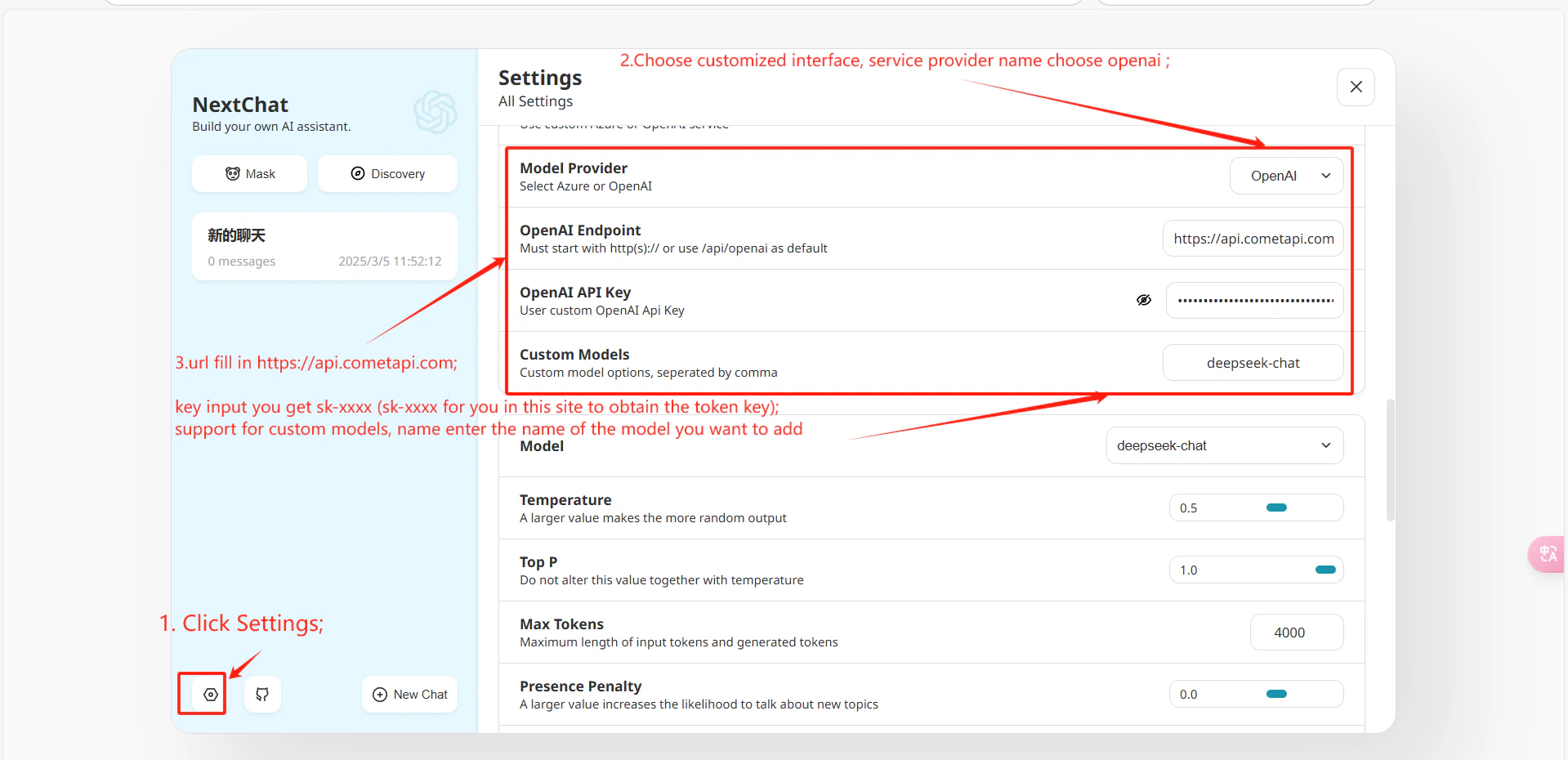
NextChat settings — custom interface and OpenAI API options
3

Test the connection

Send a test message. A successful reply confirms the integration is working.
To add custom models, go to SettingsCustom Model Names and enter entries in this format:
+your-model-id@OpenAI
Format: + adds a model, the name before @ is the model ID, and @OpenAI means it uses OpenAI format. Separate multiple entries with commas.
